Top 8 Apps to Transfer Data from Android to iPhone
Move to iOS not working and looking for apps to easily transfer data from android to iPhone? This post list the top 8 alternatives to help you transfer data from Android to iPhone iPad.
When switching from Android to iPhone, definitely you want to move everything important from your Android phone to your new iPhone, right? But the Move to iOS app may be not working well to do this job. People reported that It sometimes doesn’t work and brings bugs and errors like being unable to get the code, not connect, no internet, etc. This app won’t perfectly suit everyone.
Here in this post, we listed 8 great apps to be the alternative to help you easily transfer files and contents from Android to your iPhone. Keep on reading and figure out the best one for you.
#1. AnyTrans
AnyTrans is a full-way Android & iPhone data management tool that can also help you transfer almost all files from Android to iPhone. Such as to transfer photos from Android to iPhone, text messages, contacts, songs, videos, calendar, and more. No matter you want to move data selectively or wholly from Android to iPhone. It can handle them quite well.
As a professional data management tool, AnyTrans can also help users back up, restore, manage, download, etc. This easy-to-use software will bring you more convenience when transferring data from Android to iPhone. Download AnyTrans to have a try.
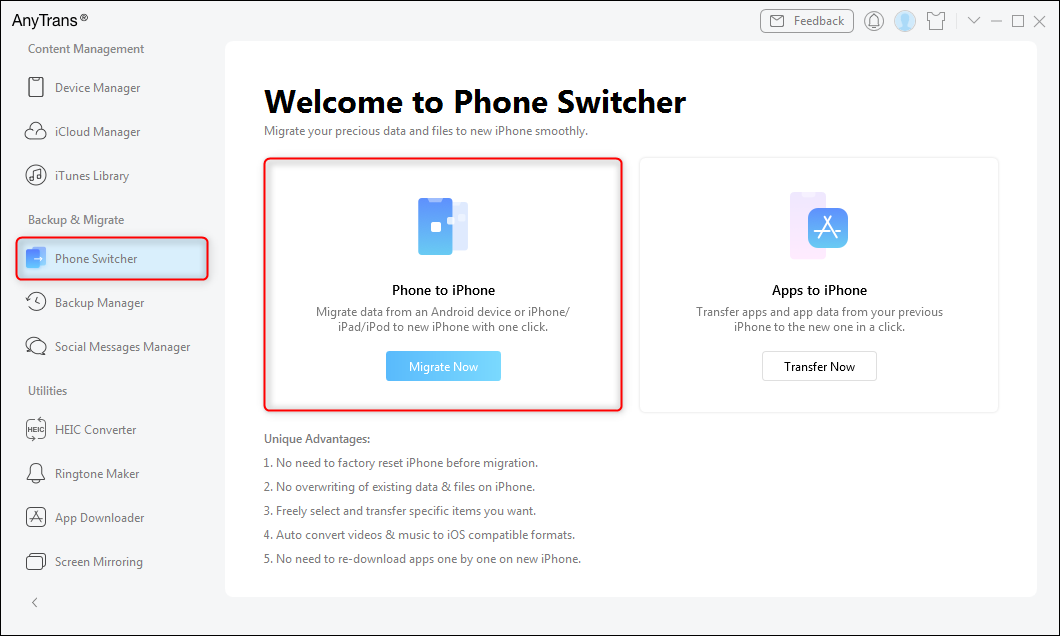
Choose Phone to iPhone on Phone Switcher
Free Download * 100% Clean & Safe
#2. PhoneTrans
PhoneTrans is made for Phone to Phone switching. It’s the perfect Android to iPhone transfer app in the market as it supports transferring various data types from Android to iPhone. What’s more, it’s much more stable than Move to iOS. It also supports transferring between two different mobile operating systems.
As a professional data transfer tool, it provides 2 options to migrate data from Android to iPhone. You can transfer data selectively or wholly which is sure all right with PhoneTrans.
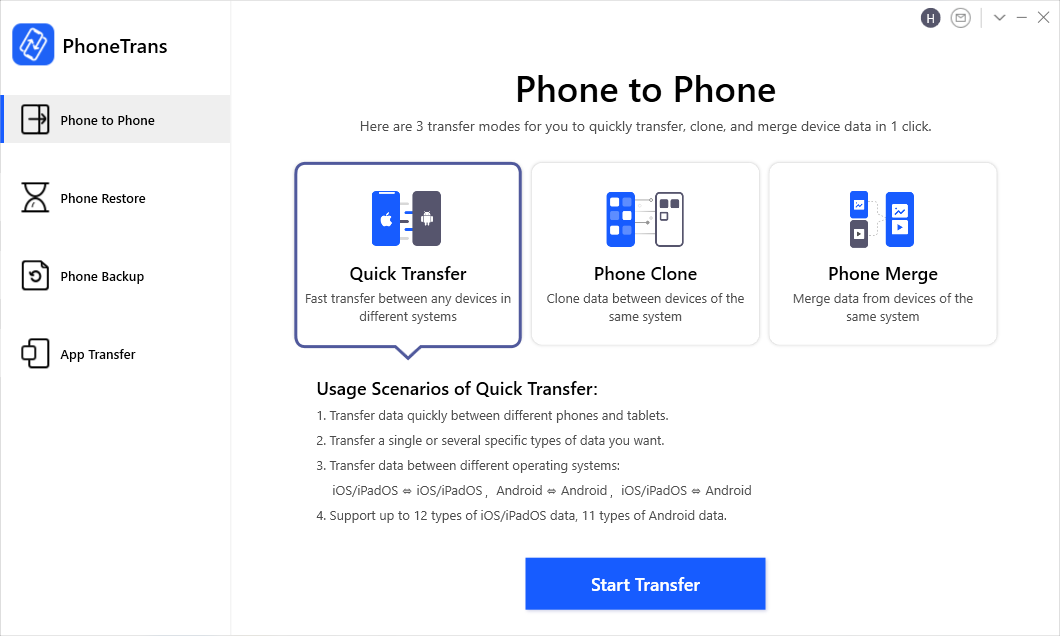
Choose the Quick Transfer Mode
#3. SyncTrans
SyncTrans can make data transfer as easy and fast as count 1.2.3. It supports transferring any files wirelessly to the iPhone from an old Android device, no matter Samsung phone or . That’s why we highly recommend SyncTrans to help with data migration. What’s more, no matter you want to transfer photos, apps, music, videos, documents, or other files, SyncTrans can definitely handle them all.
SyncTrans
Some more features of SyncTrans:
- Transfer any type of data instantly from phone to phone.
- Wireless move data between phone and computer.
- Upload/download/share Cloud files you want.
- Manage all the data with ease.
- Totally free.
#4. Dropbox
Dropbox
This is a cloud base service that enables you to store files in your Dropbox folder and stay updated on every device linked to your account, data will be auto sync to your computer, as well as your iOS and Android, etc. Hence, you can with the aid of this function to transfer data from Android to iPhone.
Supported file types: Photos and Videos.
Storage and price: It’s not a free app; you need to pay for using it. For individuals, you need to pay for $8.25 per month. You can enjoy 2GB of free space, and you need to pay for more space, 1 TB for $10/month.
#5. Xender
Xender
Xender is a free tool for file transfer and sharing. It enables you to transfer files of different types and sizes between mobile devices, either Android or iOS based, with no need for cables or Wi-Fi or cellular Internet connection, and with absolutely no mobile data usage for transfer.
With Xender, you can transfer virtually anything from your Android phone to iOS devices, such as contacts, photos, music, videos, apps, etc. All you need to do is create a transfer group and also be close to the user you want to transfer files to. This is very important because Xender only works when the person you want to transfer files to is nearby. In addition, you can send files to up to five different devices simultaneously.
#6. Wireless Transfer App
For transferring data from Android to iPhone, this function of Wireless Transfer is free. You can use it to transfer photos wirelessly with Wi-Fi network from your Android to iPhone. Note that it only supports transferring photos and videos from Android to iPhone.
#7. SHAREit
SHAREit
SHAREit is an application developed by Lenovo, and free for users. You can use this sharing app to share photos, videos, music, installed apps, and any other files from Android to iPhone without using a computer. You don’t need to have a working Internet connection for this, but both devices must be in the same Wi-Fi. It creates a Wi-Fi hotspot of its own and file transfer speed is fast.
To use it to transfer files from Android to iPhone, you need to install this app on both your Android and iPhone. After that, connect the devices to the same WiFi and open the SHAREit app on both, it has a very simple and concise display, and you can make it with ease.
#8. Smart Transfer: File Sharing App
Smart Transfer
Smart Transfer: File Sharing App supports cross-platform content transfer from android to iPhone. Also, it can transfer data from iPhone to Android. It is quite convenient as it supports HotSpot/WiFi network free file transfer which means data can be moved between devices wirelessly. The file type concludes contacts, pictures, videos, calendars, reminders, and so on. Smart Transfer supports over 9 types of files to migrate.
It has advertised its good quality on data transfer between Android and iOS devices. But some of its users have reported it would take lots of time to complete the data migration. So if you want to give Smart Transfer a try you may need to think twice.
Why We Need Android to iPhone Data Transfer App
Move to iOS is a practical app anyway, but it has many limit conditions, such as you must have a stable Wi-Fi condition and connect two devices in the same Wi-Fi, Android must be running in 4.0 or higher and iPhone must be running in iOS 9 or later, and only supports transferring data from Android to a new or reset iPhone, etc. What’s worse, you may meet many problems when you use it to transfer data, for instance, not working properly, unable to migrate, transfer interrupt randomly, stuck on transferring, disconnect Wi-Fi, not connecting to the device, etc.
In this condition, many users are searching for some Android to iPhone Transfer to help them finish moving data in an easy way. We sum up several alternatives in this article, the following are the most common move to iOS similar apps, and you can try out them one by one.
The Bottom Line
The top 8 best Android to iPhone tools are introduced above, you can select the one you like best to transfer your data from Android to iPhone. Phone switching is a big thing while you are meaning to get to a new iPhone. Data safety would be the first thing to consider. A one-stop solution would be preferred, that’s why AnyTrans and PhoneTrans should be the most convincing ones to recommend.
If you think this post is helpful, just share it with your friends. Meanwhile, if you have any other Android to iPhone transfer apps, please share it with us in the comment section.
More Related Articles


Work for iMobie team for 5 years as well as an Apple fan, love to help more users solve various types of iOS or Android related issues.
Product-related questions? Contact Our Support Team to Get Quick Solution >
