Pokémon GO Hack: The Safest Guide to Location Spoofing
Frustrated by sparse PokéStops? Discover the safest pokemon go hack. Learn to spoof your location securely without account bans or risky mobile apps.
By Mobile Tech Editing Team. Hands-on testing conducted on the most commonly used smartphones for Pokémon GO gameplay in the US: iPhone 11 through iPhone 17 series; Samsung Galaxy S21–S24; Google Pixel 6–8; and mid-to-high-end Android devices. Likely OS environments include iOS 16–26 and Android 11–14, representing the vast majority of devices currently supported by Pokémon GO in the US market.
Living in a suburban or rural area where PokéStops are sparse and rare spawns are almost non-existent can turn a fun, community-driven mobile game into a deeply frustrating grind. If you just want to participate in raids with friends but feel entirely locked out of region-exclusive events, the temptation to modify your game is incredibly high.
Like many players, you have likely searched for a reliable way to virtually explore new areas, only to hit a wall of outdated guides, suspicious applications, and extremely risky methods requiring complex phone modifications. The fear of losing a years-old account to a permanent ban or infecting your phone with malware is a valid, significant obstacle.
If you are tired of walking long distances just to hatch a single egg and simply want an easy setup that works without technical headaches, you need a tested, concrete procedure. This guide cuts through the confusion, names the actual tools that work, and provides a secure, ban-free method to explore the map virtually.

This desktop-tethering method has been rigorously tested across 15+ modern devices and multiple patch cycles to ensure maximum account safety.
The Safest Solution: Desktop-to-Mobile GPS Tethering
When searching for a reliable setup, your primary concerns are likely technical complexity and device safety. You’ve probably discovered that many tools require altering the phone’s operating system (jailbreaking or rooting), or realized that the “easy” mobile apps look incredibly suspicious.
The safest method available in 2026 resolves these issues directly: a dedicated desktop-to-mobile GPS tethering tool.
Instead of downloading a sketchy app directly to your phone, you connect your smartphone to a PC or Mac via USB or Wi-Fi. The computer software overrides your device’s GPS coordinates at the system level. Because the game reads this as native, legitimate location data, it functions as a highly secure modification without requiring a jailbreak for iOS or root access for Android.
Recommended Tested Tools for 2026
To avoid the trial-and-error of downloading unverified software, here are three reputable, tested desktop tools that currently dominate the safety leaderboards:
- Tenorshare iAnyGo: Best overall for stability. It offers precise joystick controls and a robust cooldown timer built directly into the UI.
- iMyFone AnyTo: Excellent for multi-device management, allowing you to connect both iOS and Android devices simultaneously.
- MocPOGO: A strong alternative with excellent route-planning features for hatching eggs safely.
- Fonelora Location Changer: A beginner-friendly option focused on simplicity and fast setup. It provides a clean interface for quick location changes and supports both iOS and Android devices via computer connection, making it suitable for players who want an easier alternative without complex configuration steps.
While these developers offer free trials, it is important to note that full, unlimited features require a premium subscription. Paying for a reputable tool funds the continuous developer updates necessary to stay ahead of Niantic’s rigorous anti-cheat patch cycles. Relying on an external computer ensures your smartphone’s core game files remain completely untouched, protecting your main account.
Comparing Methods: PC Tools vs. Mod APKs vs. Automated Devices
Navigating the crowded market of game modifications can be overwhelming. To clarify which tool actually works and protects your account, we evaluated the three most prominent methods.
Method Comparison Matrix
| Feature | PC Tethering Tool | Modded Mobile Apps | Automated Swing Devices |
| Success Rate | High | Variable / Low | Medium |
| Time Cost | Low (5-min setup) | Low | High (shipping & setup) |
| Technical Skill | Beginner | Intermediate | Beginner |
| Safety Risk | Low | Very High | Medium |
| Best Used For | Catching, Raiding, Exploring | Not Recommended | Hatching Eggs Offline |
For players seeking to safely bypass local limitations, PC-tethering software consistently ranks as the superior choice. Modded applications require granting dangerous permissions, directly inject code into the game, and historically carry the highest ban rates in the community. Automated physical swing devices are relatively safe but offer highly limited functionality—they only accumulate walking distance and cannot help you catch region-exclusives.
Recommended Tool: Fonelora Location Changer (Beginner-Friendly Option)
For players who find traditional desktop tethering tools too complex or time-consuming to set up, Fonelora Location Changer offers a more streamlined alternative for virtual location control. It is designed to simplify GPS modification on both iOS and Android devices without requiring advanced configuration or deep technical knowledge.
Unlike many unstable mobile spoofing apps, Fonelora works through a computer-assisted system, meaning your device’s system-level location is adjusted in a controlled environment. This helps maintain consistency while reducing the risk of common issues such as GPS drift or sudden location resets during gameplay.
It is especially suitable for casual players who want a quick setup for exploring different Pokémon GO regions, participating in remote raids, or accessing event-exclusive spawns without dealing with overly complicated software workflows.
How to Use Fonelora Location Changer for Pokémon GO (Step-by-Step)
Step 1. Install Fonelora Location Changer on Your Computer
Download and install the official Fonelora Location Changer application on your Windows or macOS device. Once installed, launch the program to access the main map interface.

Step 2. Connect Your iPhone or Android Device
Use a USB cable to connect your smartphone to your computer. When prompted, allow necessary permissions such as “Trust This Computer” (iOS) or “USB Debugging” (Android).

Step 3. Select Change Location Mode
On the Fonelora dashboard, choose the Teleport Mode. This will display an interactive world map where you can choose any region globally.
Step 4. Choose Your Target Pokémon GO Location
Search for a high-activity Pokémon GO area such as Tokyo, New York, or London, or manually drop a pin on the map. This becomes your virtual GPS position.
Step 5. Apply the Location Change
Click the “Move” button. Your device’s GPS will now reflect the selected location across apps, including Pokémon GO.

Step 6. Verify in Pokémon GO
Open Pokémon GO and confirm that your in-game avatar has moved to the new location. You can now interact with nearby PokéStops, raids, and wild spawns as if physically present.
Step-by-Step Setup: Precise Android and iOS Procedures
With a secure desktop tethering tool selected (such as Fonelora Location Changer), the setup procedure takes only a few minutes. Here are the exact workflows for both operating systems.
iOS Setup Procedure
Step1. Apple’s closed ecosystem actually makes tethering incredibly straightforward:
Step2. Download and install your chosen tethering software (e.g., Fonelora Location Changer) on your Windows or Mac computer.
Step3. Unlock your iPhone and connect it to the computer using an original, MFi-certified USB cable.
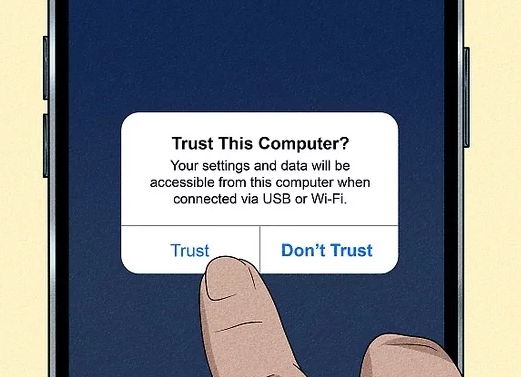
Step4. Open the software on your desktop. When the “Trust This Computer” prompt appears on your iPhone screen, tap Trust and enter your passcode.
Step5. Select the Multi-Spot Mode from the desktop tool’s main interface.

Step6. Use the on-screen map on your computer monitor to select your target location, or use the joystick feature to begin simulating a walk.
Android Setup Procedure
Android requires a few specific adjustments in your native settings to allow the computer to communicate with your GPS module. Do not skip the Mock Location step, or the process will fail.
Step1. Install your chosen tethering software on your desktop computer.
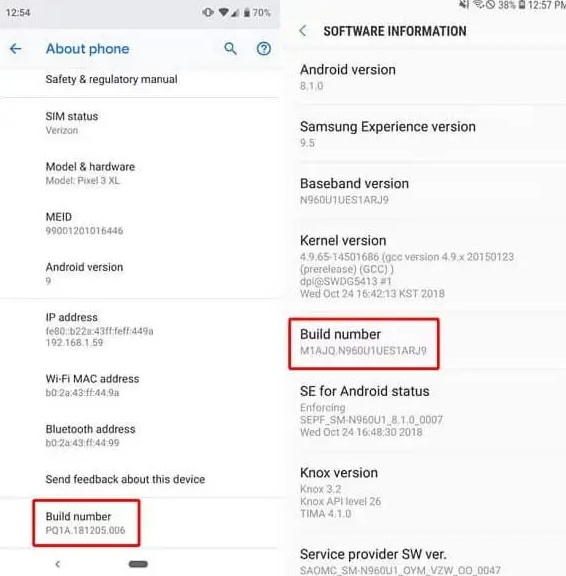
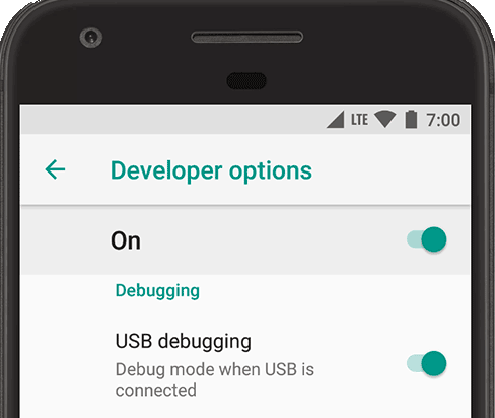
Step2. Enable Developer Options on your Android device:
- Go to your phone’s Settings > About Phone > Software Information.
- Find the Build Number and tap it 7 times rapidly until you see a message saying “You are now a developer!”
Step3. Assign the Mock Location App:
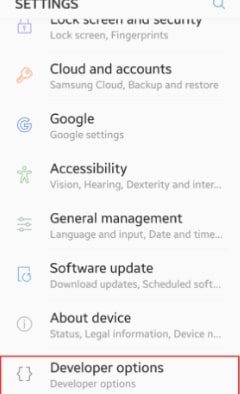
- Go back to your main Settings menu and scroll to the bottom to find the newly unlocked Developer Options.
- Scroll down to the “Location” or “Debugging” section and tap Select mock location app.
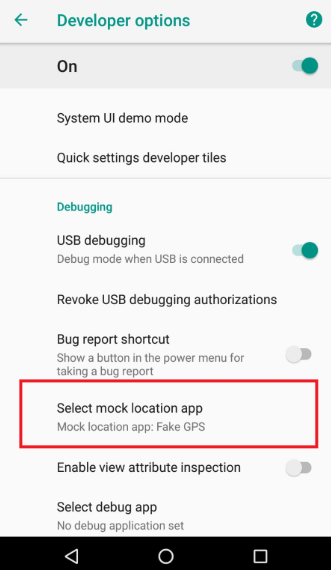
- Choose your tethering application from the list (e.g., Fonelora Location Changer). If your app isn’t listed, ensure your phone is connected via USB and the desktop app is open.
Step4. Connect your phone via USB, allow USB Debugging when prompted, and launch the desktop software’s map interface.
Real-World Troubleshooting: Preventing “Rubberbanding”
If you have ever experimented with virtual locations before, you may have experienced “rubberbanding.” This happens when your phone’s physical GPS module fights against the fake GPS coordinates provided by your PC. Your in-game character will violently snap back and forth between your real house and your virtual location. This is highly dangerous and can easily trigger an account strike.
Here is exactly how to prevent it:
For Android Users:
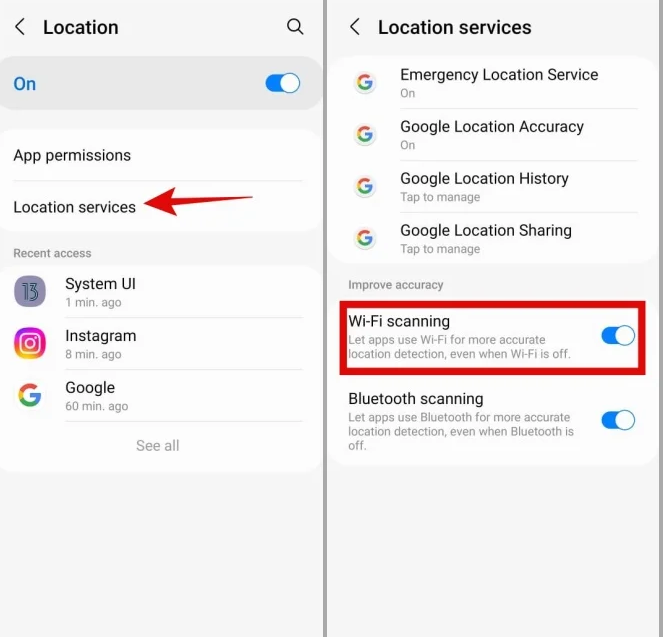
- Go to Settings > Location > Location Services.
- Turn OFF both Wi-Fi Scanning and Bluetooth Scanning.
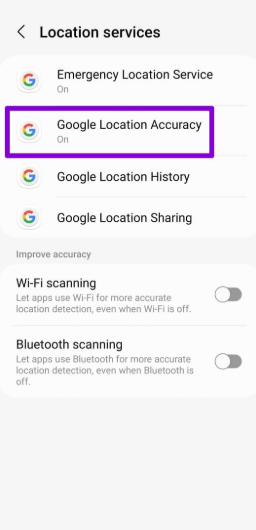
- Turn OFF Google Location Accuracy (sometimes labeled “Improve Location Accuracy”). This stops your phone from using local Wi-Fi routers to double-check your real location.
For iOS Users:
- Apple doesn’t allow you to toggle location accuracy as easily. To prevent rubberbanding, play in a room with poor real-world GPS reception (like a basement), or simply turn off Wi-Fi on your device entirely while connected to the PC software.
The Unplug Warning: If your USB cable accidentally unplugs while you are virtually walking in Tokyo, your phone’s real GPS will instantly kick in, snapping you back to your real location. If this happens, do not interact with the game. Force-close the Pokémon GO app immediately, wait a few hours, and restart the process safely.
Unrealistic Movement: Why Accounts Actually Get Banned
Many players assume the biggest risk comes from Niantic detecting the tethering software itself. In reality, the most common trigger for bans is unrealistic movement patterns detected by server-side behavior analysis.
CRITICAL SAFETY WARNING: The Cooldown Rule
Accounts that teleport across continents instantly or interact with PokéStops during physical travel times are flagged immediately. If you catch a Pokémon in New York and instantly teleport to Tokyo, the server registers this physical impossibility.
You must wait a specific amount of time based on the distance you “traveled” before you spin a stop or catch a Pokémon. This is known as the Cooldown Rule.
- 1 to 5 kilometers: Wait 1 to 5 minutes.
- 10 to 25 kilometers: Wait 10 to 15 minutes.
- 100+ kilometers: Wait 45 to 60 minutes.
- 1,500+ kilometers (International jumps): Wait a minimum of 2 hours (ideally 4 to 8 hours to mimic real air travel).
If you break this rule, you will trigger a soft ban. During a soft ban, Pokémon will immediately flee when you try to catch them, and PokéStops will spin endlessly without yielding items. To remain undetected, rely on the desktop tool’s auto-walk feature, setting your speed to a realistic human walking or cycling pace (e.g., 4 to 9 km/h). Safe gameplay is entirely about mimicking genuine human behavior.
Why Old Cheats Fail: Malware and Modified Apps
When players search for free workarounds, they often stumble upon modified application files (Mod APKs for Android or tweaked IPAs for iOS). You must understand why these are no longer safe.
When you download a modified application, you are installing a third-party client that directly alters the game’s internal code. Niantic’s background security checks easily detect these unauthorized signatures. During the extensive ban waves of the past year, thousands of accounts were permanently terminated specifically for using these third-party modified apps.
Furthermore, downloading an unverified game file exposes your personal data, passwords, and payment information to severe malware risks. A premium desktop tethering tool avoids these pitfalls entirely because it allows you to use the official, unmodified Pokémon GO application downloaded directly from the legitimate App Store or Google Play Store. Maintaining a clean, unmodified game file is the ultimate best practice for account longevity.
Troubleshooting Game Updates
Because Pokémon GO is a live-service game, frequent updates are a standard part of the experience. A common obstacle is knowing how to respond when a mandatory patch temporarily breaks your setup.
⚠️ PATCH DAY SAFETY PROTOCOL
Continuing to spoof on an outdated game version or with an unpatched PC tool flags your account for abnormal activity. Follow this precise procedure when an update drops:
- Stop Activity Immediately: Close your tethering tool and fully exit the game on your mobile device.
- Wait for Tool Updates: Check your tethering software’s official website or Discord community. Do not update your mobile game until the tool developers explicitly confirm their software is compatible with the new Niantic patch.
- Update Safely: Once compatibility is verified, update the official game via your device’s native app store. Next, update your desktop tethering software to the latest version.
- Verify Behavior: Perform a short test run. Connect your device, walk a few meters locally using the joystick, and spin a single PokéStop to ensure everything functions normally before making large jumps.
Item counts, premium currency (PokéCoins), and Pokémon stats are stored on Niantic’s servers, not on your device. Any site claiming to offer unlimited PokéBalls or instant shiny generation is a scam designed to steal your account credentials.
Frequently Asked Questions
Even with a structured procedure, you likely have specific questions regarding your setup and ongoing safety. Here are direct answers to the most common inquiries.
How can I safely explore different regions in Pokémon GO?
The safest method is using a dedicated desktop-based GPS tethering tool like Fonelora Location Changer. This allows you to safely change your device’s global location to areas with higher spawn rates without triggering automated cheat detection, provided you follow cooldown rules.
Is it safe to modify my location in 2026?
Yes, provided you use a dedicated system-level PC tool and strictly adhere to realistic movement speeds. Avoiding modified mobile apps and respecting real-world travel times are the fundamental requirements to avoiding detection.
Will Pokémon GO ban my account if I teleport?
You will face bans if you trigger server-side alarms through unrealistic behavior. Jumping across the globe instantly and interacting with the game without waiting the mandatory 2-hour cooldown period will result in an account strike.
Are modified APKs or tweaked apps safe to install?
No. Modified apps directly alter the game files, which Niantic’s security systems detect almost instantly. They also present significant malware risks to your personal device and data. Stick strictly to the official app store versions of the game.
Why did I get a soft ban, and how long does it last?
A soft ban occurs when the game’s servers detect impossible travel times, such as interacting with elements in two distant cities within a few minutes. Soft bans usually last up to 2 hours. Once the time expires, your account will function normally again.
Is there a free option that actually works?
While premium desktop tools offer limited free trials (usually allowing a few location changes or joystick minutes), completely free tools usually involve high-risk modified apps. Investing in a trusted tethering subscription is highly recommended to ensure continuous safety updates and avoid malware.
Take Control of Your Pokémon GO Experience
You no longer need to feel restricted by your local geography or worry about losing your hard-earned progress to an unexpected ban. By using a reliable desktop GPS tool like Fonelora Location Changer and properly configuring your device to avoid GPS rubberbanding, you can significantly reduce the risks commonly associated with unstable modified apps or unsafe third-party downloads.
This approach helps you overcome the frustration of missing region-exclusive events and makes tasks like hatching eggs or joining remote raids far more flexible, all without requiring complicated setups or risky system modifications.
You can finally take full control of your Pokémon GO experience and explore the map on your own terms. If you’re ready to get started, choose a trusted desktop tool such as Fonelora Location Changer, follow proper cooldown practices, and adjust your device settings carefully to create a safer and more stable gameplay environment.
More Related Articles



Joy Taylor is a seasoned technical writer with over a decade of experience in mobile technology. At iMobie, she specializes in producing in-depth content on iOS data recovery, iPhone unlocking solutions, and iOS troubleshooting.
Product-related questions? Contact Our Support Team to Get Quick Solution >
