UnlockTool Review 2026: Price, Features & Technician Use
Considering UnlockTool for phone repair? Review its license model, supported-device workflow, MTK and Qualcomm requirements, technician use cases, common errors, and how it compares with Chimera and UMT.
UnlockTool is an account-based mobile servicing platform built for technicians who work with different phone models, chipsets, connection modes, and repair procedures. It can be useful on a repair bench that regularly handles MTK, Qualcomm, Samsung, Xiaomi, and other supported workflows, but the buying decision should not start with a broad claim such as “supports Samsung” or “best for MTK.”
The more useful question is whether the current UnlockTool build supports the exact models and procedures your shop actually handles. A supported platform does not automatically mean every model, firmware revision, loader, or service operation is supported.
For authorized servicing only: Use device-service functions on phones you own or are authorized to repair. Before FRP, account, flashing, or board-level work, verify the device identity, requested service, and ownership documentation appropriate for your repair business.
Table of ContentsHide
UnlockTool Review at a Glance
Who Is UnlockTool For?
UnlockTool Supported Models & Functions
UnlockTool vs Chimera vs UMT
UnlockTool Price & License
5 Checks Before You Activate UnlockTool
UnlockTool MTK, Qualcomm & Samsung Workflows
When UnlockTool May Be More Than You Need
UnlockTool Not Working: Common Errors
UnlockTool FAQs
What to Check Before Activating
UnlockTool Review at a Glance
| Review Item | What to Know |
| Tool type | Technician-oriented mobile servicing platform |
| License model | Account-based, time-limited activation commonly sold through distributors |
| Traditional dongle required? | Standard UnlockTool activation is account-based rather than built around a traditional hardware dongle |
| Main workflow areas | MTK, Qualcomm, Samsung, Xiaomi and other supported device/platform procedures |
| FRP | Available through supported device and procedure combinations; do not assume universal FRP support |
| Technical level | Technician-oriented; device modes, drivers, loaders and procedure selection can matter |
| Best suited to | Repair technicians handling recurring service jobs across supported devices |
| Most important check | Exact model + platform + required procedure + current software support |
UnlockTool makes more sense for recurring repair work than for a single phone problem. Its value comes from the procedures it can add to your real bench workflow, not from the length of a supported-brand list.
Who Is UnlockTool For?
UnlockTool is most relevant to technicians who regularly service phones and are comfortable identifying the exact model, chipset, connection mode, firmware or security state, and required operation before starting a procedure.
It is worth evaluating if you routinely work across different Android platforms, need more than one service function, and can benefit from a tool that receives ongoing model, loader, and procedure updates.
UnlockTool May Be More Difficult to Justify If:
- You only need one FRP job on one personal phone.
- You expect one universal Connect and Unlock workflow for every model.
- You are choosing the tool only because a reseller lists a supported brand.
- Your existing technician tools already cover almost all of the same recurring jobs.
- You do not want to diagnose drivers, connection modes, loaders, or model-specific requirements.
The important distinction is between a repair-bench platform and a one-problem consumer utility. UnlockTool is designed around technician decisions rather than hiding every device-level choice.
UnlockTool Supported Models & Functions: What to Check
UnlockTool is sometimes described simply as an MTK or FRP tool, but its servicing scope extends across multiple platforms and device families. The safer compatibility rule is:
Platform supported does not mean model supported, and model supported does not mean every procedure is supported.
| Platform / Area | Types of Workflow to Check | Technician Verification |
| MediaTek | FRP, reset, read/write, flashing and other supported platform procedures | Exact chipset, model, DA/loader requirements and required connection state |
| Qualcomm | FRP, reset, readback, flashing and supported loader-based procedures | Exact device, applicable loader/firehose and required connection mode |
| Samsung Qualcomm | Model- and revision-specific service procedures | Full model code, chipset, BIT/security revision and requested operation |
| Samsung Exynos | Supported Download Mode, ADB and other model-specific procedures | Chipset, model, BIT/security state and procedure prerequisites |
| Xiaomi / Redmi / POCO | Supported Qualcomm and MTK service workflows | Exact model or codename, chipset, boot state and required operation |
| Other supported devices | Functions vary by current software release | Do not extend support from a similar model or platform without checking the exact procedure |
Do not select a nearby model just to expose a procedure. A mismatch in model, loader, chipset, BIT revision, firmware, or device state can cause the procedure to fail and may create additional recovery work.
Why Current Support Matters More Than an Old Tutorial
Technician tools change through software releases, while phone manufacturers continue changing firmware, security revisions, bootloaders, and device variants. A procedure demonstrated on an older build is therefore not proof that the same workflow applies to a different current phone.
Before accepting a repair job based on UnlockTool support, verify the complete model and the specific operation you need in the current software or current support information.
UnlockTool vs Chimera vs UMT: Compare the Workflow
UnlockTool, Chimera, and UMT all target technician servicing, but their licensing, device-selection, and workflow models differ. A useful comparison should start with the phones and procedures already arriving at your bench rather than trying to identify one universal winner.
| Decision Factor | UnlockTool | Chimera Tool | UMT |
| License approach | Account-based time activation commonly offered through distributors | Annual license tiers with different usage conditions | Hardware/module-oriented ecosystem depending on the UMT setup |
| Device decision | Platform, model, loader and function choices vary by procedure and release | Uses a live model-and-procedure-oriented servicing workflow | Depends on the applicable UMT hardware/module and supported procedure |
| MediaTek / Qualcomm work | Important parts of the servicing workflow where supported | Available through supported model/procedure combinations | Coverage depends on the relevant UMT module |
| Samsung | Check exact model, chipset, BIT/security revision and current procedure | Check the exact Samsung model and procedure in the current database | Check the applicable module and exact device support |
| Best evaluation question | Does the current build cover recurring jobs on my bench? | Does its model/procedure workflow and license structure fit my servicing volume? | Does the hardware/module setup cover the jobs I actually perform? |
If Chimera is also on your shortlist, see the Chimera Tool download and technician guide for its installer, license structure, compatibility checks, and procedure-selection workflow.
If your workshop already uses or is considering the UMT ecosystem, the UMT Dongle setup guide explains its hardware, software, driver, and setup workflow.
Practical comparison: review your recent repair jobs by exact model, chipset, and procedure. A platform that covers real recurring jobs is more useful than one with the longest generic feature list.
UnlockTool Price & License: What to Compare
UnlockTool uses time-limited activation rather than a permanent lifetime license. Activation periods and prices can vary by distributor, region, tax, service fee, and whether the purchase is a new activation or renewal.
For that reason, a reseller price shown in an older review should not be treated as a permanent worldwide UnlockTool price. Before paying, check:
- The activation period you are purchasing.
- Whether the listing is for new activation or renewal.
- The final checkout price including applicable fees or taxes.
- How and when the activation period begins.
- Whether the seller provides the account or activation support you expect.
Calculate Break-Even from Eligible Jobs
For a repair shop, a simple starting formula is:
Break-even eligible jobs = Total activation cost ÷ Average gross profit per eligible UnlockTool job
The word eligible matters. If 100 phones enter your shop but only 10 realistically require a currently supported UnlockTool procedure, those 10 are more relevant to the calculation than the total number of phones repaired.
Do not count jobs that your existing licensed tools already perform more efficiently, unsupported firmware or security states, or jobs your business would decline for authorization reasons.
5 Checks Before You Activate UnlockTool
Instead of trying to score UnlockTool in the abstract, check it against your own repair workload.
| Check | Question to Ask |
| 1. Exact models | Do current UnlockTool procedures cover models that repeatedly arrive at your shop? |
| 2. Required procedures | Does it support the FRP, reset, flash, read/write or other operations you actually sell? |
| 3. Device conditions | Can your technicians meet the required chipset, loader, connection-mode, firmware and security conditions? |
| 4. Existing tools | Will UnlockTool fill a real coverage gap or mostly duplicate software you already own? |
| 5. Activation period | Are there enough eligible jobs during the license period to justify the cost? |
This device-and-procedure audit is more useful than assuming a tool is worth buying because it supports many brands.
UnlockTool MTK, Qualcomm & Samsung Workflows
UnlockTool procedures can depend heavily on the device platform and required connection state. Avoid turning one successful tutorial into a universal recipe for every phone using the same chipset family.
MediaTek: Preloader, BROM and Loader Requirements
A MediaTek job may require Preloader, BROM, or another connection state depending on the exact phone and procedure. The required button sequence, timing, driver, DA/loader, or preparation can also differ.
A safer workflow is to identify the exact model and chipset, select the applicable current procedure, read its connection instructions, install the required driver, and confirm the expected port before starting an operation that can modify the device.
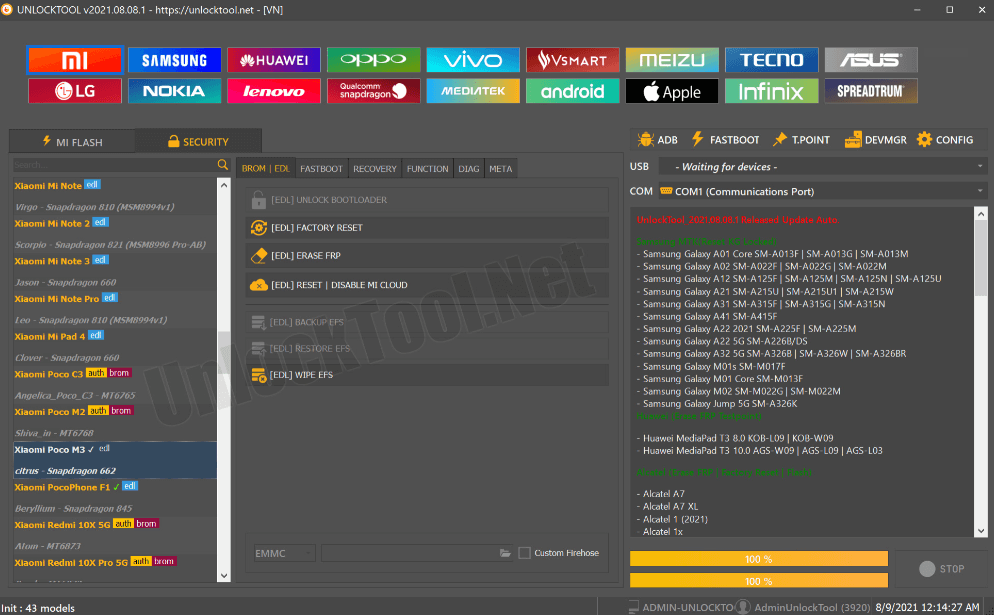
Example of an UnlockTool MTK Workflow — Follow the Instructions for the Exact Device and Procedure
Do not treat one screenshot as a universal MTK sequence. If the current procedure requires another mode or loader, follow the device-specific workflow rather than forcing the connection method used by another phone.
Qualcomm: EDL Does Not Automatically Mean Procedure Support
Qualcomm servicing can involve the HS-USB QDLoader 9008 EDL state, but the way a device reaches that state varies by model. The applicable procedure can also require a device-specific loader or firehose.
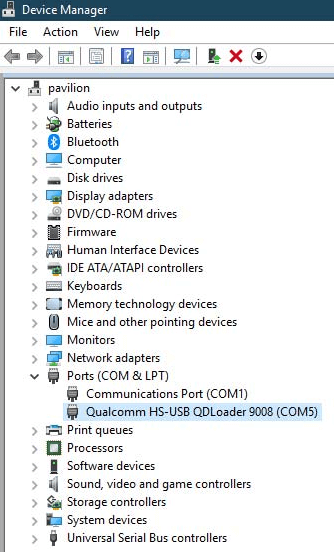
QDLoader 9008 Indicates an EDL Connection State, Not Universal Procedure Support
Seeing QDLoader 9008 confirms that the computer can see an EDL connection. It does not establish that the selected UnlockTool procedure or loader supports that exact phone.
If board-level access is required, use service information for the exact device and motherboard revision rather than a test-point diagram from a similar-looking model.
Samsung: Model, Chipset and BIT Matter
For a Samsung job, check the complete model code, chipset/platform, BIT or bootloader revision where relevant, current firmware/security environment, and required operation.
Support for one variant or revision should not be extended to every device with the same retail family name. A loader or procedure added for one model/BIT combination does not automatically apply to another.
ADB, Download Mode and Other Connection States
Connection modes are useful only when the selected procedure expects them. An ADB-dependent operation requires the appropriate ADB state; a Download Mode procedure requires its own supported workflow. The existence of one connection mode does not make every UnlockTool function available.
When UnlockTool May Be More Than You Need
UnlockTool’s technician-level flexibility is useful when you repeatedly work across platforms, models, and service procedures. It can be unnecessary when your entire problem is one supported Android phone stopped at Google verification.
| Your Need | Direction to Evaluate |
| Recurring repair-shop jobs across multiple devices | A technician platform such as UnlockTool may match the workflow |
| Loader, flashing, read/write and platform-specific service work | Evaluate technician-tool model and procedure coverage |
| One supported Android FRP case | A narrower guided FRP workflow may be easier to evaluate |
| You need other consumer Android utilities as well | Compare a broader consumer Android toolkit with the exact task you need |
For a one-device FRP scenario, DroidKit FRP Bypass is a more focused workflow to evaluate. It should not be treated as a replacement for UnlockTool’s wider technician functions, and its own device and FRP compatibility requirements still need to be checked before use.
UnlockTool Not Working: Driver, Mode & Procedure Errors
When UnlockTool fails, identify the failure layer before changing models, reinstalling software, or opening the phone:
Account → Driver → Connection Mode → Loader → Procedure Support → Execution
| Symptom | Check First | Do Not Assume |
| Login or activation fails | Account, active license, network connection and current client | Changing USB drivers will fix an account problem |
| Waiting for device | Required mode, driver, USB cable, port and connection timing | The phone is unsupported before the required port is established |
| MTK port appears briefly | Whether the procedure expects Preloader/BROM and whether the driver and timing match | Every MTK phone should remain on one persistent port |
| Qualcomm 9008 appears | Exact model, applicable loader and supported EDL procedure | 9008 detection proves the requested procedure is supported |
| Samsung procedure is missing | Exact model, chipset, BIT/security revision and current support | Selecting a nearby Samsung model is safe |
| Procedure starts but fails | Final log, loader, firmware/security state and preparation requirements | Repeating the same operation changes the support condition |
UnlockTool Keeps Saying Waiting for Device
Start with the connection state required by the selected procedure. Depending on the job, the tool may be waiting for Preloader/BROM, EDL, Download Mode, ADB, or another supported state.
Then check the USB data cable, direct USB port, appropriate platform driver, device preparation, and model selection.
Qualcomm 9008 Is Detected but the Procedure Fails
If QDLoader 9008 is already present, separate a connection problem from a loader or support problem. Confirm the exact device, applicable firehose/loader, current procedure support, and any firmware or storage conditions.
The Procedure Is Missing or Fails
Record the software build, exact model, chipset, firmware/security or BIT information, selected operation, connection state, and final error message. Then compare those details with the current support information.
Do not select a similar phone simply to expose a missing button. A nearby model can use a different chipset, loader, partition layout, or security revision.
UnlockTool FAQs for Technicians
How much does UnlockTool cost?
UnlockTool activation pricing can vary by distributor, activation period, region, taxes, and service fees. Check the current checkout terms before purchasing rather than relying on a price copied from an older review.
Does UnlockTool need a dongle?
The standard UnlockTool software activation is account-based rather than centered on a traditional hardware dongle. Confirm the current activation terms with the seller before ordering.
What phones does UnlockTool support?
Support changes by current software release, platform, model, loader, firmware or security state, and requested procedure. Do not treat a supported brand or chipset as proof that every model and function is supported.
Is UnlockTool only for MediaTek phones?
No. UnlockTool includes workflows across multiple platforms, including MediaTek, Qualcomm, Samsung, Xiaomi and other supported devices. The exact model and procedure still need to be checked.
Is UnlockTool better than Chimera?
The two platforms use different licensing and servicing workflows. Compare them against the exact models and procedures your shop handles, the current support information, activation or license structure, and the tools already on your bench rather than assuming one platform is universally better.
Why does UnlockTool say Waiting for Device?
The selected operation may be waiting for a particular connection state. Check the required mode first, followed by the driver, USB cable, port, connection timing, and model selection.
Does Qualcomm 9008 mean UnlockTool supports my phone?
No. HS-USB QDLoader 9008 indicates that the PC sees a Qualcomm EDL connection. UnlockTool still needs an applicable loader and supported procedure for the exact device.
Is UnlockTool suitable for beginners?
It is primarily a technician-oriented platform. A new technician can learn the workflow, but model selection, drivers, connection states, loaders, flashing risks, and procedure requirements still need to be understood. For a single supported FRP case, a more guided workflow may be easier to evaluate.
What to Check Before Activating UnlockTool
UnlockTool is easiest to evaluate when you start with your workload rather than its feature list. Review the models that actually arrive at your shop, identify the procedures you regularly sell, and check whether the current software supports those exact combinations.
Use the same approach when comparing Chimera, UMT, or another technician platform. License price matters, but so do model coverage, loader availability, device modes, technician time, existing tools, and the number of eligible jobs you expect during the activation period.
Most importantly, do not turn platform-level support into a device-level promise. Confirm the exact model and required procedure before accepting a job or purchasing a tool specifically for that phone.
More Related Articles


Roger Smith is a senior technical writer with years of experience in providing Android solutions. He loves to help users solve various problems such as Android unlock, Android data recovery, and Android system repair.
Product-related questions? Contact Our Support Team to Get Quick Solution >
