5 Free FRP Bypass Tools & Methods for Android With or Without PC
Compare 5 free FRP bypass tools and methods for Android, including TalkBack, Odin, VNROM, Pangu, and SamFw. Learn which options need a PC, where each method fits, why free FRP tools fail, and when to switch to another route.
Searching for a free FRP bypass tool often produces a mixed list of APK files, accessibility tricks, Samsung firmware utilities, and Windows programs. They are not interchangeable. TalkBack is built into Android, VNROM and Pangu are associated with APK-oriented routes, while Odin and SamFw are mainly relevant to Samsung users with a computer.
The practical question is therefore not just “Which FRP tool is free?” It is whether the route still matches your phone’s brand, model, Android version, security patch, Setup Wizard screens, and available connection method. A method that depends on browser access, APK installation, Download Mode, or Samsung device detection cannot continue if that checkpoint is missing.
Quick Answer: If an older Android setup still exposes the required accessibility or browser path, a TalkBack- or APK-based route may be worth checking. Samsung users who understand firmware flashing can evaluate Odin, while Windows users may compare SamFw with other servicing routes. If a free tool stops at “App not installed,” a missing Settings screen, failed device detection, or firmware mismatch, diagnose that failure before downloading another tool.
For users comparing free methods with commercial software, the FRP bypass tool comparison covers a broader mix of options. This page stays focused on free FRP methods and on deciding whether a no-PC, APK, firmware, or Windows route actually fits the device.
Use FRP servicing methods only on a device you own or are authorized to manage. If the Google account previously synced with the phone can still be recovered, account recovery avoids the compatibility risks involved in APK installation, firmware flashing, or third-party servicing utilities.
5 Free FRP Bypass Tools and Methods Compared
The five options below belong to different method categories. That distinction matters because their requirements and failure points are different. A TalkBack route can fail because an old setup shortcut disappeared, while an Odin route can fail because the firmware package does not match the exact Samsung device.
| Option | Type | PC Needed? | Best Fit | Main Limitation |
| Google TalkBack | Built-in Android accessibility feature used in some older manual FRP routes | No | Older Android setup environments where the required accessibility path still appears | Security and Setup Wizard changes can remove the menus used by older tutorials |
| Samsung Odin | Samsung firmware flashing utility | Yes, Windows | Advanced Samsung users who can verify the exact model, firmware, binary, and Download Mode requirements | It is not a universal FRP removal button; mismatched firmware can create additional software problems |
| VNROM | APK/resource-based FRP route | Sometimes no | Users whose exact Android setup still permits the required browser, APK, or Settings path | Compatibility depends on the device, Android environment, security patch, APK source, and setup entry points |
| Pangu FRP Bypass | Third-party APK-oriented route | Depends on the workflow | Older or device-specific cases where the required Pangu-related setup path is still available | APK installation or the Settings/sign-in route may be blocked |
| SamFw Tool | Windows mobile servicing utility | Yes | Samsung users and technicians evaluating device-specific servicing operations | Drivers, USB detection, phone state, security changes, and service requirements can affect the available route |
If you are not sure whether your phone needs an APK route, a Windows utility, a brand-specific process, or Google account recovery, the Android FRP bypass guide organizes the broader problem by phone brand, Android version, verification state, and method type.
Which Free FRP Route Fits Your Situation?
Choose the method category from the checkpoint your phone can actually reach. This prevents an old tutorial from turning into a cycle of downloading different files that all depend on the same missing setup path.
| Your Situation | Better Starting Point | Why |
| No PC and an older setup screen still exposes accessibility, browser, or Settings entry points | TalkBack or a device-specific APK route | The method can be evaluated without starting a Windows servicing workflow |
| An FRP APK shows “App not installed” | Check package integrity, Android fit, installation restrictions, and setup state | Renaming or repeatedly downloading APK files does not solve a compatibility restriction |
| Samsung phone and you understand firmware flashing | Odin-related workflow | Odin is relevant only when the exact Samsung model, binary, firmware package, and Download Mode requirements are understood |
| Samsung phone with a Windows PC | Check SamFw requirements | SamFw depends on Samsung detection, drivers, USB connection, phone state, and the available device workflow |
| A no-PC tutorial shows menus that do not exist on your phone | Check Android version, security patch, and OEM Setup Wizard changes | The missing screen is stronger evidence of incompatibility than the age of the tutorial alone |
| You have already tried several free FRP tools | Identify the exact failure point first | Choosing the next method from the failure is more useful than choosing another tool name at random |
5 Free FRP Bypass Tools and Methods in Detail
1. Google TalkBack Method
Google TalkBack is Android’s screen-reading accessibility feature. It is not a dedicated FRP removal application. It appears in older FRP tutorials because some Setup Wizard versions allowed users to move from accessibility menus into browser help, Settings, or another activity required by the rest of the method.
Why users consider it: TalkBack itself is built into Android environments where the feature is available, so the initial check does not require a separate desktop program or APK download.
The compatibility checkpoint: Compare the exact menus and gestures in the tutorial with the phone in front of you. If the Help page, browser route, Settings activity, or gesture behavior shown by the guide no longer exists, repeating the sequence will not restore that old Setup Wizard path.
TalkBack Pros
- No traditional Windows servicing utility is required for the initial route.
- The accessibility feature itself does not require a paid activation.
- It can still be relevant when an older device exposes the same setup path shown by the instructions.
TalkBack Limitations
- TalkBack is not an FRP removal tool by itself.
- Menus and gestures can differ across Android versions and phone manufacturers.
- Security and Setup Wizard changes may remove browser or Settings entry points used by old guides.
Best for: Users whose exact phone and Android setup still show the accessibility path required by the method.
2. Samsung Odin
Odin is a Windows utility associated with Samsung firmware flashing. FRP-related tutorials may mention it together with Download Mode and AP, BL, CP, or CSC firmware files, but that does not make Odin a universal one-click Google lock remover.
The critical Odin question is whether the firmware package matches the exact Samsung model, region, bootloader/binary level, and software branch. A file that looks similar but belongs to another device configuration can fail to flash or create a separate recovery problem.
Before using a firmware-based route, review the Odin FRP bypass guide for the model-matching, Download Mode, firmware-file, and failure checks that matter specifically to this method.
Odin Pros
- Relevant to advanced Samsung firmware servicing workflows.
- Runs on Windows.
- Can be useful when the task genuinely requires a Samsung firmware-level process.
Odin Limitations
- Samsung-focused rather than a general Android FRP tool.
- Requires accurate device and firmware information.
- Not a good starting point for users unfamiliar with Download Mode and Samsung firmware packages.
- Mismatched files can lead to failed flashing, boot problems, or extra recovery work.
Best for: Advanced Samsung users or technicians who can verify the exact firmware requirements before flashing anything.
3. VNROM FRP Bypass
VNROM commonly appears in searches for free FRP APK resources. The attraction is obvious: users may be looking for an APK-oriented route instead of purchasing a desktop license. The important compatibility test, however, is not whether an APK file can be found online.
A VNROM workflow may depend on browser access, permission to install an APK, a particular Settings activity, the Android version, the security patch, and the phone maker’s Setup Wizard behavior. If the device cannot reach the required entry point, another copy of the APK will not fix the missing route.
The VNROM FRP bypass guide covers the VNROM-specific download, Android compatibility, installation, and failure questions to check before using this route.
VNROM Pros
- Relevant to users researching free APK-oriented FRP methods.
- Some workflows may not require a traditional Windows servicing program.
- Useful when the device and Setup Wizard still match the required APK path.
VNROM Limitations
- There is no single APK workflow that applies to every Android phone.
- APK source and package integrity still matter.
- Installation may be blocked during the setup process.
- Browser or Settings entry points used by older routes may disappear after security changes.
Best for: Users who have matched the VNROM route to their exact device, Android environment, and available setup screens.
4. Pangu FRP Bypass
Pangu FRP Bypass is another name frequently seen in free FRP APK searches. Depending on the tutorial, the workflow may involve an APK, a computer, an OTG-related route, or additional setup preparation.
For Pangu, treat the required phone screens as the compatibility test. Check whether the device can install the package and whether the Settings or account path expected by the instructions still appears. If either checkpoint is blocked, a tutorial written for another Android environment should not be treated as a match.
Pangu Pros
- Frequently researched by users comparing free FRP methods.
- APK-oriented workflows may still fit certain older device environments.
- Can be evaluated by checking the required setup path before moving to a more technical servicing method.
Pangu Limitations
- Compatibility varies by phone, Android version, and setup environment.
- The APK may fail to install.
- The required Settings or sign-in path may no longer be exposed.
- An older Pangu workflow should not be assumed to work simply because the phone is Android.
Best for: Users whose phone still exposes the same APK installation and setup checkpoints required by the specific Pangu-related workflow they are evaluating.
5. SamFw Tool
SamFw Tool is a Windows servicing utility commonly researched by Samsung users. Its desktop interface and Samsung-focused functions make it different from TalkBack or APK-based methods, but it still depends on the device being recognized correctly and on an appropriate workflow being available for the phone’s current software state.
The word “free” also needs care here. A downloadable utility may contain free functions while other procedures, patches, or service routes can follow different requirements. Check the exact function you need rather than assuming every operation associated with the tool is permanently free.
For SamFw-specific versions, setup questions, FRP workflows, and alternatives, see the SamFw Tool guide.
SamFw Pros
- Samsung-oriented Windows servicing interface.
- Useful for users who prefer a desktop utility to an APK-based route.
- Provides Samsung servicing functions beyond a single FRP scenario.
SamFw Limitations
- Requires Windows and a working USB connection.
- Samsung drivers, device detection, phone state, and software environment matter.
- Not every Samsung FRP scenario follows the same workflow.
- Older SamFw tutorials may not correspond to newer security conditions.
Best for: Samsung users or technicians with a Windows PC who can confirm that the phone is detected correctly and that the required SamFw route fits the device situation.
What Does “Free FRP Bypass Tool” Really Mean?
“Free” is used for several different things in FRP search results. Separate the cost of downloading a file from the cost and availability of the complete operation.
| Free Claim | What It May Actually Mean |
| Free built-in method | A phone feature such as TalkBack is available without purchasing software, while the FRP route itself still depends on a compatible Setup Wizard path |
| Free APK | The package may be downloadable without payment, but source quality, installation restrictions, and device compatibility still need to be checked |
| Free desktop utility | The Windows program or some functions may be available without charge, while particular procedures or service routes can differ |
| Free download | The installer can be downloaded, which does not necessarily mean every function inside the software is free |
| Free trial | An evaluation or limited-use option rather than a permanently free full service |
That distinction is especially important when comparing APK files with Windows servicing tools. A free file is not useful if the device blocks installation, and a free desktop utility is not useful if the phone cannot be detected or the required device operation is unavailable.
Free FRP Tool Not Working: Diagnose the Failure Point
If one of these methods fails, use the stopping point to narrow the next move. TalkBack, APK, firmware, and Windows-tool failures come from different parts of the process.
| Failure Point | Likely Area to Check | Better Next Step |
| TalkBack tutorial shows different screens | Android version, OEM Setup Wizard, TalkBack behavior, or security patch | Stop repeating an old menu sequence and find guidance that matches the current device environment |
| APK says “App not installed” | Package integrity, Android compatibility, installation restrictions, or setup state | Verify the APK and device environment before trying another file |
| Browser or Settings page will not open | The setup entry point used by the method may have been removed or restricted | Switch method category instead of cycling through APK names that depend on the same missing path |
| Odin fails to flash | Model/firmware mismatch, binary mismatch, driver, cable, or Download Mode | Recheck the exact Samsung firmware details before another flash attempt |
| SamFw does not detect the phone | Samsung driver, cable, USB port, device mode, or unsupported device state | Resolve detection first; repeatedly starting the FRP function cannot compensate for an unrecognized device |
| FRP verification remains after restart | The selected procedure did not complete the required account-verification change | Reassess account recovery and whether the chosen method actually matched the device |
1. The No-PC Method Does Not Match Your Screen
Many older no-PC routes depend on a specific Help page, browser shortcut, keyboard menu, accessibility screen, or Settings activity. If your phone never exposes that screen, the method is mismatched at the entry point. Repeating the same gestures or taps will not recreate a menu that the current Setup Wizard does not provide.
2. The FRP APK Will Not Install
Check whether the APK package is intact, whether installation is permitted at that stage of setup, and whether the file was intended for the Android environment described by the instructions. A filename containing “latest” or a newer year does not prove compatibility.
3. The Windows Tool Cannot Detect the Phone
Check Windows Device Manager, the required USB driver, a data-capable cable, the USB port, and the device connection mode. Detection is a prerequisite: an FRP function cannot complete when the servicing tool has not established the required connection with the phone.
4. The Tool Works on Another Phone but Not Yours
Compare the full model code, chipset, Android version, manufacturer software layer, region, and security state. Two devices with similar marketing names can still use different hardware or firmware branches, and an APK or servicing route that works on one should not automatically be generalized to the other.
5. FRP Comes Back After Restart
Do not respond by repeatedly factory-resetting the phone or stacking several unrelated methods. First verify whether the previous procedure actually matched the device and completed its required verification steps.
The FRP bypass not working guide goes deeper into failed APK installation, outdated TalkBack routes, missing setup screens, PC detection, and Android security changes.
When a Guided FRP Tool Makes More Sense
A commercial computer workflow becomes relevant on this page only after the free route reaches a specific dead end: TalkBack cannot open the required setup path, an FRP APK repeatedly fails to install, a Samsung firmware procedure is too technical to perform confidently, or the free Windows utility does not fit the connected device.
For Android devices covered by its current FRP workflow, DroidKit FRP Bypass provides on-screen steps from a computer. DroidKit is commercial software, so it is deliberately kept outside the five free options compared above.
Consider DroidKit After These Free-Method Failure Points
- The TalkBack, browser, or Settings path shown by an old no-PC guide is no longer present.
- The FRP APK repeatedly fails at installation rather than reaching the required account screen.
- You do not want to select and flash Samsung firmware manually with Odin.
- A free Windows servicing workflow cannot complete the required device-specific process.
- The phone is covered by the FRP workflow presented by DroidKit.
Step 1. Install DroidKit on your computer, open it, and choose FRP Bypass.

Choose FRP Bypass Mode in DroidKit.
Step 2. Connect the Android phone with a USB data cable, click Start, and select the correct phone brand when prompted.
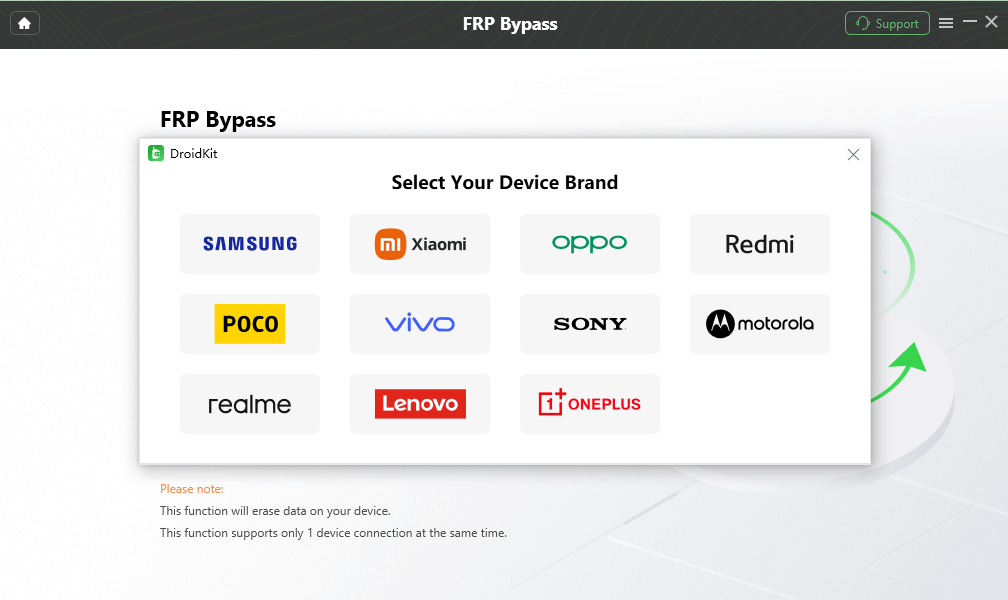
Select the correct device brand.
Step 3. Wait while DroidKit prepares the configuration required for the available device workflow, then continue when prompted.
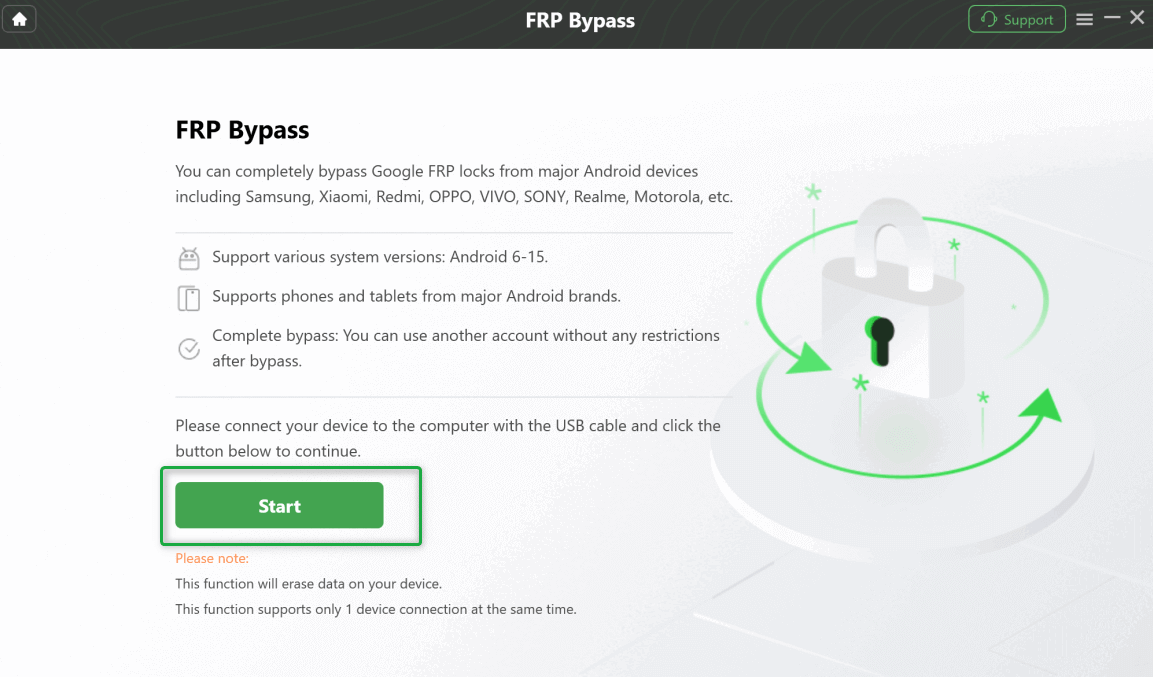
Continue after the required preparation is complete.
Step 4. Select or confirm the device information requested by the software and follow the instructions shown for that route.
Step 5. Keep the device connected until the workflow reports completion, then follow the remaining device setup instructions.

Complete the available FRP workflow.
The reason to move from a free route to a guided tool should be visible in the failure itself. An APK installation block, a missing TalkBack entry point, and an Odin firmware-matching problem are three different reasons to change direction; they should not all lead to another random “free FRP tool” download.
FAQs About Free FRP Bypass Tools
Are there really free FRP bypass tools?
Yes, but the word “free” covers different things. TalkBack is a built-in Android accessibility feature, VNROM and Pangu are associated with APK-oriented routes, and utilities such as Odin or SamFw can be downloaded or used in particular servicing workflows. A free file or program does not guarantee that the complete FRP procedure supports every Android phone or security state.
What is the best free FRP bypass tool?
There is no single best option across all five categories. TalkBack is relevant only when the required accessibility route still exists. VNROM or Pangu depends on APK installation and setup access. Odin is mainly for advanced Samsung firmware workflows, while SamFw requires a compatible Windows/Samsung servicing route. Match the tool category to the phone before comparing tool names.
Can I bypass FRP without a computer for free?
Some Android environments may still expose no-PC paths based on accessibility features, browser access, or APK installation. Whether those routes remain usable depends on the exact model, Android version, security patch, and Setup Wizard. If the required browser or Settings screen is absent, choosing another no-PC tutorial that depends on the same screen will not solve the problem.
Is Odin a free FRP bypass tool?
Odin is better described as a Samsung firmware flashing utility. FRP-related workflows may involve Odin, Download Mode, and matched firmware files, but it is not a universal one-click FRP remover. Model, binary, region, and firmware matching are more important than whether the Odin program itself can be obtained without payment.
Is VNROM a no-PC FRP tool?
Some VNROM-related APK workflows can be researched without a traditional desktop servicing program. The complete route still depends on whether the phone can reach the required browser or file source, install the APK, and open the necessary Settings or account screens.
Is SamFw completely free?
Do not assume every operation associated with SamFw follows the same pricing or service model. The Windows tool includes Samsung-oriented servicing functions, but the exact route available to a user can depend on the function, device, software state, and current service requirements.
What should I use when a free FRP method fails?
Choose the next route from the failure point. A missing TalkBack or browser screen points to a Setup Wizard compatibility issue; “App not installed” points to an APK or installation problem; Odin FAIL points to firmware, driver, connection, or Download Mode checks; and SamFw detection failure points first to the Windows/USB connection. Only after identifying that blocker should you decide whether another free method or a guided computer workflow is appropriate.
Conclusion: Match the Free FRP Route to the Failure Point
The five options on this page solve different parts of the FRP problem. TalkBack depends on an accessible Setup Wizard path, VNROM and Pangu depend on APK and menu access, Odin depends on exact Samsung firmware preparation, and SamFw depends on a working Windows/Samsung servicing route.
Start with the phone’s exact model, Android environment, security state, and whether a computer is available. Then check the first prerequisite of the method before committing to the rest of the tutorial. If that first checkpoint is absent, switching to another tool in the same category usually adds downloads without solving the underlying compatibility issue.
That failure-first approach is also the clearest way to decide when a free method has reached its limit. Diagnose installation, setup access, device detection, or firmware matching first; then choose the next category of solution instead of repeating another version of the same blocked route.
More Related Articles


Roger Smith is a senior technical writer with years of experience in providing Android solutions. He loves to help users solve various problems such as Android unlock, Android data recovery, and Android system repair.
Product-related questions? Contact Our Support Team to Get Quick Solution >
