Global Unlocker Review: Features, Pricing, Risks, and Alternative
Global Unlocker is often searched as an Android FRP, SIM unlock, and phone repair tool. This review explains what it claims to do, what to verify before downloading, how its credits work, and when DroidKit may be a better FRP option for ordinary users.
If your Android phone is stuck on FRP lock , carrier restrictions, or a repair-related lock, you may come across Global Unlocker or Global Unlocker Pro. The tool claims to support FRP bypass, SIM/network unlock, selected repair functions, and brand-specific services. However, not every device, Android version, or security patch is supported.
This review focuses on practical questions before you download or buy credits: what Global Unlocker is, whether it is worth using, how pricing works, what safety risks to check, and how it compares with DroidKit for FRP bypass on supported Android devices.
Important: Use any FRP, unlock, or repair tool only on a device you own or are authorized to unlock. FRP exists to protect lost, stolen, or reset devices from unauthorized use.
Quick Answer: Is Global Unlocker Worth Using?
Quick Answer: Global Unlocker Pro is a phone unlocking and repair tool that claims to support FRP bypass, SIM unlock, IMEI repair, carrier-related tasks, and selected brand services. It may be useful for repair technicians or users who understand credits, drivers, and device-specific steps. However, pricing, version, supported models, and safety should be checked on the official site before use. If your main issue is Google FRP after a factory reset, DroidKit FRP Bypass may be easier on supported Android devices, but FRP bypass may erase device data.
What Is Global Unlocker?
Global Unlocker, often presented as Global Unlocker Pro, is a Windows-based phone unlocking and servicing tool. It is closer to a repair-technician tool than a simple consumer app. Depending on the device and service, it may involve USB drivers, device modes, credits, server access, and model-specific instructions.
The tool is commonly associated with these tasks:
- FRP bypass: Removing Google verification on selected Android devices after factory reset.
- SIM or network unlock: Carrier-related unlock services for supported models.
- IMEI or repair functions: Technician-oriented operations where local laws and service rules apply.
- Boot or firmware-related repair: Selected repair workflows for supported brands and models.
- Brand-specific services: Samsung, LG, Motorola, Nokia, Alcatel, Google, Coolpad, ZTE, and other brands may appear in service lists, but support must be verified per model.
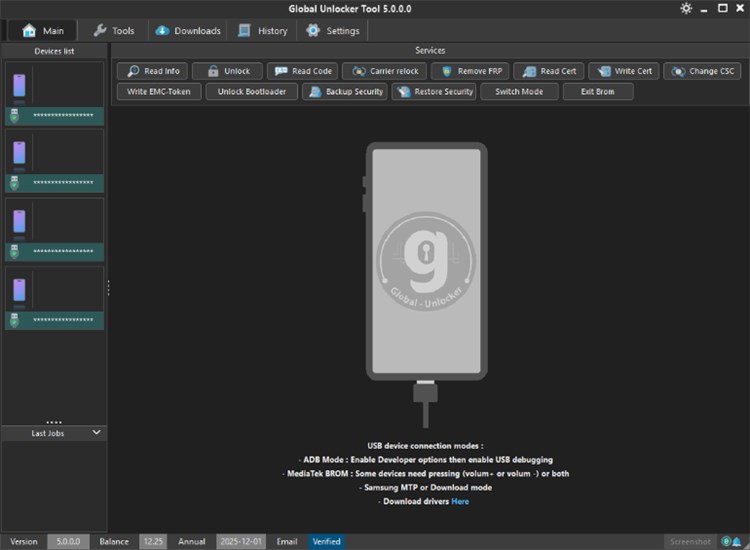
Global Unlocker Interface Example
Global Unlocker vs Global Unlocker Pro
Older articles may use “Global Unlocker” and “Global Unlocker Pro” interchangeably. Before buying credits or installing the tool, check the current official download page and supported-model list because versions, services, and credit rules can change.
| Item | Global Unlocker / Older Mentions | Global Unlocker Pro / Current Tool Positioning |
| Main use | Often described as phone unlocking and FRP bypass. | Positioned as an unlock, FRP, SIM, IMEI, carrier, and repair-service tool. |
| User type | Casual users looking for an unlock solution. | Repair technicians or users comfortable with credits, USB drivers, and device modes. |
| Access model | May be described as license-based in older reviews. | Current official pages describe annual license and credit-based access. |
| Risk level | Depends on download source and device support. | Still requires support verification, safe download, and understanding of data/warranty risks. |
Global Unlocker Features: What It Claims to Do
Global Unlocker Pro’s official site describes the tool as an unlock and repair utility. Treat feature lists as claims to verify , not guaranteed results for every phone.
| Feature | What It Means | What to Verify First |
| FRP bypass | May help remove Google verification on supported devices. | Brand, model, Android version, security patch, and credit cost. |
| SIM / network unlock | May support selected carrier-unlock services. | Carrier rules, IMEI eligibility, legal restrictions, and model support. |
| IMEI repair | Technician-level servicing function. | Local laws, device ownership, service legality, and required credits. |
| Boot repair / flash-related services | May help in selected repair workflows. | Firmware compatibility, drivers, and risk of making the device unusable. |
| Brand services | Supported brand lists may include Samsung, LG, Motorola, Nokia, Google, and others. | Exact model page and current supported functions. |
Global Unlocker Pricing and Credits
Global Unlocker uses license or credit-based access. Do not rely on old screenshots or copied price tables, because credit costs and supported functions can change.
| Access Type | Best For | Important Notes |
| Annual License | Technicians with daily use on selected models/functions. | Official pricing information describes annual use as limited to some models and functions. Verify current scope before purchase. |
| Credit License | Users who want pay-as-you-go services. | Credits are typically consumed per service. Check model, service type, and required credit amount before starting. |
Before paying, confirm whether the exact function you need is available for your device. A service name appearing on the website does not mean every model or every security patch is supported.
Is Global Unlocker Safe to Download and Use?
Downloading from the official website reduces risk, but no unlocking or repair tool should be treated as automatically safe. These tools may require drivers, USB permissions, admin access, and device-specific instructions. Cracked packages or mirror downloads can introduce malware, corrupted files, or fake installers.
- Use the official website instead of third-party mirrors or “free credit” sites.
- Avoid cracked or modified installers.
- Scan downloads and drivers before installation.
- Confirm the tool version and changelog before using it.
- Check whether the operation may erase data, affect warranty, or fail on newer security patches.
- Use the tool only on devices you own or are authorized to unlock.
Google Play Protect can warn, disable, remove, or block potentially harmful apps and URLs. Even when a tool is downloaded outside Google Play, you should still treat unknown installers and drivers carefully.
How to Download Global Unlocker Safely
The official download page may show a newer version than older reviews. Instead of relying on a hard-coded version number, visit the official download page and verify the tool name, version, system requirement, and update notes before installation.
Official download page: Global Unlocker Pro Download
Before installing, prepare:
- A Windows PC that meets the tool’s current requirements.
- A compatible USB cable.
- Required drivers for the target device brand.
- A Global Unlocker account, credits, or license if the service requires payment.
- Proof that you own or are authorized to service the device.
Can Global Unlocker Bypass FRP?
Global Unlocker Pro claims to support FRP bypass on selected devices. However, FRP results depend on the exact model, Android version, security patch, server status, and required credits. Some FRP workflows may require special dialer codes, USB debugging prompts, service menus, or device modes. These steps can vary by brand and patch level.
For safer content quality and better user trust, this guide does not present Global Unlocker as a guaranteed FRP bypass method. Always check the current supported functions for your exact model before buying credits or starting a service.
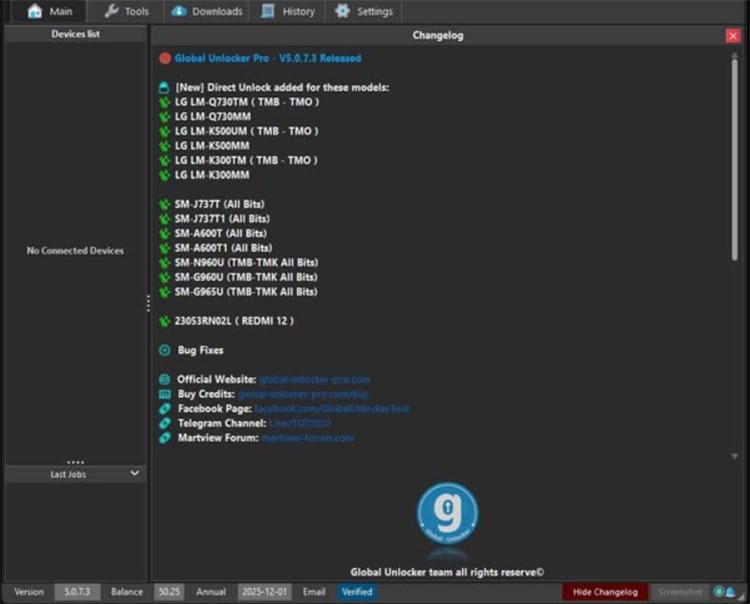
Global Unlocker Service Example
Global Unlocker vs DroidKit: Which Tool Should You Choose?
Global Unlocker and DroidKit overlap in FRP-related use cases, but they are not the same type of tool. Choose based on your actual problem.
| Need | Global Unlocker Pro | DroidKit |
| FRP after factory reset | May work on selected devices and services with credits. | May help on supported Android devices with guided steps. |
| Android screen lock | Not mainly positioned as a consumer screen lock tool. | Relevant through Screen Unlocker on supported devices. |
| SIM/network unlock | May support selected carrier-related services. | Not a carrier/SIM unlock replacement. |
| IMEI repair or boot repair | More relevant for technician-level service tasks. | Not a replacement for professional IMEI/boot repair tools. |
| Beginner-friendly workflow | Can require credits, drivers, and model-specific instructions. | Designed for guided FRP, screen lock, system repair, and data recovery workflows. |
| Data risk | Depends on function and device-specific workflow. | FRP bypass and many unlock workflows may erase device data. |
Alternative: Use DroidKit FRP Bypass on Supported Devices
If your main problem is Google verification after a factory reset and you prefer a guided workflow, DroidKit FRP Bypass may help on supported Android devices. This does not mean DroidKit replaces Global Unlocker for SIM unlock, IMEI repair, carrier services, or boot repair.
Data and compatibility note: DroidKit FRP Bypass may erase device data. Compatibility depends on the exact brand, model, Android version, region, and security patch. Use it only on a device you own or are authorized to unlock.
When DroidKit may be a better fit:
- Your phone is stuck on Google verification after factory reset.
- You want a guided FRP workflow rather than technician-level servicing.
- You do not need SIM unlock, IMEI repair, or boot repair.
- Your device is within the supported device range.
- You understand that the process may erase device data.
Free Download * 100% Clean & Safe
Basic steps to use DroidKit FRP Bypass:
Step 1. Download and install DroidKit on your computer. Launch it and choose FRP Bypass .

Choose FRP Bypass Mode
Step 2. Connect your Android device and click Start after the device is detected.
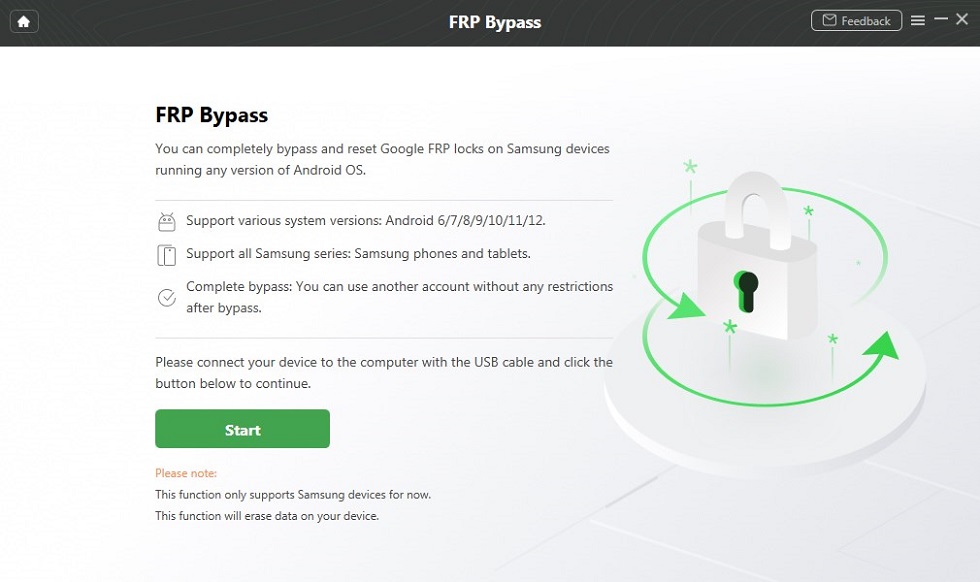
Connect Your Device
Step 3. Wait for the configuration file to be prepared, then click Start to Bypass .
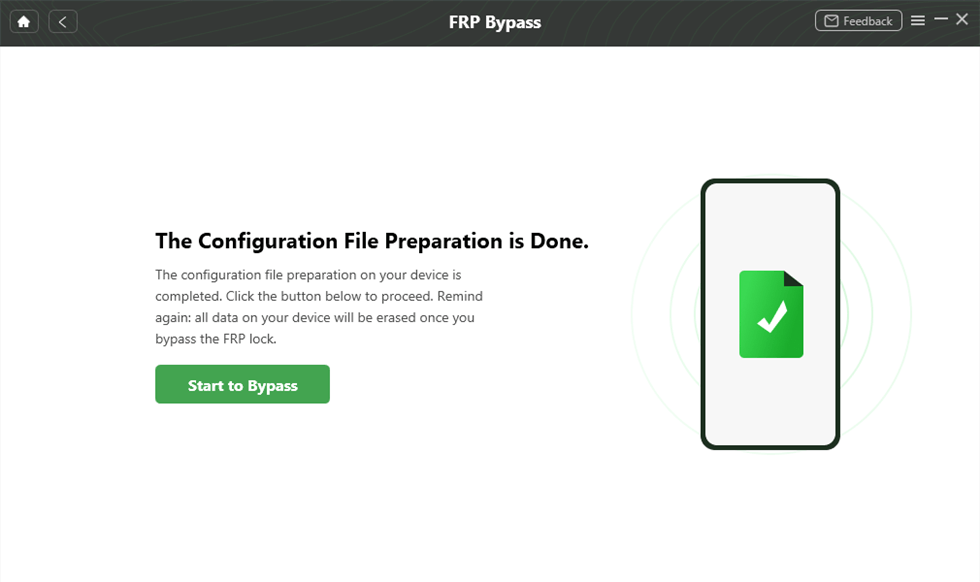
Click Start to Bypass
Step 4. Follow the on-screen instructions for your device brand and system version.
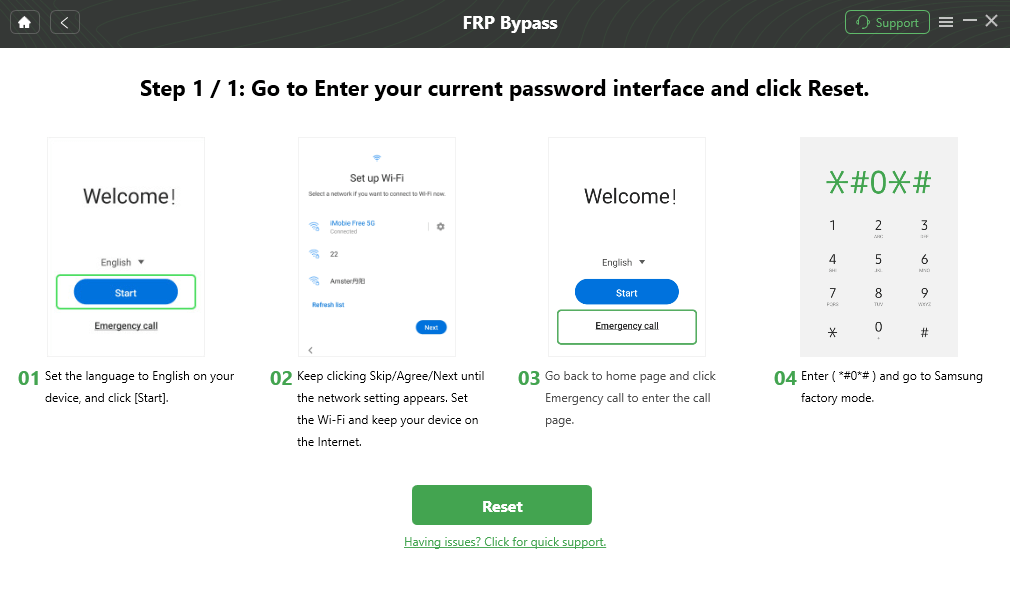
Follow the On-screen Instructions
Step 5. After the process finishes, the device will restart. Set it up again and confirm that Google verification has been removed.

FRP Bypass Complete
FAQs About Global Unlocker
What is Global Unlocker?
Global Unlocker Pro is a phone unlocking and repair tool that claims to support tasks such as FRP bypass, SIM/network unlock, IMEI repair, carrier-related functions, and selected device repair workflows. Exact support depends on the device model, brand, drivers, credits, and current tool version.
Is Global Unlocker free?
Not for full use. Global Unlocker uses license or credit-based access. The current price, available services, and supported functions should be checked on the official pricing page before purchase because they may change.
What is the latest Global Unlocker version?
The version can change frequently. Older reviews may mention previous releases, so you should always check the official download page before installing or buying credits.
Is Global Unlocker safe to download?
Downloading from the official website reduces risk, but any unlocking or repair tool still requires caution. Avoid cracked packages, mirror downloads, and unverified drivers, and scan downloads before installation.
Can Global Unlocker bypass FRP?
Global Unlocker Pro claims to support FRP bypass on selected brands and models. Results depend on the exact device, Android version, security patch, server status, and available credits. Use it only on devices you own or are authorized to unlock.
Is Global Unlocker better than DroidKit?
It depends on the task. Global Unlocker Pro is closer to a technician tool for FRP, SIM unlock, IMEI repair, and device repair services. DroidKit is more suitable for ordinary users who need a guided FRP bypass, screen lock removal, system repair, or Android data recovery workflow on supported devices.
Does DroidKit replace Global Unlocker?
No. DroidKit does not replace Global Unlocker for technician-level tasks such as IMEI repair, carrier unlock, or boot repair. DroidKit is mainly relevant when the user needs guided FRP bypass or Android screen unlock on supported devices.
Will FRP bypass erase data?
It may. FRP bypass and reset workflows can erase data on the device. Check the tool guide, back up what you can, and understand the data risk before starting any unlock process.
The Bottom Line
Global Unlocker Pro may be useful for repair technicians or users who need selected FRP, SIM unlock, IMEI repair, carrier, or repair services. However, it is not a universal unlock guarantee. Version, supported devices, credits, and service availability should be checked on the official site before installation or purchase.
If your main issue is Google verification after reset , DroidKit may be a simpler option on supported Android devices. Still, FRP bypass may erase data, and compatibility depends on your model, Android version, region, and security patch.
Free Download * 100% Clean & Safe
Related Guides You May Need



Senior writer of the iMobie team as well as an Apple fan, love to help more users solve various types of iOS & Android-related issues.
Product-related questions? Contact Our Support Team to Get Quick Solution >
