Samsung A15 FRP Bypass With/Without PC (A15 & A15 5G)
Locked out of your Samsung A15 or A15 5G after a factory reset? This guide compares Samsung A15 FRP bypass methods with or without PC, explains why free Google Keyboard steps may fail on Android 14, and shows when a guided FRP tool is a better option.
Why does your Samsung A15 or Samsung A15 5G keep asking for the previously synced Google account after a factory reset? This usually happens because FRP, or Factory Reset Protection, is active on the device. If you forgot the Google account password or bought a second-hand phone whose previous owner did not remove the account, you may be stuck on the Google verification screen.
This guide explains Samsung A15 FRP bypass methods with or without a computer. You can compare a guided PC-based option and a no-PC Google Keyboard method, then choose the path that fits your Samsung A15, Samsung A15 5G, Android version, and security patch.
Guided Way to Bypass FRP on Samsung A15
iMobie DroidKit provides a guided PC-based way to bypass FRP on Samsung A15 and A15 5G. It is useful when you cannot remember the previously synced Google account, or when manual no-PC methods are blocked by Android 13/14 security updates.

Samsung A15, like many modern Android devices, comes with FRP to help protect your data after a factory reset. If the linked Google account is not removed before resetting the phone, the device may ask you to sign in with the same account again. You can first try to contact the previous owner or recover your Google account. If that is not possible, the methods below may help you continue.
Quick Answer: Samsung A15 FRP Bypass Options
For Samsung A15 and Samsung A15 5G FRP bypass, you can try a no-PC method such as Google Keyboard first, but it may not work on Android 14 or newer security patches. If your phone is updated, the keyboard shortcut is missing, or the browser/settings path is blocked, a guided PC-based FRP tool is usually easier to follow.
If you need FRP solutions for more Galaxy A models, check the full Samsung Galaxy A FRP guide.
Why Am I Stuck on Samsung A15 FRP Lock?
Factory Reset Protection is a security feature designed to help prevent unauthorized access after a factory reset. When your Samsung A15 is reset without removing the linked Google account first, FRP can be activated and the phone will ask for the Google credentials previously used on the device.
You may be stuck on Samsung A15 FRP lock for one of these reasons:
- You reset your Samsung A15 but forgot the linked Google account password.
- You bought a used Samsung A15 or A15 5G and the previous owner did not remove their Google account.
- The phone was reset by someone else, and the Google credentials are unknown to you.
- Your device was updated to a newer Android version, so older FRP shortcuts no longer work.
If you still have access to the previous Google account, recovering that account is the official path. If you cannot access it, continue with the preparation checklist and methods below.
Preparations for Samsung A15 FRP Bypass
Before starting the FRP bypass process on your Samsung A15 or Samsung A15 5G, prepare the following items to avoid interruptions:
1. Stable Wi-Fi Connection
Connect your Samsung A15 to a stable Wi-Fi network. FRP setup screens and online verification steps usually require internet access.
2. A Computer for the PC-Based Method
If you choose the DroidKit method, prepare a Windows or Mac computer. If you only want to try the no-PC Google Keyboard method, you can skip this step.
3. USB Cable
Use a reliable USB cable to connect your Samsung A15 or A15 5G to the computer when using a PC-based tool.
4. Battery Charge
Keep your Samsung A15 battery above 50% before you start. A low battery may interrupt the bypass process or setup steps.
5. Confirm Your Android Version If Possible
Samsung A15 and A15 5G devices may run different Android versions depending on region, update status, and model. Android 14 and newer security patches often block older no-PC shortcuts, so it is useful to know your system version before choosing a method.
6. Confirm Device Ownership
Only perform an FRP bypass on a Samsung A15 that you own or are authorized to access. If it is a second-hand phone, contact the previous owner first and ask them to remove their Google account from the device. Also note that resetting or setting up the phone again may erase locally stored data.
Samsung A15 FRP Bypass Methods Compared
Before choosing a method, compare the PC and no-PC options below:
| Method | PC Needed | Best For | Main Limitation |
| DroidKit FRP Bypass | Yes | Samsung A15/A15 5G users who want guided steps | Requires a Windows or Mac computer |
| Google Keyboard | No | Users who want to try a free manual method first | Often blocked on Android 14 or newer security patches |
Key takeaway: Free no-PC methods are worth trying, but they are more likely to fail on updated Samsung A15 5G devices. If the manual path is blocked, switch to a guided PC-based method instead of repeatedly downloading random FRP APK files.
Method 1: Bypass Samsung A15 FRP with DroidKit
One practical way to bypass FRP on Samsung A15 is to use iMobie DroidKit FRP Bypass. It offers a guided FRP Bypass mode for Samsung phones and can be useful when you do not know the previously synced Google account, or when no-PC methods are unavailable on your device.
For users comparing tool-based options, you can also check more Samsung FRP tool solutions before deciding which method fits your phone.
Why Choose This Method
- It provides step-by-step guidance for Samsung FRP bypass.
- It is easier for beginners than long manual keyboard or APK-based methods.
- It is useful when Android 13/14 security updates block older no-PC shortcuts.
- It avoids relying on unverified Samsung A15 FRP files or APK downloads.
Steps to bypass FRP on Samsung A15 with iMobie DroidKit:
Step 1. Download and install iMobie DroidKit on your computer.
Free Download * 100% Clean & Safe
Step 2. Launch DroidKit and select FRP Bypass. Then connect your Samsung A15 or Samsung A15 5G to the computer with a USB cable.

Choose FRP Bypass Mode
Step 3. Follow the on-screen instructions and choose Samsung as your device brand.
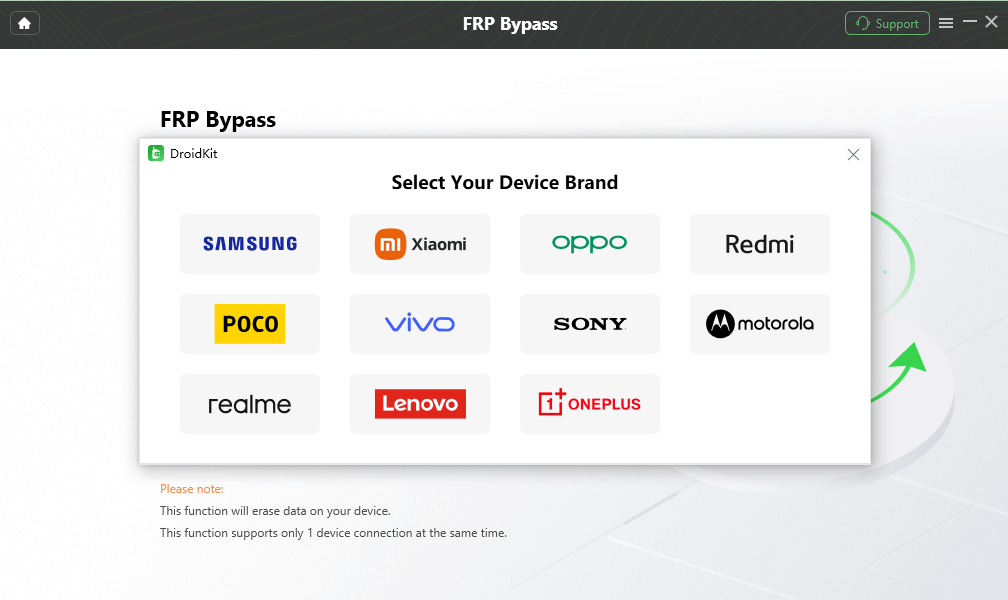
Choose Device Brand
Step 4. Choose the Samsung system version shown on your phone. This helps DroidKit provide the corresponding FRP bypass instructions.
Step 5. Follow the steps on the screen to put your Samsung A15 into the required mode.
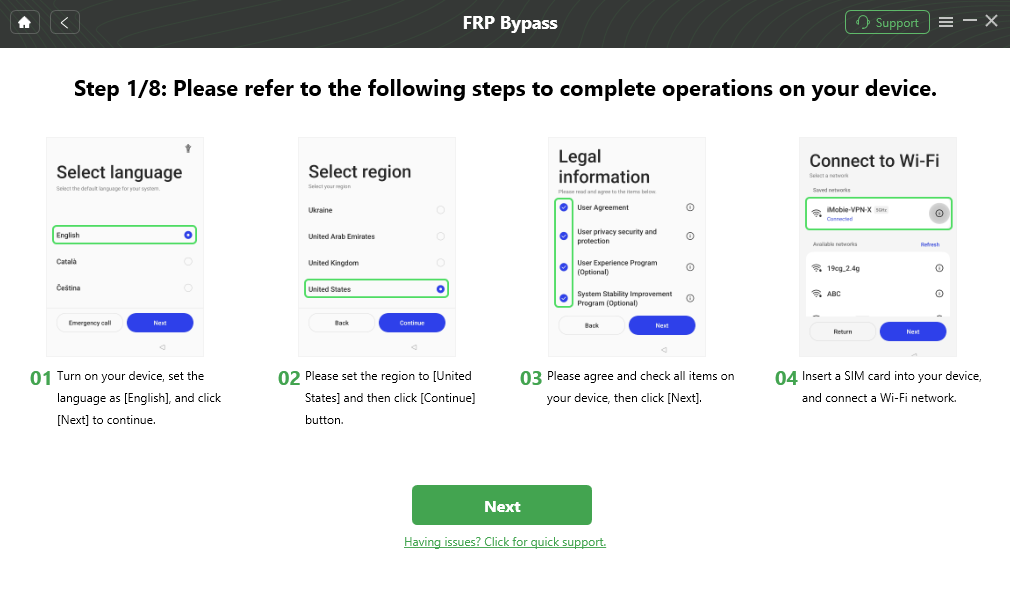
Follow the Bypass Steps
Step 6. Complete the remaining on-screen operations and wait for the FRP bypass process to finish. After the process is complete, your Samsung A15 will restart, and you can set it up again.

FRP Bypass Complete
Who Should Use This Method?
This method is a good fit if you:
- Do not know the original Google account.
- Already tried and failed with manual no-PC methods.
- Use Samsung A15 5G with a newer Android version.
- Want guided steps instead of complex APK or keyboard shortcuts.
If the Google Keyboard method is blocked on your Samsung A15 or A15 5G, DroidKit gives you a guided PC-based path to continue without relying on random FRP APK downloads.
Free Download * 100% Clean & Safe
Method 2: Bypass Samsung A15 FRP Without PC via Google Keyboard
If you do not have access to a computer, you can try the Google Keyboard method. This is a free no-PC method, but it depends heavily on your Android version, security patch, and whether the required settings path is still available on your Samsung A15.
Before you start, keep in mind:
- It may not work on Android 14 or updated Samsung systems.
- It requires several manual steps.
- The keyboard, Help & Feedback, YouTube, browser, or settings path may be blocked.
- If the steps do not match your screen, switch to Method 1 instead of trying unsafe APK files.
Step-by-Step Guide to Bypass FRP Using Google Keyboard
Step 1. Turn on your Samsung A15. When you reach the Wi-Fi setup screen after factory reset, connect to a stable Wi-Fi network.
Step 2. On the Google account verification screen, tap the text input field to open Google Keyboard.
Step 3. Tap and hold the @ key or the gear icon to open keyboard settings. From the settings menu, tap Languages and choose Add Keyboard.
Step 4. Choose a language that uses a different alphabet, such as Hindi or Arabic. This may take you back to the main keyboard settings page.
Step 5. In keyboard settings, tap the three-dot icon in the upper-right corner, then tap Help & Feedback.
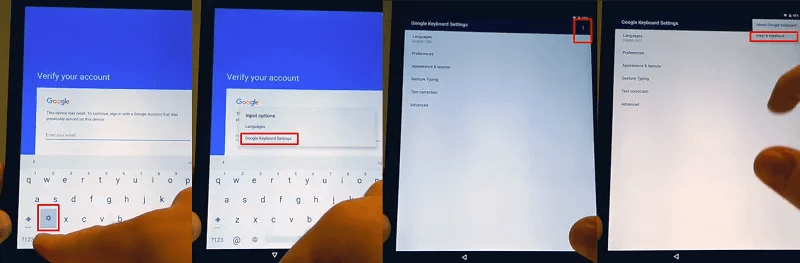
Go to the Help Page from Google Keyboard Settings
Step 6. In the Help section, tap a help topic such as Using Google Keyboard. Select text on the page and look for options that may open another app or browser.
Step 7. If YouTube or a browser opens, try to access the phone settings from there. On some older systems, this path may allow you to reach settings and continue the setup process.
Step 8. Restart your Samsung A15 after completing the available settings changes. Then check whether the Google verification screen still appears.
If the Google Keyboard Method Does Not Work
This is common on Samsung A15 and Samsung A15 5G, especially after newer system updates. Possible reasons include:
- The Help & Feedback option is no longer accessible.
- YouTube or browser access is blocked during setup.
- The Android 14 security patch has closed the shortcut.
- The steps differ between Samsung A15 and Samsung A15 5G models.
If this method fails, do not keep repeating the same steps or downloading unknown APK files. Use a guided PC-based method or try official Google account recovery.
Samsung A15 5G FRP Bypass on Android 14/13
Samsung A15 and Samsung A15 5G users often search for Android 14 or Android 13 FRP bypass because newer systems may block older no-PC methods. The Google Keyboard method, browser path, or APK-based shortcuts may disappear after updates.
| System Situation | What Usually Happens | Suggested Next Step |
| Samsung A15 on Android 13 | Some manual paths may still appear, but results vary by security patch | Try Google Keyboard first, then use a PC-based method if blocked |
| Samsung A15 5G on Android 14 | No-PC shortcuts are more likely to be patched | Use a guided FRP tool or check dedicated Android 14 FRP bypass solutions |
| Updated security patch | Keyboard, browser, APK, or settings paths may not match older guides | Stop using outdated shortcuts and switch to a safer fallback |
If your Samsung A15 5G is on Android 14 and the no-PC method does not match your screen, the method is likely blocked. A PC-based process is usually easier to follow in this case.
What If Samsung A15 FRP Bypass Fails?
FRP bypass can fail for different reasons. Use the table below to identify the likely cause and choose the next step.
| Problem | Possible Reason | What to Try |
| Google Keyboard settings do not open | The shortcut may be blocked by the current security patch | Try DroidKit or recover the original Google account |
| YouTube or browser cannot be opened | The setup wizard blocks external app access | Use a PC-based method instead of repeating the same steps |
| Samsung A15 5G still asks for the Google account | FRP is still active after reset | Use the previously synced Google account or read this Google account verification after reset guide |
| FRP APK download looks suspicious | The source may be unsafe or outdated | Avoid entering account details or installing unknown files |
| The method works on A15 but not A15 5G | Model, carrier, region, or Android version differences | Check your model and Android version, then choose a matching method |
When a manual method fails, the safest next step is not to try random APK files from unknown websites. Use a guided method, recover the original Google account, or contact the previous owner if the phone is second-hand.
FAQs about Samsung A15 FRP Bypass
Can I bypass FRP on Samsung A15 without a computer?
Yes, you can try a no-PC method such as Google Keyboard. However, it may not work on Android 14 or newer security patches. If the steps are missing or blocked, use a PC-based method instead.
Does this work on Samsung Galaxy A15 5G?
The methods can apply to Samsung A15 and Samsung A15 5G, but the result depends on the Android version, security patch, and available setup-screen options. Samsung A15 5G with Android 14 is more likely to block free manual methods.
What if I do not know the previous Google account?
The official option is to recover the Google account or ask the previous owner to remove the device from their account. If that is not possible and the phone belongs to you, a guided FRP bypass tool may help you continue.
How can I prevent FRP lock before factory resetting a Samsung A15?
If you can still access the phone, go to Settings > Accounts and backup > Manage accounts, select the linked Google account, and tap Remove account before performing a factory reset. The menu names may vary slightly by One UI version. Removing the account first helps prevent the Samsung A15 from requesting the previously synced Google account during setup.
Is there a 100% free Samsung A15 FRP bypass method?
Not reliably. Free methods such as Google Keyboard can work in some cases, but they are often limited by Android version and security patch. Updated Samsung A15 and A15 5G devices may require a different approach.
Which method is easier for beginners?
A guided PC-based method is usually easier for beginners because it provides clearer steps. The Google Keyboard method is free, but it requires more manual operations and may fail on updated systems.
Conclusion
Samsung A15 FRP bypass can be done with or without a computer, but the best method depends on your device model, Android version, and security patch. If your Samsung A15 or A15 5G is on an older system, you can try the Google Keyboard method first. If it is updated to Android 14, or if the manual steps are blocked, a guided PC-based method is usually easier to follow.
Use a guided Samsung A15 FRP bypass option when no-PC methods are blocked.
Free Download * 100% Clean & Safe
More Related Articles


Roger Smith is a senior technical writer with years of experience in providing Android solutions. He loves to help users solve various problems such as Android unlock, Android data recovery, and Android system repair.
Product-related questions? Contact Our Support Team to Get Quick Solution >
