Best Samsung M01 FRP Unlock Tool [3 Minutes]
In this article, you will explore all about the Samsung M01 FRP unlock tool. You will learn what FRP is and how you can use a tool like iMobie DroidKit to bypass it in just three minutes. You will also discover a few ways for Samsung M01 FRP bypass.
iMobie DroidKit – Samsung M01 FRP Unlock Tool
Whether you have forgotten your password or purchased a second-hand device, iMobie DroidKit is your best choice. As a professional FRP Unlock Tool, it can quickly and safely help you unlock the Samsung M01 FRP lock and restore the device to normal use.

Many Samsung M01 users get stuck on FRP after a factory reset or when they can’t remember the Google account linked to the device. FRP is meant to safeguard your phone from unauthorized access, but when you’re the rightful owner and can’t verify the account, it turns into a frustrating roadblock that stops you from using your phone at all. In these cases, a reliable Samsung M01 FRP unlock tool becomes essential. This article will explore several Samsung M01 FRP unlock tools and provide other solutions for Samsung M01 FRP bypass. Let’s dive in!
Samsung Galaxy M01 Specifications
The Samsung Galaxy M01 is a budget-friendly smartphone, best fulfills your basic daily needs. With this phone, you can make calls, text, and use the browser. It offers all the basic features that other smartphones offer. However, it is less expensive. Samsung Galaxy M01 comes with a moderate screen size and a durable battery. Here are some key specs and model details for this smartphone:
| Features | Specification |
| Model Name | Samsung Galaxy M01 |
| Launch Date | June 2020 |
| Display | 5.7 inches, PLS TFT LCD |
| Resolution | 720 x 1520 pixels |
| Internal Storage | 32GB |
| Battery | 4000mAh, non-removable |
| Operating System | Android 10, upgradable to Android 11 |
Now that we have explored the specs of the Samsung Galaxy M01, let’s move forward and learn about why we need to bypass the FRP lock in this device.
What Is the FRP lock on Samsung Galaxy?
FRP (Factory Reset Protection) is a built-in Android security feature introduced with Android 5.0 and used on all recent devices, including the Samsung M01. Once you sign in with a Google account on your phone, FRP is automatically activated in the background. Its main purpose is to prevent unauthorized access to your device after a factory reset, especially if the Google account credentials are removed or forgotten.
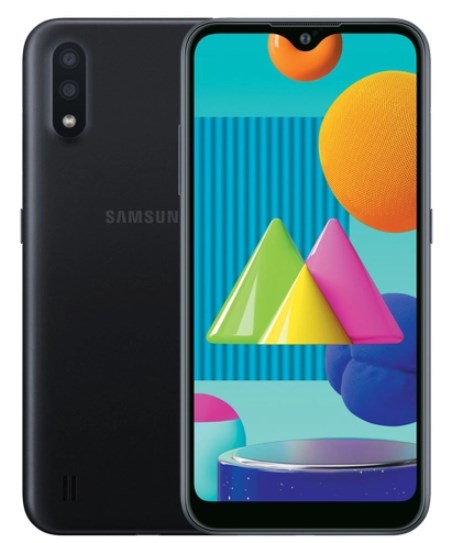
Samsung Galaxy M01
Why Perform a Samsung M01 FRP Bypass?
The purpose of FRP lock is to secure your phone, specifically Android phones like the Samsung Galaxy M01. When this lock is enabled, you need to enter your Google account details to use your phone after a reset. But you could get locked out if you forget your account info or buy a used phone with FRP active. This can be frustrating. In this case, unlocking the FRP lock is needed. You cannot access your phone features without unlocking this lock.
In these situations, a Samsung M01 FRP bypass becomes necessary to regain access and restore normal device functionality. A reliable FRP unlock tool allows the rightful owner or authorized user to remove the lock safely and start using the phone again without delays. In the next section, we’ll introduce the best Samsung M01 FRP unlock tool and show you how to bypass FRP step by step.
Best Samsung M01 FRP Unlock Tool [Easy & Secure]
When it comes to unlocking FRP on the Samsung M01, iMobie DroidKit stands out as a top choice. It’s reliable, fast, and designed for users of all skill levels. You don’t need technical experience to follow its on-screen guidance. Beyond a clean, intuitive interface, DroidKit is built as a one-stop solution for many Android problems, not just FRP bypass. In addition to safely bypassing FRP locks on supported models like the Samsung M01, DroidKit also offers system repair, screen lock removal, and powerful Android data recovery features so you can recover lost photos, messages, contacts, and other important files.
Main Benefits of iMobie DroidKit:
- Compatible with both Windows and Mac to bypass FRP on Samsung M01.
- Restore access without the original Google credentials.
- Complete the FRP bypass in a few guided steps, no technical skills required.
- Remove a previous owner’s Google account and set up a new one quickly.
Free Download * 100% Clean & Safe
Steps to Use iMobie DroidKit to Bypass FRP Lock on Samsung M01:
Step 1. First, download and install the iMobie DroidKit on your PC/laptop. Once the installation is done, open the software and select “FRP Bypass” from the options.

Choose FRP Bypass Mode
Step 2. Now, connect your Samsung M01 to your PC via a USB cable. DroidKit will start recognizing the device. Once done, click “Start” and select “Samsung” as your device brand.
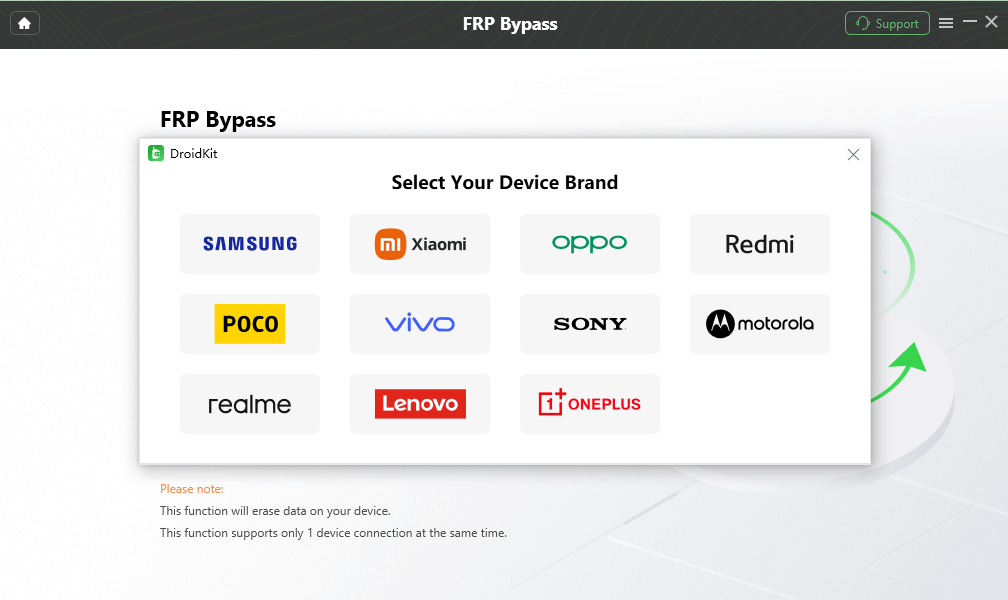
Choose Device Brand
Step 3. Next, DroidKit will start preparing the configuration file for your Samsung M01. Once done, click “Start to Bypass” and proceed.
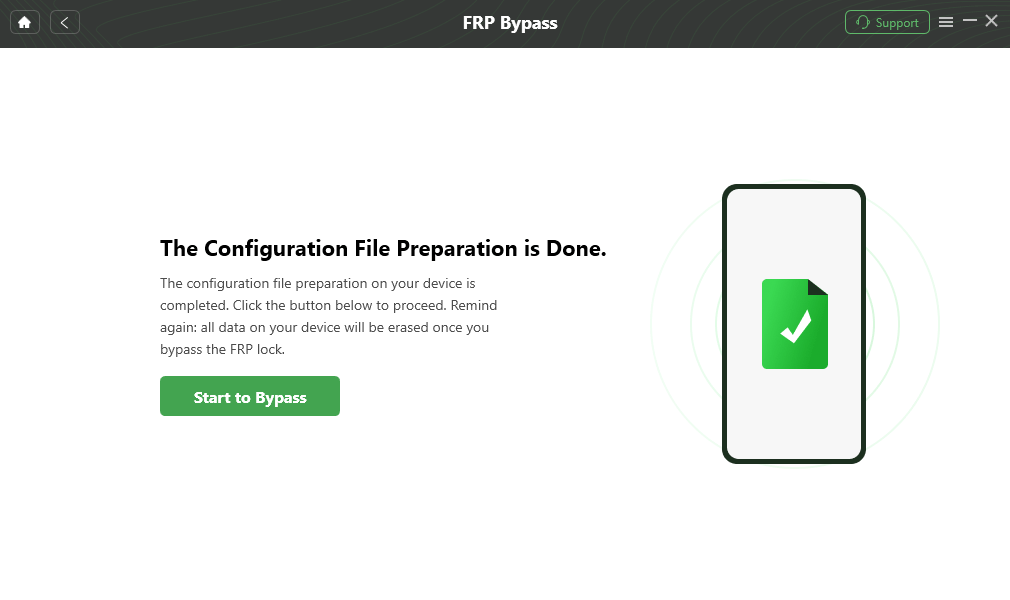
Click Start to Bypass
Step 4. Now select the system version of your Samsung M01 and click the “Next” button. Remember, the boot screen varies with the Android version. DroidKit provides five boot-screen views for reference. Select accordingly.
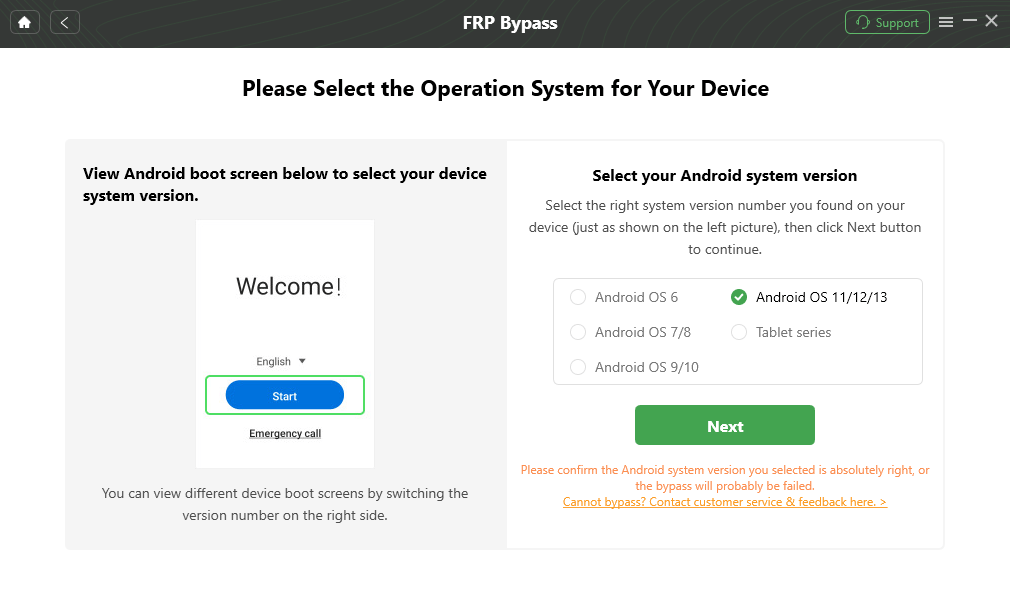
Choose System Version
Step 5. Now, you need to go to the “Enter your current password” interface. Follow the on-screen instructions to complete the corresponding settings. After entering the factory mode, click the “Reset” button.
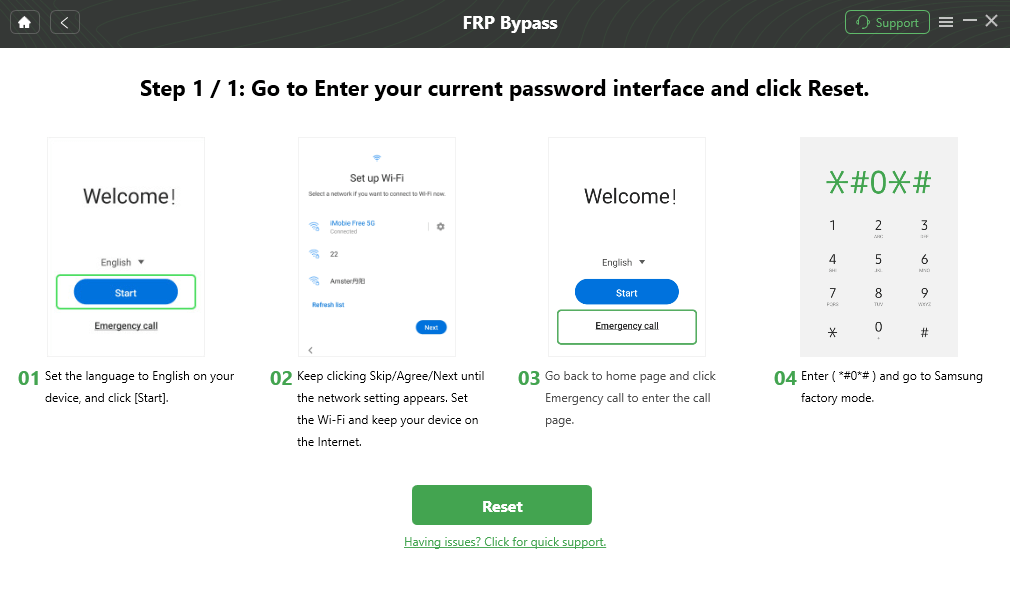
Click Reset
Step 6. After clicking reset, DroidKit will start bypassing the FRP lock on your Samsung M01. Once the process is completed, you will see the interface below.

FRP Bypass Complete
Just a few clicks, and you will make your Samsung M01 device functional again. Although there are various tools and methods to bypass the FRP lock, iMobie DroidKit stands out due to its ease of use and effectiveness.
Samsung M01/M01 Core FRP Bypass: Other Methods and Tools
Samsung M01 FRP bypass can be done in several ways. However, each of them may vary in ease and effectiveness. You can try to find a special tool or app. Some people say you can do it by yourself, but it’s hard. Be careful when trying these methods. You might damage your phone. Here are some other methods for Samsung M01 Core FRP bypass:
Method 1: Official Samsung M01 FRP Unlock Tool
Sometimes, Samsung provides official tools or customer support for bypassing FRP. You can visit their official website or call them for assistance. This method requires the IMEI number or serial number of the device. This information can usually be found on the back of the device or on the box.
At the same time, Samsung may ask the user to provide proof of purchase or other relevant documents to verify the legal ownership of the device. Once verified, Samsung will remotely unlock the user’s device. This process is usually completed online, and the user does not need to send the device to Samsung.
Method 2: Reset Your Google Account Password
If you can still access the Google account linked to the Samsung M01, resetting the account password would be a safer choice. After you change the password and successfully sign in on the device, the FRP lock will be cleared for that account. Here are the steps to reset your Google Account password:
Step 1. Visit the Google login page. Enter your Google account email address and click “Next”. Select “Forgot your password?“: On the password input page, click the “Forgot your password?” link.
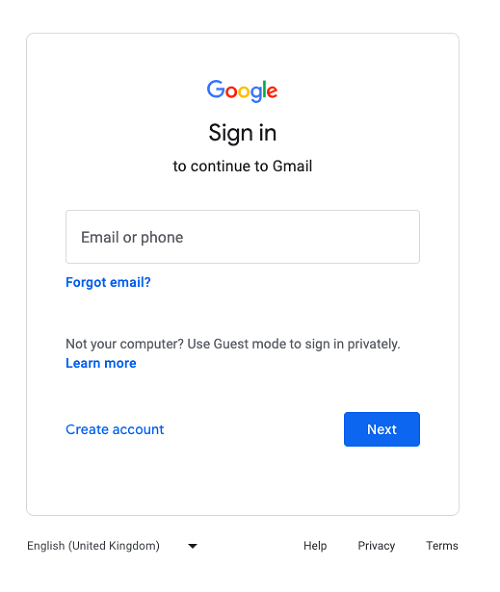
Go to the Google Account Login page
Step 2. Google will ask you to answer a few questions to verify your identity. You may be asked to choose to verify your identity through a mobile verification code, an alternative email address, or answer security questions. Select the verification method that suits you and follow the prompts.
Step 3. After successful verification, you will be directed to the “Create a new password” page. Enter a new password.
Step 4. Click the “Change password” button to complete the password reset process.
Method 3: Use FRP Bypass APK Installer for Samsung M01 FRP Bypass
FRP Bypass APK Installer is another solution for Samsung M01 FRP bypass. It uses a purpose-built APK to open device settings or a browser and complete the FRP verification flow. However, this method is best suited for users who know how to install APKs and manage permissions. Before you proceed, back up any important data on Android, perform a factory reset, and then go through the device’s initial setup to trigger the FRP flow. Here are the steps:
Step 1. In the device’s setup wizard, connect to a Wi-Fi network and proceed until the device asks for Google account information.
Step 2. When you get to the Google account login page, tap the text on the page (such as “Email Address” or “Password”) to highlight it, then tap the three-dot menu icon in the upper-right corner. In the menu that appears, select “Help & Feedback” or “Terms of Use.”
Step 3. On the “Help & Feedback” page, tap any feedback item and select “Open in Browser.” This will open your device’s web browser.
Step 4. In the browser, search for and download the app called “FRP Bypass APK.” Please note that downloading third-party apps can be risky, so get it from a trusted source.
Step 5. Once the download is complete, tap the file to begin the installation. You may be prompted to allow the installation of apps from unknown sources, so enable this permission in Settings.
Step 6. Once the installation is complete, open the FRP Bypass app and tap “Settings” to enter the device’s settings page.
Step 7. In Settings, find and select “Backup & reset” or “About phone”, then select “Reset factory settings” or “Erase all data”. Confirm the operation, and the device will reset and restart.
Step 8. After the restart, you will be able to set up the device without entering the Google account information again, thus successfully bypassing the FRP lock.
Method 4: Samsung M01 FRP Bypass via Emergency Call
Emergency-call/dialer tricks have sometimes been used to access limited device menus and trigger FRP-bypass workflows on models like the Samsung M01 and M01 Core. However, they’re unreliable, highly model- and firmware-specific, and are often patched by security updates. Here is how to:
Step 1. Connect the device to a Wi-Fi network and enter the page that asks you to enter your Google account information.
Step 2. On the Google account verification page, click the “Emergency Call” button to enter the dialer interface.
Step 3. Enter “*#0808#” or other specific code on the dialer interface (you can try *#9090# or *#7284#, the specific code may vary from device to device). This will open the USB settings or Service Mode menu.
Step 4. On the USB settings page, select “DM+ACM+ADB” mode or similar options (may vary from device to device). This will allow the device to interact more extensively with the computer via USB.
Step 5. Connect the device to a computer via USB and use third-party tools such as Odin or other tools to flash custom firmware or unlock tools to bypass the FRP lock.
Step 6. After completing the setup, restart the device and follow the prompts to complete the initial setup to successfully bypass the FRP lock.
Bonus Tip: How Do I Remove Google Account on Samsung M01?
If you’re planning to sell, give away, or reset your Samsung M01, make sure you remove the Google account first. This prevents FRP from activating and locking the next setup behind account verification. Here’s how to remove the Google account safely:
Step 1. Go to Settings on your Samsung M01. Tap Accounts and backup > Manage accounts.
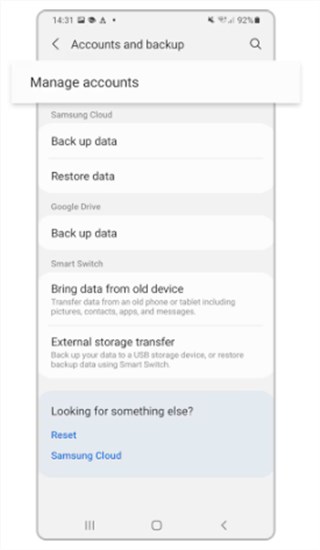
Step 2. Select the Google account linked to your phone. Tap Remove account.
Step 3. Confirm when prompted. Once removed, you can proceed with a factory reset without triggering FRP.
FAQs about Samsung M01 FRP Unlock Tool
Q1. Is there any solution for Samsung M01 FRP bypass Android 10?
To bypass FRP on Samsung M01 Android 10, try recovering your Google account first. If that doesn’t work, a trusted FRP unlock tool can help you regain access legally.
Q2. What is the best Samsung M01 FRP Unlock Tool 2025?
Several tools support Samsung M01 FRP bypass, and some leading solutions offer a simple guided process and high device compatibility — making them a reliable choice for most users.
Q3. How Do I Remove Google Account from Galaxy M01?
To remove Google Account from Galaxy M01, you can go to Settings > Accounts and backup > Manage accounts, select your Google account, and tap Remove account before performing a factory reset.
Conclusion
To sum up, this guide covered five solutions for Samsung M01 FRP bypass. Some are limited, unreliable, or risky and may not work on all models or firmware versions. For a dependable option, consider iMobie DroidKit as a better Samsung M01 FRP unlock tool. It can help you regain access with just a few clicks, even if you’ve forgotten your Google account password. Download iMobie DroidKit to quickly and safely restore your Samsung M01.
Free Download * 100% Clean & Safe
FRP Tools And Tips
FRP Tips
- SamFw FRP Tool: Download and Use
- Easy Samsung FRP Tool Free Download
- All Things You Need to Know about GSM FRP Tool
- Samfirm FRP Tool Review & Best Alternative [Free Download]
- Full Guide to Download and Use Techeligible FRP Bypass Tools
- TFT Unlocker: 2025 New Review & Best Alternative [Free Download]
- How to Use Vnrom Bypass to Bypass Google Account


Roger Smith is a senior technical writer with years of experience in providing Android solutions. He loves to help users solve various problems such as Android unlock, Android data recovery, and Android system repair.
Product-related questions? Contact Our Support Team to Get Quick Solution >
