UnlockJunky Review: FRP Service, Pricing, Risks, and Alternative
Thinking about using UnlockJunky for FRP or phone unlocking? This review explains what UnlockJunky does, why its current service status should be checked first, what risks to consider, and when DroidKit may be a self-guided FRP alternative.
Factory Reset Protection can stop you from setting up an Android phone after a reset if the device still requires the previously synced Google Account. UnlockJunky is one service users may find when searching for FRP bypass or remote phone unlocking. However, before paying for any remote unlock service, it is important to check whether the service is currently available, what device models are supported, and what privacy or data risks may be involved.
Quick Answer: Is UnlockJunky Still Worth Using?
Quick Answer: UnlockJunky is a remote phone unlocking service known for FRP / Google unlock and carrier unlock services. However, its current official pages show mixed signals: the site still lists FRP services and temporary Samsung FRP order forms, while the homepage also includes a goodbye message. Before paying or installing remote-access software, confirm availability through the official live chat. If your main issue is FRP after reset, DroidKit may be a self-guided alternative on supported Android devices, but FRP bypass may erase data.
Service Status Note: Because UnlockJunky’s official pages currently show mixed service-status messages, treat availability, pricing, supported devices, and Android 15 / 16 support as needs human review . Confirm directly through UnlockJunky live chat before purchase.
What Is UnlockJunky?
UnlockJunky is a remote phone unlocking service associated with FRP / Google unlock, carrier unlock, and Samsung Account unlock services. Instead of giving users a standalone desktop program to run independently, the service typically relies on selecting a device, connecting the phone to a Windows PC, installing required remote or USB software, and working with a technician through live chat.
This makes UnlockJunky different from a self-guided Android toolkit. It may be useful for users who prefer technician-led help, but it also means you should verify service availability, payment terms, refund rules, remote software requirements, and device support before starting.
UnlockJunky Current Status: What to Check Before Paying
UnlockJunky’s official pages currently show mixed signals. The homepage still lists FRP / Google unlock, carrier unlock, and Samsung Account unlock information, but the page also includes a goodbye message. The order form also describes temporary Samsung FRP payment options while the main system is under maintenance.
Before using the service, check these items manually:
- Whether UnlockJunky is currently accepting orders for your device brand and model.
- Whether your Android version is supported, especially Android 15 or Android 16.
- The exact fee, refund policy, and expected waiting time.
- Whether you need to install remote-access or USB redirection software.
- Whether the technician will need device information, recovery screen details, or live chat access.
What Services Does UnlockJunky Offer?
Based on its official pages and existing service descriptions, UnlockJunky is mainly associated with the following service types. Availability may change, so confirm each service before paying.
| Service | What It Means | Important Check |
|---|---|---|
| FRP / Google Unlock | Help with Google verification after factory reset on selected devices. | Check brand, Android version, screen type, and current service status. |
| Carrier Unlock | Help with network restrictions on selected carrier-locked phones. | DroidKit does not replace carrier unlock services. |
| Samsung Account Unlock | Service category related to Samsung Account lock situations. | Confirm availability, ownership requirements, and supported models. |
| Remote Technician Help | A technician may guide or perform parts of the process online. | Understand remote software, privacy, payment, and authorization risks. |
UnlockJunky Pricing and Compatibility
UnlockJunky pricing should not be treated as fixed without live confirmation. Different official pages show different examples, such as FRP / Google Unlock, Carrier Unlock, Samsung Account Unlock, Samsung FRP Removal, Samsung FRP Remote via IMEI Unlock, and Android 15 / 16 contact-pricing scenarios.
| Item to Check | Why It Matters | Recommendation |
|---|---|---|
| Device brand and model | FRP support can vary by Samsung, LG, ZTE, Motorola, and other models. | Send exact model information before payment. |
| Android version | Newer versions may require different methods or chat-first confirmation. | Confirm Android 15 / 16 support before ordering. |
| Price | Pricing can differ by unlock type and device situation. | Ask live chat for the exact fee and refund terms. |
| Remote software | Remote unlock services may require PC software or USB connection tools. | Install only from official instructions and avoid third-party mirrors. |
Is UnlockJunky Safe to Use?
UnlockJunky may be convenient for users who want technician-led help, but remote unlock services need extra caution. They may involve payment, live chat, device information, PC software, USB connection, and a technician-guided workflow.
- Use the service only for devices you own or are authorized to unlock.
- Confirm the current service status before paying.
- Read the refund policy and support hours before ordering.
- Avoid cracked tools, mirror downloads, or unofficial installers.
- Back up data when possible, because FRP or unlock workflows may affect device data.
- Do not share unnecessary personal information beyond what the service requires.
How UnlockJunky Works: High-Level Process
Because UnlockJunky is a remote service and its current ordering system may change, this article should not be treated as a guaranteed step-by-step tutorial. The usual high-level process is:
- Open the official UnlockJunky site and check live chat availability.
- Confirm your device brand, model, Android version, and lock type.
- Review the quoted price, refund terms, and software requirements.
- If you decide to continue, follow the official instructions to connect the device to a Windows PC.
- Work with the technician through live chat until the process is complete.
Important: Do not pay or install remote software until you have confirmed that your exact device and Android version are supported.
UnlockJunky Pros and Cons
| Pros | Cons / Risks |
|---|---|
| Technician-led remote help may be easier for non-technical users. | Current service status needs live-chat confirmation. |
| May cover FRP / Google unlock and carrier-related service categories. | Pricing and supported devices can vary by device and Android version. |
| No need to ship the phone if the remote workflow is available. | May require Windows PC, USB connection, remote software, and stable internet. |
| Useful if you prefer a human technician rather than self-guided software. | Remote service workflows may involve privacy, payment, and data-risk considerations. |
UnlockJunky vs DroidKit: Which Should You Choose?
UnlockJunky and DroidKit are not the same type of solution. UnlockJunky is closer to a remote technician service, while DroidKit is a self-guided Android toolkit. Choose based on your lock type and comfort level.
| Item | UnlockJunky | DroidKit |
|---|---|---|
| Main Type | Remote technician service | Self-guided desktop software |
| Best For | Users who want technician-led FRP or carrier-related service | Users who want guided FRP or screen lock workflows on supported Android devices |
| Needs PC | Usually yes | Yes, Windows or Mac |
| Remote Technician | Yes | No, user follows in-app steps |
| Carrier Unlock | May offer carrier unlock services | Not a carrier unlock service |
| FRP Data Risk | Needs confirmation by service and device | FRP Bypass may erase device data |
| Status | Needs live-chat confirmation due to mixed official status signals | Check official compatibility before use |
Alternative: Use DroidKit FRP Bypass on Supported Devices
If your main issue is Google FRP after a factory reset and you prefer a self-guided workflow, DroidKit FRP Bypass may help on supported Android devices. It does not replace UnlockJunky for carrier unlock, Samsung Account service, or technician-led remote workflows.
Before using DroidKit, check your exact brand, model, Android version, region, and security patch. DroidKit’s FRP-related workflow may erase data, and Samsung devices with security patches dated August 2023 or later are currently unable to bypass FRP.
Free Download * For Windows & Mac
Basic DroidKit FRP Bypass workflow:
Step 1. Install and open DroidKit on your computer. Choose FRP Bypass .

Choose FRP Bypass in DroidKit.
Step 2. Connect the Android device to the computer and follow DroidKit’s on-screen instructions.
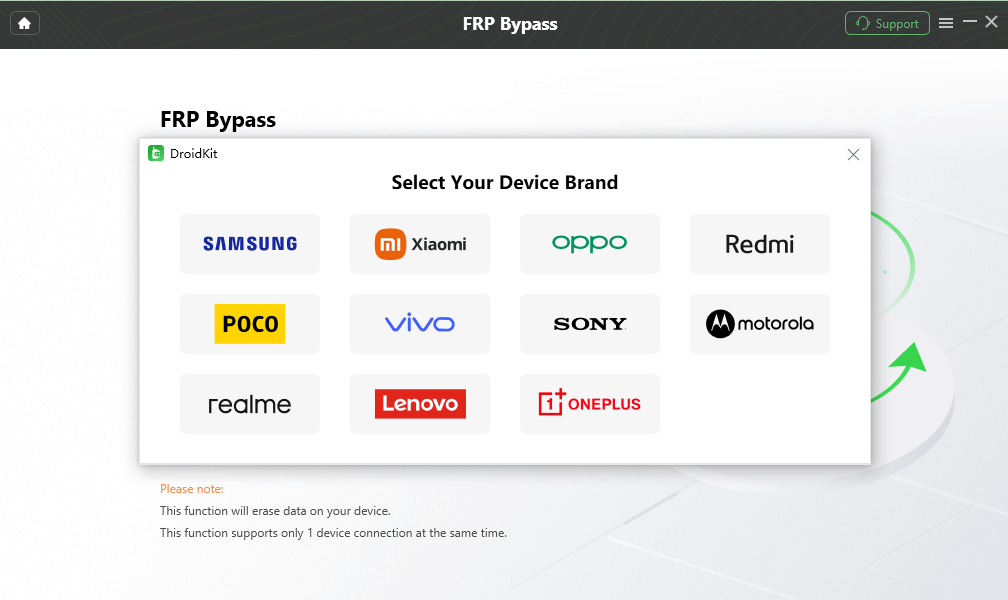
Choose the correct device brand.
Step 3. Select the correct system version and complete the device-specific instructions carefully.
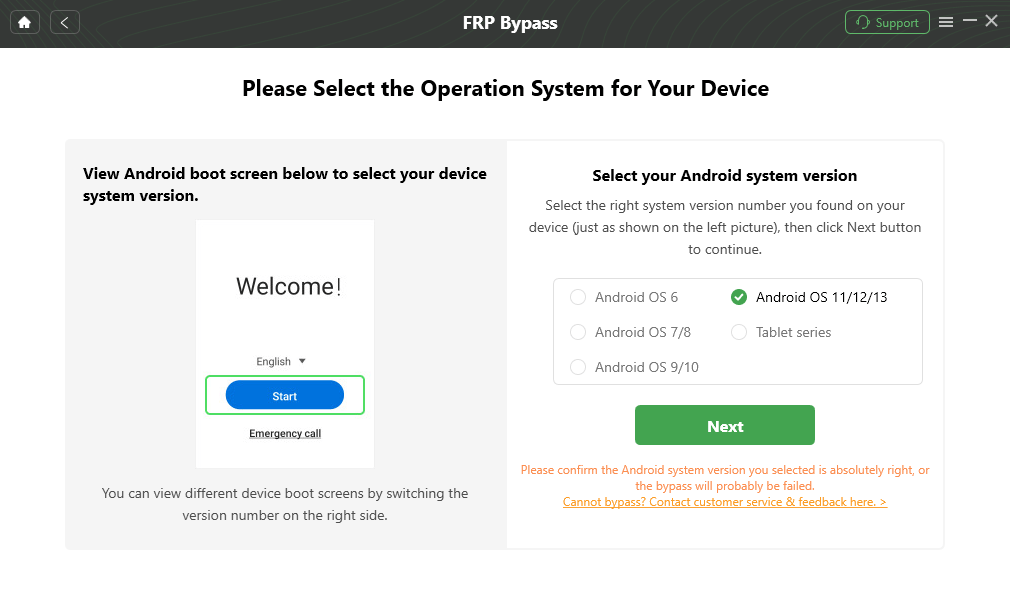
Select the correct Android system version.
Step 4. Wait until the process finishes and the device restarts.

FRP Bypass Complete.
FAQs About UnlockJunky
What is UnlockJunky?
UnlockJunky is a remote phone unlocking service associated with FRP / Google unlock, carrier unlock, and Samsung Account unlock services. It typically involves selecting a device, connecting it to a PC, and working with a technician through live chat.
Is UnlockJunky still working?
Needs human review. UnlockJunky’s official pages still list FRP and carrier unlock services, but they also show mixed status signals, including a goodbye message and a temporary order form while the main system is under maintenance. Confirm availability through official live chat before paying.
How much does UnlockJunky cost?
Pricing can vary by device, unlock type, Android version, and current service status. UnlockJunky’s pages list examples such as FRP / Google unlock, carrier unlock, Samsung Account unlock, Samsung FRP Removal, and Android 15 / 16 contact pricing. Always confirm the price in live chat before purchase.
Is UnlockJunky safe to use?
It depends on the current service status, payment channel, remote software, and device process. Because remote unlock services may require PC software, USB connection, live chat, and device information, use them only on devices you own or are authorized to unlock.
Can UnlockJunky bypass FRP?
UnlockJunky claims to provide FRP / Google unlock services for selected devices. However, device support, Android version support, pricing, and service availability should be confirmed before purchase, especially for newer Android versions.
Is DroidKit better than UnlockJunky?
It depends on the task. UnlockJunky is a remote technician service that may include carrier unlock and account unlock services. DroidKit is a self-guided Android toolkit that may help with FRP or screen lock issues on supported devices, but it does not replace carrier unlock services.
Will DroidKit FRP Bypass erase data?
Yes, it may. DroidKit’s official FRP guide states that the FRP Bypass function will erase data on the device. Always check compatibility and understand the data risk before using it.
What should I try before using an FRP bypass service?
First try signing in with the previously synced Google Account, recovering the Google Account, or asking the previous owner to remove the account if it is a second-hand phone. Protected devices may require screen unlock or Google Account information after factory reset.
The Bottom Line
UnlockJunky may be useful for users who want a remote technician service for selected FRP or carrier-related situations, but its current service status, pricing, and supported devices should be confirmed before payment. If you prefer a self-guided FRP workflow, DroidKit may be worth checking on supported Android devices, with the important note that FRP bypass may erase data.
Related Guides You May Need



Senior writer of the iMobie team as well as an Apple fan, love to help more users solve various types of iOS & Android-related issues.
Product-related questions? Contact Our Support Team to Get Quick Solution >
