Vivo Y21 FRP Bypass Android 11/12: Unlock Tool & No-PC Methods
Stuck on the Google verification screen on Vivo Y21? Learn which Android 11/12 routes still make sense, when TalkBack + EasyShare may work, and when a PC-based FRP unlock tool is the safer fallback.
Vivo Y21 users usually get stuck at the verification screen after a reset when Android 11/12 still expects the old Google account. The tricky part is that some TalkBack and EasyShare routes still appear in old tutorials, but they may disappear on newer Funtouch OS builds.
This guide focuses on Vivo Y21 FRP bypass on Android 11 and Android 12. You will compare Google Account Recovery, a guided Vivo Y21 FRP unlock tool, and a no-PC TalkBack + EasyShare method. You will also learn what to do when YouTube, browser access, Phone Clone, or QuickShortcutMaker no longer works.
Table of ContentsHide
Quick Answer: Can You Bypass Vivo Y21 FRP on Android 11/12?
Choose the Right Vivo Y21 FRP Bypass Method
Need More Vivo FRP Methods?
Method 1: Try Google Account Recovery First
Method 2: Vivo Y21 FRP Unlock Tool with DroidKit
Method 3: Vivo Y21 FRP Bypass Without PC via TalkBack
What If Vivo Y21 TalkBack or EasyShare Does Not Work?
Vivo Y21 FRP Bypass FAQs
Conclusion: Best Path for Vivo Y21 FRP Bypass
Quick Answer: Can You Bypass Vivo Y21 FRP on Android 11/12?
Yes, but the best method depends on your Android version, Funtouch OS patch, and whether you have a computer.
- Have the original Google account? Use Google Account Recovery first. It is the safest official route.
- Need a Vivo Y21 FRP unlock tool? Use a guided PC-based workflow such as DroidKit when manual methods are blocked.
- Want to try without PC? The TalkBack + EasyShare method may work on some Vivo Y21 Android 11/12 builds, but it often fails on updated firmware.
- Manual method not matching your screen? Stop repeating the same steps and switch to another route.
If TalkBack or EasyShare does not match your Vivo Y21 screen, stop repeating the same route and move to a guided PC-based FRP workflow.
Choose the Right Vivo Y21 FRP Bypass Method
Use this table to choose the most realistic method before downloading APK files or trying long manual steps.
| Method | PC Needed? | Best For | Main Limitation |
| Google Account Recovery | No | Users who can access the original recovery email or phone number | Requires account recovery information |
| DroidKit FRP Bypass | Yes | Users who want a guided Vivo Y21 FRP unlock tool | Requires a Windows or Mac computer |
| TalkBack + YouTube + EasyShare | No | Users who want a Vivo Y21 FRP bypass without PC | Often patched on newer Funtouch OS builds |
| QuickShortcutMaker / Factory Test | No | Older firmware where transferred apps can still open system activities | Factory Test or Activity Launcher may be blocked |
Need More Vivo FRP Methods?
If your locked phone is another Vivo Y-series model, the main Vivo FRP bypass guide gives a broader route map for EasyShare, TalkBack, and tool methods. For users comparing Android 11, 12, 13, or newer patches, the Android FRP bypass guide by version is the better next step.
Method 1: Try Google Account Recovery First
Before using any bypass method, try to recover the Google account previously synced on your Vivo Y21. This is the safest route if the phone belongs to you and you still have access to the recovery email or phone number.
Step 1. On the Google verification screen, tap Forgot email? or go to Google Account Recovery on another device.
Step 2. Enter the recovery phone number or backup email linked to the original Google account.
Step 3. Follow the verification prompts from Google.
Step 4. After recovering the account, return to your Vivo Y21 setup screen.
Step 5. Sign in with the recovered Google account and complete setup.
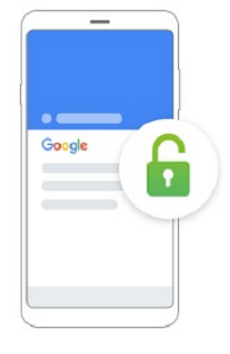
Google FRP is connected to a previously synced Google account.
Note: If you changed your Google password recently, Google may require a waiting period before you can use the account on a reset phone.
Method 2: Vivo Y21 FRP Unlock Tool with DroidKit
If you cannot recover the Google account or the no-PC method does not work, a PC-based tool can be the next practical option. DroidKit FRP Bypass provides guided steps for supported Android FRP bypass scenarios.
Use DroidKit if:
- You need a guided Vivo Y21 FRP unlock tool.
- Your Vivo Y21 is on Android 11 or Android 12 with a newer security patch.
- TalkBack does not open YouTube or browser access.
- EasyShare or Phone Clone cannot transfer QuickShortcutMaker.
- You have a Windows PC or Mac and a stable USB cable.
You can also compare more best FRP bypass tools before choosing a tool.
Free Download * 100% Clean & Safe
Steps to Bypass Vivo Y21 FRP with DroidKit
Step 1. Download and install DroidKit on your computer. Launch it and choose FRP Bypass.

Choose FRP Bypass Mode
Step 2. Connect your Vivo Y21 to the computer with a USB cable, then click Start.
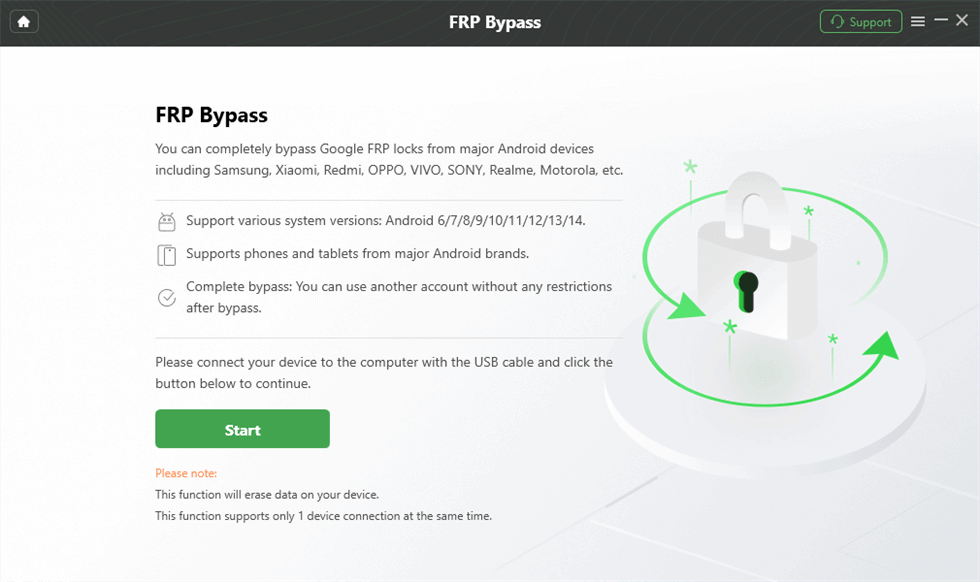
Connect Device and Click Start
Step 3. Select Vivo as your device brand when prompted.
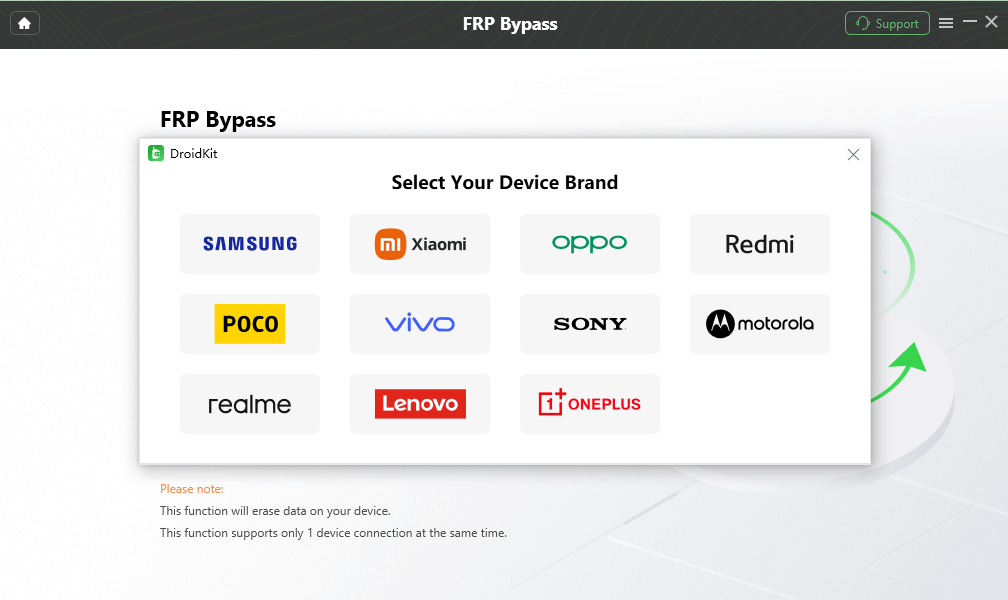
Choose Device Brand
Step 4. Wait while DroidKit prepares the configuration file for your device. When it is ready, click Start to Bypass.
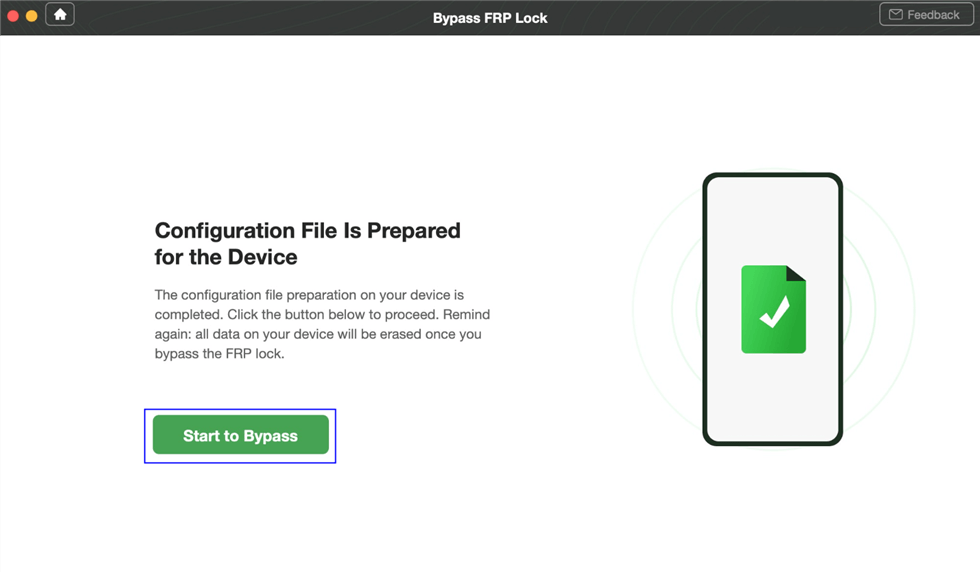
Preparing the Configuration for Your Device
Step 5. Choose the system version or device option according to the on-screen prompt.
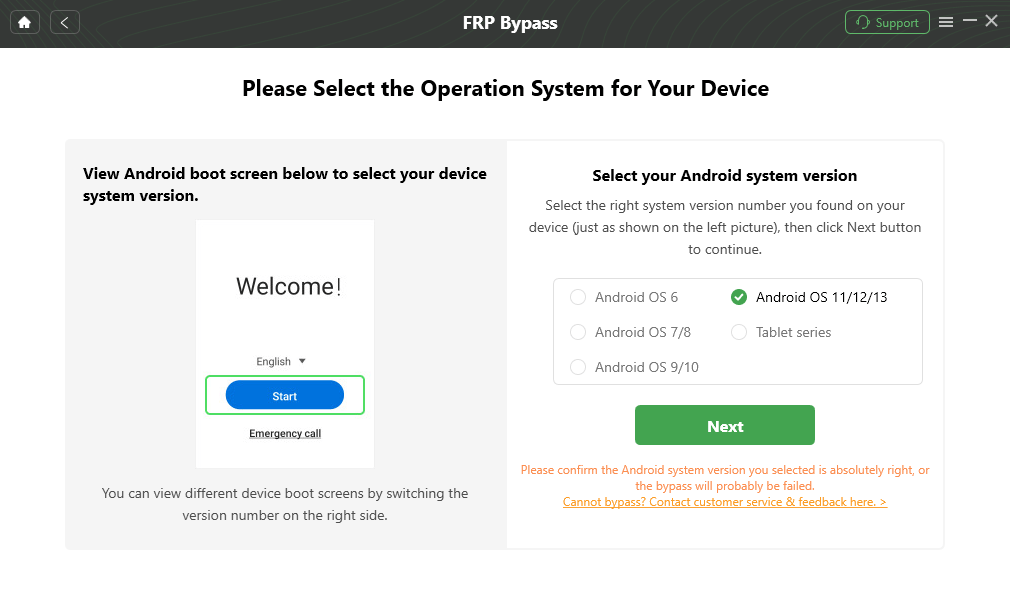
Choose System Version
Step 6. Follow the on-screen settings guide. The exact steps may vary by Android version, Funtouch OS build, and device status.
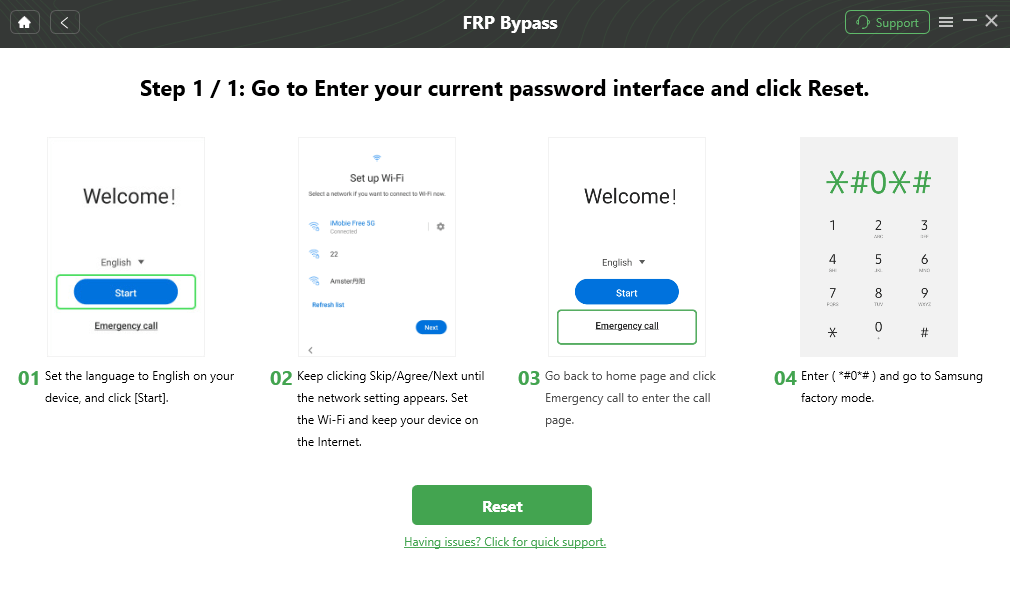
Complete Corresponding Settings
Step 7. Wait for the process to finish. Your Vivo Y21 may restart, and you can continue setup after the FRP process completes.

FRP Bypass Complete
Method 3: Vivo Y21 FRP Bypass Without PC via TalkBack
The TalkBack method is a no-PC Vivo Y21 FRP bypass route. It uses accessibility, YouTube, browser access, EasyShare, Phone Clone, and QuickShortcutMaker to reach system settings. It may work on some Android 11/12 builds, but it can fail if Vivo or Google has patched the setup path.
Compatibility Note: Try this method only when the screens match your Vivo Y21. If YouTube, browser, Phone Clone, or QuickShortcutMaker cannot open, the method is likely blocked on your firmware.
Step-by-Step TalkBack Method
Step 1. From the welcome screen, press and hold Volume Up + Volume Down for about 3 seconds to activate TalkBack.
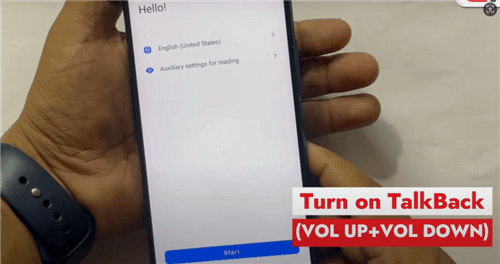
Turn on TalkBack
Step 2. Swipe right and allow permissions for the Accessibility Suite if the prompt appears.
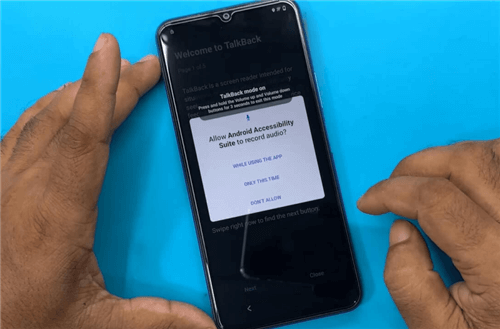
Allow Permission
Step 3. Confirm the use of voice commands.
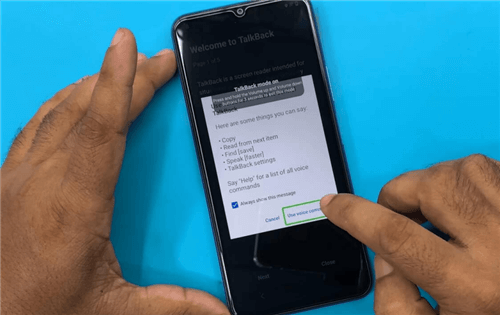
Confirm Using Voice Command
Step 4. Say Open YouTube.
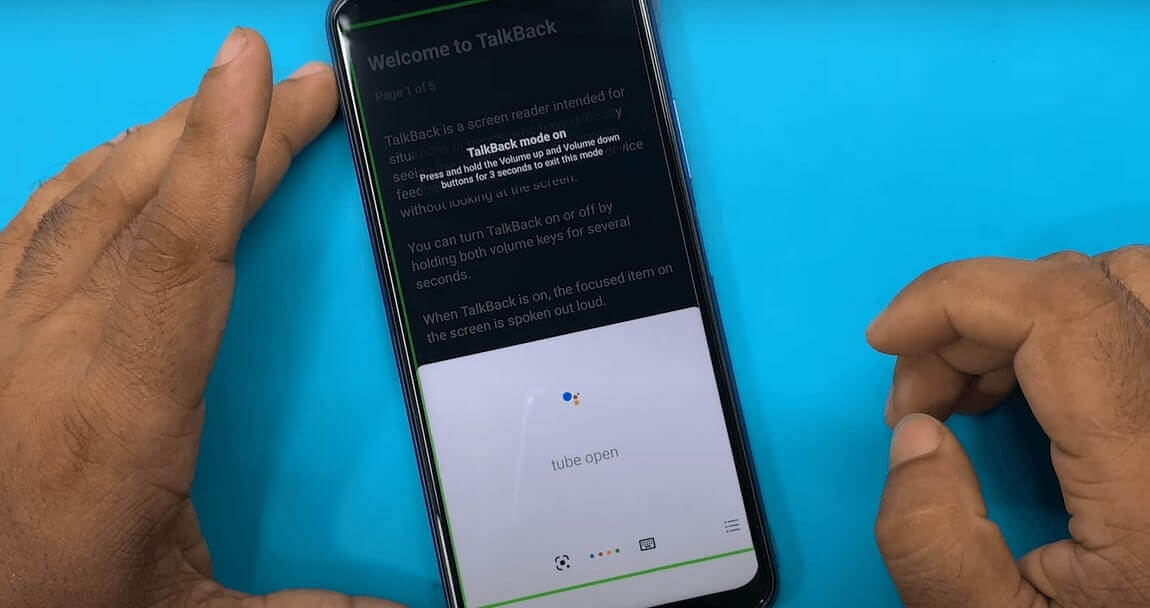
Say Open YouTube
Step 5. After YouTube opens, press Volume Up + Volume Down for about 3 seconds to turn off TalkBack.
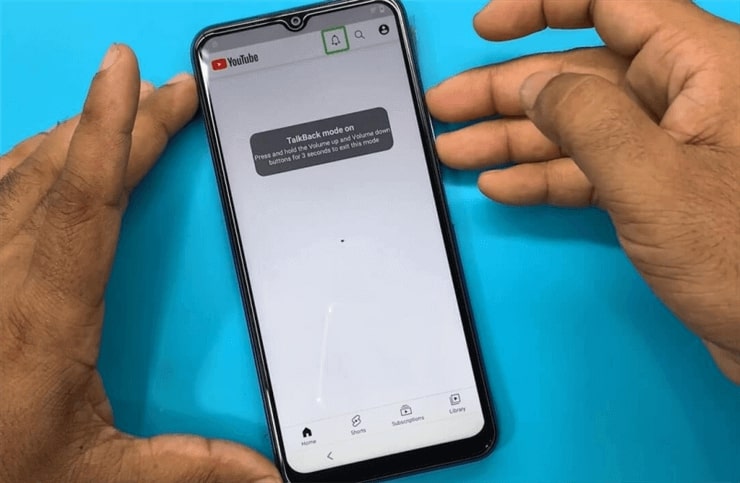
Turn off TalkBack
Step 6. In YouTube, tap the profile icon, then go to Settings > About > YouTube Terms of Service. This should open a browser page if the route is still available.
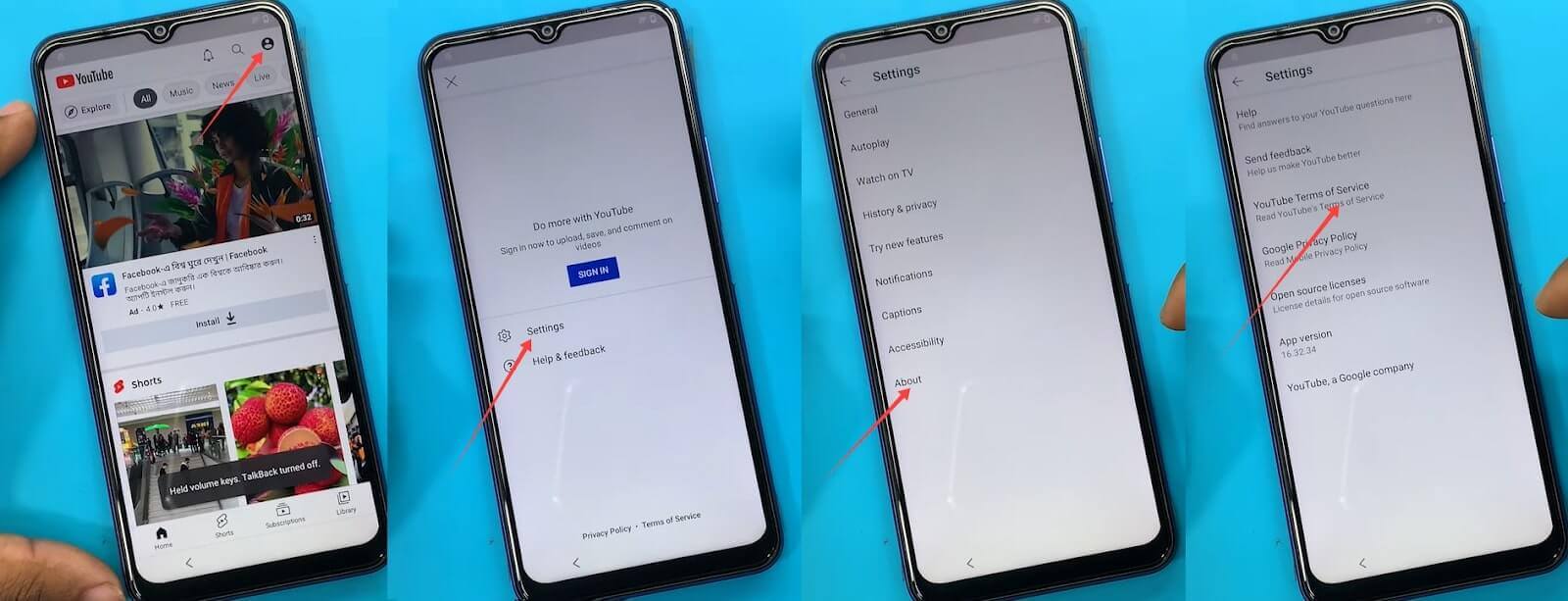
Open the Browser from YouTube
Step 7. In the browser, use a trusted FRP utility path to open the Settings shortcut. Avoid downloading APK files from unknown sources.
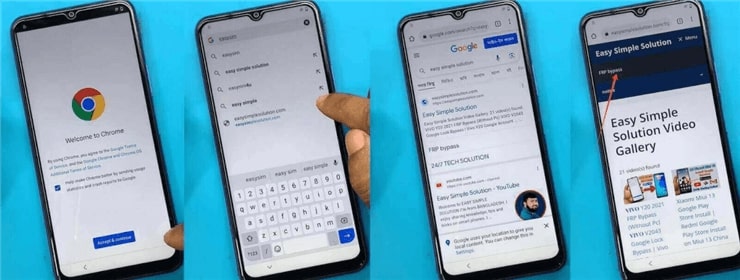
Open the FRP Utility Page
Step 8. If Settings opens, go to System > Phone Clone, then choose This is a new phone.
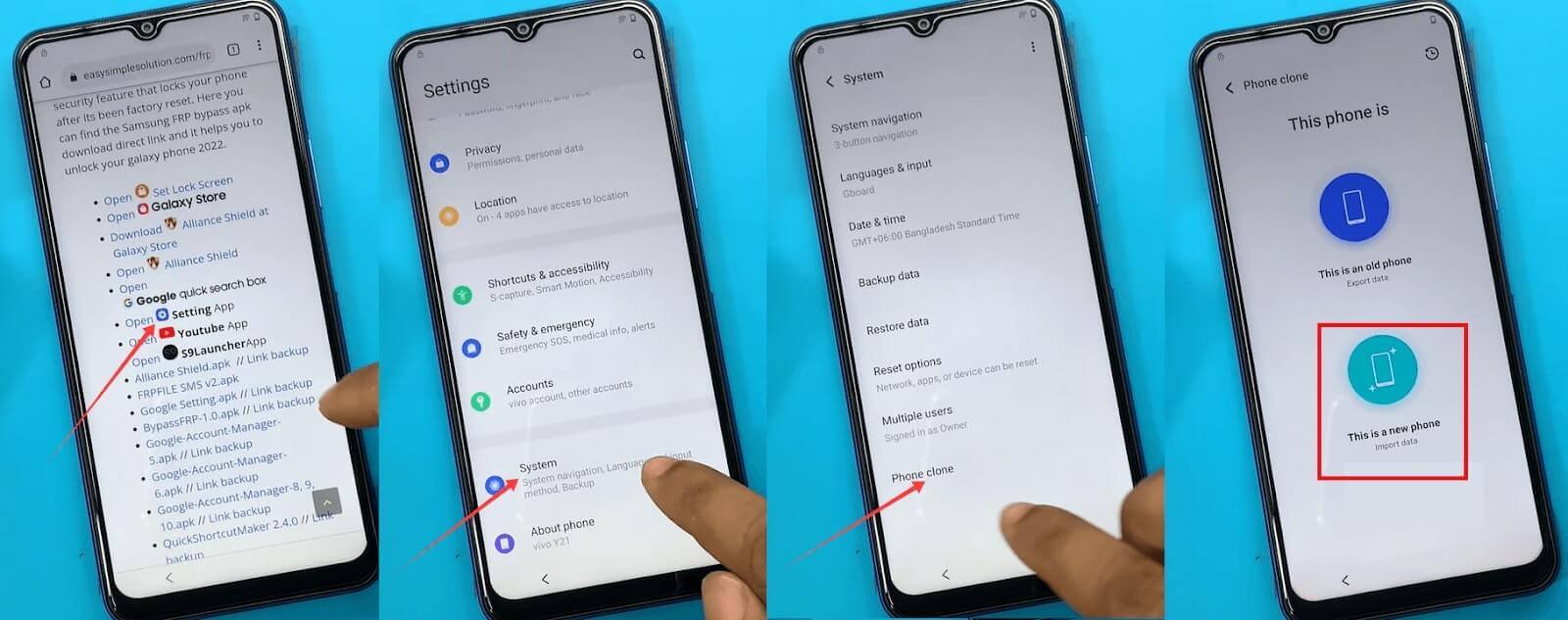
Open Settings and Go to Phone Clone
Step 9. Use EasyShare on another unlocked phone to transfer QuickShortcutMaker to the locked Vivo Y21.
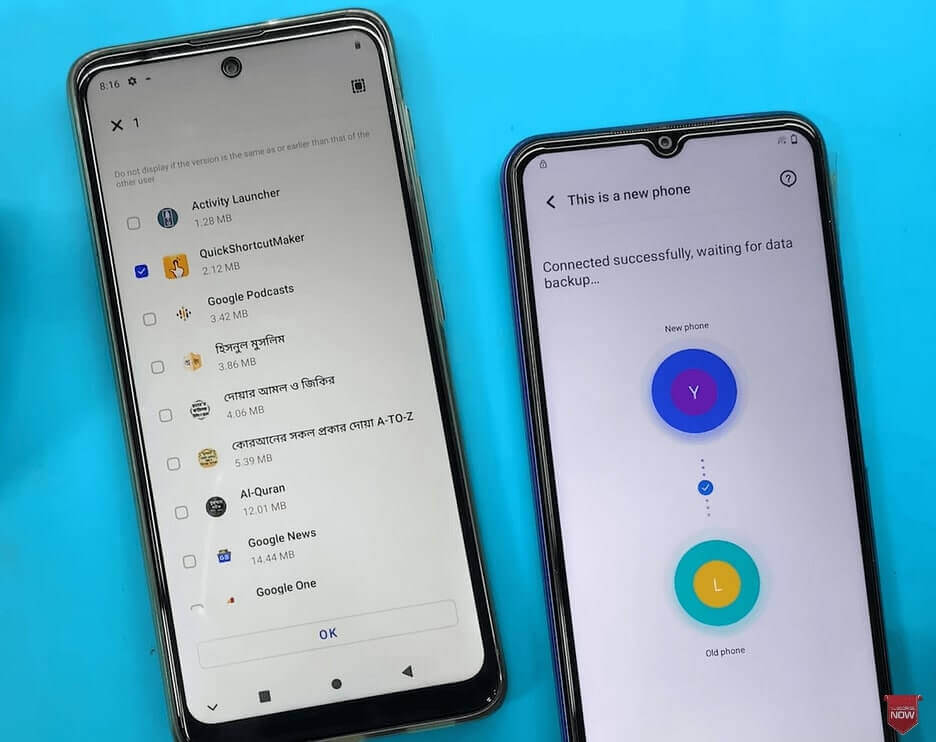
Transfer QuickShortcutMaker Using EasyShare
Step 10. Launch QuickShortcutMaker and search for Factory Test. Open the matching factory or engineering test activity if it appears.
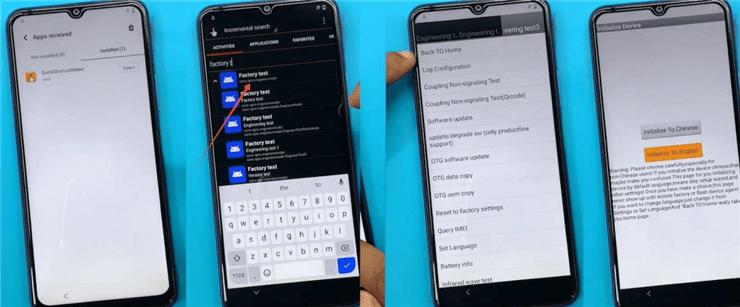
Use QuickShortcutMaker and Go to the Home Screen
Step 11. If the method reaches the home screen, open Settings, go to About phone, and tap Build number seven times to enable Developer options.
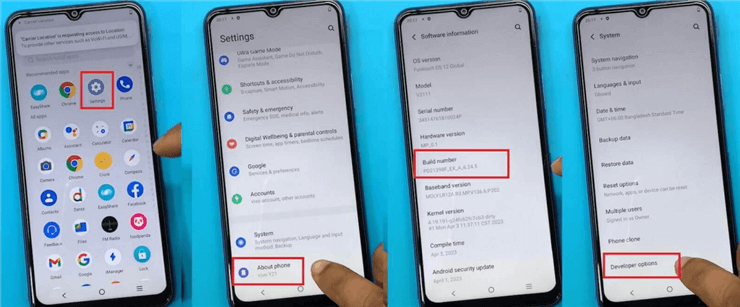
Enable Developer Options
Step 12. In Developer options, turn on OEM unlocking if the option is available. Then reset the device from Settings.
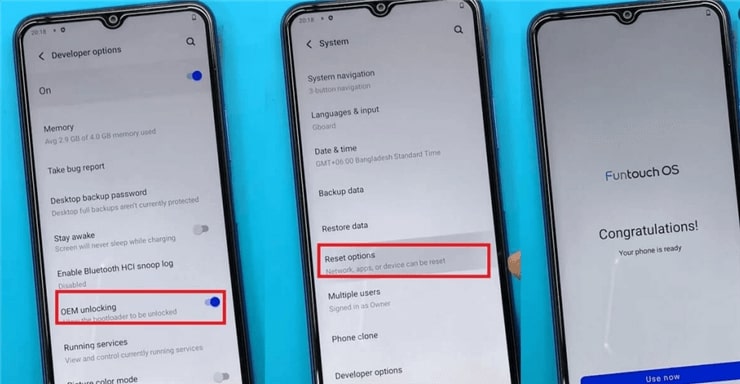
Turn on OEM Unlocking and Reset the Device
This no-PC method is long and depends on unpatched setup paths. If any required screen is missing, do not keep repeating the same route.
What If Vivo Y21 TalkBack or EasyShare Does Not Work?
Many Vivo Y21 FRP bypass failures happen because Android, Funtouch OS, or Google security updates block older setup paths.
| Problem | Likely Reason | What to Try Next |
| TalkBack does not open voice commands | Accessibility route is patched | Use Google recovery or a PC-based FRP workflow |
| YouTube does not open | Assistant or TalkBack route is blocked | Stop repeating the TalkBack path |
| Browser does not open from YouTube Terms | Setup loophole is disabled | Try another method |
| Phone Clone or EasyShare is missing | Funtouch OS blocks transfer access during setup | Use a guided Vivo FRP unlock tool |
| QuickShortcutMaker opens but Factory Test is missing | System activity is hidden or restricted | Manual method is not suitable for your firmware |
If YouTube, browser, Phone Clone, or QuickShortcutMaker cannot open, your Funtouch OS build may have patched the no-PC method. Try a PC-based Vivo FRP unlock tool next.
Vivo Y21 FRP Bypass FAQs
What is the best Vivo Y21 FRP unlock tool?
The best tool depends on your Android version and security patch. DroidKit FRP Bypass is a guided PC-based option when manual Vivo Y21 FRP bypass methods are blocked or too complicated.
Can I bypass Vivo Y21 FRP without a PC?
Sometimes. The TalkBack + EasyShare method may work on some Vivo Y21 Android 11/12 builds, but it often fails if YouTube, browser access, Phone Clone, or QuickShortcutMaker is blocked.
Does TalkBack work on Vivo Y21 Android 12?
It may work on some older Android 12 builds, but it is not guaranteed. If the TalkBack menu, voice command, or YouTube path does not appear, the method is likely patched.
Why does Vivo Y21 still ask for the previous Google account after reset?
FRP is active because a Google account was synced on the phone before reset. You need to sign in with that account, recover it, ask the previous owner to remove it, or use a suitable FRP bypass method on a device you own.
Can a factory reset bypass Vivo Y21 FRP?
No. A factory reset can trigger FRP if the Google account was not removed first. Resetting the phone again usually will not remove Google verification.
Will Vivo Y21 FRP bypass erase data?
Some FRP bypass methods may erase data or require reset steps. If the phone was already factory reset, most local data may already be unavailable.
Is Vivo Y21 FRP bypass legal?
It is legal only when you are unlocking your own device or a phone you are authorized to access. Do not bypass FRP on lost, stolen, or unauthorized devices.
Conclusion: Best Path for Vivo Y21 FRP Bypass
Vivo Y21 FRP bypass on Android 11/12 depends on the phone’s Funtouch OS build and security patch. Start with Google Account Recovery if you can access the original account. Try the TalkBack + EasyShare method only if the screens match your device.
If TalkBack, YouTube, browser access, Phone Clone, or QuickShortcutMaker does not work, stop repeating the same path. A guided PC-based workflow such as DroidKit is usually the more practical fallback for supported Vivo Y21 FRP scenarios.
Free Download * 100% Clean & Safe
More Related Articles



Joy Taylor is a seasoned technical writer with over a decade of experience in mobile technology. At iMobie, she specializes in producing in-depth content on iOS data recovery, iPhone unlocking solutions, and iOS troubleshooting.
Product-related questions? Contact Our Support Team to Get Quick Solution >
