Vivo Y15/Y15s FRP Bypass 2026: Android 15, No PC & Tool
Vivo Y15s FRP bypass depends on your Android version, Funtouch OS build, and whether browser, APK, TalkBack, or bypass-code routes are still available. This guide helps you identify which method is still realistic before trying repeated no-PC tricks.
Locked out of your Vivo Y15, Vivo Y15s, or Vivo Y17 after a factory reset? If the phone asks for the Google account previously synced on the device, you are facing Factory Reset Protection, also called FRP. FRP is designed to protect Android devices after a reset, but it can also block legitimate owners who forgot the Google account or bought a second-hand Vivo phone that was not properly removed from the previous owner’s account.
This guide focuses on Vivo Y15 FRP bypass, Vivo Y15s FRP bypass, Vivo FRP bypass without PC free, Vivo bypass code, and Vivo FRP bypass Android 15 intent. You will compare Google account recovery, VNROM / FRP APK methods, TalkBack, emergency bypass codes, and a guided PC-based option when manual methods do not work.
Use FRP bypass methods only on a Vivo phone you own or are authorized to repair. If you need a broader Vivo guide, see the main Vivo FRP bypass guide. For broader Android-version behavior across brands, see the Android FRP bypass guide.
Table of ContentsHide
Quick Answer: Which Vivo Y15s FRP Bypass Method Should You Try?
Choose the Right Vivo Y15/Y15s/Y17 FRP Method
Vivo Y15/Y15s FRP Bypass by Android Version
Need a Broader Vivo FRP Guide?
Method 1: Google Account Recovery for Vivo Y15s FRP
Method 2: Vivo Y15s FRP Bypass with VNROM / FRP APK
Method 3: TalkBack and Accessibility Method for Older Vivo Devices
Method 4: Vivo FRP Bypass Code — Does It Still Work?
Method 5: Vivo Y15s FRP Bypass with DroidKit on PC
Vivo FRP Bypass Android 15: What Changes?
What If Vivo Y15s FRP Bypass Does Not Work?
Vivo Y15 vs Y15s vs Y17: Which Method Fits?
Vivo Y15s FRP Bypass FAQs
Conclusion: Best Path for Vivo Y15s/Y15/Y17 FRP
Quick Answer: Which Vivo Y15s FRP Bypass Method Should You Try?
The best Vivo Y15/Y15s FRP bypass method depends on your model, Android version, Funtouch OS version, security patch, and whether you still have access to the original Google account. Google recovery should always come first. VNROM/APK, TalkBack, and bypass-code methods may work only on older firmware where the required menus still appear.
| Your Situation | Best First Method | What to Know |
| You know the previous Google account | Google Account Recovery | This is the safest official route. |
| You search for Vivo FRP bypass without PC free | TalkBack, VNROM, or code check | Works only on some older Vivo/Funtouch OS builds. |
| You search for Vivo bypass code | Emergency dialer code check | Codes such as *#812# may do nothing on updated devices. |
| You search for Vivo FRP bypass Android 15 | Guided PC-based workflow | Old no-PC and APK methods are often blocked. |
| VNROM, TalkBack, or code method failed | DroidKit FRP Bypass | Use only on supported devices you own or are authorized to repair. |
Choose the Right Vivo Y15/Y15s/Y17 FRP Method
Use this table to choose the most realistic method before downloading APK files or repeating old YouTube steps.
| Method | PC Needed? | Best For | Main Limitation |
| Google Account Recovery | No | Users who remember recovery email or phone number | Requires access to the original Google account recovery options. |
| VNROM / FRP APK | No | Older Vivo Y15s or Y15 firmware with browser/APK access | Unknown APK sources can be risky and may fail on updated firmware. |
| TalkBack / Accessibility | No | Older Vivo devices where TalkBack still opens Help or browser paths | Often patched on newer Funtouch OS versions. |
| Vivo FRP Bypass Code | No | Users checking whether old emergency dialer codes still respond | Codes are commonly blocked and may do nothing. |
| DroidKit FRP Bypass | Yes | Users who want guided steps when manual methods fail | Requires a Windows or Mac computer and supported device scenario. |
Vivo Y15/Y15s FRP Bypass by Android Version
Vivo FRP behavior depends heavily on Android and Funtouch OS version. A method that works on Vivo Y15 with Android 9 may fail on Vivo Y15s with Android 11 or on a newer Android 15 search scenario.
| Version / Scenario | Method Outlook | Recommended Direction |
| Vivo Y15 / Android 9 / Funtouch OS 9 | Some older APK, TalkBack, or code routes may still appear. | Try Google recovery first, then no-PC methods only if menus match. |
| Vivo Y15s / Android 11 | VNROM and shortcut methods may work only on some builds. | Check browser, APK install, and Google Account Manager access first. |
| Vivo Y17 / Android 9 | Older manual methods may be possible. | Use the same caution as Vivo Y15 and verify firmware behavior. |
| Vivo FRP bypass Android 14 | Manual loopholes are less reliable. | Use Android-version guidance or a supported PC method. |
| Vivo FRP bypass Android 15 | Expect stricter patch behavior. | Do not rely on old APK/code tricks; use recovery or guided tools. |
Need a Broader Vivo FRP Guide?
This page focuses on Vivo Y15s, Y15, and Y17. If you are working with a different Vivo model or want brand-level Vivo methods, use the main Vivo FRP bypass guide. If you are comparing general FRP tool options, check this best FRP bypass tool guide.
Method 1: Google Account Recovery for Vivo Y15s FRP
Google Account Recovery should be your first option if you remember the Google account, recovery phone number, or backup email connected to the Vivo phone. It avoids APK risk and is the safest route for a device you own.
Step 1. On the Google verification screen, tap Forgot email? or use the available account recovery option.
Step 2. Enter the recovery phone number or backup email linked to the original Google account.
Step 3. Follow the verification prompts on another phone or computer.
Step 4. After you recover the account, return to the Vivo Y15s/Y15/Y17 setup screen.
Step 5. Sign in with the recovered Google account and complete setup.
Important: If you recently changed the Google password, Google may require a waiting period before the account can be used on a reset device.
Method 2: Vivo Y15s FRP Bypass with VNROM / FRP APK
Many users search for VNROM bypass Vivo Y15s, Vivo FRP bypass APK, or frpbypass Vivo. APK-based methods may work on some older Vivo firmware versions, but they are not reliable on every Android or Funtouch OS build.
Safety note: Do not download APK files from random websites. Unknown APK files may contain malware, fail to install, or no longer work on updated Vivo firmware.
Option A: Quick Shortcut Maker Method
Quick Shortcut Maker is often used to create direct access to hidden Android settings or Google Account Manager pages. Use it only if your Vivo phone still allows browser or APK access during setup.
Step 1. On the FRP lock screen, tap the email field and try to open keyboard settings from the keyboard menu.
Step 2. If Help & Feedback, YouTube, or Chrome can be opened, use the browser path only to reach a trusted APK source.
Step 3. Download Quick Shortcut Maker only from a source you trust.
Step 4. Enable installation from unknown sources only if you understand the risk.
Step 5. Open Quick Shortcut Maker and search for Google Account Manager or relevant Settings activities.
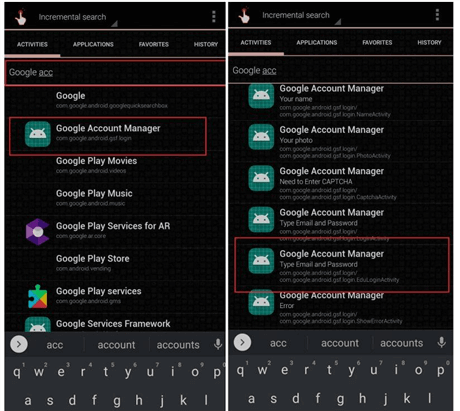
Select Google Account Manager
Step 6. Try opening the matching activity and follow only the visible on-screen options.
Step 7. Restart the Vivo phone and check whether setup can be completed with your own Google account.
Option B: Google Account Manager + FRP APK
Some older tutorials use Google Account Manager together with a Vivo FRP bypass APK. This method is more technical and may fail when APK installation, browser access, or Google Account Manager activities are blocked.
Step 1. From the FRP screen, try to access Chrome or a browser through keyboard settings, TalkBack, or another setup path.
Step 2. Download a Google Account Manager APK that matches your Android version, only from a source you can verify.
Step 3. Download a Vivo FRP bypass APK only if the source is trustworthy.
Step 4. Install the required APK files and open the bypass app.
Step 5. Follow the visible app instructions, then restart the phone and test setup again.
APK methods are not recommended for newer Android versions or updated Funtouch OS builds. If APK installation is blocked or Google Account Manager cannot open, switch to a safer PC-based method.
Method 3: TalkBack and Accessibility Method for Older Vivo Devices
TalkBack methods try to use Android accessibility menus to open Help, YouTube, browser, or settings pages during setup. This may work on some older Vivo Y15/Y15s/Y17 firmware versions, but it is commonly patched on newer systems.
Step 1. On the welcome screen, try to enable TalkBack by holding both Volume keys or using the accessibility shortcut available on your device.
Step 2. Use two fingers to navigate. Draw an L gesture on the screen to open the TalkBack context menu if that gesture is supported.
Step 3. Open TalkBack Settings, then try Help & Feedback.
Step 4. If YouTube or browser access appears, use it carefully to reach Settings or a trusted FRP utility path.
Step 5. If the method asks for APK installation, verify the APK source before installing anything.
Step 6. Restart the device and check whether the Google verification screen is cleared.
Checkpoint: If TalkBack does not open Help, YouTube does not launch, or browser access is blocked, this method is patched on your Vivo firmware.
Method 4: Vivo FRP Bypass Code — Does It Still Work?
Searches for Vivo FRP bypass code often mention codes such as *#812# or ##7378423##. These codes may appear in old Vivo FRP tutorials, but they are not reliable on modern devices and should not be treated as guaranteed shortcuts.
- Emergency dialer codes may be blocked during setup.
- Engineering menus are often disabled by Funtouch OS security updates.
- A code may do nothing even if it worked on another Vivo model.
- Codes do not replace the need for the previously synced Google account when FRP is active.
Step 1. On the Google verification screen, tap Emergency Call if it is available.
Step 2. Enter the code only if it is meant for your exact Vivo model and firmware.
Step 3. If nothing happens, do not keep repeating the code. Move to another method.
If you are stuck on Google verification after reset, this guide on Google verification after factory reset can help you understand why the lock appears and which paths are more realistic.
Method 5: Vivo Y15s FRP Bypass with DroidKit on PC
If VNROM, TalkBack, Quick Shortcut Maker, or FRP code methods do not work, a guided PC-based tool can be the next step. DroidKit FRP Bypass provides guided steps for supported Android FRP bypass scenarios.
Use this method if:
- Your Vivo Y15s/Y15/Y17 has newer security patches.
- VNROM or APK installation is blocked.
- TalkBack no longer opens the required pages.
- Vivo FRP bypass codes do nothing on your device.
- You search for Vivo Android 15 FRP bypass tool.
- You have access to a Windows PC or Mac and a reliable USB cable.
Free Download * 100% Clean & Safe
Steps to Bypass Vivo Y15s/Y15/Y17 FRP with DroidKit
Step 1. Download and install DroidKit on your computer. Launch it and choose FRP Bypass.

Choose FRP Bypass Mode
Step 2. Connect your Vivo Y15s, Y15, or Y17 to the computer with a USB cable, then click Start.
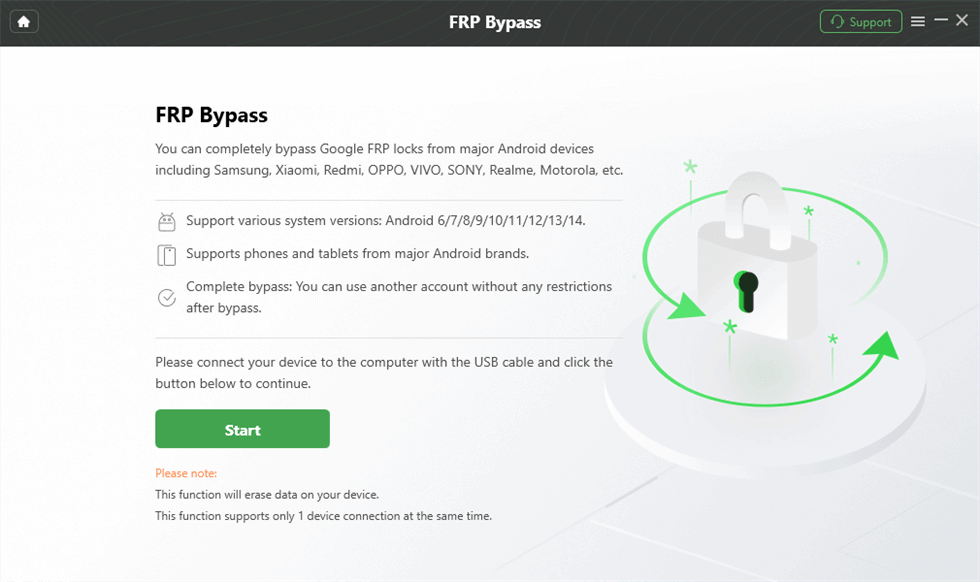
Connect the Device and Click Start
Step 3. Wait while DroidKit prepares the configuration file for your device. When the configuration is ready, click Start to Bypass.
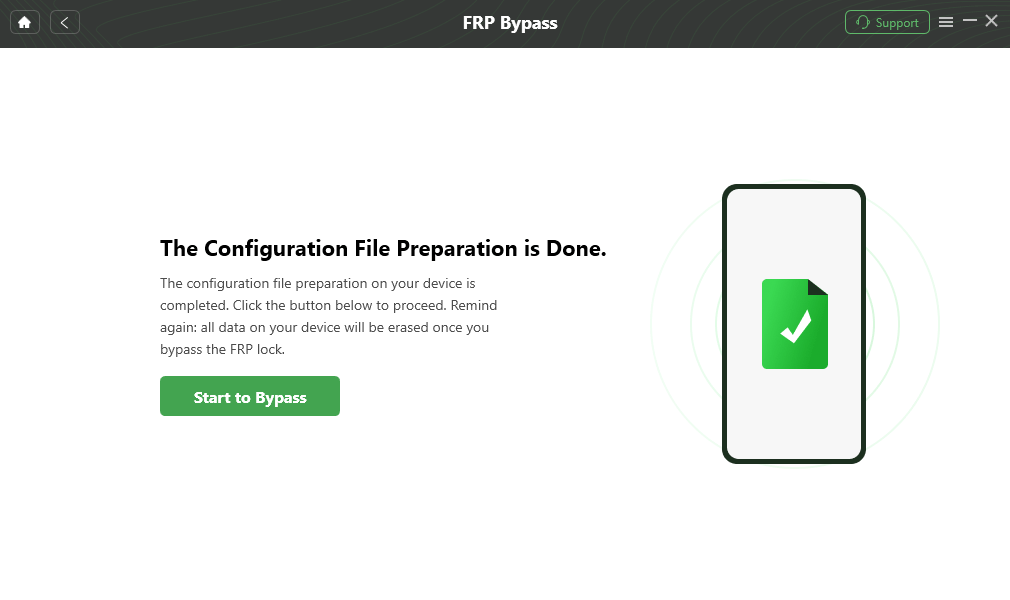
Click Start to Bypass
Step 4. Select the device system version or model option according to the on-screen interface, then click Next.
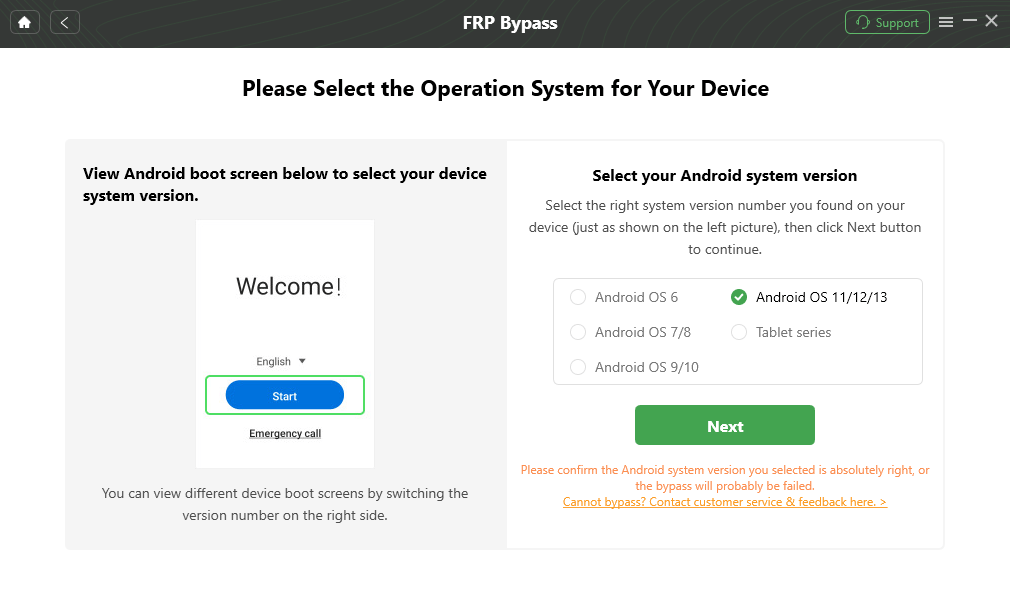
Choose System Version
Step 5. Follow the on-screen directions to complete the corresponding settings. The exact steps may vary by device model and Android version.
Complete Corresponding Settings
Step 6. Wait for the process to finish. Your Vivo device may restart, and you can continue setup after the FRP process completes.

FRP Bypass Complete
Note: No FRP tool should be described as working on every Vivo phone. Check device support first and use FRP tools only on your own or authorized device.
Vivo FRP Bypass Android 15: What Changes?
Queries such as Vivo FRP bypass Android 15, Vivo Android 15 FRP bypass tool, and FRP bypass Android 15 Vivo usually mean the user is dealing with a newer device or a stricter security patch. In this scenario, old VNROM, Activity Launcher, emergency code, and TalkBack methods are less likely to work.
| Android 15 Search Intent | What It Usually Means | Safer Direction |
| Vivo FRP bypass Android 15 | User wants a current method for a newer security build. | Start with Google recovery, then use a supported PC-based workflow. |
| Vivo Android 15 FRP bypass tool | Manual methods probably failed. | Compare trusted FRP tools instead of random APK files. |
| FRP bypass Android 15 Vivo without PC | User wants a free no-PC workaround. | Check whether required menus still appear; if not, do not force it. |
| Vivo bypass code Android 15 | User hopes an emergency code still opens settings. | Expect most codes to be blocked on newer firmware. |
If your Vivo phone is running Android 15 and EasyShare, Activity Launcher, or APK shortcut methods no longer work, follow this dedicated Vivo Android 15 FRP bypass guide before trying more random APK files or repeated no-PC tricks.
What If Vivo Y15s FRP Bypass Does Not Work?
If one method fails, do not keep repeating the same steps. Use the table below to find the likely reason and next step.
| Problem | Likely Reason | Next Step |
| VNROM or APK page does not open | Browser or setup access is blocked. | Try Google recovery or a PC-based FRP method. |
| APK file does not install | Unknown-source installation is blocked or APK is incompatible. | Avoid random APKs and switch methods. |
| Google Account Manager activity is missing | The Android version or Funtouch OS build blocks the shortcut. | Use another method instead of repeating the APK route. |
| TalkBack does not open Help or YouTube | Accessibility route has been patched. | Use a guided PC workflow. |
| Vivo FRP bypass code does nothing | Emergency dialer code is blocked or not supported. | Stop using codes and try another route. |
| DroidKit or PC tool does not detect the Vivo phone | Bad cable, missing driver, wrong USB mode, or unsupported scenario. | Use another data cable, change USB port, and follow the device instructions. |
If multiple methods fail, read this FRP bypass not working guide before downloading more APK files.
Vivo Y15 vs Y15s vs Y17: Which Method Fits?
Vivo Y15, Vivo Y15s, and Vivo Y17 are related Y-series phones, but their Android versions and firmware behavior can differ. Use the table below as a general reference before choosing a method.
| Attribute | Vivo Y15 | Vivo Y15s | Vivo Y17 |
| Common release period | 2019 | 2021 | 2019 |
| Typical Android version | Android 9 / Funtouch OS 9 | Android 11, depending on region and updates | Android 9 / Funtouch OS 9 |
| Manual method chance | Possible on older firmware | Possible on some Android 11 builds | Possible on older firmware |
| High-risk method to avoid | Random APK files from unknown mirrors | Repeated Activity Launcher or VNROM copies | Model-mismatched bypass codes |
| Best fallback | Guided PC-based FRP workflow | Guided PC-based FRP workflow | Guided PC-based FRP workflow |
Device details vary by region and firmware. If your Vivo model is not Y15s, Y15, or Y17, return to the main Vivo FRP guide for model-level options.
Vivo Y15s FRP Bypass FAQs
What is the best Vivo Y15s FRP bypass method?
If you can access the original Google account, Google Account Recovery is the safest route. If manual APK, VNROM, TalkBack, or code methods fail, a guided PC-based FRP tool is usually the next practical option for supported devices.
Can I bypass Vivo Y15s FRP without a PC for free?
Sometimes. No-PC methods may work on older firmware where browser, TalkBack, APK, or emergency-code access is still available. On updated firmware, these paths are often blocked.
Is VNROM safe for Vivo Y15s FRP bypass?
VNROM-style APK methods can be risky if you download files from unknown sources. APK files may contain malware, fail to install, or be blocked by your Android version. Use APK methods only if you trust the source and understand the risk.
Does Vivo FRP bypass code still work?
Not reliably. Codes such as *#812# or ##7378423## may be blocked by newer Funtouch OS versions or may not apply to your Vivo model. Do not rely on codes as a guaranteed method.
Can Vivo FRP bypass work on Android 15?
It depends on the Vivo model, Android version, Funtouch OS build, and security patch. For Android 15, old no-PC, APK, TalkBack, and bypass-code methods are less reliable, so account recovery or a supported PC workflow is more realistic.
Why is Vivo Y15s Activity Launcher not working?
Activity Launcher may fail because the system activity is hidden, restricted, or patched by Funtouch OS. If it cannot open Google Account Manager or Settings, switch methods.
Can a factory reset remove FRP from Vivo Y15s?
No. A factory reset can trigger FRP if the Google account was not removed first. After reset, the phone may still ask for the previously synced Google account.
Will DroidKit erase data from Vivo Y15s?
Some FRP bypass processes may erase data or require reset steps. If the phone was already factory reset, most local data may already be unavailable.
Is Vivo FRP bypass legal?
FRP bypass should only be used on a Vivo phone you own or are authorized to repair. Do not use FRP tools to access someone else’s device, Google account, or data.
Conclusion: Best Path for Vivo Y15s/Y15/Y17 FRP
Vivo Y15s, Y15, and Y17 FRP bypass depends on your Android version, Funtouch OS build, security patch, and whether setup loopholes are still available. Start with Google Account Recovery if you can access the original account. Try VNROM/APK, Quick Shortcut Maker, TalkBack, or code methods only when you understand the risks and the steps match your screen.
If APK installation is blocked, Activity Launcher does not work, or Vivo FRP bypass codes do nothing, stop repeating the same path. A guided PC-based tool such as DroidKit is usually a more practical fallback for supported Vivo FRP scenarios.
Free Download * 100% Clean & Safe
More Related Articles


Roger Smith is a senior technical writer with years of experience in providing Android solutions. He loves to help users solve various problems such as Android unlock, Android data recovery, and Android system repair.
Product-related questions? Contact Our Support Team to Get Quick Solution >
