What Is Activation Lock on iPhone and Why Does It Stay After Erase?
Activation lock after factory reset keeps iPhone locked to owner. Learn what is activation lock, why it remains, and how to remove it using official Apple or supported solutions safely.
Activation Lock Still Stays After Erase: The Direct Answer
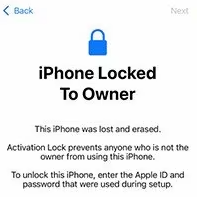
Erasing an iPhone can remove the photos, apps, settings, and local data on the device, but it does not always remove Activation Lock. If Find My was enabled before the erase, the iPhone may still need the Apple Account that was previously linked to the device before it can be activated again.
That is why an iPhone can look freshly reset but still show iPhone Locked to Owner or ask for the previous Apple Account during setup. The erase process clears the device locally; Activation Lock is part of Apple’s antitheft activation check.
Before trying another reset, identify the exact screen you see:
- iPhone Locked to Owner usually points to Activation Lock.
- iPhone Unavailable or Security Lockout usually points to too many wrong passcode attempts.
- Remote Management points to MDM supervision.
- A normal Apple Account signin prompt may simply mean the device needs the owner’s credentials.
Before choosing a recovery path, identify the lock you are actually seeing. Several iPhone lock terms sound similar, but they point to different problems.
| Lock or issue | Where you usually notice it | What it usually asks for | Better next step |
| Screen passcode | Lock Screen before you can open the iPhone | The device passcode | Use an Apple-supported passcode recovery or restore path for your own device. |
| Apple ID sign-in issue | Settings, App Store, iCloud, or account login screen | Apple ID email, password, or account verification | Recover or reset the Apple account through Apple’s account tools. |
| Activation Lock | Setup or activation screen after erase or restore | The Apple ID associated with the iPhone | Use the matching Apple ID, contact the account holder, or check Apple’s ownership-based support options. |
| iPhone Locked to Owner | Setup screen, often after a second-hand purchase or erase | Information connected to the previous owner’s Apple ID | Contact the previous owner or pursue an ownership-based support route if available. |
For a second-hand iPhone, the Apple ID shown or partially hidden on the screen may not belong to you. In that case, a screen passcode method is unlikely to solve the core issue because the iPhone is asking for account verification, not just local access.
Why Apple Designed Activation Lock This Way
Activation Lock exists to reduce unauthorized reuse of lost, stolen, or improperly transferred iPhones. Without an ownership verification step, someone could erase an iPhone and immediately activate it as a new device.
By linking activation status to the Apple Account associated with Find My, Apple separates local data removal from ownership verification. This means a factory reset can clear the device itself while still requiring account confirmation before the iPhone can be used again.
From a security perspective, this design helps discourage device theft and unauthorized resale rather than simply protecting local files or screen access.
A useful way to think about it is this: the iPhone has two different layers of protection.
| Layer | What it protects | What erase usually affects |
| Local device data | Photos, apps, settings, and files stored on the iPhone | Erased |
| Activation status | Whether the device can be activated again without the linked Apple Account | May remain active |
This is why repeatedly erasing the same iPhone usually does not help. If the activation check still expects the previous Apple Account, the device will keep returning to the same ownership screen.
The main question is not “How many times can I reset it?” It is “Which lock am I facing, and who can verify the account or ownership?”
Why “Erase iPhone” Does Not Always Mean “Remove Owner”
The phrase “erase iPhone” can be misleading. It sounds like everything connected to the previous owner disappears, but that is not how Activation Lock works.
An erase is mainly about removing local content. Activation Lock is about proving that the person setting up the phone has the right to use it. These are related, but they are not the same thing.
For example:
- If you forgot your screen passcode and erase the iPhone, your local data may be removed.
- If Find My was enabled, the device may still require the Apple Account used before the erase.
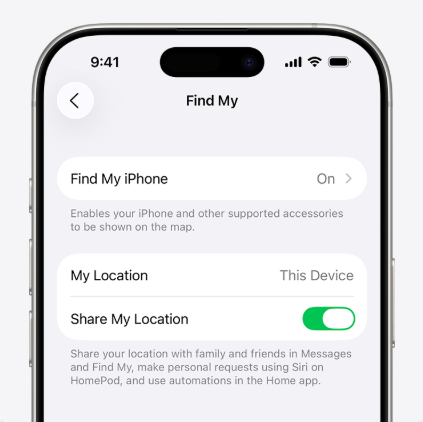
- If you bought a used iPhone, the seller may need to remove the device from their Apple Account.
- If the device came from a company or school, Remote Management may appear instead of Activation Lock.
The most important practical rule is simple: do not keep factoryresetting the iPhone as a guessing strategy. The next step depends on which lock screen appears after the erase.
Official Ways to Remove Activation Lock
Your safest next move depends on which situation fits you:
- You know the Apple ID connected to the iPhone.
- You own the device but forgot the Apple account details.
- You bought a second-hand iPhone that still points to a previous owner.
- You have purchase or ownership information and need to check Apple’s current support options.
1. Contact the Previous Owner
If you bought the device used, the easiest solution is to ask the previous owner to remove the device from their account. They do not need to be physically present. They can simply log into iCloud.com, go to the “Find My” section, select the iPhone, and click “Remove from Account”. (If you are looking at a used device, read our iUnlocker review to learn how you can check a device’s iCloud status before buying.)
2. Submit an Apple Support Request
If you cannot reach the previous owner, you can submit an Activation Lock support request directly to Apple. However, Apple has strict security requirements for this route. You must provide the original proof of purchase.
Checklist for what Apple accepts as “original proof of purchase”:
• A receipt from an official Apple Store or an Apple Authorized Reseller.
• The document must clearly show the device’s serial number or IMEI.
• The original purchase date and store details must be clearly visible.
Invoices from secondary marketplaces like eBay, Craigslist, or third-party refurbishers are generally rejected by Apple Support.
The safest official path is to use the original Apple Account connected to the iPhone. If you own the account, try signing in with the correct Apple Account email and password during setup.
If you bought the device secondhand, ask the previous owner to remove it from their Apple Account. They may be able to do this from their own Apple device or account settings. After that, restart setup on the iPhone and check whether the activation screen clears.
If the original owner is unavailable but you have proof of purchase, Apple Support may be able to review the case. This usually requires ownership documentation, and it is not the same as simply knowing the device serial number.
Be careful with any service that claims every second-hand Activation Lock case can be fixed automatically.
A practical checklist:
1. Confirm whether the screen says iPhone Locked to Owner.
2. Try the linked Apple Account only if it is your own account.
3. Contact the seller or previous owner if the phone is secondhand.
4. Prepare proof of purchase before contacting Apple Support.
5. Avoid paid services that promise universal or permanent serverside removal.
When a Desktop Tool May Help
After you have identified the lock type and checked ownership-based options, you may consider a desktop recovery tool such as AnyUnlock only if your situation matches the product’s documented workflow.
Before using AnyUnlock or any iPhone unlock tool, confirm these points:
– Authorization: You own the iPhone or have permission to manage it.
– Lock type: The wording on the screen matches the tool’s documented use case.
– Device and system fit: Your iPhone model and iOS version are listed as supported by the product’s current documentation.
– Expected impact: You understand whether the workflow may erase data, require account information, or have other limits.
– Apple ID or owner path: You have considered Apple ID recovery, previous-owner help, or Apple support where those options apply.
AnyUnlock’s support depends strictly on the specific device model, current iOS version, and current product capability. You should always check the module’s compatibility for your exact phone before proceeding.
A desktop utility is worth considering only after you understand which lock you are dealing with. AnyUnlock is designed as an iOS access recovery toolkit for scenarios such as iCloud Activation Lock bypass on supported devices, screen passcode removal, MDM bypass, Screen Time passcode removal, SIM lock removal, and iTunes backup password recovery.
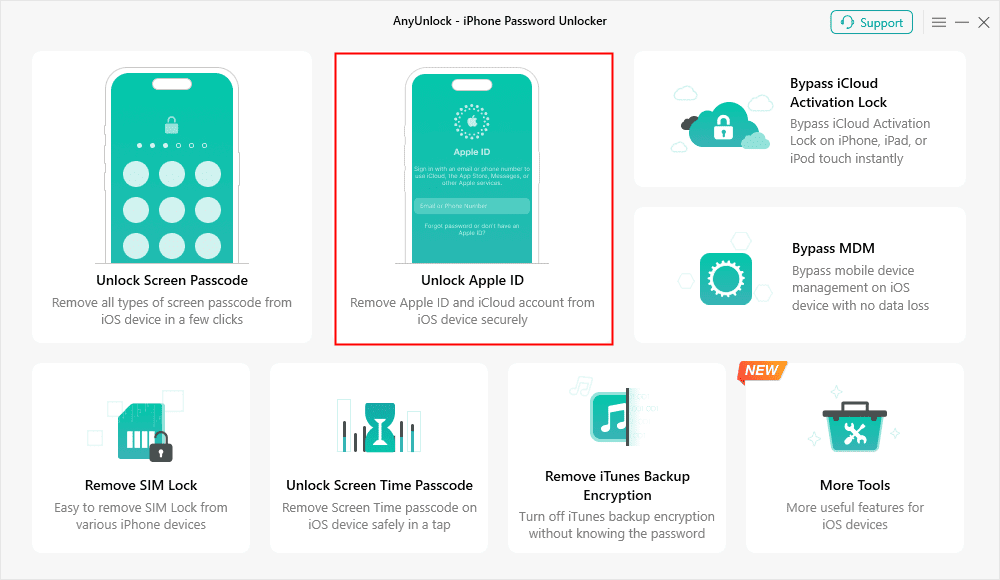
For Activation Lock, compatibility matters. AnyUnlock supports iCloud Activation Lock bypass on supported iOS versions and devices, including a nojailbreak workflow for newer supported iOS versions. It should not be treated as a universal fix for every iPhone status, every hardware condition, or every ownership situation.

AnyUnlock – One-stop iOS Unlocker
What if you get locked out of your iPhone? Or what if you forgot your Apple ID and its password? No worries, AnyUnlock unlocks any iOS lock for you with 1 click. No technology required. Only 3 steps.
Use this decision logic:
- If you know the linked Apple Account, use the official signin path first.
- If you can contact the previous owner, ask them to remove the device from their Apple Account.
- If you legally own the device and official recovery is blocked, check whether a supported AnyUnlock workflow applies to your device state.
- If the iPhone is lost, stolen, blacklisted, or not yours, do not attempt to bypass ownership protections.
Important Limitations of Tool-Assisted Bypasses
Before using any tool-assisted bypass, it is crucial to set clear expectations about how these solutions work. Tool-assisted bypasses are temporary, local workarounds, not permanent server removals.
Keep these important limitations in mind before proceeding:
• The bypass is local: Tools like AnyUnlock bypass the lock on the device’s current software layer. They do not delete the underlying hardware record from Apple’s activation servers.
• The lock will return if you reset: If you perform another factory reset, erase all content and settings, or flash the device’s firmware, the Activation Lock will reappear. You will need to run the bypass tool again to regain access.
• Not for lost or stolen devices: Bypass tools are designed to help legitimate owners and second-hand buyers. They are not a solution for—and often will not work on—devices that have been reported stolen or placed in “Lost Mode” by the original owner.
Common Mistakes That Keep Users Stuck
Many users lose time because they treat all iPhone locks as the same problem. Activation Lock is not the same as a forgotten passcode, and MDM is not the same as an Apple ID signin problem.
Avoid these mistakes:
- Resetting repeatedly: If Activation Lock remains after erase, another erase usually does not solve the ownership check.
- Confusing passcode lock with Activation Lock: A passcode blocks access to the current iOS environment; Activation Lock appears during setup or activation.
- Ignoring the previous owner: For secondhand phones, the original account holder is often the fastest path.
- Assuming “bypass” means permanent server deletion: A local or deviceside workflow is not the same as removing records from Apple’s activation system.
- Skipping ownership proof: For official support, documentation matters.
FAQ
Does a factory reset remove Activation Lock?
No. A factory reset only deletes the personal files stored physically on the phone. Activation Lock is a server-side protection that remains intact even if the local storage is completely wiped.
Why does my iPhone say Locked to Owner after I erased it?
This happens if “Find My” was not disabled prior to the wipe. If you erased the phone via iTunes or Finder on a computer, the system allows the local wipe to proceed without asking for your Apple
ID, which triggers the lock automatically upon your next setup attempt.
How do I remove Activation Lock if I bought the phone used?
You should first try to contact the seller to have them remotely remove the device from their iCloud account. If that fails, provide the original retail receipt to Apple Support. If neither option is available, you can use a bypass tool like AnyUnlock on supported models.
What is the difference between local data erase and Activation Lock?
A local data erase removes your personal data (photos, apps, messages) from the hardware. Activation Lock is a security registry on Apple’s servers that ties that specific hardware to an Apple ID to prevent unauthorized use.
Can Apple remove Activation Lock without proof of purchase?
Generally, no. Apple strictly requires original purchase documentation from an authorized reseller. Third-party invoices or second-hand transaction receipts are typically rejected.
Summary: Which Activation Lock Solution Should You Choose?
If you are stuck on the Activation Lock screen after erasing your iPhone, your path forward depends entirely on what information you have access to.
Use this quick decision guide to choose your next step:
- Choose the previous owner route if you are still in contact with the seller and they are willing to remove the device remotely via iCloud.com.
- Choose Apple Support if you are the original owner or if the seller provided the original retail receipt from an authorized Apple reseller.
- Choose a tool-assisted workflow if you lawfully own the device, cannot contact the seller, lack the original receipt, and understand that the bypass is local and will return upon a future reset. You can also research options to compare the FRPFile iCloud bypass tool and others before taking action.
If the official options are blocked and you need to get your legally owned device working again, checking AnyUnlock‘s compatibility for your specific iPhone is the most practical next step. Check your device compatibility with AnyUnlock today to see if you can use the guided workflow to regain local access.
AnyUnlock – Unlock Any iOS Password
Quickly and easily unlock your iPhone/iPad/iPod touch from various locks such as screen lock, MDM lock, iCloud activation lock, Apple ID, iTunes backup password, and more.
Free Download for all windows & 100% safe
Free Download for all mac & 100% safe
Free Download 100% Clean & Safe
More Related Articles



Wanda Norris is a junior author in iMobie specializing in iOS tips and solutions. She keeps a close eye on every iOS update to provide practical, easy-to-understand guides that help users solve problems and master their Apple devices.
Product-related questions? Contact Our Support Team to Get Quick Solution >
