Moto G 5G FRP Bypass 2026: Android 14/13/12 & No PC
Moto G 5G FRP behavior changes across the 2022, 2023 and 2024 models—and the Android version may have changed since the phone launched. This guide helps you identify the model and current OS, check whether TalkBack or Emergency Information routes still match, and choose a different path when the required setup screen is missing.
If your Moto G 5G stops at Google account verification after a factory reset, Factory Reset Protection (FRP) is active. Before trying a bypass tutorial, identify two things: which Moto G 5G generation you have and which Android version is actually installed now. A 2022, 2023, or 2024 phone may have received a later Android update since it was released, so the model year alone does not tell you which setup screens will appear.
This guide focuses on Moto G 5G 2024, 2023, and 2022 models, Android 12 through Android 15 scenarios, no-PC routes, common TalkBack and Emergency Information failure points, and a computer-guided option when the required setup path is unavailable.
For Motorola-wide FRP scenarios beyond the Moto G 5G, use the Motorola FRP bypass guide. If your main intent is comparing Motorola-specific software, see the Moto FRP Tool guide.
Before continuing: Use account-recovery or FRP-removal methods only on a Moto G 5G you own or are authorized to service. If the phone was purchased second-hand, ask the previous owner to help complete Google verification before trying another route.
Table of ContentsHide
Quick Answer: Can You Bypass FRP on Moto G 5G?
Identify Your Moto G 5G Model and Current Android Version
Which Moto G 5G FRP Route Should You Check?
Can Moto G 5G FRP Be Bypassed Without a PC?
Manual vs Tool: Which Route Fits Your Moto G 5G?
Moto G 5G Model Year vs Android Version
Moto G 5G 2024 FRP on Android 14
Moto G 5G 2024 on Android 15: What to Check
Moto G 5G 2023 FRP on Android 13
Moto G 5G 2022 FRP on Android 12
Why Moto G 5G Manual FRP Routes May Fail
Troubleshooting Moto G 5G FRP Errors
PC-Guided Moto G 5G FRP Option with DroidKit
How to Avoid FRP Before Resetting Your Moto G 5G
Moto G 5G FRP Bypass FAQs
Final Thoughts
Quick Answer: Can You Bypass FRP on Moto G 5G?
FRP removal may be possible in an authorized Moto G 5G scenario, but do not choose a method from the model year alone. First check the current Android version and whether the setup screens required by that method still appear on your phone.
| Your Moto G 5G Situation | Route to Check First | What to Verify |
| You still know the previously synced Google account | Google account recovery or sign-in | No bypass route is needed if you can complete verification with the correct account. |
| Moto G 5G 2024 still running Android 14 | Check the Emergency Information / App Info route | Continue only if the exact Choose Image, App Info, Permissions, and Settings entry points appear. |
| Moto G 5G 2024 updated to Android 15 | Re-check the current setup flow first | Do not assume the Android 14 sequence still matches after the OS update. |
| Moto G 5G 2023 still running Android 13 | Check whether the TalkBack / Assistant route is available | The method depends on the exact accessibility and Assistant screens still being accessible. |
| Moto G 5G 2022 still running Android 12 | Check the older TalkBack / Accessibility route | A later Android update or security patch can change the setup flow. |
| You want a Moto G 5G FRP unlock tool | Compare Motorola FRP tool options | Tool support depends on device detection, software version, and the supported route. |
Identify Your Moto G 5G Model and Current Android Version
One of the easiest ways to waste time on Moto G 5G FRP is to follow a 2022 guide on a 2024 phone—or to assume a 2024 phone is still running the same Android version it shipped with.
If you still have access to normal Settings, Motorola identifies the model number under an About phone menu, where the Model Number or SKU can be shown. During FRP setup you may not be able to open Settings, so use the most reliable information you still have:
- Original box or purchase record: Usually the clearest way to confirm whether the phone is the 2022, 2023, or 2024 model.
- Model number / SKU: Use it when it is visible on your paperwork, device information, or accessible settings.
- Carrier or order documentation: Useful when several generations were sold under similar Moto G 5G names.
- Physical appearance: Use camera layout and body design only as a secondary visual clue, not as the sole identification method.
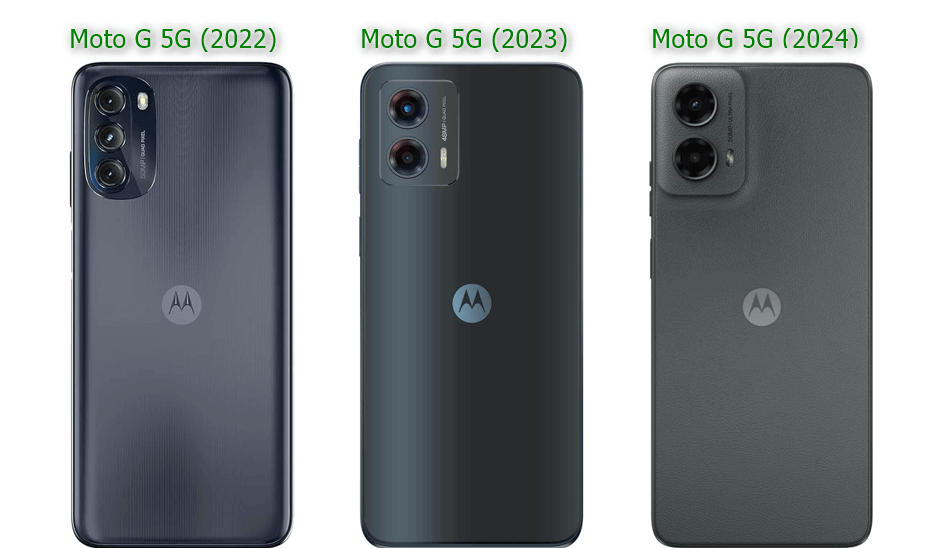
Moto G 5G 2024, 2023, and 2022 Model Comparison
After identifying the generation, check the Android version if possible. The 2022 model launched with Android 12, the 2023 model with Android 13, and the 2024 model with Android 14, but later official OS updates mean those launch versions should not be treated as permanent.
Which Moto G 5G FRP Route Should You Check?
Use the table below as a decision guide rather than a promise that one manual sequence will work on every phone from the same year.
| Model / Current OS | Manual Route to Check | If the Required Screen Is Missing |
| Moto G 5G 2024 / Android 14 | Emergency Information > image picker > App Info route | Stop that sequence and diagnose the blocked entry point. |
| Moto G 5G 2024 / Android 15 | Check the current setup environment before using an Android 14 guide | Use a route documented for the current build or evaluate a supported PC option. |
| Moto G 5G 2023 / Android 13 | TalkBack / Assistant route if all required menus remain available | Use Android-version troubleshooting or a different supported route. |
| Moto G 5G 2023 / Android 14 | Do not assume the original Android 13 route still applies | Check the current Android 14 setup behavior first. |
| Moto G 5G 2022 / Android 12 | Older TalkBack / Accessibility route if the menus match | Stop when the expected shortcut is absent. |
| Moto G 5G 2022 / Android 13 | Re-check the route after the OS upgrade | Use the installed OS and setup screens, not the launch-year assumption. |
If your device is not a Moto G 5G, use the broader Android FRP bypass guide rather than applying these model-specific paths to another phone.
Can Moto G 5G FRP Be Bypassed Without a PC?
A no-PC route is relevant only when your phone still exposes every menu the method depends on. Moto G 5G tutorials commonly use TalkBack, Accessibility, Emergency Information, Google Assistant, an image picker, App Info, Settings, or an offline-setup path.
Before trying one, use these checkpoints:
- Does the tutorial match your Moto G 5G generation?
- Is the phone still running the Android version shown in the tutorial?
- Does the first required accessibility or Emergency Information menu appear?
- Can the route actually reach the next App Info, Assistant, Settings, or offline-setup screen?
Stop at the first real mismatch. If Choose Image, App Info, Assistant, Settings, or another required screen is absent, repeating the same taps is unlikely to make that entry point appear.
Manual vs Tool: Which Route Fits Your Moto G 5G?
| Factor | Manual Route | PC-Guided Route |
| Computer | Not required for the no-PC paths covered here | Windows PC or Mac required |
| Best fit | The exact setup menus shown in the tutorial still appear on your phone | The manual entry point is missing and you prefer on-screen software instructions |
| Main dependency | Model, current OS, security patch, and available setup screens | Device detection and support for the connected phone and software route |
| Typical failure signal | TalkBack, Assistant, image picker, App Info, or Settings cannot be reached | The phone is not detected or the required device route is not available |
If you want to compare additional software before deciding, see the FRP bypass tool comparison.
Moto G 5G Model Year vs Android Version
Android version is an important checkpoint, but it should be read together with the Moto G 5G generation, current security patch, and the setup screens that are actually available. Each of the three generations can appear on a later Android version than the one it originally shipped with.
| Moto G 5G Model | Launch OS | Later OS to Consider | FRP Guide Decision |
| Moto G 5G 2022 | Android 12 | Android 13 update | Check the installed OS before assuming the original 2022 Android 12 route still matches. |
| Moto G 5G 2023 | Android 13 | Android 14 update | A 2023 phone may now show Android 14 setup behavior instead of the original Android 13 flow. |
| Moto G 5G 2024 | Android 14 | Android 15 update | Check whether the phone has already been upgraded before following an Android 14-specific tutorial. |
Moto G 5G 2024 FRP on Android 14
This section applies only when you have confirmed that the Moto G 5G 2024 is still on Android 14 and the required menus actually appear. For broader Android 14 behavior, see the Android 14 FRP bypass guide.
Step 1. On the welcome screen, check whether Accessibility and an Accessibility Menu shortcut are available.
Step 2. If supported by the current setup screen, open Emergency Call and then Emergency Information.
Step 3. Look for the edit or profile-image path used by the tutorial. Continue only if Choose an image is actually available.
Step 4. If the image picker opens, check whether long-pressing Drive or Photos leads to App Info.
Step 5. Continue only if the expected Permissions or Settings entry point appears. If the phone blocks the transition, stop this manual route.
Step 6. If you legitimately reach normal Settings, review the available account and reset options rather than assuming that another reset by itself removes FRP.
Failure checkpoint: Missing Choose Image, App Info, Permissions, or Settings is a sign that this specific Android 14 sequence does not match your current build. Do not keep repeating the same shortcut.
Moto G 5G 2024 on Android 15: What to Check
Android 15 is no longer only a future search term for the Moto G 5G 2024. Motorola provides Android 15 upgrade information for this model, so a 2024 device may now show a setup environment that differs from the Android 14 screens used in older FRP tutorials.
If your Moto G 5G 2024 is on Android 15:
- Do not start from the assumption that the Android 14 Emergency Information route still matches.
- Compare the first screen before continuing. If Accessibility, image-picker, App Info, or Settings behavior differs, the old sequence is no longer a reliable guide for that build.
- Check the current security patch as well as Android 15. Two phones on the same major Android version can still expose different setup behavior.
- Avoid substituting unrelated Moto instructions. A path demonstrated on another Moto G or Edge model may depend on menus not present on the Moto G 5G 2024.
This page does not claim one universal Moto G 5G Android 15 bypass sequence. The useful decision is whether the required setup entry points are present on your actual device.
Moto G 5G 2023 FRP on Android 13
The Moto G 5G 2023 launched with Android 13, but Motorola also provides an Android 14 upgrade path for this generation. Use the steps below only when your phone is still on Android 13 and the required TalkBack and Assistant menus appear. For broader version-level context, see the Android 13 FRP bypass guide.
Step 1. Connect the Moto G 5G to a stable Wi-Fi network during setup.
Step 2. Check whether the accessibility shortcut can enable TalkBack on your current build.
Step 3. If the TalkBack menu used by the tutorial appears, check whether its voice-command option is still accessible.
Step 4. Continue only if Google Assistant can actually be opened from that setup environment.
Step 5. If Assistant cannot reach the required next screen or Settings entry point, stop the route rather than substituting steps from another Android version.
Signs the Android 13 Route Does Not Match
- TalkBack cannot be triggered.
- The expected TalkBack menu or gesture does not respond.
- Google Assistant is unavailable during setup.
- Assistant cannot reach the next screen shown by the tutorial.
- The phone has already been updated to Android 14.
Moto G 5G 2022 FRP on Android 12
The Moto G 5G 2022 launched with Android 12, but Motorola also documents an Android 13 update for this model. Confirm that the phone is still on Android 12 before relying on an Android 12-specific TalkBack or Accessibility sequence. For general Android 12 context, see the Android 12 FRP bypass guide.
Step 1. Connect the phone to Wi-Fi and check whether the expected accessibility shortcut is present.
Step 2. Enable TalkBack only if your setup screen offers the same route shown in the tutorial you are following.
Step 3. Check whether the TalkBack menu and voice-command path can still be opened.
Step 4. Continue only while each screen matches the expected Android 12 flow.
Step 5. If an Accessibility Menu or offline-setup option is part of the route, verify that it appears before proceeding.
Step 6. If the phone is already on Android 13 or a required shortcut is absent, stop using the Android 12 sequence and reassess the current software environment.
Why Moto G 5G Manual FRP Routes May Fail
Most manual Moto G 5G FRP methods depend on a chain of setup-screen entry points. The route breaks as soon as one required screen is unavailable, moved, restricted, or changed by the installed build.
- The tutorial was made for a different Moto G 5G generation.
- The phone has received a later Android version than the one assumed by the guide.
- TalkBack no longer exposes the same menu or voice-command route.
- Emergency Information no longer reaches the expected image picker.
- App Info or Settings cannot be opened from the setup environment.
- Google Assistant cannot be launched or cannot open the required next screen.
- An offline-setup option used by the tutorial is missing.
- The phone still requests the previously synced Google account after another reset.
If several routes fail at their first required shortcut, use this FRP bypass not working guide to diagnose the failure before testing another sequence.
Troubleshooting Moto G 5G FRP Errors
| Problem | What It Suggests | What to Check Next |
| TalkBack shortcut does not respond | The accessibility route does not match the current setup environment | Confirm the model year, installed Android version, and whether the tutorial was made for the same build. |
| Choose Image is missing | The Emergency Information sequence cannot reach its next required step | Stop that Android 14 route rather than repeating it. |
| App Info or Settings will not open | The shortcut chain is blocked or different on the current build | Use a route that does not depend on that screen. |
| Google Assistant cannot be opened | The Android 13-style Assistant route does not match the phone | Check whether the device has been updated or whether another documented route fits. |
| Setup offline is unavailable | The tutorial depends on a setup option your build does not expose | Do not continue that exact sequence. |
| Google verification returns after reset | The account-verification requirement remains active | Use the previously synced account, previous-owner assistance, or another applicable recovery route. |
| A PC tool does not detect the Moto G 5G | Cable, USB connection, driver, mode, or device-support issue | Check the connection first before assuming the FRP workflow itself is unsupported. |
PC-Guided Moto G 5G FRP Option with DroidKit
If the required TalkBack, Assistant, Emergency Information, image-picker, or Settings route is missing, you may prefer a computer-guided workflow instead of continuing to test setup-screen shortcuts. DroidKit FRP Bypass supports Motorola among its FRP device brands and provides an on-screen workflow for supported device scenarios.
This option is most relevant when:
- Choose Image or App Info does not appear on the 2024 setup screen.
- TalkBack or Assistant cannot reach the next required screen.
- Your 2024 phone has already moved from Android 14 to Android 15.
- You prefer a computer workflow to combining several setup-screen workarounds.
- You have a Windows PC or Mac and a stable USB data connection.
Compatibility note: Motorola support in an FRP tool does not mean every Moto G 5G build follows the same route. Use the instructions displayed for the connected phone and current software environment.
How to Bypass FRP on Moto G 5G Using DroidKit
Step 1. Download and install DroidKit on your Windows PC or Mac.
Free Download * 100% Clean & Safe
Step 2. Launch DroidKit and choose FRP Bypass.
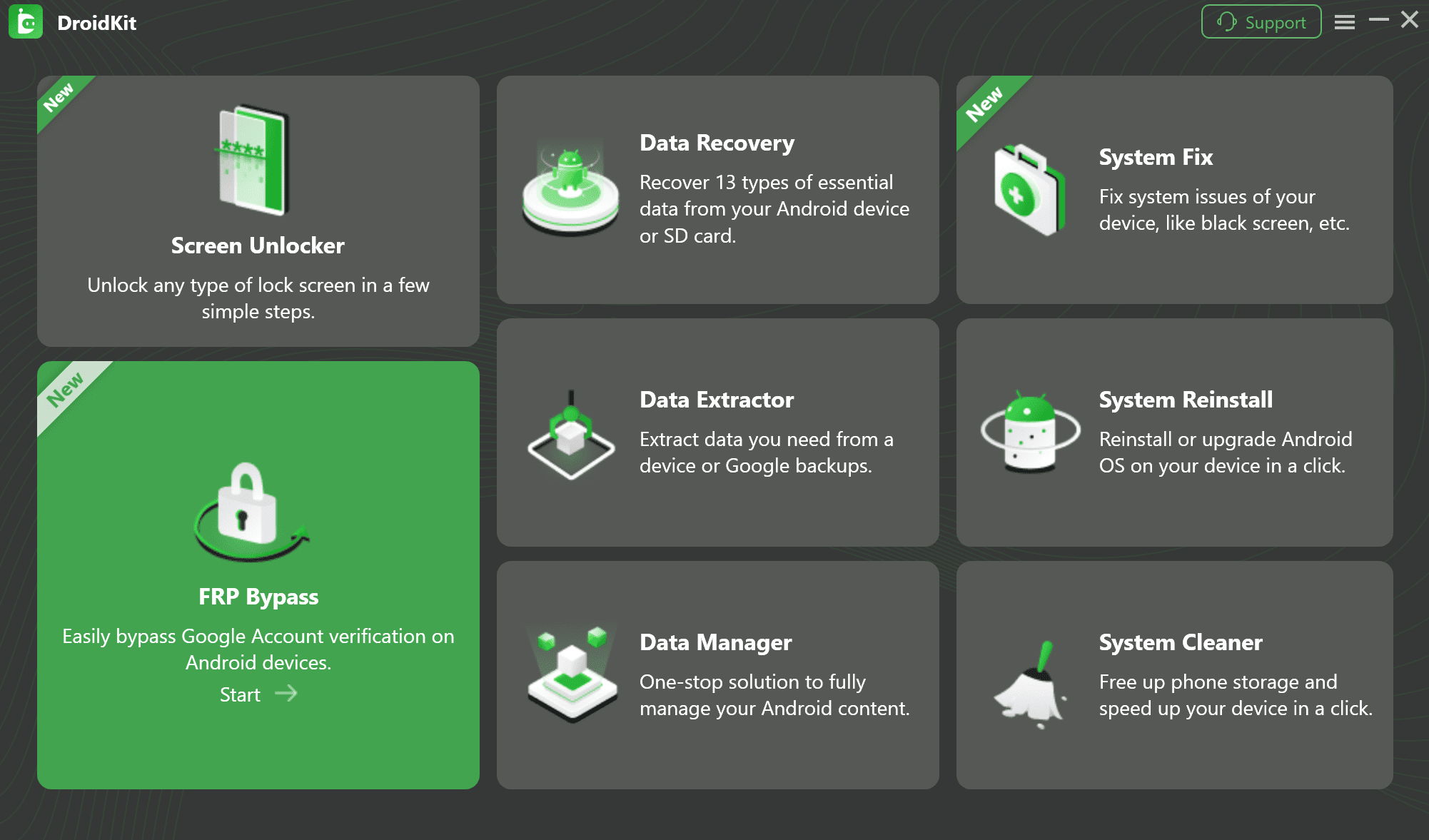
Step 3. Connect your Moto G 5G to the computer with a reliable USB cable and click Start.

Step 4. Follow the instructions displayed for the connected device. The required screens can vary with the Moto G 5G generation, Android version, and selected route.
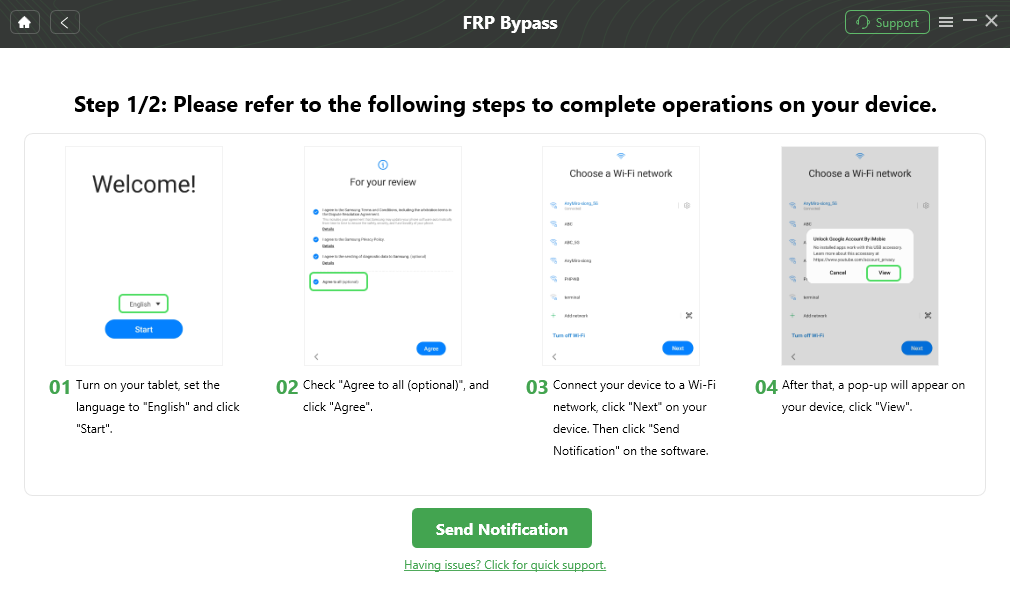
Step 5. Keep the phone connected while the selected process is running. When DroidKit reports completion, continue through normal device setup and verify the result on the phone.
How to Avoid FRP Before Resetting Your Moto G 5G
If you still have normal access to your Moto G 5G and plan to sell, give away, trade in, or reset it, deal with FRP before the reset rather than after Google verification appears.
Step 1. Make sure you know the Google account username and password currently used on the phone.
Step 2. If the phone is being transferred to another person, remove the screen lock.
Step 3. Remove the Google account or accounts from the Moto G 5G.
Step 4. Perform the factory reset through Settings > System > Reset options > Erase all data while you still have normal access.
Step 5. Before handing the phone over, confirm that the new setup flow no longer asks the next owner to verify your previous Google account.
Moto G 5G FRP Bypass FAQs
Can I bypass FRP on Moto G 5G without a PC?
A no-PC route is relevant only when the exact TalkBack, Emergency Information, Assistant, image-picker, or Settings screens required by the method still appear on your phone. Check the generation, installed Android version, and current setup flow before continuing.
Does Android 14 automatically mean I should use the 2024 method?
No. Android version and model year are separate checkpoints. A Moto G 5G 2023 can also receive Android 14, so identify both the phone generation and the installed software before choosing a route.
Can Moto G 5G 2024 run Android 15?
Yes. Motorola provides Android 15 upgrade information for the Moto G 5G 2024. If your phone has been upgraded, do not assume an Android 14-specific setup sequence still matches the current device.
What if TalkBack does not work on my Moto G 5G?
That means the TalkBack-based route you found cannot proceed as written on the current setup environment. Confirm the phone generation and Android version, then choose a method that does not depend on the missing shortcut.
Why is Choose Image or App Info missing on my Moto G 5G 2024?
The Emergency Information sequence depends on those screens being accessible. If one of them is missing, stop that particular route instead of repeatedly trying to reach a screen the current build does not expose.
Will another factory reset remove FRP?
Another reset does not automatically satisfy Google account verification. If the phone still requests the previously associated Google account, use account recovery, previous-owner assistance, or another applicable FRP route.
What is the best Moto G 5G FRP unlock tool?
There is no single tool choice for every Moto G 5G build. Compare device support, the installed Android version, connection requirements, and whether you prefer a technical Motorola-specific utility or a guided desktop workflow.
Why does my PC not detect the Moto G 5G?
Check the USB data cable, USB port, connection state, and any driver requirements of the software you are using. Device detection is a separate problem from the Google verification screen itself.
What should I do with a second-hand Moto G 5G that still asks for the seller’s Google account?
Contact the previous owner and ask them to help complete or remove the account verification first. Do not rely on a random bypass tutorial when the ownership account can still be resolved directly.
Final Thoughts
The biggest Moto G 5G FRP mistake is assuming that 2022 always means Android 12, 2023 always means Android 13, and 2024 always means Android 14. Those are the launch versions, but later official updates can change the Android environment and the setup screens available during verification.
Identify the phone generation and current OS first. Then use the first missing screen as your diagnosis: if TalkBack does not open, Assistant cannot continue, Choose Image is absent, or App Info cannot be reached, stop that specific manual route. If you own the phone and prefer a computer workflow, a supported DroidKit route can be evaluated without turning this page into a generic Motorola FRP tool guide.
Free Download * 100% Clean & Safe
More Related Articles


Roger Smith is a senior technical writer with years of experience in providing Android solutions. He loves to help users solve various problems such as Android unlock, Android data recovery, and Android system repair.
Product-related questions? Contact Our Support Team to Get Quick Solution >
