Halabtech Tool Review 2025: Price, Credits & Features Guide

A professional’s guide to the Halabtech Tool in 2025. We break down the license and credit costs for profitability and review its powerful support for Tecno and Infinix devices.

Author Avatar Roger Smith Last Updated: Oct. 10, 2025

For mobile repair technicians, finding reliable English information on the Halabtech Tool can be tough. You know it’s a powerful GSM tool, especially for Tecno, Infinix, and regional Xiaomi devices prevalent in the Middle East and North Africa (MENA), but key details are often buried in forums like GSM-Forum. You need clarity on its cost, credit system, and whether it outperforms competitors like UnlockTool for your workbench’s needs.

This Halabtech Tool review 2025 delivers practical answers. We break down costs, provide a step-by-step FRP bypass guide, and compare Halabtech to competitors to help you decide if it’s a profitable investment for your workshop. Disclaimer: Use Halabtech only for legitimate repairs on authorized devices—unauthorized use may violate local laws.

What Is Halabtech Tool?

Halabtech Tool is a professional GSM service software designed for technicians. It specializes in FRP removal, IMEI repair, network unlocking, flashing, and chipset-level operations across multiple Android brands. Its biggest appeal lies in early, reliable support for Tecno, Infinix, and regional Xiaomi variants, which are especially common in MENA markets.

Unlike global competitors such as Chimera Tool or UnlockTool, Halabtech positions itself as a regional specialist with fast updates tailored to devices that many international tools overlook.

System Requirements, Support, and Updates

Before considering pricing or workflow, technicians need to confirm whether their shop’s environment supports Halabtech Tool.

  • PC Requirements: Windows 10/11 (64-bit), Intel i3 or higher, at least 4GB RAM
  • Internet Connection: Required for license verification and all credit-based operations
  • Update Frequency: Typically every 1–2 weeks, adding new models, features, and security patches
  • Technical Support: Delivered through authorized resellers and active communities on GSM forums
  • License Policy: Digital (no dongle), locked to one PC via hardware ID (HWID). Some resellers offer HWID resets a limited number of times per year.

👉 These requirements are standard for professional GSM tools but highlight Halabtech’s advantage of frequent updates—a must for keeping up with Tecno and Infinix’s evolving security layers.

Halabtech Tool Pricing: License and Credit Costs

Adopting new software hinges on its cost. Halabtech uses a hybrid pricing model:

  • A yearly digital license ($50–$70 depending on reseller)
  • Credits for advanced, server-side operations (typically $0.15–$0.25 per credit)
Operation Estimated Credit Cost Estimated USD Cost (at $0.20/credit)
Samsung FRP Bypass (MTP Mode) 0 Credits $0.00
Tecno/Infinix IMEI Repair (New Security) 10 – 15 Credits $2.00 – $3.00
Xiaomi Auth Flash (EDL Mode) 5 – 8 Credits $1.00 – $1.60
Oppo/Realme IMEI Repair (Qualcomm) 10 – 20 Credits $2.00 – $4.00
Network Unlock (Various Models) 20 – 50+ Credits $4.00 – $10.00+
Generic MTK Read/Write Flash 0 Credits $0.00

Official Refund Policy for Failed Operations

A common concern is losing credits on a failed job. The official policy, often discussed on platforms like GSM-Forum, is straightforward:

  • Server-Side Error: If the Halabtech server causes the failure, credits are automatically refunded.
  • Client-Side Error: If the failure is on your end—a bad USB cable, incorrect drivers, or user error—credits are not refunded. Always double-check your setup.

Halabtech Tool Download and Activation: Secure Setup Guide

A proper setup ensures Halabtech Tool works flawlessly. Follow these steps to download and activate securely.

1. Find a Trusted Reseller: Purchase from authorized resellers listed on halabtech.com or verified via GSM-Forum to avoid scams.

2. Download Official Software: Get the installer from halabtech.com. Avoid third-party sites to prevent malware.

Click Download Button

Click Download Button

3. Install and Activate:

  • Run the installer as administrator.
  • Open Halabtech Tool and click Register new user.
  • Enter the activation code from your reseller, create a username/password, and click Register.

Troubleshooting: If activation fails, disable antivirus temporarily (it may flag GSM tools) and check internet stability. Verify your code with the reseller.

How to Use Halabtech Tool for Samsung FRP Bypass

Now that you’re set up, let’s walk through a common repair task: Samsung FRP bypass. This credit-free FRP bypass for Samsung devices showcases Halabtech’s efficiency:

Prerequisites

  • A PC with Halabtech Tool installed and activated.
  • A high-quality USB data cable.
  • The latest Samsung USB drivers installed on your PC.

Step-by-Step FRP Bypass Procedure (MTP Mode):

1. Open and Login: Launch the Halabtech Tool.

2. Select Module: Click the ‘Samsung’ tab.

3. Connect Device: Power on the Samsung phone to the “Welcome” screen and connect it to your PC.

4. Choose Method: In the ‘FRP’ sub-tab, select the option labeled ‘Bypass FRP (MTP)’.

5. Execute: Click the ‘Start’ button.

Follow the On-sceen Instruction

Follow the On-sceen Instruction

6. Action on Phone: A notification will pop up on the phone’s screen. Tap ‘View’. This will open a browser or the Galaxy Store, allowing you to proceed with standard manual bypass methods to remove the account.

Halabtech Tool vs. Competitors: Comparison for MENA Technicians

Global tools like Chimera Tool and UnlockTool are powerful, but Halabtech excels by focusing on the specific device ecosystem of the MENA region.

Feature Halabtech Tool UnlockTool Chimera Tool
Tecno/Infinix Support Excellent, often first-to-market Very Good, broad coverage Good, via generic functions
Regional Xiaomi Variants Strong, region-specific support Good general support Strong, less focused on regional variants
User Interface Functional, for professionals Very user-friendly, clear layout Highly detailed, professional
Pricing Model License + Credits Time-based license only License + Credits

Analysis:

  • Halabtech: For shops focusing on Tecno, Infinix, and MENA Xiaomi repairs, its early support for regional models ensures a competitive edge.
  • UnlockTool: Ideal for high-volume, multi-brand shops needing broad Android support.
  • Chimera: Best for Samsung-heavy shops, especially for Knox Guard (KG) locks.

Beyond Halabtech, consider complementary tools to optimize your workflow.

Expanding Your Toolkit: DroidKit as a Complementary Tool

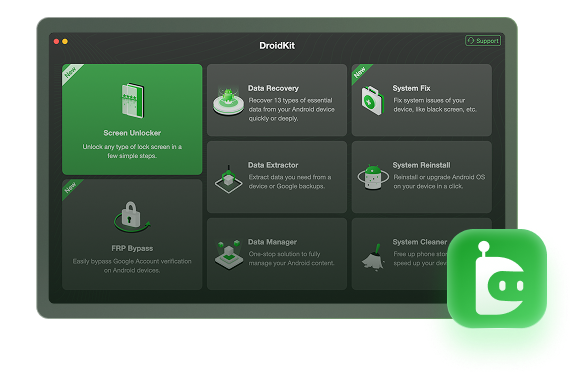
For high-volume, repetitive tasks like FRP bypass, a simpler tool can streamline operations, freeing Halabtech for complex repairs. DroidKit (by iMobie) is an excellent complement, offering beginner-friendly FRP bypass for Samsung, Xiaomi, and more.

Free Download

Free Download

* 100% Clean & Safe

Free Download * 100% Clean & Safe

  • Guided interface, no deep GSM knowledge required
  • Works on both Windows & macOS
  • Broad device coverage, including Samsung, Xiaomi, Oppo, and more
  • Ideal for front-desk staff to handle high-volume jobs quickly

Step-by-Step Instructions:

1. Install DroidKit: Download the latest DroidKit version from imobie.com and install it on your Windows or Mac PC. Run as administrator on Windows to avoid permission errors

2. Launch FRP Bypass Mode: Open DroidKit and select FRP Bypass from the main interface. Click Start to initiate the process.

DroidKit FRP Bypass

DroidKit FRP Bypass

3. Connect Your Device: Use a USB-C cable to connect your FRP-locked Android device to the PC. If prompted, enable USB debugging (follow DroidKit’s on-screen guide for your brand).

4. Configure Device Settings: Select your device’s brand (e.g., Samsung, Xiaomi) and model. DroidKit will generate a custom configuration file. Once prepared, click Start to Bypass.

Select Correct Brand

Select Correct Brand

5. Enter Recovery Mode: Follow DroidKit’s instructions to boot your device into Recovery Mode (e.g., for Samsung, hold Volume Up + Power until the logo appears). Select Reset in Recovery Mode to proceed.

6. Complete the Bypass: DroidKit will process the FRP removal, showing real-time progress. Upon completion, a “FRP Bypass Complete” message will appear, and your device will reboot without the Google account lock.

Frequently Asked Questions

1. What is the official price of a Halabtech Tool license?

A one-year digital license typically costs between $50 and $70 USD, set by authorized resellers.

2. Which operations are free and which require credits?

Standard operations like flashing or basic FRP bypass are usually free. Credits are for server-based tasks like advanced IMEI repair, network unlocking, and bypassing new security on some models.

3. What happens if a credit operation fails?

If it’s a Halabtech server error, credits are refunded automatically. If it’s a client-side error (bad cable, wrong drivers), credits are not refunded.

4. What is the official website to download the tool?

The only safe place to download the installer is halabtech.com.

5. How does Halabtech support the latest Tecno models?

Its team specializes in the MediaTek chipsets and custom security (HiOS, XOS) found in these devices, allowing them to release solutions very quickly.

Conclusion: Is Halabtech Tool a Worthy Investment?

After a thorough review, the verdict is clear. The Halabtech Tool is not just another GSM utility; it is a highly specialized instrument for a specific market.

Its primary strength—and the main reason to invest in it—is its deep, early, and reliable support for brands like Tecno, Infinix, and regional Xiaomi variants that are prevalent in the MENA market and beyond. The hybrid pricing model of a reasonable annual fee plus a la carte credits for advanced jobs allows for excellent profitability control.

For any mobile repair workshop that sees a steady flow of these devices, the Halabtech Tool is an essential, high-ROI investment. For technicians focused primarily on global Samsung or iPhone models, other tools might take precedence, but Halabtech remains a powerful and strategic addition to any professional’s software arsenal in 2025.

Author Avatar
Roger Smith Twitter Share Facebook Share

Roger Smith is a senior technical writer with years of experience in providing Android solutions. He loves to help users solve various problems such as Android unlock, Android data recovery, and Android system repair.

Back to Top Icon