MobileTeamOfficial FRP Bypass APK: Is It Safe & Still Working?
MobileTeamOfficial FRP APK appears in older bypass tutorials, but the file name alone does not establish who published a download or whether it fits your phone. Check the APK source, file identity, Android installation requirements and exact failure point before using the legacy route.
Searching for a MobileTeamOfficial FRP Bypass APK download usually means you have found an older Android FRP tutorial that expects a browser, one or more APK files, and a Google sign-in or account-management screen to become available during setup.
The risky part is that the name “MobileTeamOfficial” does not tell you whether the file in front of you is the same APK shown in another tutorial. Before installing anything, check where the file came from, whether different downloads identify the same package, what Android installation controls your phone exposes, and which step of the old route your device can actually reach.
If you are dealing with FRP more generally rather than this specific APK name, the Android FRP bypass guide organizes routes by brand, Android environment and setup condition. For background on why the verification screen appears after a reset, see what Factory Reset Protection is.
Before using an FRP APK: A download button is not proof of file provenance. If you cannot establish where a MobileTeamOfficial APK came from, what file you actually received, or why the tutorial needs it, do not weaken Android security settings merely to force that file onto the phone.
Quick Answer: Is MobileTeamOfficial FRP APK Safe to Download?
Do not judge a MobileTeamOfficial FRP APK by the filename alone. The safer decision depends on whether you can establish the file’s source and whether your locked Android environment provides every step the legacy APK route requires.
| Your Situation | What It Means | Recommended Decision |
| You found several sites offering files with the MobileTeamOfficial name | The filename does not prove the downloads are identical or from the same publisher. | Compare source information, version/package details and file hashes before trusting any sample. |
| The download page does not identify a developer, package version or file provenance | You have little information for verifying what will be installed. | Do not treat the page as an official download source merely because it uses the MobileTeamOfficial name. |
| Your phone cannot open a browser or downloaded APK from Setup Wizard | The legacy APK route is missing an early prerequisite. | Stop this route before downloading more files. |
| The APK is blocked, flagged or produces “App not installed” | The problem may involve the source, package, signature, Android compatibility or installation controls. | Diagnose the failure instead of cycling through random modified APKs. |
| The APK installs but Browser sign-in or the expected account screen is missing | The old post-install workflow does not match your Android environment. | Stop the legacy MobileTeamOfficial sequence. |
| You prefer a PC method | A desktop tool avoids relying on an unverified FRP APK file. | Check the PC tool’s current FRP compatibility and data-loss conditions first. |
Download answer: this page does not recommend a random third-party MobileTeamOfficial mirror when the publisher and file provenance cannot be established. If a tutorial requires a specific APK, verify the exact sample rather than assuming every file carrying the same name is interchangeable.
What Is MobileTeamOfficial FRP Bypass APK?
MobileTeamOfficial FRP Bypass APK is a name associated with legacy Android FRP tutorials that use an installed APK to reach a Google account, browser sign-in or account-management activity during post-reset setup.
Some versions of these tutorials also instruct the user to install a separate Google Account Manager APK. That means the route can depend on two different sideloaded packages rather than one: the Account Manager package and the FRP helper APK.
That distinction matters for safety and compatibility. If the method asks for two APKs, both files need to come from sources you can evaluate, both need to fit the Android environment, and both need to expose the activities expected by the tutorial.
- It is an APK-based route: the method depends on installing software directly on the Android device.
- It is not a universal Android function: the exact setup flow depends on what the phone exposes after reset.
- It may depend on another APK: some tutorials pair it with a Google Account Manager package.
- It depends on Android activities: installing the file is not enough if Browser sign-in, account management or the required Settings activity is unavailable afterward.
- The file itself needs verification: identical-looking download buttons can distribute different files.
For a broader explanation of APK-based FRP routes—including installation failures and download risks—use the FRP bypass APK guide. This page stays focused on the MobileTeamOfficial name and its legacy workflow.
Can You Verify a MobileTeamOfficial APK Download?
A useful safety check asks a more specific question than “Is MobileTeamOfficial safe?” You need to evaluate the exact APK file you are considering.
During this update, we could not establish a clearly identifiable canonical publisher/download source for the MobileTeamOfficial FRP APK from the sources available to us. That makes file-level verification especially important when the same name appears on unrelated APK pages or tutorials.
| Check | What to Look For | Why It Matters |
| Source | A clearly identified developer or publisher rather than an anonymous mirror | A familiar filename does not prove who distributed the APK. |
| Filename and version | Consistent package/version information across the page and file | A mirror may rename a modified package to match a popular tutorial. |
| SHA-256 hash | A cryptographic hash that can be compared between copies | If two files have different hashes, they are not byte-for-byte identical. |
| Package signature | Consistent signer information between claimed versions of the same app | Unexpected signer changes can indicate that files have different origins. |
| VirusTotal or another scanner | Whether multiple security engines identify known suspicious behavior | A scan can flag risk, but a clean result is not proof that the APK is trustworthy. |
| Requested permissions | Whether the installed application asks for access unrelated to its stated function | Unexpected sensitive permissions deserve additional scrutiny. |
| Play Protect warning | Whether Android flags or blocks the sideloaded app | Do not disable protections simply because an old tutorial tells you to ignore the warning. |
How to Screen an APK Before Installing It
Step 1. Save the APK to a computer first when possible. Do not immediately open or install a file simply because the download finished.
Step 2. Record the exact filename, file size and SHA-256 hash. If another page claims to distribute the same build but provides a different file, treat it as a different sample.
Step 3. Submit the file to a reputable multi-engine scanner such as VirusTotal.
Step 4. Read the result rather than looking only for a green or red icon. Several detections, an unexpected package name, or inconsistent signer information are reasons not to install the file.
Step 5. Even if no scanner flags the sample, continue checking its provenance and permissions. Malware scanning does not prove that the APK is authentic, compatible or appropriate for your FRP route.
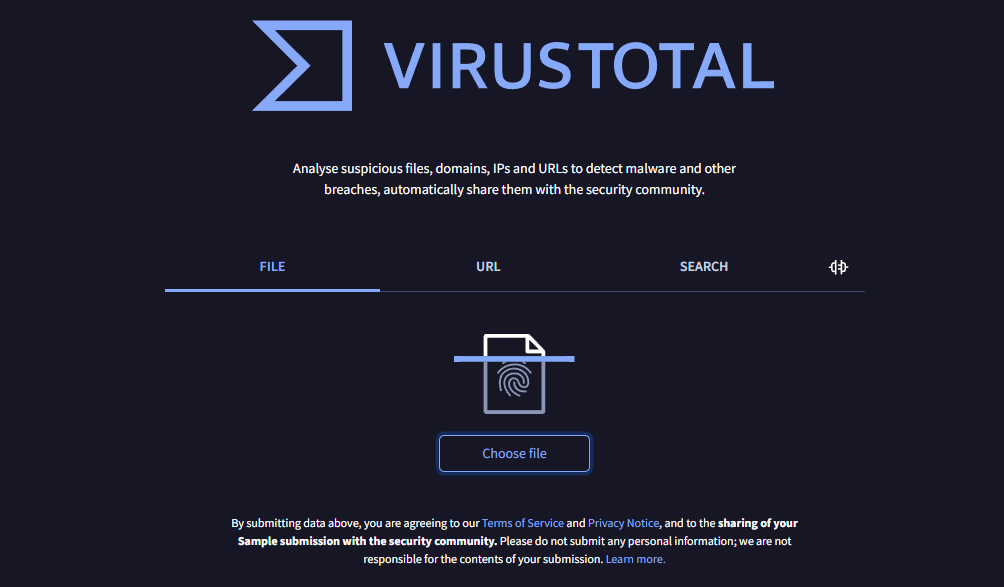
Example of Checking an APK File with VirusTotal
What this screenshot does not prove: it should be treated as an example of the scanning workflow, not as evidence that every APK named MobileTeamOfficial has been tested or certified safe.
Android Version Matters, but It Is Not the Only Check
The original MobileTeamOfficial discussion is often associated with older Android tutorials, but Android version alone is not enough to declare the APK “working” or “blocked.” One concrete version difference is how Android handles sideloaded applications.
| Android Environment | Unknown-App Installation Model | What It Means for This Route |
| Android 7.1.1 and earlier | Uses the older Unknown sources setting, with some devices also allowing a one-time installation prompt | An old tutorial may show a global Unknown sources control, but browser access, APK compatibility and sign-in activities still need to match. |
| Android 8.0 and later | Uses Install unknown apps permission for the particular source attempting the installation | The browser, file manager or other source used by the tutorial must be allowed to request package installation. |
This change is an installation-permission difference, not proof that MobileTeamOfficial works on Android 7 and stops on Android 8 or 9. A working legacy route also needs browser access, a compatible package, the expected account/sign-in activity and the correct Setup Wizard behavior.
Security updates, OEM customizations and Google components can change those individual dependencies even when two phones display the same major Android version.
Check the APK Route Prerequisites Instead of an Android Cutoff
The fastest way to judge MobileTeamOfficial compatibility is to walk through the dependency chain before you install anything.
| Route Checkpoint | What Must Be Available | If It Is Missing |
| 1. Setup entry point | A legitimate route from Setup Wizard into the browser, file interface or another required app | The APK sequence cannot begin. |
| 2. APK source | A file whose provenance and identity you can evaluate | Do not replace provenance with trust in the filename. |
| 3. File access | The downloaded package can be opened from the current Android setup environment | The route stops before installation. |
| 4. Installer access | Android’s package installer launches for the selected file | Downloading another APK does not fix the missing installer path. |
| 5. Source permission | The relevant browser/file source can receive permission to install unknown apps when Android requires it | The package cannot be installed through that source. |
| 6. Package compatibility | The APK installs and launches in the current Android environment | “App not installed,” parse errors or immediate crashes indicate a package-level problem. |
| 7. Google Account Manager dependency | If the tutorial requires it, the separate package must also match the expected environment | The legacy sign-in chain may break even if the FRP helper APK itself opens. |
| 8. Browser sign-in / account activity | The installed app still exposes the exact activity expected by the tutorial | The old workflow no longer matches the phone. |
| 9. Post-restart result | The phone proceeds through the expected setup state | If the same previous-account verification returns, the route did not complete successfully. |
This is more useful than assuming “Android 6–8 works” or “Android 9+ does not.” One missing dependency is enough to eliminate the specific MobileTeamOfficial route on the phone in front of you.
Before Trying the MobileTeamOfficial APK Route
Use this checklist before following an old MobileTeamOfficial tutorial:
- Confirm the phone and lock: make sure you are dealing with Google FRP after reset rather than a screen PIN, SIM lock or manufacturer account lock.
- Confirm ownership: if the Google credentials belong to a previous owner, contact that person before installing third-party APKs.
- Locate the first browser/file entry point: do not download packages until you know the locked Setup Wizard can actually reach them.
- Verify each APK separately: a MobileTeamOfficial file and a Google Account Manager file are two separate provenance and compatibility decisions.
- Check the installation model: Android 8.0+ uses source-specific Install unknown apps permission rather than the older global Unknown sources switch.
- Keep Play Protect warnings meaningful: do not switch off protections simply because a tutorial says the APK cannot otherwise install.
- Define the stop point: App not installed, repeated crashes, missing Browser sign-in or an unavailable account activity are reasons to abandon that sample or route.
If your main problem is already an install or sign-in failure, use the FRP bypass not working guide to diagnose the failed checkpoint instead of collecting more APK copies.
How the Legacy MobileTeamOfficial APK Route Works
The sequence below explains the structure used by older MobileTeamOfficial tutorials. It is intentionally conditional: continue only while the required screen exists on your own phone and the APK files you are considering have passed your source checks.
Legacy MobileTeamOfficial FRP APK Route Example
Step 1. Establish browser or file access from the locked Setup Wizard. The exact entry point differs by manufacturer and software build. If no legitimate route to a browser or downloadable file exists, stop here.
Step 2. Identify the APK files required by the particular tutorial. Some legacy sequences require both a Google Account Manager package and the MobileTeamOfficial FRP helper. Verify each file independently before installation.
Step 3. If the tutorial requires Google Account Manager, install only a package whose origin and compatibility you can justify. If Android blocks the installation or the package produces an error, do not compensate by downloading several unknown modified versions.
Step 4. Open the MobileTeamOfficial APK installer. On Android environments using source-specific installation controls, the browser or file source may need permission to install unknown apps. If that control is inaccessible from the locked setup environment, the route stops here.
Step 5. Launch the installed FRP helper only if installation completes without a security or compatibility problem. Older tutorials may expect a password/account interface and a menu containing Browser sign-in. Continue only if the same activity exists on your phone.
Step 6. If the expected sign-in flow opens, use an account you control and follow only the screens available on your device. Do not enter another person’s account credentials.
Step 7. Restart the phone only after completing the sequence shown by the device. If post-reset setup still requests the previously synced Google account, the legacy route did not complete on that software environment.
The most important result may be a failure: if Browser sign-in never appears, the Account Manager package crashes, or the installer cannot run, you have identified why this particular old MobileTeamOfficial sequence does not fit the phone. That is more useful than repeatedly replacing the APK.
Why MobileTeamOfficial APK Does Not Install or Complete Sign-In
“MobileTeamOfficial not working” can describe several completely different failures. Diagnose the exact stage before deciding whether the problem is the file, Android, the Setup Wizard or the tutorial itself.
| Failure | What to Check | Decision |
| You cannot open a browser from Setup Wizard | The old tutorial’s browser handoff is unavailable on this device/build | Stop the browser-dependent MobileTeamOfficial route. |
| The APK downloads but cannot be opened | File access or package-installer access is unavailable | Do not assume another APK mirror will create an installer path. |
| Installation is blocked | Source-specific installation permission, device policy or Android security warning | Read the block reason before changing security settings. |
| “App not installed” appears | Package compatibility, signature, file integrity or installer requirements | Reject the assumption that every file with the same name is interchangeable. |
| The APK crashes immediately | Runtime/API incompatibility, damaged file or modified package | Do not keep retrying the same sample. |
| Google Account Manager fails | The separately sideloaded package does not fit the system or expected account flow | The GAM-dependent legacy route cannot continue as shown. |
| Browser sign-in is missing | The activity expected by the tutorial is not exposed | Stop the old sign-in sequence. |
| The APK installs but cannot reach account/settings controls | Post-install Android activities differ from the tutorial | Installation alone is not enough for this method. |
| FRP returns after reboot | The sequence did not change the post-reset verification state on this phone | Use account recovery or evaluate another applicable FRP route. |
| A scanner or Play Protect flags the file | The sample may exhibit known harmful or suspicious characteristics | Do not disable protection simply to complete the tutorial. |
If the Google verification screen itself is the main problem rather than this particular APK, the Google account verification after reset guide covers account recovery and other post-reset paths.
MobileTeamOfficial APK vs DroidKit
The two options solve the same broad FRP problem in very different ways. The important comparison is not “free versus paid”; it is unverified legacy APK distribution versus a documented PC workflow with its own compatibility limits.
| Comparison | MobileTeamOfficial APK Route | DroidKit FRP Bypass |
| Distribution | The exact APK source must be evaluated file by file; do not assume a mirror is canonical. | Distributed through iMobie’s official DroidKit pages. |
| Installation location | APK is sideloaded onto the Android device. | DroidKit is installed on a Windows PC or Mac. |
| Main prerequisite | Browser/file access, installer access, APK compatibility and the expected post-install sign-in activity | A currently supported FRP brand/device route plus the required USB/device-mode workflow |
| File-provenance burden | You need to evaluate each APK sample, and some tutorials require a second Google Account Manager APK. | The desktop installer comes from the vendor-controlled download path. |
| Published FRP compatibility | No broad compatibility matrix should be inferred from the MobileTeamOfficial filename alone. | Current DroidKit documentation publishes a supported-brand/system list and device-specific instructions. |
| Data impact | Depends on the phone’s existing reset state and the exact legacy sequence. | The current DroidKit FRP Guide states that FRP Bypass erases data on the device. |
| Useful when | You are researching a specific old APK workflow and can verify both the file and every required Android entry point. | You want a PC workflow and your phone matches DroidKit’s current FRP support. |
| Do not use when | The source is unclear, the APK is flagged, installation fails, or the expected account activity is missing. | The device falls outside current FRP support or a documented restriction applies. |
This difference is why DroidKit FRP Bypass can be relevant after a MobileTeamOfficial-specific failure: it removes the need to find and sideload that uncertain APK. It still requires its own compatibility check before you proceed.
When DroidKit Is a Relevant Alternative
Consider DroidKit when the legacy MobileTeamOfficial chain breaks at browser access, APK installation, Google Account Manager compatibility or Browser sign-in—and your phone appears in DroidKit’s current FRP support documentation.
The current DroidKit FRP Guide lists Samsung, Xiaomi, OPPO, Motorola, Lenovo, VIVO, Redmi, POCO, Realme, SONY and OnePlus devices running Android 6 and above. This is not a universal guarantee for every model or build; the software can require brand-, Android- or chipset-specific routes.
Samsung also has a documented exception: DroidKit’s current guide states that Samsung devices with security patches dated August 2023 or later are currently unable to use its FRP bypass workflow.
| Before Choosing DroidKit | What to Confirm |
| Brand | The phone’s brand is included in the current DroidKit FRP supported-device list. |
| Device/version route | The software can match the actual device environment rather than relying only on broad Android support. |
| Samsung patch | If the phone is Samsung, check whether it falls under the August 2023-or-later security-patch restriction. |
| Computer connection | You have a working USB data cable and can follow the device-mode instructions shown by the program. |
| Data | You understand that the current DroidKit Guide states its FRP Bypass function erases device data. |
| Free vs activated version | The current guide distinguishes device matching from the activated FRP-bypass capability. |
You can also review the current DroidKit FRP User Guide before starting so the instructions shown for your device take priority over an old screenshot or video.
How to Use DroidKit After Confirming FRP Compatibility
Step 1. Download and install DroidKit on your Windows PC or Mac. Open the program and choose FRP Bypass.
Step 2. Connect the Android phone with a USB data cable. Follow the program’s prompt to select the actual brand and device/system route rather than choosing another option simply to continue.
Step 3. Follow the instructions shown for the connected device. Different brands can require different setup or device modes.
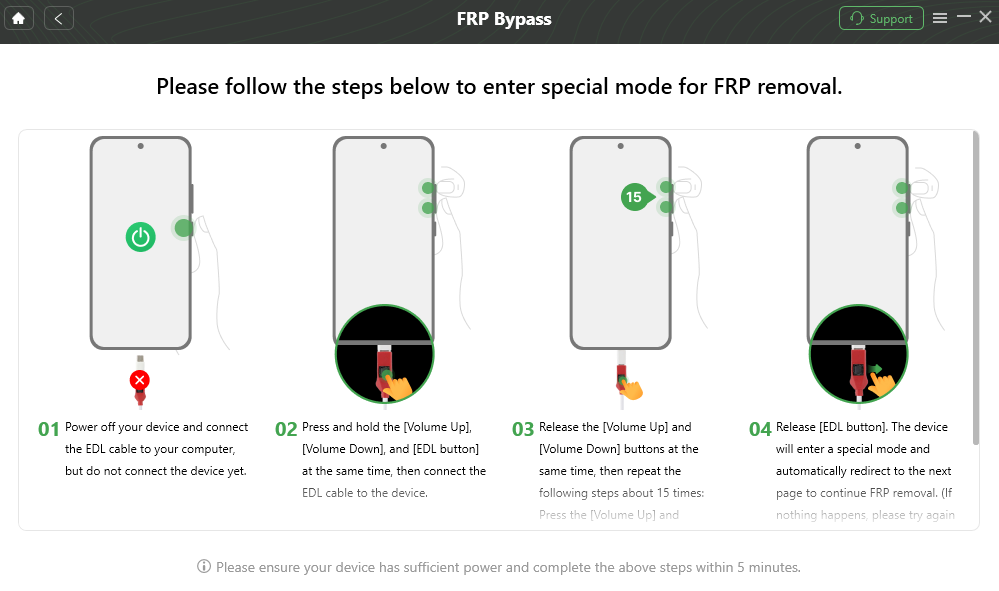
Follow the Device-Specific FRP Instructions Shown by DroidKit
Step 4. Keep the device connected while the applicable process runs. If the supported workflow completes, let the phone restart and follow the setup displayed afterward.
Why this route is different from downloading another APK: DroidKit does not solve a suspicious MobileTeamOfficial file by declaring that file safe. It gives you a different FRP workflow for phones covered by its current compatibility documentation.
FAQs About MobileTeamOfficial FRP APK
1. Is there an official MobileTeamOfficial FRP Bypass APK website?
During this update, we could not establish a clearly identifiable canonical publisher/download source for the MobileTeamOfficial FRP APK from the sources available to us. That means you should not treat a third-party page as “official” simply because its title contains MobileTeamOfficial. Check the exact APK’s source, hash, package information and signature instead.
2. Is MobileTeamOfficial FRP Bypass APK safe?
Safety depends on the exact file, not only the name. A sample from an unknown mirror may be different from another file carrying the same filename. Check provenance, hash, signer information, permissions, malware-scan results and Android security warnings before deciding whether a particular APK is acceptable to install.
3. Does a clean VirusTotal result prove the MobileTeamOfficial APK is safe?
No. A multi-engine scan is useful for identifying known suspicious behavior, but a clean result does not prove who published the APK, whether it was modified, whether its permissions are appropriate or whether it is compatible with your phone. Treat scanning as one part of file verification.
4. Does MobileTeamOfficial APK only work on Android 6, 7 or 8?
There is not enough verified compatibility evidence to use Android 6–8 as a guaranteed support range or Android 9 as a universal cutoff. Android version affects installation behavior, but the legacy route also depends on browser access, package compatibility, Google Account Manager when required, and the availability of the expected Browser sign-in or account activity.
5. Why can’t I enable Unknown sources like an old MobileTeamOfficial tutorial shows?
Android’s sideload controls changed. Android 7.1.1 and earlier use the older Unknown sources model, while Android 8.0 and later require permission for the particular source under Install unknown apps. Even when that permission exists, the locked Setup Wizard still has to let you reach it.
6. Why does MobileTeamOfficial APK say “App not installed”?
Possible causes include an incompatible package, corrupted or modified APK, signature issues, unavailable installer access or Android compatibility differences. Do not assume that another file with the same name will fix the problem; compare the exact sample and installation environment first.
7. Do I need a Google Account Manager APK?
Some legacy MobileTeamOfficial tutorials pair the FRP helper with a separately sideloaded Google Account Manager package. That creates another compatibility and file-provenance requirement. If the tutorial depends on a specific Account Manager activity and the package does not run correctly on your phone, the full route can fail even when the MobileTeamOfficial APK installs.
8. What if Browser sign-in is missing?
If the legacy tutorial requires Browser sign-in and that menu or account activity is not present, the method no longer matches the current Android environment. Reinstalling the same APK does not restore an activity that the system does not expose.
9. What should I do if Play Protect flags the FRP APK?
Do not disable Play Protect simply to satisfy an old tutorial. Recheck the APK’s source, file identity and scan results. If the sample cannot be trusted, reject that download and use another legitimate account-recovery or FRP route.
10. Is DroidKit a replacement for MobileTeamOfficial APK?
It is an alternative workflow rather than another copy of the same method. MobileTeamOfficial tutorials depend on sideloaded APKs and legacy Android activities. DroidKit uses a PC-based FRP process for device families listed in its current documentation. Check the supported route, Samsung patch restriction and data-erasure notice before using it.
11. Will DroidKit FRP Bypass erase data?
Yes. The current DroidKit FRP Guide states that its FRP Bypass function erases device data. If the phone had already been factory-reset before reaching Google verification, some local data may already have been removed by that reset.
12. What should I do with a second-hand phone asking for the previous owner’s Google account?
Contact the seller or previous owner before relying on a MobileTeamOfficial APK. If the verification account belongs to someone else, resolving that ownership relationship is different from troubleshooting whether an APK will install.
Conclusion: Check the File and the Route Before Installing
The most important MobileTeamOfficial question is not whether one Android version is “supported.” First determine what file you have and what the old tutorial expects the phone to expose.
If the APK source cannot be established, the sample is flagged, the package will not install, Google Account Manager does not fit the phone, or Browser sign-in never appears, those are separate reasons to reject the legacy route. Downloading additional files with the same MobileTeamOfficial label does not resolve any of those missing prerequisites.
If you decide not to sideload the APK, move to a different FRP path based on the actual device rather than simply looking for another mirror. A PC product such as DroidKit is one option only when its current FRP documentation covers the phone and you accept its data-erasure conditions. The decision on this page therefore begins with file provenance and route compatibility, not with the download button.
More Related Articles



Jeremy Feron is a writer for iMobie with a deep passion for Android. He specializes in creating clear guides on Android tips and the latest updates, helping users navigate their devices and get the most out of new features.
Product-related questions? Contact Our Support Team to Get Quick Solution >
