2026 Samsung Secret Codes: The Ultimate Guide to Unlocking Hidden Features and Diagnostics
Unleash your Samsung’s hidden power with 2026 secret codes. Access diagnostics, check hardware, and master your device with this comprehensive guide.
Did you know your Samsung smartphone has a hidden toolbox of features, waiting to be unlocked with a few simple taps on the dialer? These combinations of symbols and numbers, known as Samsung secret codes, allow you to access a world of hidden menus, run detailed diagnostics, and view crucial device information that isn’t available through standard settings.
Whether you’re a tech enthusiast looking to explore your device’s full potential or a user trying to troubleshoot a specific problem, this comprehensive guide will give you the most up-to-date Samsung secret codes for 2026.
Disclaimer: The functionality of these codes can vary depending on your specific Samsung phone model, network carrier, and One UI version. Please use caution with codes labeled “High Risk” and always back up your data before using any reset codes.
What Are Samsung Secret Codes?
Samsung secret codes are special codes that you input directly into your phone’s dialer app. Instead of initiating a call, these codes trigger a specific command or open a hidden menu. These functions are primarily used by developers, repair technicians, and internal staff for testing and diagnostics.
While they may seem like a magical trick, using them is straightforward. Simply open the Phone app, enter the code, and a new screen will appear instantly.
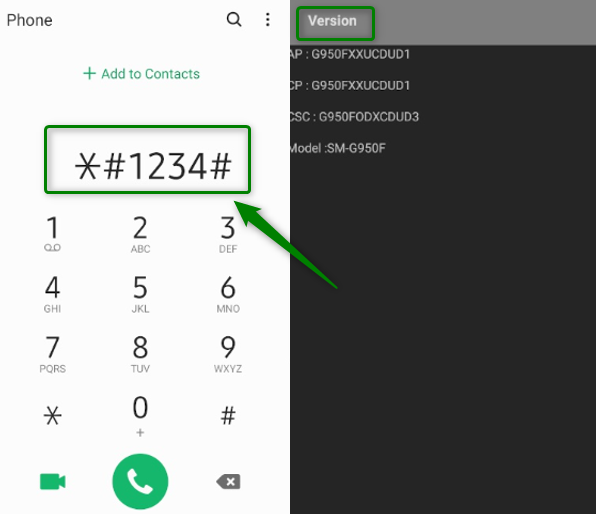
Samsung Secret Codes
Complete Samsung Secret Code List (2026)
Here’s a categorized list of standard and applicable Samsung secret codes. Keep in mind that functions may vary depending on your device model and Android version.
| Code | Function | Risk Level |
| *#06# | Show IMEI number | Safe |
| #0# | General hardware test (screen, sensors, vibration, camera) | Safe |
| *#0228# | Battery status and ADC readings | Safe |
| *#1234# | Show firmware version | Safe |
| #12580369# | Software and hardware info | Safe |
| *#0011# | Service mode (network info) | Safe |
| *#9090# | Diagnostic configuration | Caution |
| *#0808# | USB settings | Caution |
| *#2663# | Touchscreen version update | Caution |
| *#7353# | Quick test menu | Safe |
| *#2664# | Touchscreen test | Safe |
| *#7780# | Factory reset (keeps firmware) | High – Erases data |
| 27673855# | Full factory reset (erases everything) | High – Erases data |
| #272IMEI# | Sales code change | High – May reset device |
Most Useful Samsung Secret Codes in Daily Life
1. Checking Your IMEI Number
- Code: *#06#
- Why use it: This is the most common code, used to verify the authenticity of a used phone or to provide your device’s unique ID for carrier or warranty issues.
- How to use: Simply dial the code, and a screen with your IMEI number will pop up instantly.
- What to look for: Make sure the number matches the one on the original box (if you have it).
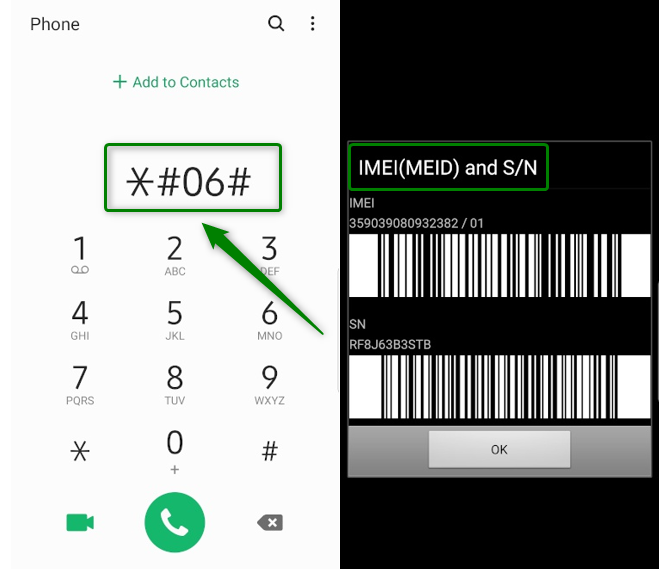
Check Your IMEI Number
2. Testing Hardware Before Purchase
- Code: *#0*#
- Why use it: This is a crucial tool for anyone buying a used Samsung phone. It allows you to test the display, sensors, cameras, and more.
- How to use: Dial the code, and a menu of test options will appear. Tap a test (e.g., Red, Green, Blue) to check for screen dead pixels, or a sensor test to ensure all hardware is working correctly.
- What to look for: A flawless display without any dead pixels, fully functional sensors (like the accelerometer and proximity sensor), and clear camera images.
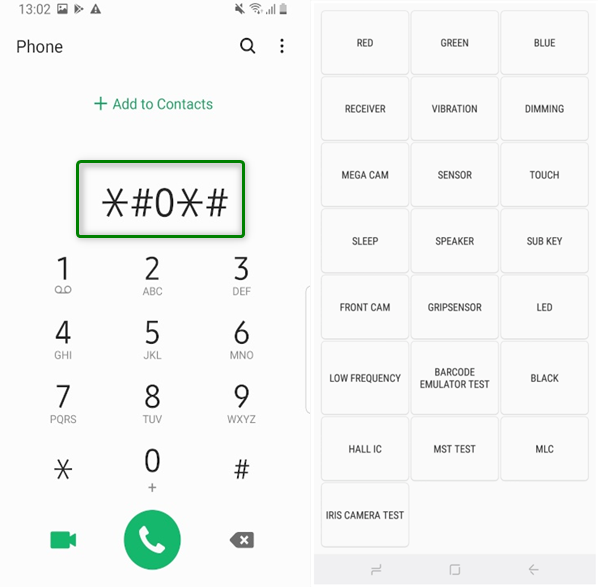
Test Hardware
3. Checking Battery Health
- Code: *#0228#
- Why use it: This code provides detailed information about your battery’s status, including voltage, charge level, and internal readings. It’s a quick way to check your battery health and see if a full charge is truly reaching the battery’s capacity.
- How to use: Dial the code, and a screen will show your battery status in real-time.
- What to look for: The voltage reading and other data to get a sense of your battery’s current state.
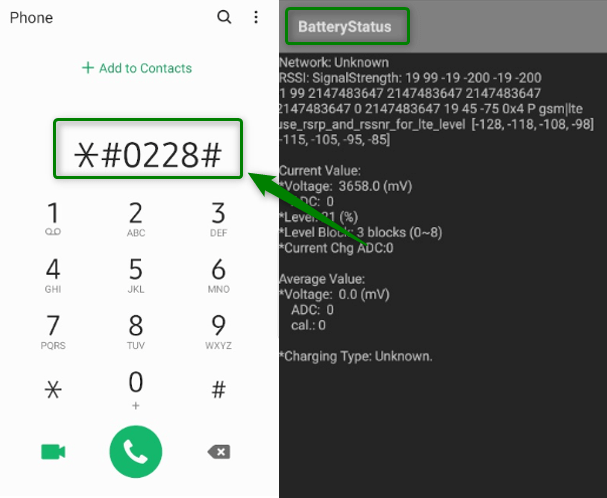
Check Battery Health
How to Use Samsung Secret Codes Safely
While exploring these codes can be fun and useful, it’s crucial to do so responsibly.
1. Back Up Your Data: Before entering any code, especially those in the “Reset” category, ensure your photos, contacts, and other important data are backed up to Google Drive or Samsung Cloud.
2. Understand the Code’s Purpose: Always know what a code does before you enter it. The diagnostic codes are generally safe, but others can have permanent effects.
3. Use Reputable Sources: Only use codes from trusted sources like this guide. Avoid random codes found on unknown websites.
Alternatives to Using Secret Codes
If you’re not comfortable with dialer codes, you can access similar diagnostic features through these official alternatives:
- Samsung Members App: This pre-installed app offers a “Phone diagnostics” section where you can perform comprehensive hardware and software tests without needing any codes.
- Developer Options: This hidden menu in your phone’s settings provides advanced debugging and configuration tools. To enable it, go to Settings → About Phone, then tap “Build Number” 7 times.
- Service Center Diagnostics: For advanced issues, technicians use proprietary tools for comprehensive testing.
Frequently Asked Questions (FAQ)
Q1: Why aren’t some of the codes working on my Samsung phone?
A: The functionality of these codes can vary depending on your specific Samsung phone model, your network carrier, and the version of One UI (Samsung’s Android skin). Many of the older codes have been phased out.
Q2: Will using these secret codes void my phone’s warranty?
A: No, simply entering these codes and viewing information will not void your warranty. However, be cautious with codes that modify system settings.
Q3: Can I use these codes on other Android phones?
A: Some codes, like *#06#, are universal for most Android phones. However, the majority of the diagnostic and service codes listed here are specific to Samsung devices.
Conclusion
Samsung secret codes are potent tools for testing, diagnosing, and configuring your phone. Whether you want to check your battery health, test your hardware, or verify your IMEI, these codes can save time and give you direct access to hidden menus.
Always remember:
- Use safe codes for testing and information checks.
- Avoid risky reset codes unless you’ve backed up your data.
- Not all codes work on all models — results may vary.
Bookmark this list or keep it handy for future reference, especially if you buy or sell used Samsung devices.
More Related Articles



Jeremy Feron is a writer for iMobie with a deep passion for Android. He specializes in creating clear guides on Android tips and the latest updates, helping users navigate their devices and get the most out of new features.
Product-related questions? Contact Our Support Team to Get Quick Solution >
