Chimera Tool Download Guide: Official Setup, License & Crack Risks
Chimera Tool is a professional desktop mobile servicing platform, not an Android APK. This guide shows where to get the official download, how the current license tiers differ, why crack searches carry extra risk, how to verify model-level support, and what to check when login, driver, or procedure errors stop a repair job.
Chimera Tool is a professional mobile phone utility used for device servicing tasks such as supported FRP removal, network operations, firmware work, bootloader procedures, certificate functions, and diagnostics. But searches for Chimera Tool download are often mixed with terms such as Chimera Tool crack, Chimera Tool cracked, and even Chimera Tool download APK.
Those searches do not describe the same thing. The official Chimera distribution is a desktop servicing platform tied to an account and licensing system. It is not a normal Android APK that you install on the phone. A cracked or patched package downloaded from an unrelated mirror also does not follow the official account, update, and support workflow.
Quick Answer: Download Chimera only from the official Chimera website, check the exact device and required operation in the official Supported Models database, then choose a license that matches your repair volume. Chimera is designed for professional servicing workflows. If you only need to deal with one supported FRP-locked Android device and do not need a multi-brand technician platform, a guided consumer-oriented FRP workflow may be a better fit.
This guide focuses on the questions behind the current Chimera searches: where the official download is, whether a crack or APK exists as an official option, how the licenses differ, how to set up the software, and what to check when authentication, drivers, or a device procedure fails.
Table of ContentsHide
What Is Chimera Tool?
Chimera Tool Crack or APK: What Are You Actually Downloading?
Chimera Tool vs. Other Repair and FRP Tools
Chimera Tool License Pricing
How to Download, Install and Activate Chimera Tool
When Chimera Tool Is Not the Right Choice
How to Check Supported Models and Operations
Chimera Tool Errors and Fixes
Chimera Tool Pros and Cons
Chimera Tool Alternative for a Simpler FRP Job
Frequently Asked Questions
Final Thoughts
What Is Chimera Tool?
Chimera Tool is a desktop mobile servicing platform built for professional device repair workflows. The official platform provides different operations depending on the exact model, chipset, firmware, and available procedure.
Depending on device support, its feature categories can include:
- FRP reset or removal procedures.
- Network-related servicing functions.
- Firmware update and software operations.
- Bootloader unlock or relock procedures on supported devices.
- Certificate read, write, patch, backup, and restore functions where available.
- Device information and diagnostic procedures.
- IMEI-related repair functions where permitted and supported.
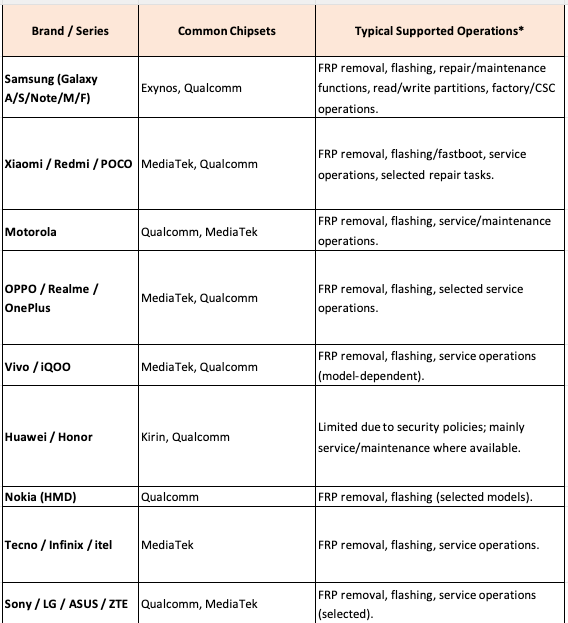
The important phrase is where available. Chimera support should not be described only by brand name. A Samsung, Xiaomi, Motorola, Huawei, Vivo, OPPO, Tecno, or Infinix device can have different supported procedures depending on the precise model code and software environment.
For example, finding the phone brand in a tool does not prove that every operation is available for every variant. Before buying a license or connecting a repair device, check the exact model and the exact procedure you need.
Is Chimera Tool for Regular Phone Users or Repair Technicians?
Chimera’s current official positioning is professional mobile repair software, and its current account and service terms are structured around professional repair and servicing use. That makes the platform most relevant to technicians and repair businesses that handle multiple devices or need advanced multi-brand servicing functions.
A one-time user dealing with only a Google verification screen has a much narrower problem. In that case, the decision should start with the exact lock type and device compatibility rather than buying a technician platform simply because Chimera appears in a search result.
Is Chimera Mobile Phone Utility a Separate Product?
Searches for Chimera mobile phone utility normally refer to the Chimera Tool platform rather than a separate Android application with that name. The official workflow is centered on the Chimera desktop client, account, license, connected device, and model-specific procedures.
Chimera Tool Crack or APK: What Are You Actually Downloading?
Chimera Tool crack is one of the strongest search intents around this software, but users should separate three very different file categories:
| Search Term | What It Usually Means | What to Check |
| Chimera Tool download | The official desktop Chimera client | Use the official Chimera download page and account workflow |
| Chimera Tool crack or cracked | An unofficial modified package that claims to bypass licensing or account requirements | It is not part of the official distribution and cannot be assumed to receive legitimate updates or support |
| Chimera Tool download APK | A search that treats Chimera as an Android app | The official Chimera Tool is a desktop servicing platform, not a normal FRP APK installed directly on Android |
Why a “Cracked Chimera Tool” Is Not the Same as the Official Client
The official Chimera workflow connects several elements: the official executable, an account, the selected license or service access, official updates, device support data, and procedure logs. An unofficial patched copy cannot be assumed to preserve that workflow.
Common warning signs around an unofficial download include:
- A password-protected archive with no clear publisher information.
- A page claiming lifetime premium access without a normal account or license.
- Instructions to disable all security protection before even inspecting the files.
- A download that redirects through several unrelated installers.
- A package described as an Android APK even though the official product is desktop software.
- A build that cannot connect to official services or update through the normal client.
This does not mean every antivirus detection has the same cause, but an unexplained security alert should be investigated rather than solved by permanently disabling protection or excluding an entire unknown folder.
Is There an Official Chimera Tool APK?
The official Chimera download route provides the desktop software used to connect and service supported devices. Do not install a random Android package simply because its filename contains “Chimera Tool APK.” Check the official download page before trusting a file format, filename, or mirror.
Chimera Tool vs. Other Repair and FRP Tools
Chimera is not the only mobile servicing platform, and it should not be compared with every FRP tool as though all products serve the same user.
| Tool Type | Best Fit | Typical Strength | Main Decision Point |
| Chimera Tool | Professional technicians and repair businesses | Multi-brand servicing with model-specific procedures and a professional account system | License cost, repair volume, exact model support, and available operation |
| Other technician platforms | Repair shops with specific chipset, brand, or service priorities | Different strengths across Samsung, MTK, Qualcomm, Huawei, and regional device ecosystems | Your actual repair inventory and the procedures you perform most often |
| Guided FRP software | Users with a specific supported Google verification problem | Focused workflow and device-specific on-screen instructions | Whether the exact device and software route are supported |
| Manual or APK route | Users following an exact device and Android-version guide | Can fit a narrow scenario without buying a technician license | Security patch, setup entry point, file source, and method age |
Technicians comparing Chimera with another professional platform can read the UnlockTool technician review. The purpose of that comparison is to match a platform to repair-shop workload, not to declare that one tool is automatically best for every chipset and brand.
For users whose only target is Google FRP, the broader FRP bypass tool comparison is a better starting point than choosing a full repair platform solely because it appears in a Chimera download search.
Chimera Tool License Pricing at a Glance
Chimera Tool is licensed software. The official shop currently lists three annual license levels: Basic, Professional, and Premium. Pricing and package conditions can change, so confirm the current values on the official shop before purchasing.
| License | Current Listed Annual Price | Phone Connection Allowance | Best Fit |
| Basic | $99.9 per year | Up to 100 phone connections during the license period | Lower-volume professional repair use |
| Professional | $149.9 per year | Up to 1,500 phone connections during the license period | Medium-volume repair businesses |
| Premium | $189.9 per year | Up to 5,000 phone connections during the license period | Higher-volume professional repair operations |
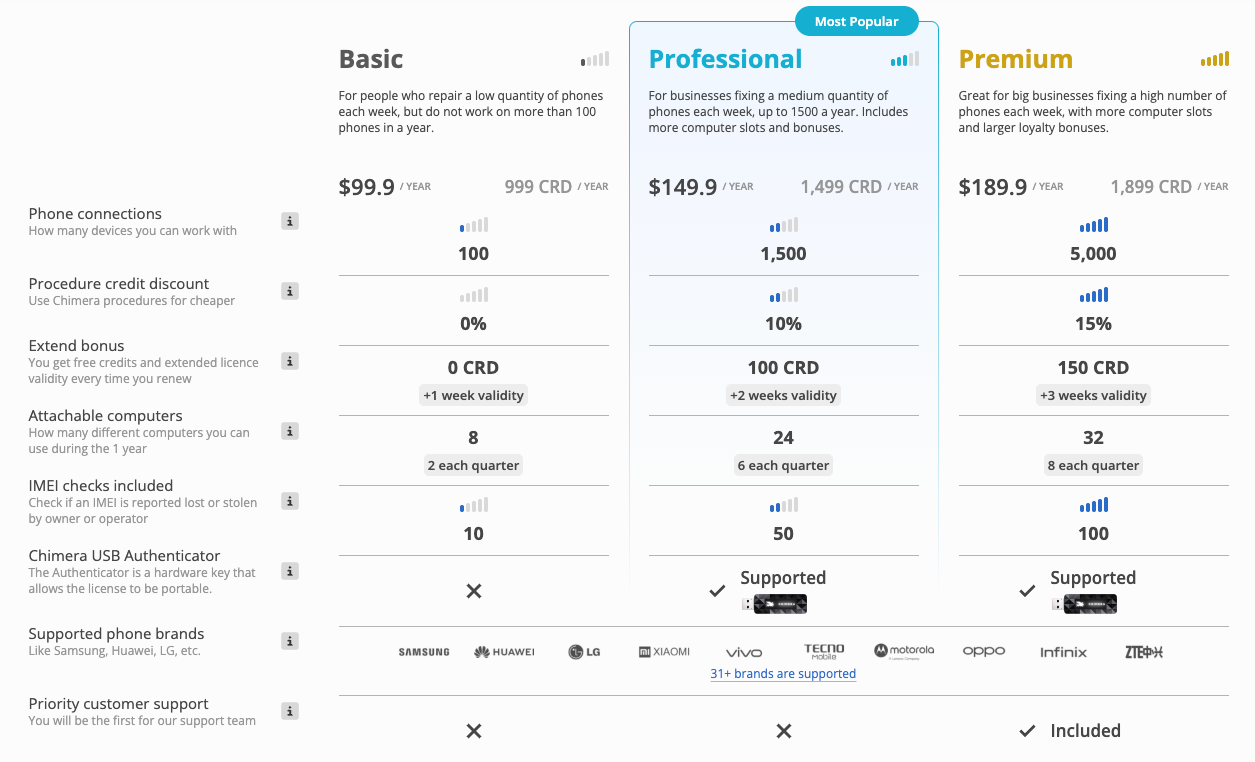
Chimera license plan screenshot from the original article. Confirm current prices and package details on the official shop before purchasing.
Check the official Chimera shop for current license details. Some special procedures or service functions may have separate credit or function-pack requirements, so do not judge the total cost of a repair job from the annual license price alone.
Which Chimera License Should You Choose?
Start with repair volume, not the feature name you saw in a video.
- Choose Basic when you operate at lower volume and the connection allowance matches your expected jobs.
- Choose Professional when the number of serviced devices makes the lower tier restrictive.
- Choose Premium when your repair workload and connection requirements justify the higher-volume plan.
Before paying for any tier, first verify that the exact model and required operation are supported. A larger license does not turn an unsupported procedure into a supported one.
How to Download, Install and Activate Chimera Tool Safely
The safest setup route is straightforward: use the official Chimera account and download pages, install or run the current official client, sign in, configure the license, then verify the model and operation before starting a repair procedure.
Step 1. Create Your Official Chimera Account
Step 1. Go to the official Chimera signup page.
Step 2. Read the current service terms and complete registration using the information required by the official account process.
Step 3. Complete the email verification and password setup steps sent through the official registration flow.
Do not buy an account from an unknown marketplace simply because it is advertised as pre-activated. The official licensing system is designed around registered accounts and professional use.
Step 2. Download Chimera Tool from the Official Source
Step 1. Open the official Chimera download page.
Step 2. Download the current Chimera executable provided there.
Step 3. Save it to a local folder where you can identify the source and version clearly.
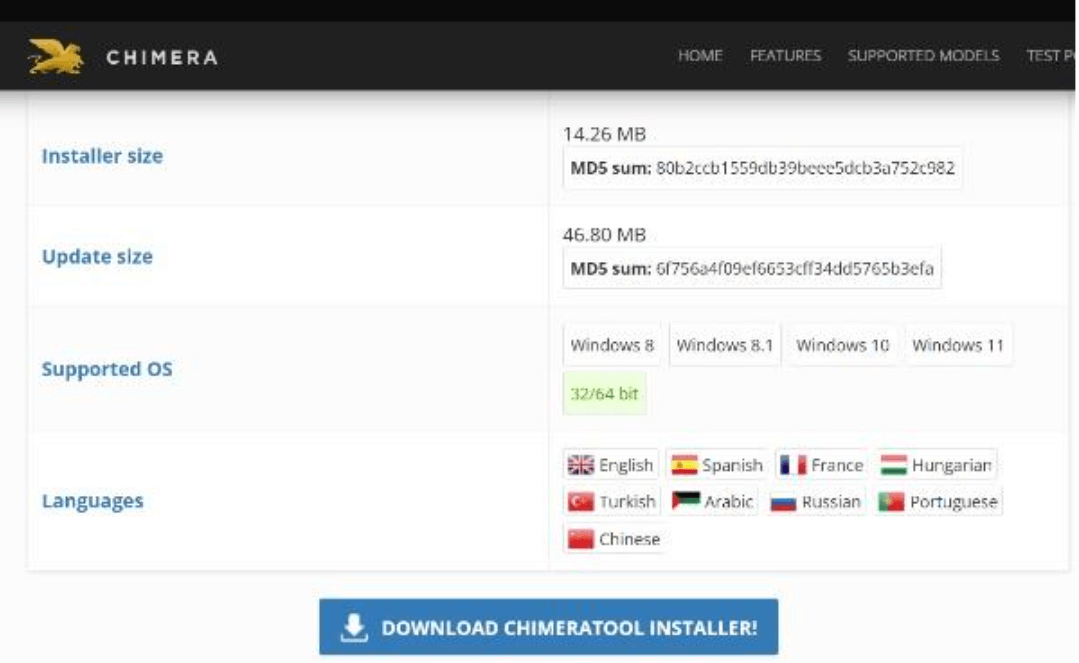
Use the official Chimera download route rather than a crack, APK, or unrelated mirror.
Step 3. Run the Official Setup Process
Step 1. Double-click the official executable and review the Windows UAC prompt.
Step 2. Read and accept the applicable license terms only after confirming that you are using the official download.
Step 3. Follow the current Full Install or Custom Install options shown by the setup process.
Step 4. Allow the official client to complete its setup and update steps before connecting a repair device.
Step 4. Sign In and Confirm License Access
Step 1. Launch Chimera Tool.
Step 2. Sign in with the account created through the official registration flow.
Step 3. Confirm the active license and account status before starting a paid or restricted procedure.
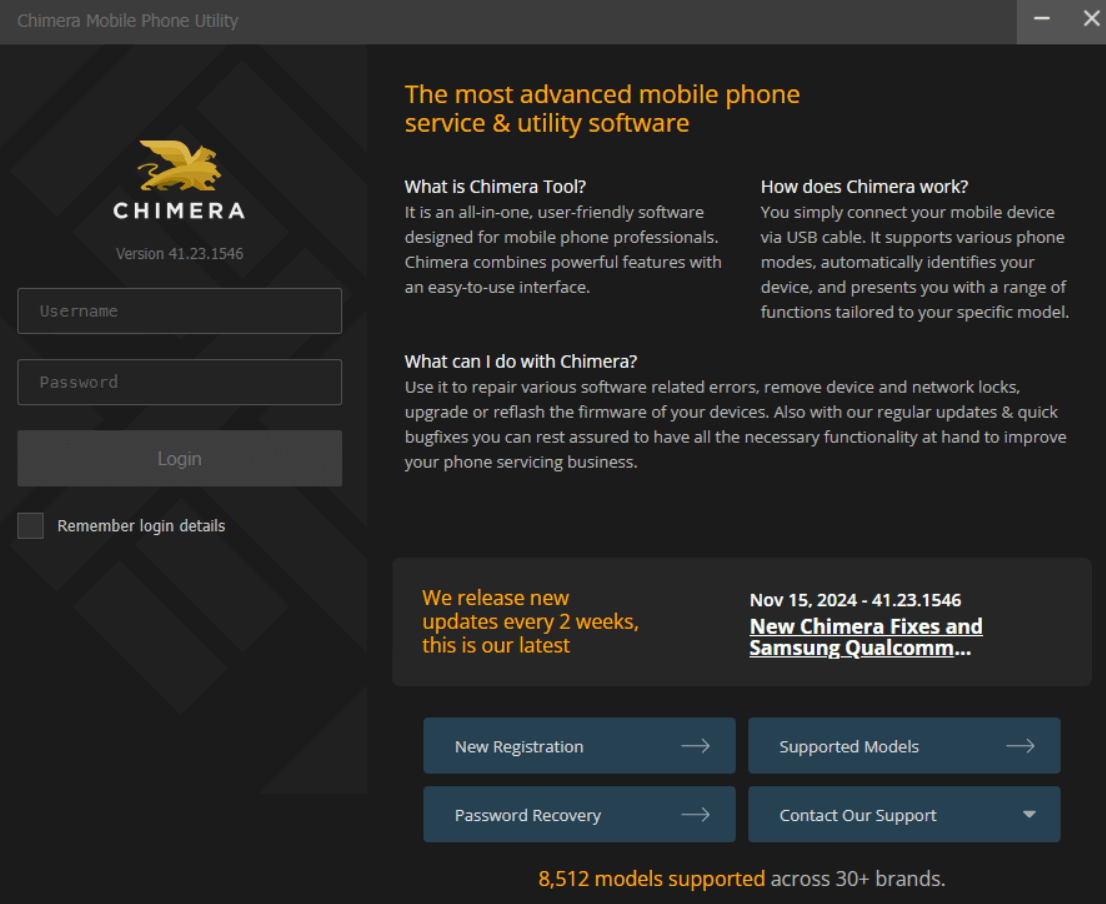
Sign in through the official Chimera account workflow.
Step 5. Use the Built-In Driver Manager
Driver problems are a common reason a servicing tool cannot communicate with a phone. Chimera includes a driver-management workflow for supported brands, so start there instead of immediately installing several unrelated manufacturer suites.
Step 1. Open Chimera settings and locate the driver-management area.
Step 2. Install or update the driver required for the connected brand and procedure.
Step 3. Reconnect the phone using a reliable data cable and direct USB port.
Step 4. Confirm that Windows and Chimera recognize the device in the mode required by the selected procedure.
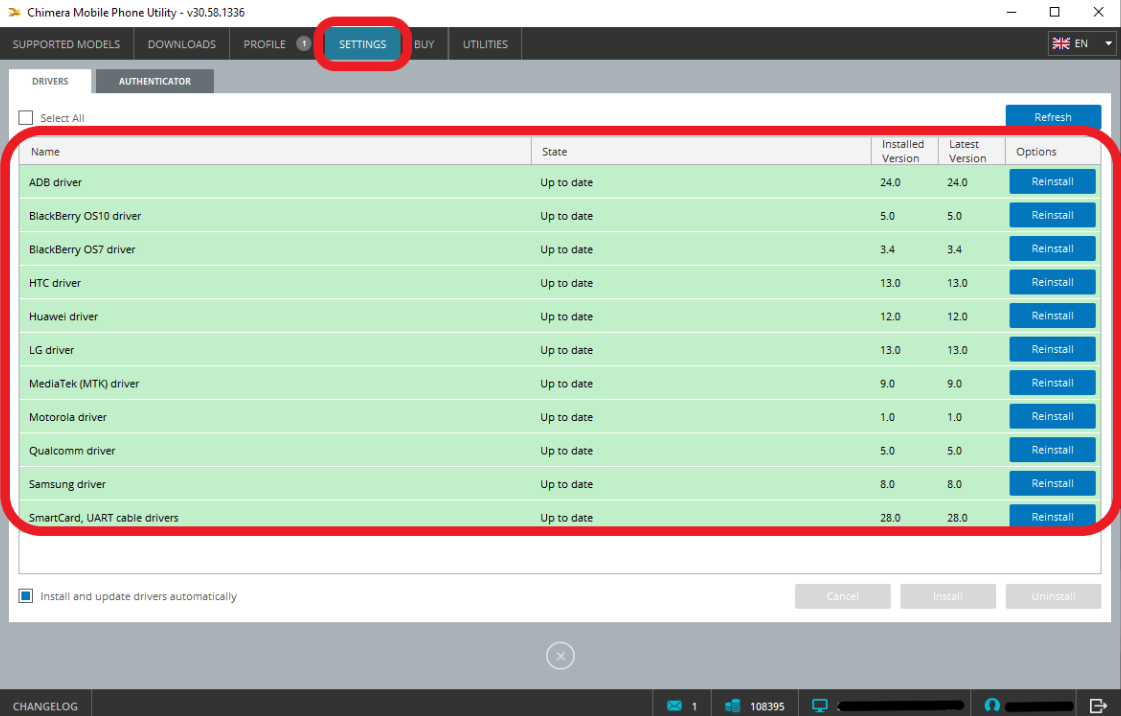
Use the appropriate driver setup before diagnosing a procedure failure.
Step 6. Check the Exact Model Before Running a Procedure
Step 1. Find the complete model code and software information for the repair device.
Step 2. Search that exact model in the official Chimera Supported Models database.
Step 3. Confirm that the specific operation you need is listed for the device.
Step 4. Read the preparation requirements shown for that procedure before proceeding.
Do not assume that support for one operation means every other procedure is available on the same phone.
When Chimera Tool May Not Be the Best Option
Chimera is a professional platform, but that does not make it the right purchase for every person who searches the brand name.
1. You Only Need One FRP Job
A user dealing with a single supported Google verification problem may not need an annual technician platform. Compare the exact phone and available FRP routes before paying for a multi-brand repair environment.
2. You Are Searching Only for a Crack
If the only acceptable result is a patched build that bypasses the account and licensing system, the official Chimera workflow does not match that goal. Do not replace a legitimate download decision with an unknown executable simply because it uses the Chimera name.
3. Your Exact Operation Is Not Listed
A model appearing in the database does not automatically mean that FRP removal, network work, flashing, or another procedure is available for every firmware and security state. Match the operation before starting.
4. You Do Not Need Technician-Level Functions
Advanced repair functions add value when they match real repair work. They add complexity when the user only needs one focused task and does not need a multi-brand service platform.
5. You Cannot Verify the Device or Authorization
Use servicing software only on devices you own or are authorized to repair. Do not proceed when the source, ownership, authorization, or requested procedure cannot be verified.
How to Check Chimera Tool Supported Models and Operations
Chimera maintains an official Supported Models database. Because device support is operation-specific and can change over time, this database should be your first compatibility checkpoint.
Step 1. Find the complete model identifier, not only the retail family name.
Step 2. Open the official Supported Models page.
Step 3. Search the full model code.
Step 4. Review the procedures listed for that exact result.
Step 5. Check any procedure-specific mode, firmware, or preparation requirements before connecting the phone.
Search the exact model and required operation instead of relying only on a brand-level compatibility claim.
Why the Exact Model Code Matters
Two phones sold under a similar commercial name can differ by chipset, region, carrier configuration, bootloader state, or firmware branch. Use the complete identifier shown by the device or servicing information rather than selecting the closest-looking model name.
Why Security and Firmware State Matter
Repair-tool procedures can change when manufacturers release new firmware and security patches. A tutorial published for an older build should not be treated as proof that the same operation is still available for a later security environment.
Check the Operation, Not Only the Model
A model can be supported for device information, firmware work, or backup procedures without necessarily supporting the exact FRP, network, bootloader, or certificate operation you want. Read the model result at procedure level.
Chimera Tool Errors and Fixes
The best troubleshooting path is to identify where the workflow stops: account authentication, client setup, driver detection, device mode, model support, or the procedure itself.
| Error Stage | What to Check First | Avoid |
| Login or authentication failure | Credentials, account status, system time, internet connection, and firewall rules | Downloading a crack because one login attempt failed |
| Phone not detected | Correct driver, cable, USB port, and required connection mode | Running an unrelated procedure on an unidentified device |
| Procedure not available | Exact model, operation list, firmware, and security state | Assuming another model’s method applies |
| Procedure failed | Last log lines, device state, prerequisites, and model-specific documentation | Repeating random procedures without reading the failure point |
| License or PC attachment issue | Account dashboard, active license, registered computer, and official attachment rules | Sharing or buying unknown accounts |
How to Fix Chimera Authentication Failed or Login Errors
Step 1. Confirm that the username and password work on the official Chimera website.
Step 2. Verify that the computer date and time are correct.
Step 3. Check whether the internet connection can reach the official service normally.
Step 4. If firewall or endpoint security is blocking the official Chimera executable, create a narrow rule only after verifying that the executable came from the official download source.
Step 5. Check account and license status before reinstalling the software.
Do not respond to a login problem by downloading a cracked build from an unrelated site. That changes the security and licensing problem instead of diagnosing the authentication failure.
How to Fix Chimera Driver Not Found or Device Not Detected
Step 1. Confirm the exact model and the connection mode required by the procedure.
Step 2. Open the Chimera driver-management settings and install or update the appropriate driver.
Step 3. Use a known-good data cable and a direct USB port instead of a low-quality charging cable or unstable hub.
Step 4. Reconnect the phone using the exact mode required by the procedure.
Step 5. Confirm detection before continuing to a flash, FRP, network, or repair function.
How to Fix a Chimera Procedure Failed Error
Step 1. Stop and read the final log lines before repeating the job.
Step 2. Recheck that the exact model and requested operation are listed as supported.
Step 3. Confirm all preparation steps required by the selected procedure.
Step 4. Check whether the device firmware or security state differs from the documentation you followed.
Step 5. Use the official help or support route with the relevant log information when the cause remains unclear.
Chimera Tool Opens but the Device Procedure Is Missing
A successful login does not mean every procedure is available for every phone. Search the official model database again and confirm the exact operation. If the requested procedure is not listed, changing menus or repeatedly reconnecting the phone will not create support that is not currently available.
A Download Claims to Be “Chimera Tool APK”
Return to the official download page and compare the file source. The official Chimera workflow is desktop-based. Do not install an Android package merely because its filename contains the Chimera brand.
A Crack Package Tells You to Disable Antivirus Permanently
Stop and reevaluate the source. Permanent security exclusions for an unknown patched executable are not a normal substitute for using the official download and account workflow.
Pros and Cons of Using Chimera Tool
| Factor | Advantage | Limitation |
| Professional workflow | One platform for multiple device-service categories | May be excessive for a one-time phone problem |
| Supported-model database | Users can check model and operation-level availability | Support still varies by model, software state, and procedure |
| Official licensing | Clear account, license, update, and support workflow | Annual cost must be justified by repair needs |
| Driver management | Built-in driver workflow reduces manual driver hunting | Detection problems can still require device-mode and cable diagnosis |
| Advanced functions | Useful for professional multi-brand servicing | Requires careful model and procedure matching |
| Crack search demand | Official download path is easy to verify | Unofficial patched copies create security, support, and licensing uncertainty |
Chimera Tool Alternative for a Simpler FRP Job
Chimera and a consumer-oriented FRP application solve different problems. Chimera is relevant when a technician needs a professional multi-brand servicing environment. A guided FRP application becomes more relevant when the user has one supported Android device stuck at Google verification and does not need network servicing, certificate work, firmware operations, or a repair-shop license.
For supported Android devices, DroidKit FRP Bypass provides a guided desktop route with device-specific on-screen instructions.
Consider DroidKit When:
- Your main issue is Google FRP verification rather than general mobile servicing.
- You do not need a professional multi-device repair platform.
- You prefer a guided workflow instead of selecting advanced servicing procedures.
- Your exact Android device route is supported.
Consider Chimera When:
- You work in professional mobile servicing.
- You repair many devices rather than solving one personal phone problem.
- You need model-specific professional procedures beyond FRP alone.
- You have checked the exact model and operation in the official database.
- The license level matches your expected repair volume.
How to Start a Guided FRP Workflow with DroidKit
Step 1. Download and install DroidKit from the official iMobie product page.
Step 2. Open the software and choose the FRP Bypass function.
Step 3. Connect the supported Android device and follow the brand- and device-specific instructions displayed by the software.
Step 4. Keep the device connected until the guided process reports completion.
DroidKit is commercial software. Check the exact device route before purchasing. The reason to choose it over Chimera is not that a consumer tool can replace every technician function; it is that a focused FRP user may not need an annual professional servicing platform.
Frequently Asked Questions About Chimera Tool
Is Chimera Tool free?
Chimera Tool is licensed professional software. The official shop currently lists Basic, Professional, and Premium annual license tiers. Some special operations may also involve separate credit or function-pack considerations, so confirm the current official shop information before purchasing.
Where can I download the official Chimera Tool?
Use the official Chimera download page. Avoid unrelated mirrors, patched archives, and packages that claim to be a Chimera Android APK. The official workflow uses the desktop client and Chimera account system.
Is there an official Chimera Tool crack?
A crack or patched build is not part of the official Chimera distribution and licensing workflow. The official product uses an account, licensed access, updates, supported-model data, and service procedures. Do not treat an unofficial modified executable as equivalent to the official client.
Is Chimera Tool an APK?
No. The official Chimera Tool is a desktop mobile servicing platform. A search for “Chimera Tool download APK” should not be treated as proof that an official Android APK exists.
How much does a Chimera Tool license cost?
The official listings currently show Basic at $99.9 per year, Professional at $149.9 per year, and Premium at $189.9 per year. Prices and package conditions can change, so verify them on the official shop before purchase.
Can Chimera Tool remove FRP?
Chimera provides FRP-related procedures for supported devices. Availability depends on the exact model and operation listed in the current official database. Check the specific device before assuming FRP removal is available.
Why is my phone not showing in Chimera Tool?
Check the exact connection mode, Chimera driver settings, USB cable, USB port, and whether Windows recognizes the device. Solve device detection before diagnosing the selected repair procedure.
Why does Chimera Tool say Procedure Failed?
Read the final log lines, confirm the exact model and operation support, verify procedure prerequisites, and check whether the phone’s software or security state differs from the guide being followed. Do not repeat random repair functions without identifying the failure point.
Does Chimera Tool need a hardware box or dongle?
The official Chimera platform is software-based and does not require a traditional repair box for its normal workflow. Users should still check the current license and account requirements for their professional setup.
Which Chimera license is best?
The answer depends primarily on repair volume and business needs. Compare the device-connection allowances and package conditions, then choose the lowest tier that realistically fits your expected professional workload.
Final Thoughts: Use the Official Chimera Workflow for the Job It Was Built For
For a Chimera Tool download search, the safest path is also the clearest: start with the official download, use the official account and license workflow, verify the exact model and required operation, then solve driver or procedure errors from the real failure point.
A search for Chimera Tool crack or Chimera Tool download APK should not change the basic product facts. Chimera is a professional desktop servicing platform, and its value comes from supported procedures, updates, licensing, logs, model-level compatibility data, and professional repair workflows—not from a renamed archive found on an unrelated download page.
For technicians who regularly service multiple devices, Chimera may justify its license through a broader workflow. For a user with one supported FRP problem, choose a focused route that matches the exact phone instead of buying or downloading more tool than the problem requires.
More Related Articles



Joy Taylor is a seasoned technical writer with over a decade of experience in mobile technology. At iMobie, she specializes in producing in-depth content on iOS data recovery, iPhone unlocking solutions, and iOS troubleshooting.
Product-related questions? Contact Our Support Team to Get Quick Solution >
