Movisur Tool Download: Version, Safety & Samsung FRP Guide
Movisur Tool is a PC utility used for selected Android servicing tasks, including Samsung FRP and ADB operations. This guide checks the current version, Public and VIP features, download source, compatibility limits, safety considerations, and alternatives.
Quick Answer: Movisur Tool is a PC utility used for Android servicing tasks, including selected Samsung FRP and ADB operations. The Movisur Team Channel lists version 3.7.1, released on June 17, 2026, with New UI V2. The release includes both Public and VIP features, so not every Movisur function should be described as free.
The team channel currently links to a MediaFire folder for the Public version. Compatibility depends on the exact phone model, chipset, Android version, security patch, ADB state, and selected function. Use FRP or account-recovery software only on a device you own or are authorized to service.
What Is Movisur Tool?
Movisur Tool is a desktop utility used for Android device servicing. Its available functions have changed across releases and can include FRP operations, ADB fixes, application management, logo repair, and other device-specific tasks. The current release notes should be checked before assuming that a feature is available for a particular phone.
These related terms describe different things:
| Term | Meaning |
|---|---|
| Movisur Team | The team name used by the channel that publishes Movisur release notes, links, and status updates. |
| Movisur Tool | The desktop software package used for supported Android servicing operations. |
| Public version | The downloadable edition with functions marked Public in the current release notes. |
| VIP version | The edition or service tier that includes functions marked VIP and may depend on account or server access. |
Is Movisur Tool a Windows Program or an APK?
Movisur Tool is primarily distributed as a compressed desktop installer, not as a standalone Android APK. Some Movisur functions can install, back up, or manage APK files on a connected phone, which may explain searches for “Movisur Tool APK.” Avoid installing an unrelated Android package that simply uses the Movisur name.
What Is the Latest Movisur Tool Version?
The Movisur Team Channel lists Movisur Tool 3.7.1 , released on June 17, 2026, with New UI V2. Because Movisur is updated frequently, check the release channel again before downloading.
| Release | Date | Selected Changes Listed by Movisur Team |
|---|---|---|
| 3.7.1 | June 17, 2026 | Exynos 2026 FRP removal, unauthorized ADB fix, improved Logo Fix, and a VIP Chimera-port fix. |
| 3.7.0 | May 13, 2026 | Application manager functions for Public and VIP editions, with force uninstall listed as a VIP function. |
Movisur Tool 3.7.1: Public vs. VIP
| Function Listed in 3.7.1 | Public | VIP |
|---|---|---|
| Remove FRP on supported Exynos 2026 scenarios | Listed | Listed |
| Unauthorized ADB fix | Listed | Listed |
| Improved Logo Fix | Listed | Listed |
| Chimera port fix | Not listed | Listed |
A feature appearing in the release notes does not mean it works on every device. Model, chipset, firmware, security patch, connection mode, and server status can still affect the result.
Where to Download Movisur Tool
The Movisur Team Channel currently publishes release notes and links to a MediaFire folder for the Public version . MediaFire is the hosting platform; the team-channel post is the context that identifies the linked folder.
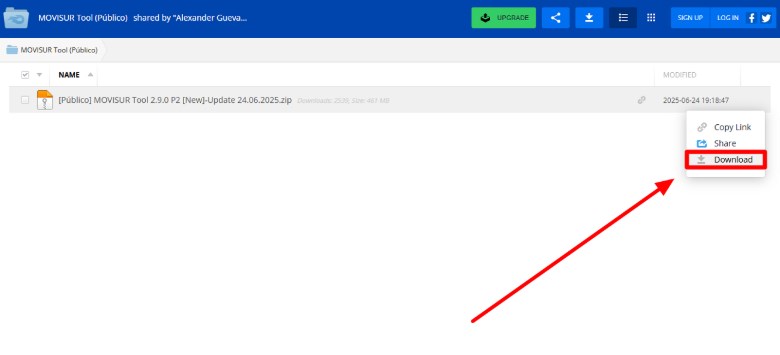
Example of a Movisur download archive page. The current filename may differ.
Before downloading, confirm that the channel post refers to the current release. Avoid search-result ads, shortened links, repackaged archives, and websites that use the filename without showing a connection to the Movisur Team channel.
- Check the version number and release date in the team-channel post.
- Scan the compressed file and installer before running them.
- Review the installer publisher, requested permissions, and included files.
- Do not enter a Google password into an unknown website or installer.
- Do not assume a similarly named APK or archive is the same Movisur release.
The current channel post provides a download folder but does not establish universal compatibility or independently verify every copy hosted elsewhere.
Is Movisur Tool Free?
Movisur has both Public and VIP functions. The channel links to a Public download folder, while individual release notes label some functions as VIP. Therefore, it is more accurate to describe Movisur as having a free Public edition and additional VIP functions—not as a completely free tool.
The exact VIP price, license duration, payment method, and support terms are not confirmed in the provided page source. Review the current Movisur channel information before purchasing access.
Is Movisur Tool Safe?
Safety cannot be confirmed from the filename alone. FRP and servicing utilities are sometimes repackaged or redistributed by unrelated sites, and an old or modified installer may behave differently from the version described in the release notes.
If security software flags the archive or installer, do not disable protection automatically. Confirm the source, scan the file, review the release notes, and proceed only if you understand the warning. When possible, use a separate service computer and back up accessible data before changing device settings.
Ownership Notice: Use Movisur only on a device you own or are expressly authorized to service. Do not use it to access a lost, stolen, or unauthorized device.
Movisur Tool Requirements and Compatibility
Movisur compatibility should be checked by function, not only by phone brand. The 3.7.1 FRP announcement specifically mentions Exynos 2026 scenarios, while other releases list functions for additional devices and brands.
| Requirement | What to Check |
|---|---|
| Computer | A PC environment capable of running the Movisur installer. The current release post does not list complete operating-system requirements. |
| USB connection | A stable data cable, working USB port, and the correct device drivers. |
| Phone model and chipset | Confirm that the selected function supports the exact model and chipset, such as Exynos, MediaTek, or Qualcomm. |
| Android and security patch | A method may fail after a firmware or security update even when the phone model is unchanged. |
| ADB or service mode | The required device mode must be available and authorized for the selected function. |
| Public or VIP access | Confirm whether the chosen operation is available in the Public edition or requires VIP access. |
For background on the connection method, read the ADB FRP bypass guide . If the phone is locked and USB debugging is unavailable, see the limitations explained in enabling USB debugging on a locked phone .
How to Use Movisur Tool on a Supported Device
The exact buttons and preparation steps vary by Movisur version and function. The following is a general workflow for lawful device servicing, not a universal FRP procedure.
Step 1. Open the latest Movisur release post and follow the download folder linked by the Movisur Team Channel.
Step 2. Scan and extract the archive, then install the required device drivers and Movisur software on the service PC.
Step 3. Connect the supported phone with a data-capable USB cable and open the matching Movisur function.
Step 4. Confirm the phone model, chipset, Android version, security patch, and whether the function is Public or VIP.
Step 5. Follow the current on-screen instructions. Do not substitute dialer codes or ADB steps from an older tutorial unless they match the current release and device.
Step 6. Keep the device connected until the operation finishes. If the result is unclear, stop and review the current release notes instead of repeatedly running unrelated functions.
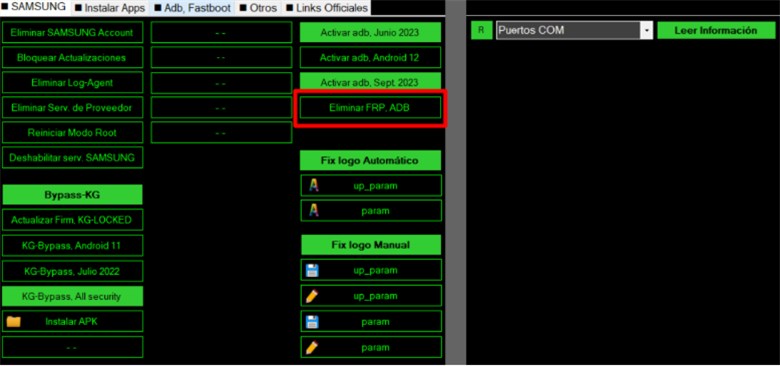
Example of an earlier Movisur interface. Version 3.7.1 uses New UI V2.
Why Movisur Tool Does Not Work
| Problem | Likely Cause | What to Check |
|---|---|---|
| The PC does not detect the phone | Driver, cable, USB port, or connection-mode problem | Reinstall the correct driver, use a data cable, and try another USB port. |
| ADB shows unauthorized | The debugging authorization is unavailable or the selected method does not match the device | Confirm the 3.7.1 ADB fix applies to the exact phone and follow the current instructions. |
| The FRP function is missing | The function may belong to another release, edition, chipset, or VIP tier | Check the Public/VIP labels and current changelog. |
| The operation starts but fails | Model, firmware, chipset, or security patch is not supported | Record the exact model and patch, then compare them with current release notes. |
| A VIP function is unavailable | License, account, or server status may be involved | Check the team channel for maintenance or service-status notices. |
| The interface differs from a tutorial | The tutorial or screenshot may show an older UI | Use the workflow shown in the current New UI V2 release. |
Do not solve a compatibility failure by installing random archives with the same name. That increases the risk of using an outdated or modified copy.
What If Movisur Does Not Support Your Phone?
First try a Google Account that was previously synced to the device, account recovery, previous-owner assistance, or the manufacturer with proof of purchase. The guide to Google account verification after a reset explains the available recovery paths.
If Movisur does not match the device or current security patch, compare other Samsung FRP tools before choosing another method.
Movisur Tool vs. DroidKit
| Item | Movisur Tool | DroidKit |
|---|---|---|
| Main fit | Technical servicing functions that vary by release, edition, chipset, and device | Guided FRP workflow for supported Android devices |
| Free access | Public and VIP functions are listed separately | The free version checks whether a device is matched; completing FRP bypass requires activation |
| Computer support | Distributed as a PC installer; complete current OS requirements need confirmation | Windows and macOS support is documented in the current guide |
| Important limitation | Compatibility and available functions change between releases | Samsung devices with security patches dated August 2023 or later are currently unsupported for FRP bypass |
| Data impact | Depends on the selected operation; back up accessible data when possible | The FRP Bypass process erases data on the device |
If you consider DroidKit, review the current FRP compatibility and instructions before proceeding.
If Movisur Tool does not support your device or security patch, check whether DroidKit supports your exact phone model and Android version . Its FRP Bypass process erases device data, and completing the process requires activation.
FAQs about Movisur Tool
What is the latest version of Movisur Tool?
The Movisur Team Channel lists version 3.7.1, released on June 17, 2026, with New UI V2. Check the channel before downloading because the current version can change.
Is Movisur Tool free?
Movisur includes a Public edition and functions marked VIP. Some operations in version 3.7.1 are listed for both editions, while the Chimera port fix is listed only for VIP. Check each release note instead of assuming every feature is free.
Where can I download Movisur Tool?
The Movisur Team Channel currently links to a MediaFire folder for the Public version. Confirm that the link comes from the release post, scan the archive, and avoid unrelated mirrors or repackaged installers.
Is Movisur Tool an APK?
No. Movisur Tool is primarily a desktop utility distributed as a compressed installer. It can include APK-management functions, but a random Android file labeled “Movisur Tool APK” should not be assumed to be authentic.
Does Movisur Tool work on every Samsung phone?
No. Compatibility depends on the selected function, phone model, chipset, Android version, firmware, security patch, ADB state, and Public or VIP access.
Why does Movisur Tool show ADB unauthorized?
The phone may not have authorized the computer, the required device mode may be unavailable, or the selected workflow may not match the model and patch. Version 3.7.1 lists an unauthorized ADB fix, but that does not guarantee support for every device.
Should I disable antivirus software to install Movisur Tool?
Do not disable security software automatically. Confirm the source, scan the archive, inspect the installer, and review the current release notes before deciding how to handle a warning.
What can I try if Movisur Tool does not support my phone?
Try Google Account recovery, previous-owner assistance, or manufacturer support first. If those options are unavailable, compare other tools and verify compatibility before proceeding. DroidKit may be considered for supported devices, but its FRP process erases device data and requires activation to complete.
Sources Checked
- Movisur Team Channel — version 3.7.1 release date, Public/VIP functions, and Public download-folder link.
- Google Android Help — device protection and ownership verification after a factory reset.
- DroidKit User Guide — supported systems, Samsung patch limitation, data erasure, and free/activated differences.
Conclusion
Movisur Tool is an actively updated desktop utility, but it should not be described as universally free, safe, or compatible. Version 3.7.1 includes both Public and VIP functions, and the result still depends on the selected operation, phone model, chipset, Android version, security patch, ADB state, and service availability.
Use the release channel to verify the current version and download context, and do not disable security software automatically. When Movisur does not support the device, start with account recovery or authorized support, then compare compatible alternatives before running another servicing tool.
More Related Articles



Senior writer of the iMobie team as well as an Apple fan, love to help more users solve various types of iOS & Android-related issues.
Product-related questions? Contact Our Support Team to Get Quick Solution >
