How to Unlock iPhone 14/14 Pro Max From Any Carrier | Updated
This article details how to unlock the carrier lock on your iPhone 14 or 14 Pro Max. We recommend using the AnyUnlock tool, which is simple and fast and can efficiently complete the unlocking process, allowing you to switch carriers freely and enjoy better services.
AnyUnlock – Unlock iPhone 14/14 Pro Max Carrier
Download AnyUnlock – iPhone Password Unlocker for free and unlock the iPhone 14 carrier with one click in just 5 minutes.
How to carrier unlock iPhone 14 Pro Max (no physical SIM)?
Purchased a phone through T-Mobile with T-Mobile as my carrier activation. Paid full price. T-Mobile rep says I need to activate the eSIM on another carrier. I felt so ridiculous about that. Just for the sake of unlocking to activate a new line on another carrier.
You might be in the same situation, and do you have any solutions? If your iPhone 14 is locked to a carrier, your network options are limited — you can’t switch SIM cards freely, use local carriers when abroad, or move to a cheaper data plan. The good news is that unlocking an iPhone 14/14 Pro Max in 2025 is much easier than it used to be. This guide walks you through everything: what carrier unlocking really means, its major benefits, how to unlock using IMEI, free methods, and reliable tools you can use even if you don’t know your passcode.
Part 1. What Does It Mean for an iPhone to Be Unlocked?
When an iPhone is “carrier locked,” it means the device is restricted to one cellular network, such as AT&T, Verizon, T-Mobile, Sprint, or other regional providers. You cannot use SIM cards from other carriers until the phone is officially or technically unlocked.
That’s to say, an unlocked iPhone 14 means:
- It accepts SIM cards from any carrier
- You can use international SIM cards while traveling
- Network settings are no longer limited by the original carrier
- You gain full flexibility to switch data plans anytime
In short, unlocking removes all network restrictions and turns your device into a globally usable iPhone.
Benefits of Unlocking Your iPhone 14/14 Pro Max
Unlocking brings several advantages, which is why many users actively search for “iPhone 14 carrier unlock” or “network unlock iPhone 14 free.” Here are the biggest benefits:
1. Use Any Carrier Worldwide: Travelers can insert local SIM cards and avoid expensive roaming charges.
2. Higher Resale Value: Unlocked iPhones have a significantly higher market value because they can be used globally.
3. Freedom to Switch Plans: You can easily switch between carriers to enjoy cheaper data or better coverage.
4. Better Compatibility: Unlocked devices allow dual-SIM usage, including eSIM activation from different providers.
5. No More Network Restrictions: Carrier-imposed features like tethering limits, VoLTE restrictions, or roaming caps disappear.
If you are sure to unlock the carrier from your iPhone 14/14 Pro Max, you should check if your iPhone is carrier locked.
Part 2. How to Check If Your iPhone 14/14 Pro Max Is Carrier Locked
To check if your iPhone 14 is carrier-locked, you can use the following two simple methods:
1. Check Settings (iOS 14 and above):
Go to Settings > General > About > Find the Carrier Lock status. If it says “No SIM Restrictions”, it means your iPhone is unlocked. If it shows any restrictions, it means your iPhone is carrier-locked.
2. Use online IMEI check:
You can get your iPhone’s IMEI number by dialing *#06# or checking in Settings > General > About.
The above two methods can quickly determine the lock status of your iPhone 14. If your iPhone is carrier locked, you can follow the method below to carrier unlock your iPhone.
Part 3. How to Unlock iPhone 14/14 Pro Max Carrier (Basic Method)
Unlocking your iPhone 14 from a carrier is a process that allows you to freely switch between different network providers, whether you want to travel abroad and avoid high roaming charges or just want to take advantage of a better service plan from another carrier. Unlocking your iPhone 14 will open up endless possibilities for you.
This section will introduce two basic methods to unlock the iPhone 14/14 Pro Max carrier.
Method 1: How to Unlock iPhone 14/14 Pro Max Free Using IMEI Number
Follow the steps below to unlock the iPhone 14 using the IMEI number:
1 Get IMEI number
First, you need to find the IMEI number of your iPhone 14. You can get it in the following ways:
- Open “Settings” > “General” > “About this device” on your iPhone, scroll down to find the IMEI number.
- Dial *#06# and the IMEI number will be displayed on the screen.
- Check the IMEI number on the original packaging box of the device or the purchase invoice.
2. Check the unlocking eligibility
Before contacting the carrier, make sure your iPhone 14 meets the carrier’s unlocking conditions, which usually include:
- The device has been paid in full.
- The device has been activated on the carrier’s network for more than a certain period of time (usually 60-90 days).
- The account has no outstanding balances and is in good condition.
3. Contact the carrier
- Verizon – Most Verizon phones are unlocked. You can call or visit your local Verizon store for details.
- Sprint – Sprint will unlock your phone if it has been active on the Sprint network for at least 50 days, but you will need to meet the following conditions: Meet the lease or purchase conditions/the phone has not been locked by law enforcement or marked for criminal activity/no outstanding payments
- AT&T – AT&T will unlock your phone if it is designed for the AT&T network, is used while making calls, and has not been marked for criminal activity. However, you will need to pay any early termination fees or contract obligations.
- T-Mobile – T-Mobile will unlock your phone if your phone is registered with T-Mobile, the phone has been paid in full, the phone has been on the T-Mobile network for a year (prepaid phones) or 40 days (monthly pay phones), the phone has not been marked for criminal activity, and you have no outstanding payments.
Recommended reading: How to Unlock SIM Card on iPhone for Use a Different/Any Carrier?
4. Provide necessary information
During the unlock application process, you will need to provide relevant information, including the IMEI number. The carrier will use this information to verify the unlock eligibility of the device.
The specific information is as follows:
- IMEI number
- Account holder name
- Account number
- Security password or PIN
- Phone number
- Email address
- Date of purchase
- Device status
- Device current activation status
5. Complete the unlock process
Once the carrier confirms that your device meets the unlock conditions, they will unlock it. After unlocking, the carrier will usually notify you via SMS or email. Depending on the carrier, this process may take a few days.
6. Verify the unlock status
After the unlock is completed, you can test whether the phone has been successfully unlocked by replacing the SIM card of a different carrier. If you can use the new SIM card for calls and data services normally, it means that the unlock was successful.
Method 2: SIM Card Unlock Chip
There are also so-called SIM card unlock chips on the market, which are physical devices installed between your SIM card and the phone to trick the phone into thinking it is not locked to a specific network.
This method does not require you to contact the operator, nor does it involve permanently changing the unlock status of the phone. It can usually be started with a simple installation.
1. Using a SIM card unlock chip may cause an unstable network connection, and some updates may cause this unlocking method to fail.
2. Not all SIM unlock chips are compatible with all phone models. Before purchasing, be sure to confirm that the unlock chip supports your phone model, especially the latest devices like the iPhone 14.
3. Although this method can also unlock your mobile phone operator, please use it with caution due to some negative effects.
Part 3. How to Unlock iPhone 14/14 Pro Max Without Passcodes Easily & Safely
In the previous section, we introduced some common methods to unlock your iPhone 14 carrier. If you have tried these methods and they don’t work for you, don’t worry. In the next section, we will introduce a quick and 100% effective method to unlock your iPhone 14 carrier, ensuring that you can easily switch networks and enjoy the freedom of choosing your preferred carrier.
By following this method, you will save time and avoid the frustration of being locked to a single network. Let’s get into the details and unlock your iPhone 14/14 Pro Max carrier quickly and safely.
Method 3: Unlock iPhone 14 Carrier Using AnyUnlock (One-click Solution)
Does your iPhone show the “SIM Not Supported” screen when you insert the SIM card? Need to use your SIM card abroad, but it’s carrier locked? AnyUnlock can remove SIM card restrictions for you in 5 minutes.
In just 3 simple steps, you can unlock the SIM yourself. No need to contact the carrier or give it to an unverified store. Just enjoy the services of any carrier in the world on your iPhone with confidence.
Main Features:
- Carrier Unlocking: Effortlessly unlocks your iPhone 14/14 Pro Max carrier, allowing you to switch networks freely.
- Advanced Technology: Utilizes cutting-edge algorithms to ensure a high success rate and secure unlocking process.
- User-Friendly Interface: A Simple and intuitive design makes the unlocking process accessible even for non-tech-savvy users.
- Wide Compatibility: Supports all iPhone models and iOS versions, ensuring broad usability.
- High Success Rate: Proven track record with numerous successful unlocks, increasing user trust and satisfaction.
- Comprehensive Features: Besides carrier unlocking, AnyUnlock can also remove iCloud activation lock, Apple ID, screen passcode, and more.
- Regular Updates: Frequently updated to support the latest iOS versions and address any new security measures from Apple.
- 24/7 Customer Support: Dedicated customer service to assist with any issues or queries, ensuring a smooth user experience.
Free Download * 100% Clean & Safe
Step 1. Free download AnyUnlock on your Windows PC or Mac. Click on Remove SIM Lock on the home page.
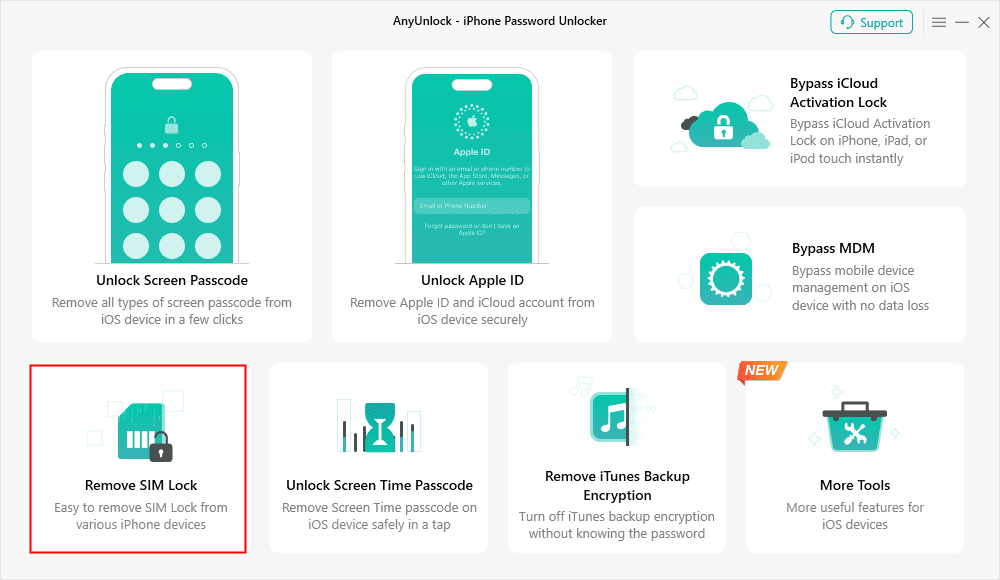
Choose Remove SIM Lock
Step 2. Connect your iPhone to the computer and make sure your iPhone is jailbroken before clicking Remove Now to continue.
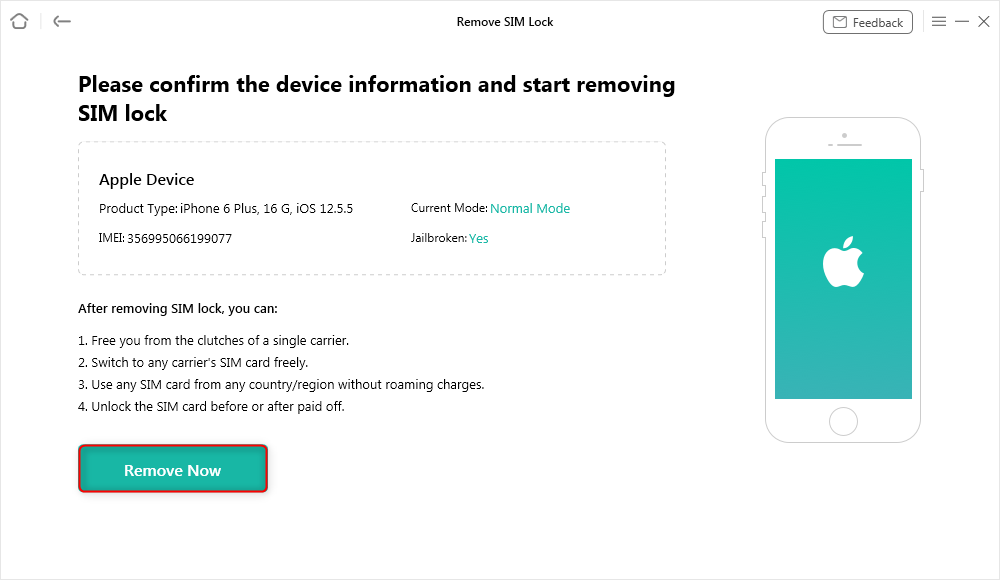
Click Remove Now
Step 3. Follow the on-screen instructions to Forget This Network on your iPhone.
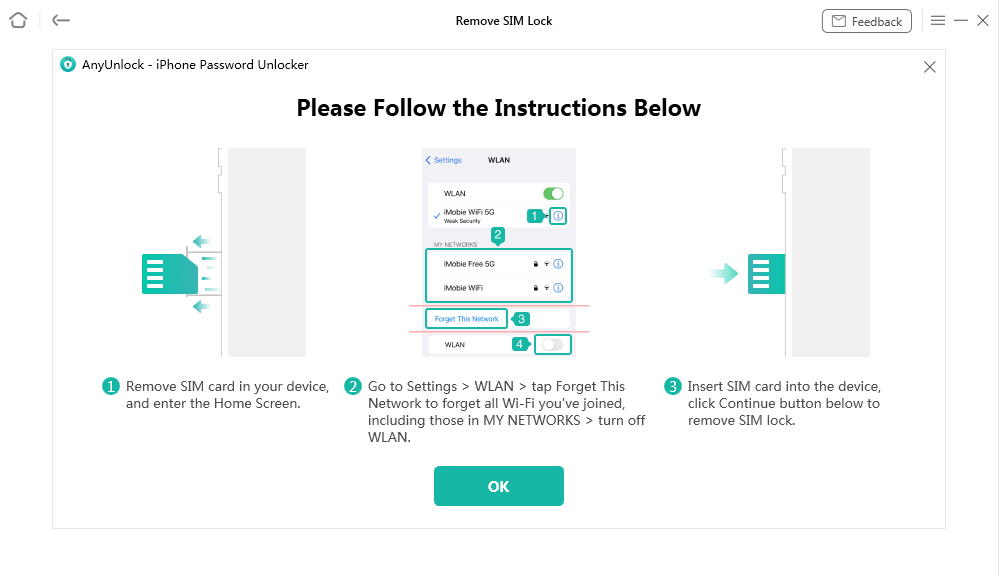
Forgot This Network on iPhone
Step 4. AnyUnlock will start removing the SIM lock as below.
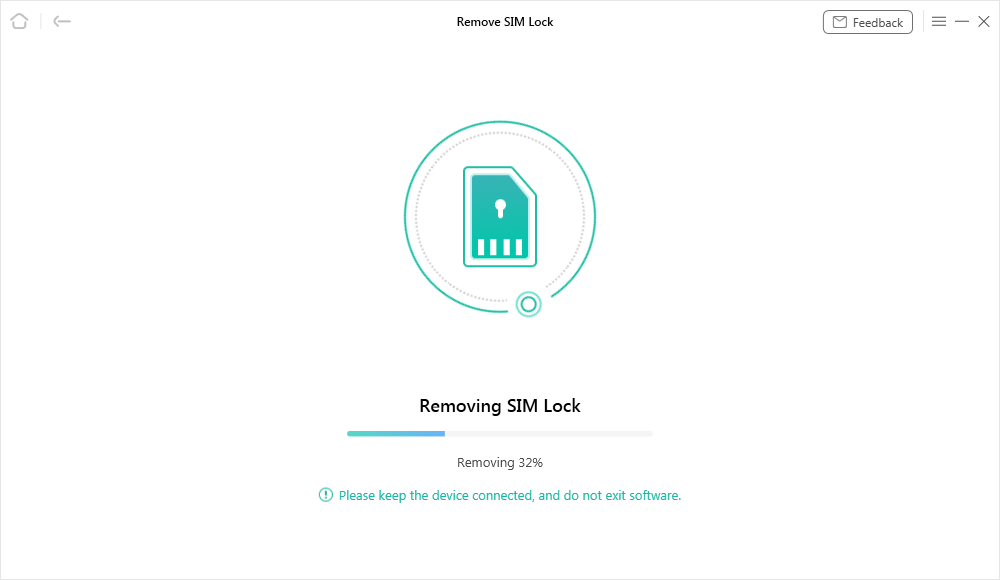
Start Removing
Step 5. Once the SIM lock is unlocked, you will get the success page.
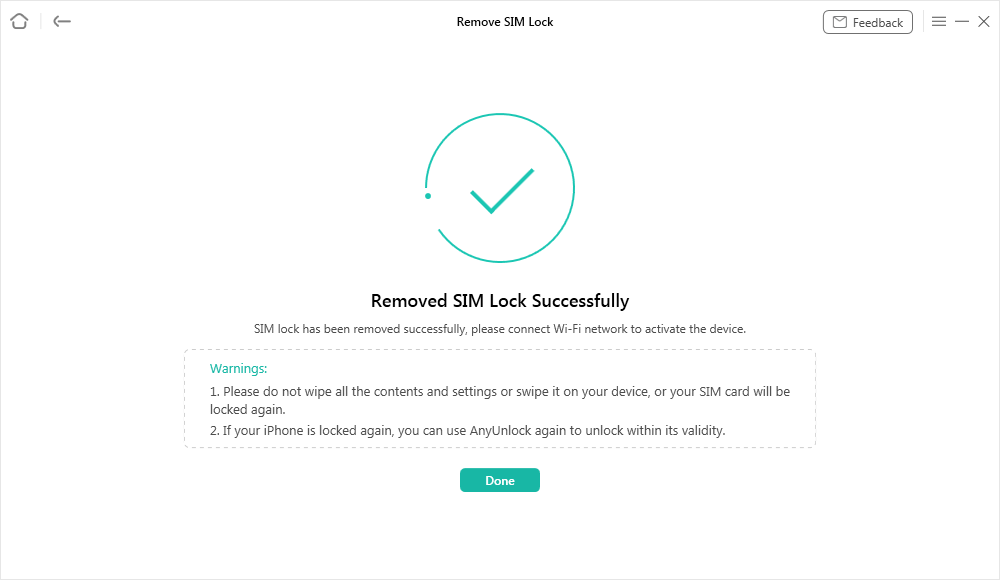
SIM Lock Removed Successfully
Through the previous steps, you have learned how to use AnyUnlock to unlock the carrier lock of iPhone 14 in three minutes.
AnyUnlock not only solves this problem quickly and efficiently, but also has a variety of other functions, such as unlocking Apple ID, bypassing MDM lock, etc. Its advanced technology and algorithms ensure a high success rate and security, so you don’t have to worry about data loss or device damage.
If you are still worried about various iOS device lock problems, AnyUnlock is your best choice. Download and use AnyUnlock now to completely get rid of the restrictions of carrier locks and enjoy a seamless mobile experience.
Free Download * 100% Clean & Safe
FAQs about Unlock iPhone 14/14 Pro Max Carrier
Q1. Can iPhone 14 be carrier unlocked?
Yes, the iPhone 14 can be carrier unlocked either through the carrier or using third-party software like AnyUnlock.
Q2. Can I jailbreak my iPhone to unlock the carrier?
No. Jailbreaking does not unlock the carrier network on modern iPhones. iOS versions after 14 fully block baseband unlock exploits. Your network lock remains even if the device is jailbroken.
Q3. What does 3001#12345# do on iPhone?
Dialing *3001#12345#* opens Field Test Mode, which displays advanced signal and network diagnostics. It does not unlock your iPhone.
Q4. Is IMEI unlock permanent?
Yes. Once your iPhone 14 is IMEI unlocked, it stays unlocked even after updates or resets.
Q5. How do I connect my iPhone 14 to my carrier?
To connect your iPhone 14 to your carrier, insert the carrier’s SIM card into the phone, then follow the on-screen instructions to activate the service.
Q6. Where is the carrier setting on iPhone 14?
The carrier settings on iPhone 14 can be found under “Settings” > “Cellular” > “Cellular Data Options.”
Conclusion
In this guide, we’ve detailed how to remove restrictions through carrier unlocking and third-party services, and we especially recommend using AnyUnlock, a simple and efficient tool. It’s easy to use and unlocks quickly, so you don’t have to wait or worry about complicated unlocking processes. In just a few steps, you can remove restrictions on your iPhone and enjoy free calls and network connections. If you’re looking for a quick and reliable way to unlock your iPhone 14/14 Pro Max Carrier, download AnyUnlock now and start a worry-free mobile experience!
For more information about phone unlocking, please read:
Vital iPhone Data Solutions
iPhone Screen Unlocker
- How to Bypass iPhone Passcode in 6 Ways [2025]
- I Found My Lost iPhone, How Do I Unlock it? (Full Guide)
- iPad Unavailable? Here Are Proven Fixes! [iPadOS 17]
- How to Reset iPhone Passcode without Losing Data [New!]
- [2025] TOP 4 Samsung MDM Remove Tools
- FRP Hijacker Full Guide & Best Alternative to Bypass Samsung FRP 2025
Unock SIM Code
Vital iPhone Data Recovery Tips



Joy Taylor is a seasoned technical writer with over a decade of experience in mobile technology. At iMobie, she specializes in producing in-depth content on iOS data recovery, iPhone unlocking solutions, and iOS troubleshooting.
Product-related questions? Contact Our Support Team to Get Quick Solution >
