GSM Prime Tool Review (2026): Risks, Download Reality & Safer Alternatives
This guide outlines the risks of malware from cracked downloads and common user mistakes. For a safer and more reliable unlocking experience, consider using a trusted, user-friendly solution from a reputable provider.
Whether you’re dealing with a Google account lock after a reset (the dreaded FRP lock), a carrier lock, or simply a forgotten passcode, all you want is to get your device working again. Along the way, you’ve probably come across tools like GSM Prime Tool. But here’s the reality: while GSM Prime Tool is often mentioned in forums and technician communities, there is no official, verified download source, and most versions circulating online come with risks.
In this guide, we’ll walk you through what GSM Prime Tool actually does, whether it’s still reliable in 2026, the real risks behind downloads and activation, and what most everyday users should consider instead.
Quick Answer: Is GSM Prime Tool Safe to Use in 2026?
- There is no official, trusted download source for GSM Prime Tool
- Most versions are loader-based or cracked, often flagged by antivirus tools
- Activation servers may fail or stop working
- The tool is designed for technicians, not casual users
- Success depends heavily on device model, chipset, and Android version
👉 If your goal is to unlock your phone quickly and safely, a guided solution is usually more reliable than using technician tools like GSM Prime Tool.
What is GSM Prime Tool and What Does It Claim to Do?
GSM Prime Tool is a piece of software built for mobile phone technicians and serious hobbyists. Its purpose is to perform low-level operations on Android devices, bypassing the standard security measures you interact with daily.
Think of it as a set of master keys for specific digital locks on your phone. Its most common advertised features include:
- FRP (Factory Reset Protection) Bypass: Removing the Google account lock that activates after a factory reset. This is its most sought-after function.
- Network/SIM Unlock: Removes carrier restrictions, allowing the phone to be used with any SIM card.
- Flashing Firmware: Installing or reinstalling the phone’s operating system (stock ROM). This can be used to fix software bugs, but it’s also where things can go wrong.
- Reading Device Information: Pulling detailed technical info from the phone’s hardware.
These tools were never intended for the average user. They assume a high level of technical knowledge and come with zero safety nets.
Is GSM Prime Tool Still Working in 2026?
In practice, GSM Prime Tool is increasingly unreliable on newer devices.
Here’s why:
- Android security patches (Android 12–16) block many older bypass methods
- Some versions of the tool fail to support newer chipsets or firmware
- Loader-based activation may stop working if servers go offline
- Success rates vary widely depending on the exact device model
👉 This means that even if you manage to run the tool, there’s no guarantee it will work on your device.
Pros and Cons of GSM Prime Tool
✅ Pros
- Supports multiple Android chipsets (MTK, Qualcomm)
- Can perform advanced operations beyond FRP bypass
- Useful for professional repair environments
❌ Cons
- No official or verified download source
- High risk of malware in cracked versions
- Complex setup (drivers, modes, connection steps)
- Activation issues with loader-based systems
- Low success rate on newer Android versions
Can You Download GSM Prime Tool Safely?
There is no single, official website for GSM Prime Tool. It’s a “loader-based” utility, meaning it’s often a repackaged collection of other tools, activated by a separate loader program. This is why finding a safe download is the biggest hurdle.
Recommended Sources for Technicians
- XDA-Developers: The largest and most respected Android development forum. Use the search function to find threads mentioning the tool. Pay close attention to the original poster’s reputation and, more importantly, read the most recent comments to see if users are still having success with it.
- GSM-Forum / Hovatek: These are professional forums dedicated to mobile phone flashing, unlocking, and repair. You’ll find highly technical discussions here, but they are an invaluable source for legitimate tool links and support threads.
Pre-Download Safety Checklist
Before you download anything, you must learn to vet the source. A few minutes of research can save you from hours of frustration or a malware-infected PC.
1. Check the Thread Date & Recent Comments: Is the thread from years ago with no recent activity? It’s probably outdated. Look for active threads where users confirm the tool works on phone models similar to yours, especially within the last few months.
2. Scan Everything: This is non-negotiable. Before extracting or running anything, upload the downloaded ZIP file to an online scanner like VirusTotal. It will check the file against dozens of antivirus engines. If it flags anything malicious, delete the file immediately.
3. Beware of “Password” Files: Many of these tools come in password-protected ZIP or RAR files. The password is often listed in the forum post or a “readme.txt” file. This is a common practice, but it’s also a way for malware to hide from initial scans. Be extra cautious.
👉 In short, there is no truly safe and straightforward way to download GSM Prime Tool.
Step-by-Step GSM Prime Tool FRP Bypass Guide
Once you’ve found and scanned a seemingly safe version, the process generally looks like this. The interface may vary slightly, but the core steps remain consistent.
Step 1: Prepare Your PC
Temporarily disable your Windows antivirus (this is a security risk, but often necessary for these tools to run). Install the required USB drivers for your device: typically MediaTek (MTK) VCOM drivers or Qualcomm HS-USB QDLoader 9008 drivers. A quick search for “[Your Phone Brand] USB Drivers” will find them.
Step 2: Launch GSM Prime Tool
You’ll likely run a “Loader.exe” file as an administrator. This loader authenticates the main program and allows it to open.
Step 3: Select the Appropriate Tab
In the GSM Prime Tool window, navigate to the correct tab. For many modern Android phones, you’ll be working in the MTK UNIVERSAL or QUALCOMM tabs.
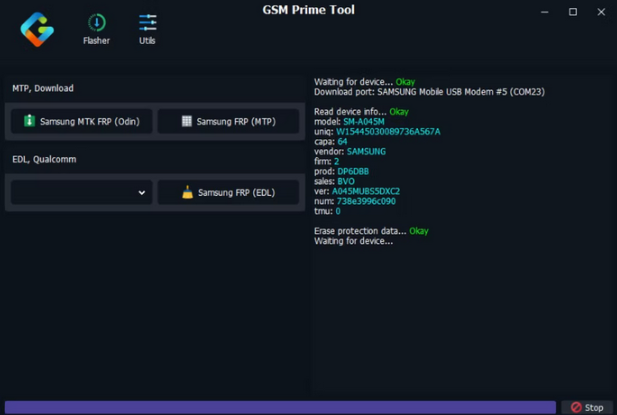
GSM Prime Tool
Step 4: Choose the Operation
Find the service you need. For an FRP lock, you’ll look for a button like “Reset FRP,” “Erase FRP,” or “FRP REMOVE.”
Step 5: Connect Your Device Correctly
This is where most people get stuck. You don’t just plug your phone in.
- For MediaTek (MTK) devices: Turn the phone completely off. Click the “Reset FRP” button in the tool, and then connect the powered-off telephone to the PC while holding the Volume Up + Volume Down buttons. The tool should detect it and begin.
- For Qualcomm devices: You need to enter EDL Mode (Emergency Download Mode). This is more complex and often involves specific button combinations (e.g., holding Vol Up + Vol Down and connecting the cable) or using “test points” on the phone’s motherboard (for advanced users only).
Step 6: Execute and Complete
Once the tool detects your device, a log window will show its progress. Do not unplug the cable or interrupt it. A successful operation usually ends with a “DONE!” or “FRP Reset… OK” message. Your phone will then reboot, free of the lock.
Common GSM Prime Tool Errors & Solutions
Error: “Device Not Detected” or “Waiting for Device…”
- The Problem: This is the #1 issue. The tool is waiting for a signal from your phone, but it isn’t receiving one.
- Solutions:
- Driver Check: Go to your Windows Device Manager. When you connect your phone in the correct mode (e.g., powered off, holding volume keys), you should briefly see “MediaTek PreLoader” or “Qualcomm HS-USB QDLoader 9008” appear under “Ports (COM & LPT).” If you see a yellow exclamation mark or “Unknown Device,” your drivers are incorrect or not correctly installed. Reinstall them.
- Cable & Port Swap: Not all USB cables are created equal. Use a high-quality data cable (not just a charging one). Switch to a different USB port on your computer, preferably a USB 2.0 port directly on the motherboard (the back of a desktop PC).
- Correct Mode: Double-check the required mode for your phone’s chipset. An MTK phone won’t be detected in Fastboot mode for an FRP reset, and vice versa.
Error: “Operation Failed” or “Bypass Failed”
- The Problem: The tool started, but couldn’t complete the task.
- Solutions:
- Unsupported Model/Patch: The GSM Prime tool’s latest version you have might not support your phone’s specific model or its latest Android security patch. This is a common dead end with free tools.
- Wrong Method: You might be using an “Old Method” reset on a “New Method” device. If the tool offers multiple FRP reset options, try a different one.
- Unstable Connection: A loose cable or faulty USB port can interrupt the data transfer and cause a failure. Restart the entire process from scratch, ensuring a solid connection.
Error: “Activation Failed” or “Loader Not Working”
- The Problem: The tool itself won’t even open.
- Solution: This is a core risk of loader-based software. The authentication server for the GSM Prime tool activation might be permanently offline, or the loader is simply outdated and blocked. Often, the only fix is to go back to the forums and search for a newer, working version.
Who Should Use GSM Prime Tool — and Who Should Avoid It
Suitable for:
- Mobile repair technicians
- Advanced users familiar with flashing tools
- Users working with older Android versions
Not suitable for:
- First-time users trying to bypass FRP
- Users without technical experience
- Anyone who simply wants quick access to their phone
👉 If your goal is to regain access to your phone quickly, rather than experiment with technician tools, a more guided solution is usually the better choice.
A Safer and Easier Alternative for Most Users
For everyday users who need to access their phone today without wrestling with drivers, test modes, and malware-laced files, there is a far better way: DroidKit by iMobie.
Here’s a more realistic look at how DroidKit compares to the experience of using GSM Prime Tool:
| Feature | GSM Prime Tool (Real-World Experience) | DroidKit |
| User-Friendliness | Designed for technicians; requires deep technical knowledge. | Designed for general users with clear, illustrated, step-by-step guides. |
| Safety & Security | High risk of malware from “cracked” versions found online. | 100% secure, verified, and clean software from an official source. |
| Cost | “Free” cracks (malware risk) or paid activation from untrusted resellers. | Paid software with transparent, upfront pricing and a money-back guarantee. |
| Customer Support | None. You rely on unverified forum posts. | 24/7 Professional Support Team |
| Installation | Complex multi-step process involving drivers, forums, and activation. | Simple, guided, one-click installation. |
| Device Bricking Risk | High. A wrong file or an interrupted connection can be catastrophic. | Low. The software includes safety checks. |
| Success Rate | Unpredictable. Depends on your skill, the tool’s version, and your phone’s patch level. | High, with customized solutions per device and Android OS. |
Instead of experimenting with different tool versions, DroidKit focuses on guiding users through the process with clear, device-specific instructions.
How to Use DroidKit for a Fast and Secure FRP Bypass
Ready to get your phone unlocked the right way? DroidKit makes the process straightforward and removes the guesswork. It creates a custom solution for your specific device model and Android version, ensuring the highest possible success rate.
Step 1: Download and Install DroidKit
First, download the official DroidKit software onto your Mac or Windows computer. The installation is clean and straightforward—no hidden extras. Launch the program once it’s ready.
Step 2: Select FRP Bypass and Connect Your Device
From the main menu, select the FRP Bypass mode. Take a moment to read the on-screen information, which clearly explains what the tool will do. Click Start. Now, connect your locked Android phone to the computer with a high-quality USB cable.
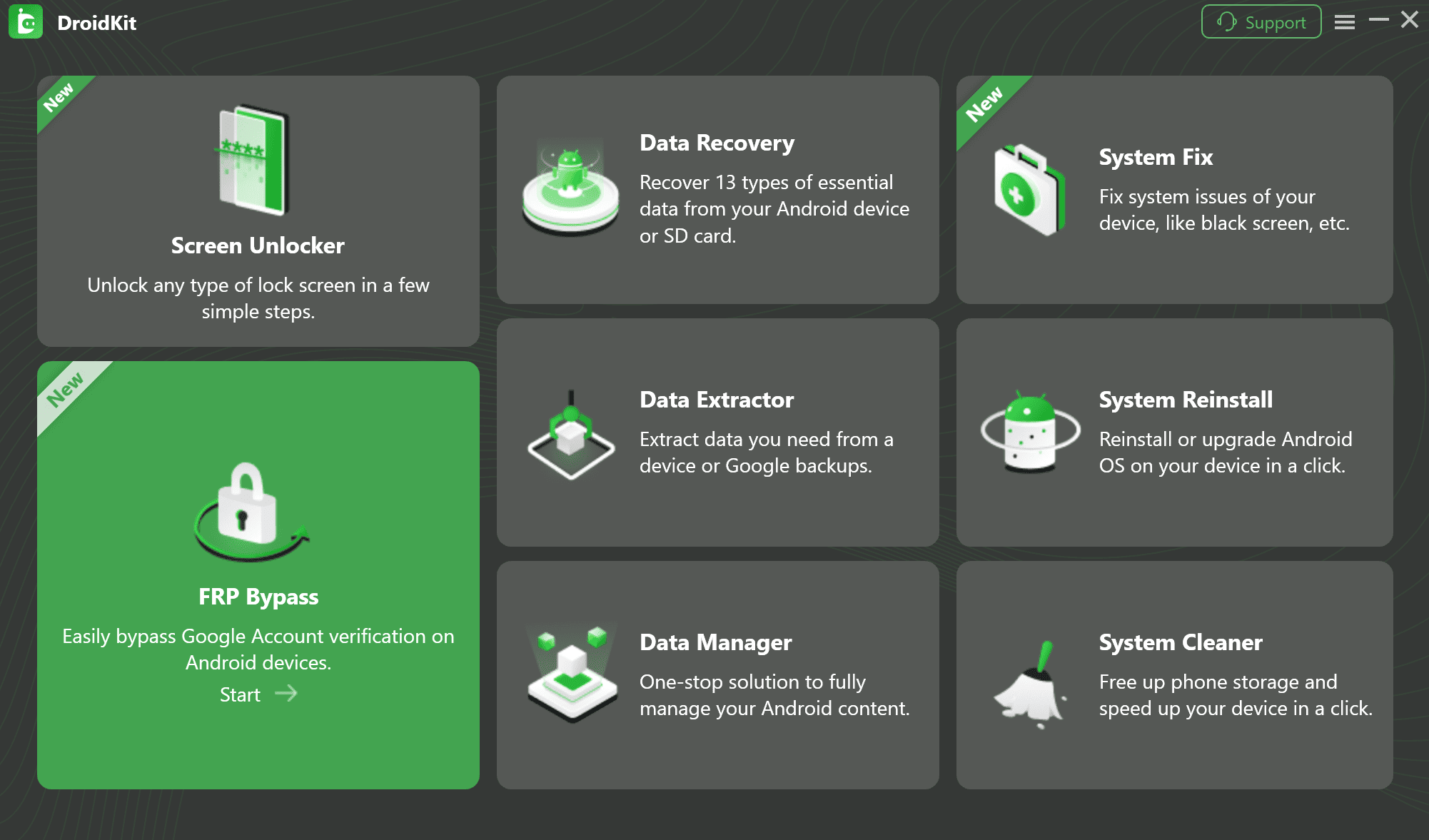
Select FRP Bypass Function
Step 3: Follow the Guided On-Screen Instructions
This is where DroidKit shines. After launching, a window will appear prompting you to choose your device brand. Once selected, DroidKit begins preparing a secure configuration file tailored to your phone. It then guides you—with clear text and illustrations—through each step specific to your device. You don’t have to guess which buttons to press; it tells you exactly what to do. I know this part can sometimes feel technical, but the on-screen instructions make it feel like an expert is right there with you.
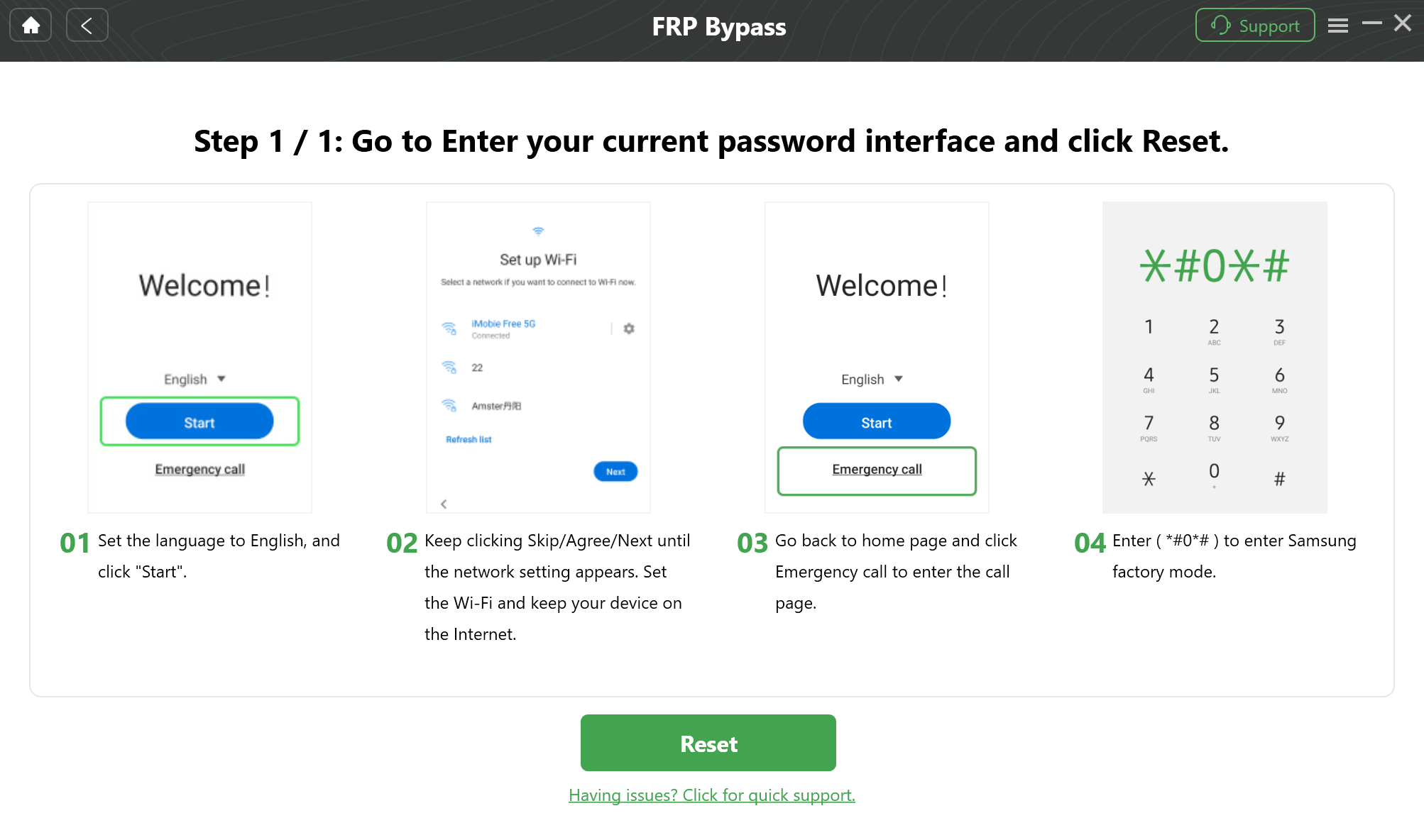
Follow the Guided On-Screen Instructions
Step 4: Complete the Bypass and Restart
The tool will handle the complex part of the bypass. Once the process is complete, the FRP lock will be gone. Your phone will restart, and you’ll be able to set it up like a new device, without needing to enter your previous Google account.
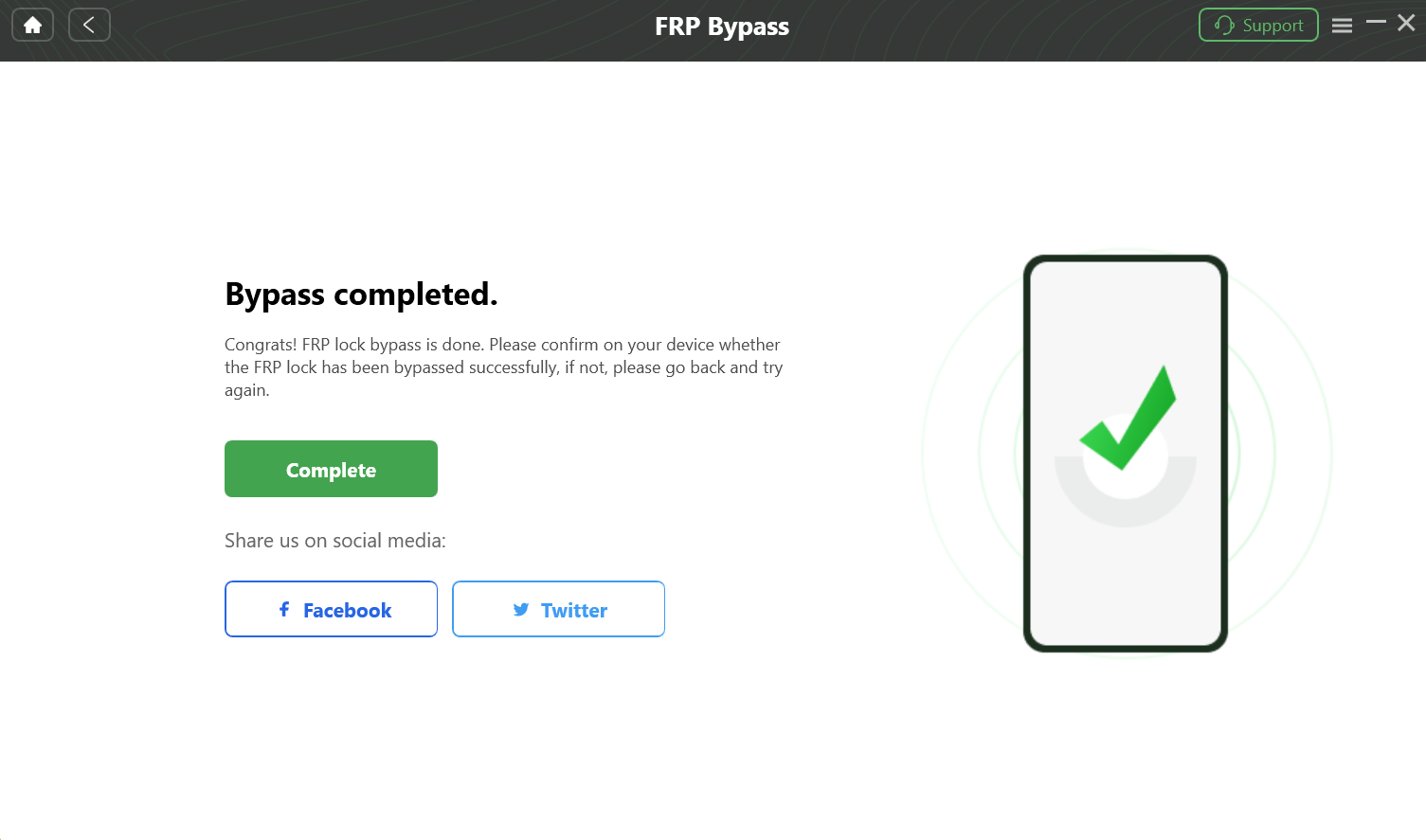
Complete the Bypass and Restart
Frequently Asked Questions (FAQ)
Q: Is there an official GSM Prime Tool download?
A: No. GSM Prime Tool does not have an official website or verified download source. Most versions are distributed through forums and carry potential risks.
Q: Is it legal to use GSM Prime Tool?
A: Legality depends on your location and how you use it. Unlocking a phone that you own is generally legal. However, using these tools on a stolen device or for other malicious purposes is illegal. Safety-wise, cracked versions are never safe.
Q: How do I download and activate GSM Prime Tool safely?
A: Frankly, there is no truly “safe” and easy way. Avoiding cracked versions is essential to protect yourself from malware. The “official” path is complex, requiring you to buy activation keys from unvetted online resellers with no guarantee of success or support. For guaranteed safety and simplicity, a verified tool like DroidKit is the recommended path.
Conclusion: Choose the Right Path to Unlock Your Device
Navigating the world of the GSM Prime Tool is a journey for the technically brave. Although it offers a free solution to your problem, this path is fraught with unreliable downloads, malware risks, and complex procedures that carry no guarantee of success. You can easily waste hours troubleshooting errors only to end up right where you started.
Stop struggling with the uncertainty and risk. Download DroidKit and try to unlock your device with confidence in just a few clicks. It’s the simple, powerful, and efficient solution you’ve been searching for.
More Related Articles



Joy Taylor is a seasoned technical writer with over a decade of experience in mobile technology. At iMobie, she specializes in producing in-depth content on iOS data recovery, iPhone unlocking solutions, and iOS troubleshooting.
Product-related questions? Contact Our Support Team to Get Quick Solution >
