AAvengers Tool v1.8 Download: Features, Risks & FRP Alternative
Avengers Tool v1.8 is a Windows-based Android servicing utility often searched for FRP reset, MTK/SPD device repair, flashing, and unlock-related tasks. This guide explains what Avengers Tool is, download safety risks, MTK/SPD compatibility, how the FRP workflow works, why the tool may fail, and when a guided FRP solution like DroidKit is a safer option.
Avengers Tool v1.8 is a Windows-based Android servicing utility often searched by users who need FRP reset, MTK/SPD device servicing, firmware flashing, or other repair-related functions. It is also connected with the older Avengers Box ecosystem, which was originally used by mobile repair technicians.
However, many Avengers Tool v1.8 downloads online are shared as loader, cracked, or unofficial packages. That means users should be careful before downloading or running any executable file. This guide explains what Avengers Tool is, what it can do, download safety risks, MTK and SPD compatibility, how the FRP workflow usually works, why the tool may fail, and when a guided alternative like DroidKit may be a safer option for supported FRP scenarios.
Use FRP or unlock-related tools only on a device you own or are authorized to repair. If you are not sure what Google FRP means, read this Factory Reset Protection explanation first. To compare more Android FRP utilities, see this Android FRP tool guide.
Quick Answer: Should You Download Avengers Tool v1.8?
You can consider Avengers Tool v1.8 only if you are an advanced user or technician, you understand MTK/SPD drivers, you have a Windows PC, and you accept the risks of running an unofficial tool package. It is not recommended for beginners who only want a simple FRP bypass process.
| Your Situation | Should You Try Avengers Tool? | Recommended Next Step |
| You are a technician working with MTK or SPD devices | Possible, but use caution. | Verify chipset, drivers, and file safety before running the tool. |
| You only need to remove Google FRP from your own phone | Usually not the easiest option. | Compare guided FRP tools before testing cracked utilities. |
| The download asks you to disable antivirus | High risk. | Do not run the file unless you fully understand and accept the risk. |
| Your phone is a newer Android model | Uncertain or low success. | Check whether your Android version and security patch are supported. |
| You do not own or service the device legally | Do not continue. | Use account recovery or ask the owner to remove the account. |
What Is Avengers Tool?
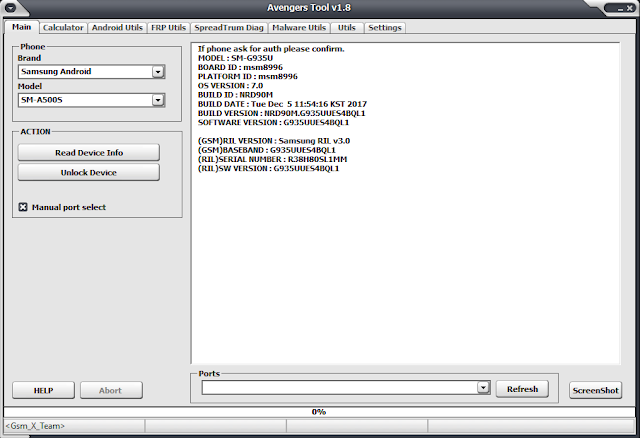
Avengers Tool v1.8 is a standalone Android servicing utility used for selected repair tasks such as FRP reset, screen lock servicing, firmware flashing, chipset operations, and other technician-level workflows. It is often associated with MediaTek and Spreadtrum/Unisoc devices, which are common in many budget and mid-range Android phones.
The original Avengers ecosystem included Avengers Box, a hardware-based tool used by repair professionals. Avengers Tool v1.8 is widely searched as a software utility, but many online packages are described as loader or cracked versions. Because of that, download source and file safety are major concerns.
Important: Some Avengers Tool features, such as IMEI-related repair or network unlock functions, may be regulated or restricted in some regions. Do not modify device identifiers, network settings, or ownership-related locks unless you are legally authorized and understand local rules.
Main Features of Avengers Tool v1.8
Avengers Tool v1.8 is searched because it combines multiple repair functions in one Windows utility. The exact available functions depend on the package, chipset, device model, and driver setup.
| Feature | What It Does | Risk / Limitation |
| FRP reset | Attempts to remove Google account verification on supported devices. | May fail on newer Android versions or patched security builds. |
| MTK support | Works with some MediaTek-based phones through MTK drivers and boot modes. | Wrong drivers or unsupported chipsets can cause detection failure. |
| SPD / Unisoc support | Works with selected Spreadtrum or Unisoc devices. | Requires correct SPD drivers and connection mode. |
| Firmware flashing | May help flash or service firmware on supported devices. | Wrong firmware can cause boot issues or data loss. |
| Screen lock servicing | May offer lock-related options on supported models. | Data loss and compatibility risks may apply. |
| Technician functions | Includes low-level servicing features for advanced users. | Not suitable for beginners or unauthorized use. |
If your main goal is only FRP removal, compare safer tool options in this best FRP bypass tool guide before running advanced servicing software.
Is Avengers Tool v1.8 Safe and Legal to Use?
Avengers Tool v1.8 should be treated as a high-risk download. Many available packages are shared through third-party file hosts, and some guides ask users to disable antivirus protection before running the tool. That can expose your computer to malware, spyware, ransomware, or modified executables.
Legally, the tool itself is only appropriate when used for legitimate repair or recovery on a device you own or are authorized to service. It should not be used to access someone else’s phone, Google account, network lock, or device data.
| Safety Check | Why It Matters | Recommended Action |
| Download source | Unofficial mirrors can repackage EXE files. | Use only sources you trust and avoid forced installers. |
| Antivirus warning | Disabling protection can expose your PC to serious risk. | Do not run a file that your security tools flag as dangerous. |
| File scan | Cracked tools may contain hidden payloads. | Scan ZIP, RAR, and EXE files before extracting or opening them. |
| Device ownership | FRP protects the previous owner’s Google account. | Continue only if the device is yours or authorized for repair. |
| Regulated functions | IMEI and network-related changes may be restricted. | Avoid sensitive operations unless you are legally authorized. |
Supported Chipsets, Devices, and Limitations
Avengers Tool v1.8 is mainly associated with MTK and SPD/Unisoc devices. Compatibility depends more on the chipset and security patch than on the phone brand alone.
| Device / Chipset Type | Possible Support | What to Check First |
| MediaTek Android phones | May work through MTK boot and driver modes. | Install correct MTK VCOM or USB drivers. |
| Spreadtrum / Unisoc phones | May work through SPD drivers and connection mode. | Confirm SPD driver and model support. |
| Samsung, Huawei, OPPO, Vivo, Tecno, Infinix, and similar brands | Possible only if chipset and security patch are supported. | Do not assume support by brand name alone. |
| Newer Android versions | Often unreliable. | Security patches may block old FRP or servicing routes. |
| Mac users | Not suitable. | Avengers Tool is Windows-based; use a Windows PC or a Mac-compatible option. |
For MediaTek-specific FRP context, you can also review this MTK FRP tool review. If your problem is that all tools keep failing, this FRP bypass not working guide may help you diagnose the cause.
How to Download and Use Avengers Tool v1.8
Using Avengers Tool v1.8 requires caution because most packages are distributed outside official app stores. Do not treat this as a beginner-friendly one-click tool. The steps below explain the general workflow and safety checks, not a guarantee that the method will work on every phone.
Before You Download Avengers Tool v1.8
- Use a Windows PC.
- Prepare a stable USB data cable.
- Know whether your device is MTK or SPD/Unisoc.
- Install the correct USB drivers for your chipset.
- Back up anything available before servicing the device.
- Scan the downloaded archive before extracting it.
- Do not continue if the download source looks suspicious or the file is heavily flagged.
The original article referenced this third-party download page: Avengers Tool v1.8 download source. Since this is not an iMobie-hosted file, verify the package carefully before running it.
General FRP Reset Workflow with Avengers Tool v1.8
Step 1. Extract the Avengers Tool v1.8 package only after scanning the downloaded file. Open the extracted folder and locate the executable file, such as Avengers_Tool_v1.8.exe.
Step 2. Run the tool as administrator on your Windows PC if required.
Step 3. Select the chipset tab that matches your phone, such as MTK for MediaTek devices or SPD for Spreadtrum/Unisoc devices.
Step 4. Power off your Android device completely. In Avengers Tool, choose the FRP-related option, such as Reset FRP, only if your device and chipset are supported.
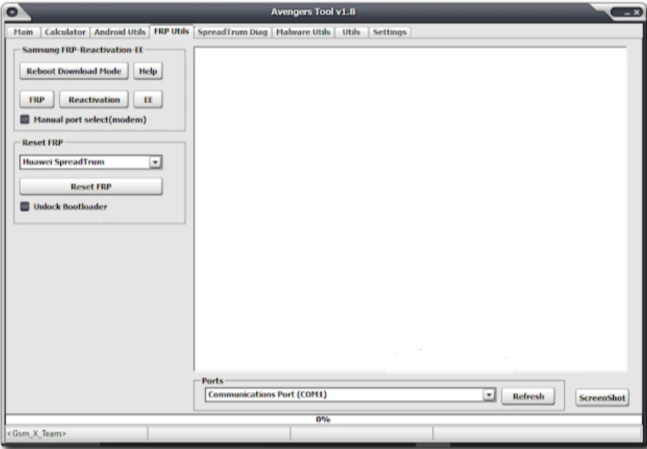
Step 5. Connect the powered-off device to the PC with a USB cable. Some MTK devices may require holding Volume Up or Volume Down while connecting.
Step 6. Wait for the tool to detect the device. If the log window shows progress, do not disconnect the phone until the process finishes.
Step 7. Restart the device and check whether the Google verification screen still appears. If FRP remains, the tool may not support your model or security patch.
Important: Do not repeatedly try random boot modes or files if the tool fails. Wrong settings can cause connection errors, data loss, or device instability.
Avengers Tool Not Working: Common Fixes
Avengers Tool v1.8 may fail because of driver conflicts, unsupported chipsets, unstable cracked packages, security software blocks, wrong boot modes, or newer Android security patches. Use the table below before downloading another copy.
| Problem | Possible Cause | What to Try |
| Tool does not open or crashes | Corrupted package, missing runtime, security block, or unstable loader. | Scan the file, reinstall Microsoft .NET and Visual C++ runtimes, and avoid unsafe copies. |
| Device not detected | Wrong USB driver, bad cable, wrong chipset tab, or wrong connection mode. | Install correct MTK or SPD drivers, try another USB port, and confirm chipset first. |
| Operation fails midway | Unsupported model, wrong method, unstable connection, or patched security level. | Stop and verify model, chipset, and Android version before trying again. |
| Antivirus blocks the file | The executable may be modified, cracked, or unsafe. | Do not disable protection unless you fully understand the risk. |
| FRP still appears after reboot | The FRP reset route is unsupported or blocked by security patch. | Use a supported FRP method or guided tool instead. |
| Wrong chipset selected | Using MTK mode on SPD device or SPD mode on MTK device. | Check exact model specs and select the correct chipset tab. |
Avengers Tool vs DroidKit
Avengers Tool and DroidKit serve different users. Avengers Tool is closer to a technician utility for MTK/SPD servicing. DroidKit is a guided Android toolkit for users who want clearer FRP steps on supported devices without handling cracked packages, chipset tabs, or driver-heavy workflows.
| Feature | Avengers Tool v1.8 | DroidKit |
| Best for | Advanced users or technicians working with MTK/SPD devices. | Users who want guided FRP steps on supported Android devices. |
| Download source | Often third-party file hosts or unofficial packages. | Official iMobie software page. |
| Ease of use | Technical and driver-dependent. | Guided workflow with on-screen instructions. |
| System support | Windows only. | Windows and Mac. |
| Main risk | Cracked files, malware risk, driver issues, unsupported models. | Requires supported device scenario and computer access. |
| Best fallback scenario | Technician-level chipset servicing. | FRP lock recovery when manual/free tools fail. |
Best Guided Alternative When Avengers Tool Fails
If Avengers Tool does not open, your antivirus blocks it, the phone is not detected, or the FRP reset fails, DroidKit can be a safer guided alternative for supported Android FRP scenarios. It is especially useful when you want official software access and step-by-step instructions instead of testing risky cracked tools.
DroidKit is suitable when:
- You want a guided FRP bypass workflow.
- You are not comfortable with MTK/SPD drivers and boot modes.
- You prefer official software instead of third-party loader packages.
- You need Windows or Mac support.
- Avengers Tool crashes, fails to detect the phone, or does not remove FRP.
Free Download * 100% Clean & Safe
How to Use DroidKit for Android FRP Bypass
Step 1. Download and install DroidKit on your Windows or Mac computer.
Step 2. Launch the software and select FRP Bypass mode from the home screen.
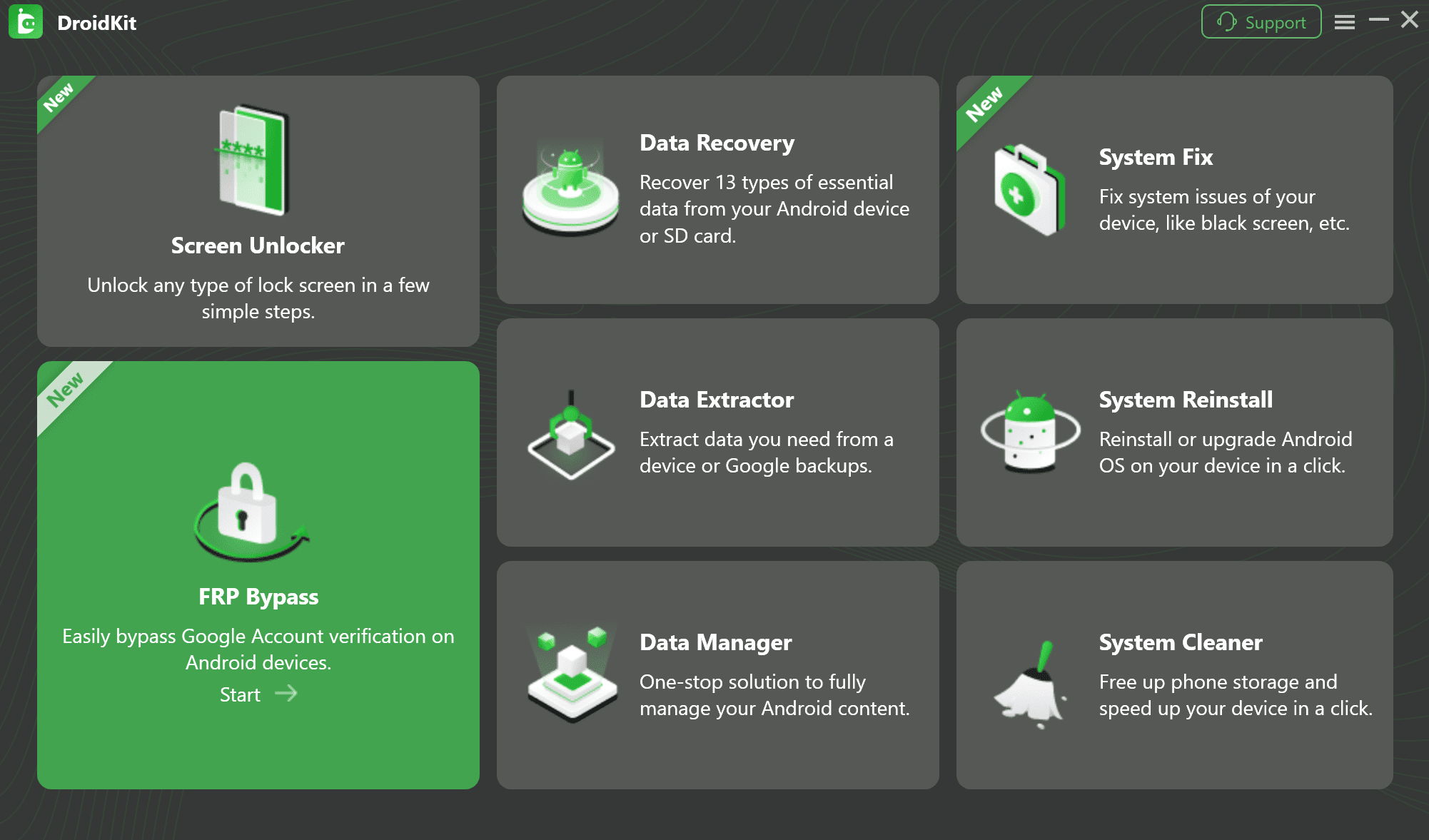
Step 3. Connect your locked Android device to the computer with a USB cable and click Start.
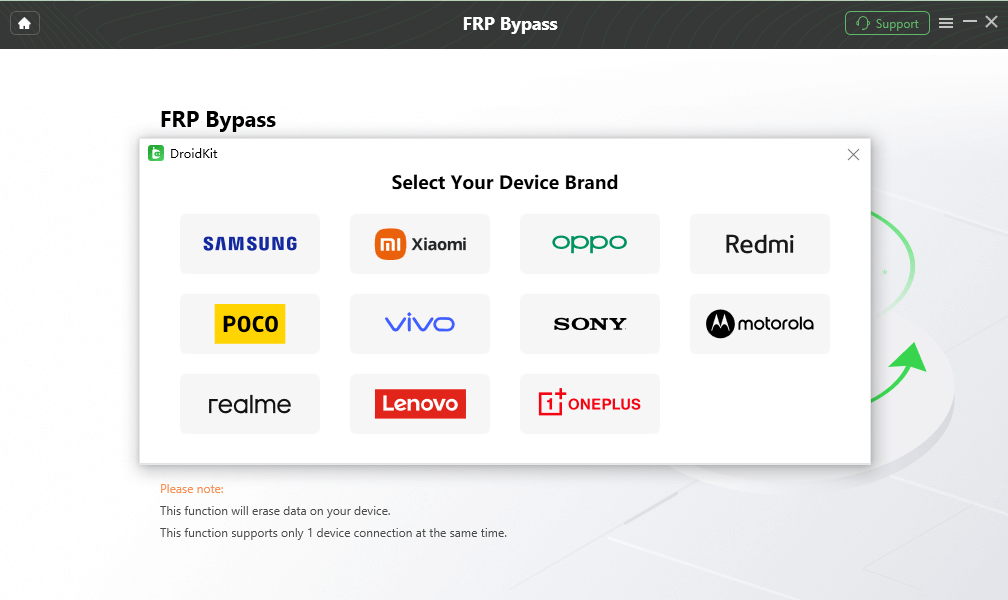
Step 4. Choose the correct device brand. Follow the on-screen instructions to put your device into the required mode and confirm the system version when prompted.
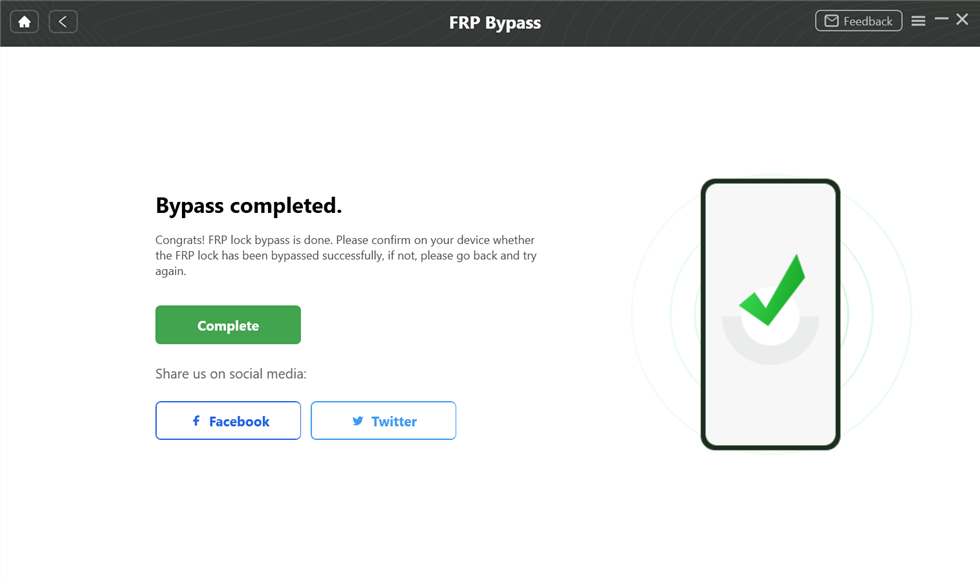
Step 5. Wait for DroidKit to complete the FRP workflow. Do not disconnect the device during the process.
FAQs About Avengers Tool
Q1. Is Avengers Tool v1.8 free to use?
Many Avengers Tool v1.8 packages online are described as free loader or cracked versions. That is exactly why users should be cautious. Free does not always mean safe, stable, or legal to use in every scenario.
Q2. Is Avengers Tool safe?
It is high risk if downloaded from unknown sources or if it requires disabling antivirus protection. Always scan files before opening them and avoid suspicious installers, repacked EXE files, or archives from untrusted pages.
Q3. What devices does Avengers Tool support?
Avengers Tool v1.8 is mainly associated with Android devices using MediaTek and Spreadtrum/Unisoc chipsets. Support still depends on the exact model, driver setup, Android version, and security patch.
Q4. Does Avengers Tool work on Mac?
No. Avengers Tool v1.8 is a Windows-based utility. Mac users need a Windows environment or a Mac-compatible guided FRP option.
Q5. Why is Avengers Tool not detecting my phone?
The most common reasons are wrong chipset selection, missing MTK/SPD drivers, a bad USB cable, wrong boot mode, or unsupported device firmware.
Q6. Can Avengers Tool bypass FRP on all Android phones?
No. No FRP tool works on every Android phone. Avengers Tool depends heavily on chipset, model, Android version, and patch level.
Q7. Is it legal to use Avengers Tool?
It should only be used for legitimate repair or recovery on a device you own or are authorized to service. Do not use it to access someone else’s device, account, or data.
Q8. What is the best Avengers Tool alternative?
DroidKit is a practical alternative for users who want a guided FRP bypass workflow, official software access, and Windows or Mac support on supported Android devices.
Conclusion
Avengers Tool v1.8 can be useful for advanced users and technicians working with selected MTK or SPD Android devices. However, because many packages online are loader or cracked versions, the risks are significant: unsafe downloads, antivirus warnings, driver problems, unsupported devices, and failed FRP reset attempts.
If you understand MTK/SPD servicing and accept the risks, you can evaluate Avengers Tool carefully. If you only need a guided FRP solution on a supported device, DroidKit is a safer and more practical next step than repeatedly testing unofficial cracked tools.
Free Download * 100% Clean & Safe
More Related Articles


Roger Smith is a senior technical writer with years of experience in providing Android solutions. He loves to help users solve various problems such as Android unlock, Android data recovery, and Android system repair.
Product-related questions? Contact Our Support Team to Get Quick Solution >
