MTK Auth Bypass Tool Download & FRP Bypass Guide 2026
MTK Auth Bypass Tool can help advanced users and repair technicians work with MediaTek devices, but download source, drivers, chipset support, and Android security patches all matter. This guide explains safe use boundaries, download requirements, supported devices, installation steps, FRP bypass workflow, common failure fixes, and a guided DroidKit alternative when MTK tools fail.
MTK Auth Bypass Tool is a Windows-based utility used in some MediaTek servicing workflows. It can help advanced users and repair technicians handle MTK authentication-related tasks, including certain FRP servicing scenarios on supported devices. However, this type of tool is not a universal Android unlock solution. Its result depends on the download source, MediaTek USB drivers, chipset support, Android version, and security patch level.
This guide explains whether you should use MTK Auth Bypass Tool, what it does, how to download and install it more safely, which devices may be supported, how to use it for MTK FRP bypass, what to do when it fails, and when a guided alternative such as DroidKit may be a better choice. Only use FRP or unlock tools on a device you own or have explicit permission to service.
Quick Answer: Should You Use MTK Auth Bypass Tool?
You can consider MTK Auth Bypass Tool if your locked Android phone uses a supported MediaTek chipset, you have a Windows PC, and you are comfortable installing MTK USB drivers, LibUSB drivers, and running a third-party executable file. It is better suited for technicians or advanced users who already understand MTK device modes and chipset selection.
You should be more careful if you are a beginner, cannot verify the download source, do not know your device chipset, or your phone runs a newer Android security patch. In those cases, start by understanding the FRP situation first and compare safer PC-based options in this Android FRP tool guide.
| Use MTK Auth Bypass Tool If | Avoid or Reconsider If | Better Next Step |
| You own the device, it uses a supported MediaTek chipset, and you can install drivers on Windows. | You are not sure whether the device is yours to unlock or repair. | Do not continue unless you have authorization. |
| You can verify the file source and scan the package before running it. | The download site forces unknown installers, pop-ups, or suspicious EXE files. | Use another source or compare safer FRP tools first. |
| You understand MTK chipset/SOC selection and USB detection modes. | The phone is not detected, the chipset is missing, or the method fails repeatedly. | Check the troubleshooting section or try a guided solution. |
What Is MTK Auth Bypass Tool?
MTK Auth Bypass Tool is a utility designed for MediaTek-powered Android devices. Some MediaTek devices require authentication before certain flashing, formatting, or servicing operations can continue. MTK Auth Bypass Tool helps bypass that authentication step on supported chipsets so that compatible servicing tools can communicate with the phone.
In FRP-related scenarios, the tool may be used as part of a workflow to handle Google account verification after a factory reset on certain MTK devices. If your issue is broader than one MTK tool, you may also review this Android FRP bypass guide to understand different routes by brand, Android version, and method type.
Key features of MTK Auth Bypass Tool:
- Helps bypass MediaTek authentication checks on supported chipsets.
- Can be used in some MTK FRP, firmware flashing, and repair workflows.
- Runs on Windows and works through a USB connection.
- Requires MediaTek USB drivers and may require LibUSB Win32 driver.
- Better suited for users who understand drivers, chipsets, and repair modes.
| Item | Details | Important Note |
| Main purpose | Bypass MTK authentication in supported servicing workflows. | It is not a universal unlock tool for every Android phone. |
| Common use case | MTK authentication bypass, some FRP servicing workflows, and firmware-related operations. | Exact function depends on the version and device support. |
| Best for | Technicians, repair professionals, and advanced users. | Beginners may find chipset and driver steps difficult. |
| System requirement | Windows PC, USB cable, MTK drivers, LibUSB driver, and administrator access. | It is generally not available as a native Mac tool. |
Is MTK Auth Bypass Tool Safe and Legal to Use?
MTK Auth Bypass Tool itself should be treated as a high-caution utility because it is often shared through third-party download sources. The main safety risk usually comes from modified packages, repacked EXE files, forced installers, or outdated tool versions. Always scan the file before extracting or running it, and do not continue if the download source looks suspicious.
Legally and ethically, FRP is designed to protect a device after a factory reset. You should only use MTK Auth Bypass Tool, MTK Meta Utility Tool, DroidKit, or any other FRP-related tool on a device you own or a device you are authorized to repair. Do not use these tools to access someone else’s phone or data.
| Safety / Legal Check | Why It Matters | Recommended Action |
| Device ownership | FRP protects the previous owner’s Google account and data. | Continue only if the device is yours or you have explicit repair authorization. |
| Download source | Unofficial mirrors may include unwanted files or modified executables. | Use a trusted source and avoid forced installers or suspicious pop-ups. |
| File scan | Third-party packages may be repacked without clear notice. | Scan the compressed file and extracted executable before running it. |
| Tool limitation | Older MTK methods may fail on newer security patches. | Do not repeat failed operations without checking the reason. |
MTK Auth Bypass Tool Download Requirements
Before downloading MTK Auth Bypass Tool, prepare the required computer environment and confirm that your phone is likely to be supported. Most failed attempts happen because the Windows drivers are missing, the USB cable is unstable, or the phone’s chipset/security patch is not compatible with the tool version.
Requirements for MTK Auth Bypass Tool:
- Windows computer: MTK Auth Bypass Tool is usually used on Windows PCs.
- MediaTek USB drivers: Your computer must detect the phone correctly in the required MTK mode.
- LibUSB Win32 driver: Some versions require LibUSB for stable communication between the tool and device.
- USB cable: Use a reliable original or high-quality USB cable.
- Administrator access: You may need admin permission to install drivers and run the tool.
- Supported MediaTek chipset: Compatibility depends on the device chipset and tool version.
- Verified download package: Scan the file before running any executable.
The original article used this third-party download page: MTK Auth Bypass Tool download. Because this is not an iMobie-hosted file, verify the package carefully before running it. If you do not want to rely on third-party mirrors, compare more options in this best FRP bypass tools comparison.
Supported Devices, Chipsets, and Limitations
MTK Auth Bypass Tool is chipset-based, not brand-based. This means a phone from Samsung, Xiaomi, Redmi, OPPO, Vivo, Tecno, Infinix, Lenovo, Motorola, Realme, or another Android brand may or may not be supported depending on whether it uses a compatible MediaTek chipset and whether the tool version supports that device’s security level.
Do not assume that every MediaTek phone is supported. Newer Android versions, updated boot security, or recent security patches can block older MTK authentication or FRP workflows. If your chipset is not listed in the tool interface, do not randomly choose another chipset option.
| Compatibility Factor | What It Means | Risk / Limitation |
| MediaTek chipset | The phone must use a supported MTK SOC. | Unsupported chipsets may not be detected or may fail during bypass. |
| Android version | Older Android versions may be easier for some tools to handle. | Newer versions can block outdated methods. |
| Security patch | Security updates may close previously working bypass routes. | A method that worked before may stop working after an update. |
| USB driver status | The computer must recognize the device in the correct mode. | Missing or broken drivers are a common reason for failure. |
| Tool version | Different versions may support different chipsets. | Old versions may not support newer devices. |
How to Install MTK Auth Bypass Tool on Windows
After confirming the requirements, you can install MTK Auth Bypass Tool on your Windows computer. The exact file name may vary by version, but the general setup process is similar.
Step 1. Download the MTK Auth Bypass Tool package from a source you trust.
Step 2. Scan the compressed file with security software before extracting it. If the file name, size, or contents look different from the source description, do not continue.
Step 3. Extract the package to a folder on your Windows computer.
Step 4. Open the extracted folder and find the executable file, such as MTKbypassv4.exe.
Step 5. Install the required MediaTek USB drivers. If your computer cannot detect the phone, reinstall the driver or try another USB port.
Step 6. Install the LibUSB Win32 driver if the tool or device detection requires it.
Step 7. Run MTK Auth Bypass Tool as administrator when required. Then reconnect your phone with a reliable USB cable.
Step 8. Confirm that the tool can detect your device before starting any bypass or servicing action.
How to Use MTK Auth Bypass Tool for FRP Bypass
Once the tool, USB drivers, and LibUSB driver are ready, you can try the MTK FRP workflow on a supported MediaTek phone. The interface may vary by version, so always follow the notes included with the package you downloaded.
Step 1. Power off your MediaTek phone and connect it to your Windows computer with a USB cable.
Step 2. Open MTK Auth Bypass Tool on your PC. Wait for the program to detect the connected device.
Step 3. Select your device chipset or SOC from the tool interface. Only choose the chipset when you are sure it matches your phone.
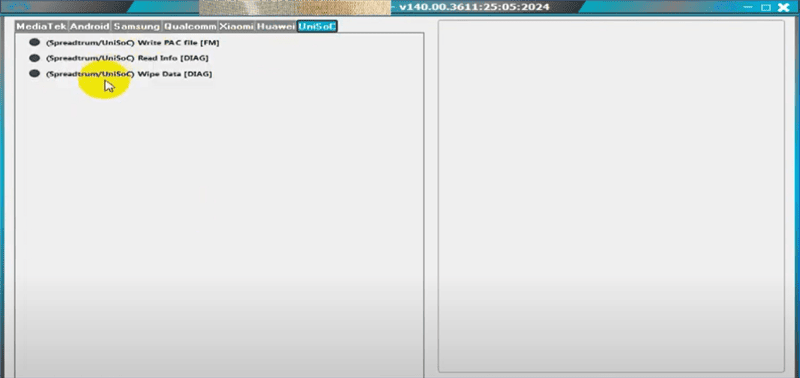
Step 4. Click Bypass in the tool. If a confirmation window appears, confirm the operation.
Step 5. Wait until the process finishes. Do not unplug the device while the tool is working.
Step 6. If the tool reports success, continue with the required FRP servicing step for your device scenario. If the phone is still stuck at Google verification, check whether a separate FRP erase or setup step is required.
Important: Do not repeat the same failed operation many times. If the phone is not detected, the chipset is missing, or the security patch blocks the method, use the troubleshooting section below before trying another tool.
MTK Auth Bypass Tool Not Working: Common Fixes
MTK Auth Bypass Tool may fail because of driver problems, unsupported chipsets, unstable USB connections, security software blocks, or newer Android security patches. Use the table below to identify the likely reason before switching tools.
| Problem | Possible Cause | What to Try |
| Device not detected | Missing MTK USB driver, wrong connection mode, or unstable cable. | Reinstall MediaTek drivers, use another USB port, and reconnect the phone while powered off. |
| LibUSB error | LibUSB driver was not installed correctly. | Reinstall LibUSB Win32 driver and run the tool as administrator. |
| Chipset not listed | Your MediaTek SOC may not be supported by the tool version. | Do not choose a random chipset. Find a compatible version or use another method. |
| Bypass button does nothing | The tool may be blocked by permissions, security software, or unsupported patch level. | Verify the file source, check Windows permissions, and avoid unsafe modified versions. |
| FRP still appears after reset | The authentication step may have worked, but the FRP workflow was incomplete. | Check whether your device needs a separate FRP erase or setup step after authentication bypass. |
| Method fails after Android update | New security patches may block older MTK methods. | Review updated FRP methods or use a guided PC-based solution. |
If your issue is not limited to this tool and FRP methods keep failing, see this FRP bypass not working guide. If your phone is stuck at the Google verification screen after a factory reset, this Google account verification after reset guide may help you choose the right next step.
MTK Auth Bypass Tool vs MTK Meta Utility vs DroidKit
MTK Auth Bypass Tool, MTK Meta Utility Tool, and DroidKit solve different user needs. MTK Auth Bypass Tool is more technical and chipset-focused. MTK Meta Utility Tool is often used in broader servicing workflows, including some Samsung MTK scenarios. DroidKit is designed for users who want a more guided FRP workflow with official software access.
| Tool | Best For | Main Strength | Main Limitation |
| MTK Auth Bypass Tool | Advanced users handling supported MediaTek devices. | Useful for MTK authentication-related servicing workflows. | Third-party download risk, Windows-only workflow, and limited chipset support. |
| MTK Meta Utility Tool | Technicians working with selected MTK and Samsung MTK servicing tasks. | Offers more utility functions for certain repair scenarios. | Compatibility depends on model, chipset, and tool version. |
| DroidKit | Users who want guided FRP steps, official software, and a clearer workflow. | Provides on-screen instructions and supports multiple Android utility features. | Requires a Windows or Mac computer and a supported device scenario. |
How to Use MTK Meta Utility Tool for Samsung MTK FRP
Some Samsung devices use MediaTek chipsets, so users may also look for MTK Meta Utility Tool when dealing with Samsung MTK FRP scenarios. The exact steps depend on the model and tool version.
Step 1. Download and install the MTK Meta Utility Tool version that matches your device scenario.
Step 2. Connect your Samsung MTK device to the Windows computer with a USB cable. Enter Preloader Mode if the tool requires it.
Step 3. Open the tool and look for the FRP-related function.
Step 4. Choose the Samsung FRP erase option only if your device model and chipset are supported.
Step 5. Wait for the process to finish and restart the device. If it fails, check compatibility instead of repeating the same operation.
Best Guided Alternative When MTK Tools Fail
MTK Auth Bypass Tool and MTK Meta Utility Tool can be helpful, but they are not always beginner-friendly. They may require manual driver setup, chipset knowledge, third-party downloads, and troubleshooting when the phone is not detected. If the tool fails, the download source is questionable, or the device security patch blocks older methods, DroidKit can be a more guided alternative for supported Android devices.
DroidKit is suitable for users who prefer official software, on-screen instructions, and a PC-based workflow. It also includes other Android utility features, such as Android screen lock removal, system repair, data recovery, and device management tools.
Free Download * 100% Clean & Safe
Steps to Use DroidKit for FRP Bypass
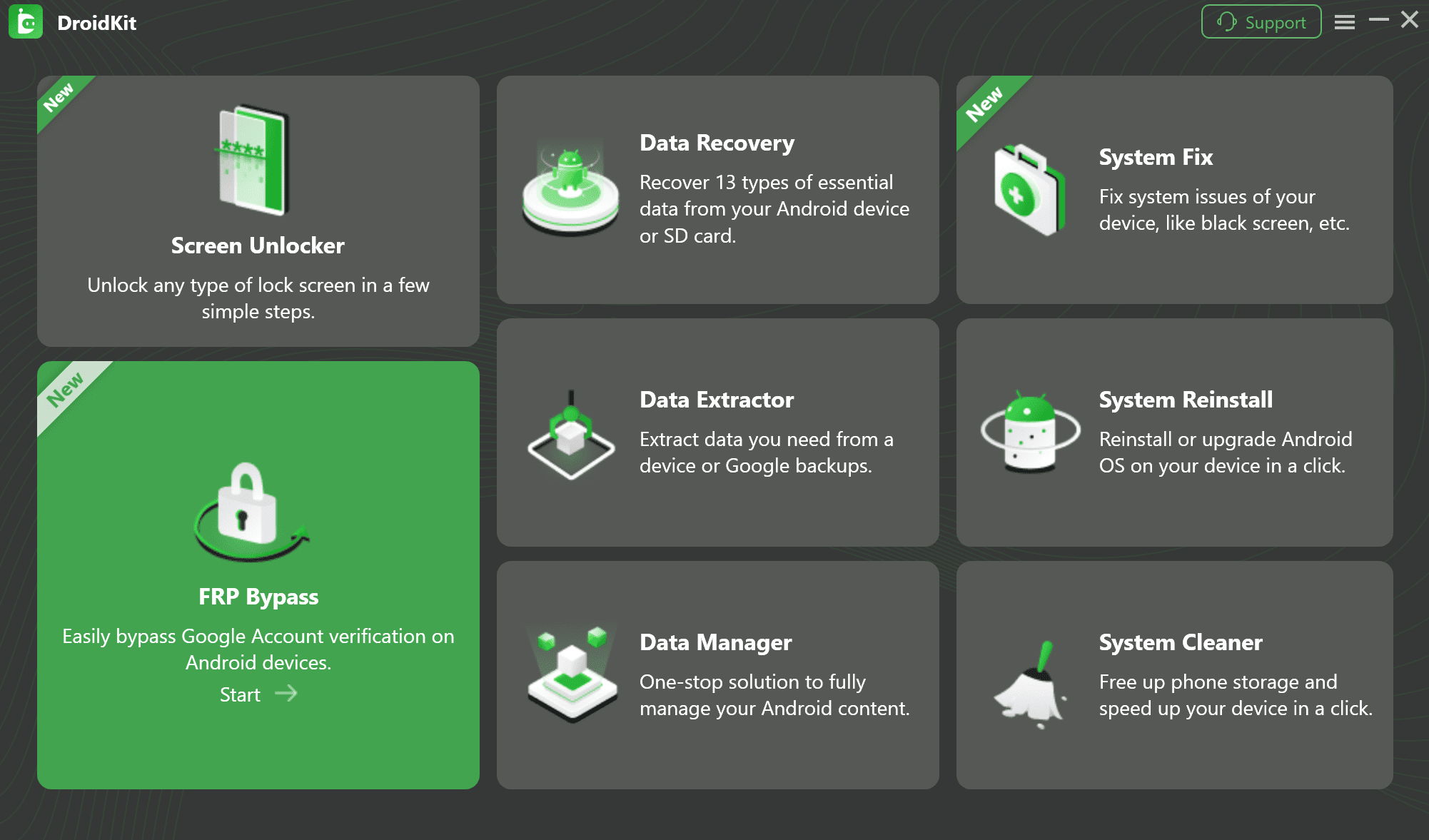
Step 1. Run DroidKit on your computer. Choose FRP Bypass mode and click Start.
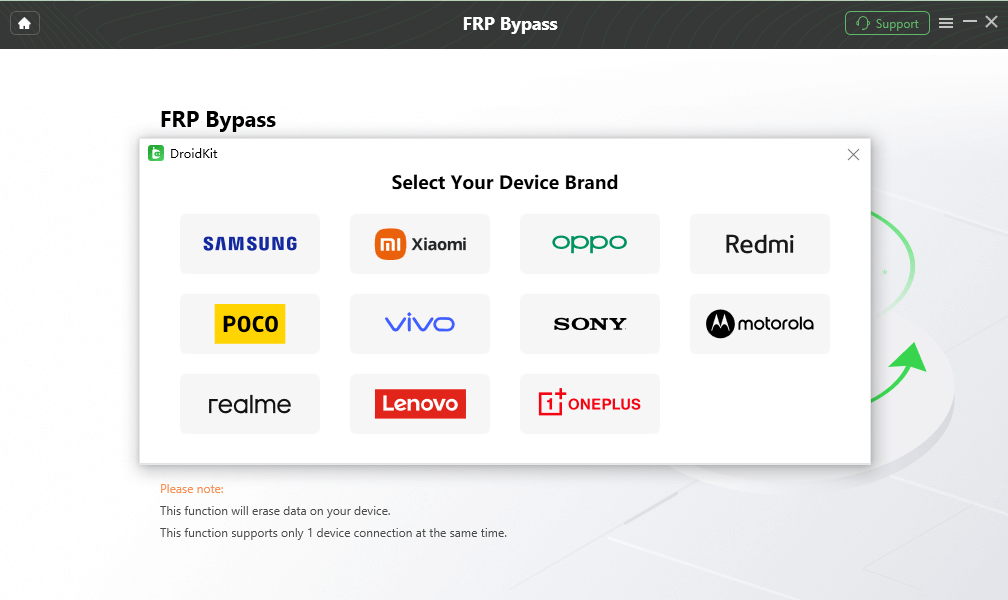
Step 2. Connect your device with a USB cable. Choose the correct device brand, model, and Android version. Click Next to continue.
Step 3. DroidKit will prepare the configuration file for your device. Click Start to Bypass when the preparation is complete.
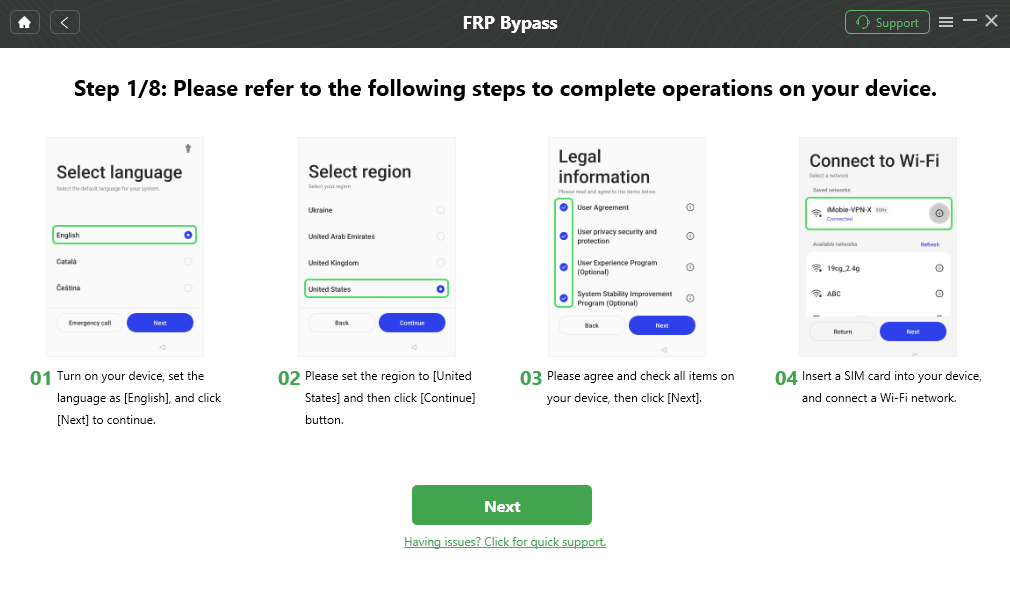
Step 4. Follow the instructions shown on your device and in the DroidKit app. Enter the required mode if prompted and click Reset.
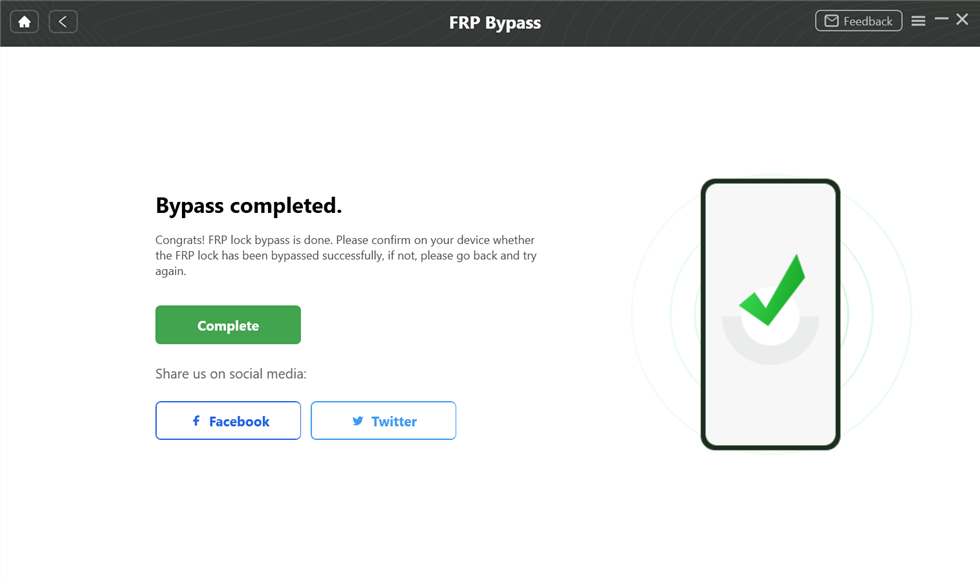
Step 5. Wait for the process to complete. When the completion screen appears, restart your device and set it up again.
FAQs
1. Is MTK Auth Bypass Tool free to use?
MTK Auth Bypass Tool is commonly shared as a free utility, but the download source matters. Avoid repackaged files, forced installers, and suspicious mirrors.
2. Where can I download MTK Auth Bypass Tool?
You can download it from a trusted developer page, community source, or reliable download site. Before running the tool, scan the package and verify that the file matches the source description.
3. Is MTK Auth Bypass Tool safe?
It depends on the version and source you use. The biggest safety risk comes from unknown mirrors and modified EXE files. Scan the package, avoid suspicious installers, and run the tool only on a computer you trust.
4. Is it legal to use MTK Auth Bypass Tool?
It should only be used on a device you own or a device you are authorized to repair. Using FRP or unlock tools to access someone else’s device may be illegal and unethical.
5. What brands are supported by MTK Auth Bypass Tool?
MTK Auth Bypass Tool is not limited to one brand. It depends mainly on whether the device uses a supported MediaTek chipset. Brand name alone cannot guarantee compatibility.
6. Does MTK Auth Bypass Tool work on the latest Android versions?
Not always. New Android versions and security patches can block older MTK authentication or FRP methods. If the tool fails after an update, you may need a newer tool version or a different guided workflow.
7. Why is MTK Auth Bypass Tool not detecting my phone?
The most common reasons are missing MediaTek USB drivers, LibUSB installation problems, an unstable USB cable, wrong connection mode, or an unsupported chipset. Reinstall the drivers, try another USB port, and confirm the chipset before trying again.
8. What is the difference between MTK Auth Bypass Tool and MTK Meta Utility Tool?
MTK Auth Bypass Tool focuses on MediaTek authentication bypass in supported workflows. MTK Meta Utility Tool provides broader servicing functions, including some Samsung MTK FRP-related options. The better choice depends on your device model and task.
9. When should I use DroidKit instead?
Use DroidKit when you want official software, guided steps, and fewer manual driver or chipset operations. It is also a practical fallback when MTK Auth Bypass Tool cannot detect the device or the download source is not reliable.
Conclusion
MTK Auth Bypass Tool can be useful for supported MediaTek devices, especially for advanced users who understand MTK drivers, chipset selection, and repair workflows. Still, it should not be treated as a universal or risk-free FRP solution. Download source, file safety, driver setup, chipset support, Android version, and security patch level all affect the result.
If you are comfortable with manual MTK tools, follow the safety checks and installation steps carefully. If the tool fails, cannot detect your phone, or feels too technical, a guided option like DroidKit may be a better next step for supported devices.
Free Download * 100% Clean & Safe
More Related Articles


Roger Smith is a senior technical writer with years of experience in providing Android solutions. He loves to help users solve various problems such as Android unlock, Android data recovery, and Android system repair.
Product-related questions? Contact Our Support Team to Get Quick Solution >
