How to Make Your iPhone Faster with 11 Solutions
Is iPhone a self-cleaning device and always running fast? Absolutely not! So how to make your iPhone faster? This article will show you how to make iPhone 12/11/XS/XR/X/8/7 run faster after iOS 14 update.
Common iPhone Tips
iPhone Backup Tips
iPhone Cleanup Tips
We take everything for granted when using iPhone because it does an incredible job to keep itself neat and tidy. However, with the growth of the use of time, you may notice that it will get sluggish and slow. Especially recently, many users have complained that their iPhone running slow after the iOS 14 update.
Seriously, when some new iPhone 12 users have this slow iPhone issue, they may wonder if the tardy emerged App is caused by stealing Wi-Fi network from a neighbor. Anyway, this How To Make iPhone Faster guide may be helpful whenever you feel your phone is jammed. It works for all iPhone modes, iPhone 13/12/11/XS/XR/X, and even the latest iPhone 12/12 Pro /Pro (Max)/12 mini.
Don’t Miss: What is the Other on my iPhone >
10 Basic Methods for How to Make Your iPhone Faster
Credit: idownloadblog.com
1. Delete large apps that take up a lot of space
Some apps on your iPhone take up much more space than you can imagine, which can seriously lead to your iPhone running slowly. So you can refer to this practical guide of ours to delete them easily and make your iPhone faster again: How to Remove Apps on iPhone 12/11/XS/XR/X/8/X/7>
2. Get rid of old photos, videos, and music
Just like the large apps, once your iPhone stores more and more photos, videos, songs, the storage will exceed, no enough space to ensure smooth running. In this situation, you can delete some unimportant and useless files, or transfer them to computer, or somewhere else as a backup, with AnyTrans.
3. Remove old text message
Many iPhone users have no such habit of deleting messages regularly. However, a large number of text messages will also eat up your iPhone memory and slow down it. By this, you can remove text messages from iPhone successfully.
4. Empty Safari’s cache
Every day we are using Safari on iPhone, it will generate lots of caches. And we all know that cache is also one important reason why iPhone not running fast. How to clear them? Follow this guide for the detailed steps: How to Clear Cache on iPhone to Free up Space with Ease >
5. Close all the background apps
Even though iPhone OS and hardware have great data processing ability, many more apps run in the background can also slow it down. You need to shut down some of them not being operated for the moment.
6. Turn off automatic app updates
Probably you never notice that this one could lead to iPhone slow and cloud also lead iPhone charging slow. Turn it off by this: Settings > Scroll down, and tap on App and iTunes Stores > Toggle off Update option.
7. Turn off automatic app downloads
Just like the fifth one, turn off automatic app downloads with these steps: Settings > Scroll down, and tap on App and iTunes Stores > Toggle off Apps option.
8. Disable Location Services
If you have turned on the location service, apps on iPhone will continuously ask for a location using cellular data. So if your network environment is not good enough, iPhone will become slow, hot, or stuck. If not necessary, you can disable this feature: Settings > Privacy > Location Services > Turn it off, or depending on your needs, turn off this function for some apps.
9. Restart your iPhone every once in a while
To make your iPhone run faster, restarting could be a great choice: Hold the Power button to show Slide to Power Off > Slide to shut down iPhone > Hold the Power button to restart it.
10. Reset your device completely
If none of the above methods work for making your iPhone faster, you can turn to reset iPhone: Settings > General > Scroll down to the bottom, and tap Reset > Choose Reset All Content and Settings. Please notice that this operation will lead to all of your data and settings on iPhone being erased, and irretrievable, unless you have backed up them before. So before taking this choice, you are highly recommended to try the in-depth solution below firstly.
Also Read: How to Make Your Mac Faster in 3 Ways >
If you also own an Apple Mac computer, it is quite necessary to know why it is getting slow and how to make it run faster.
In-depth Solution on How to Make Your iPhone Faster
Lots of iPhone 11/XS/XR/X/8/X/7/6s users feel their device is painfully slow. Even they restore their phones but still cannot improve the iPhone performance. iOS devices are used to load up with a large number of long-term junk files generated by Apps. And these useless junk files consumed too much memory resource when launching apps, browsing the web, or playing big games. However, you know these junk files make your iPhone slow down, but you still cannot accelerate it directly because Apple doesn’t provide you a service of deleting junk files & caches. Well, is there any other option to go?
At this moment, you need an all-around iPhone Cleaner solution, like PhoneClean. Via detecting and removing unwanted junks, PhoneClean can free up space on iPhone so as to reclaim more memory sources and make iPhone run faster. It supports removing various types of junk files from iPhone to make it faster, such as app junks (iOS 8.2 and earlier) like caches/cookies/temp files, Internet junk files like Safari cookies, caches, histories, Webmail caches, Privacy data like messages and attachments, notes, contacts, call histories, etc. Start to download here >
Step 1. Launch PhoneClean > Connect your iPhone to computer > Click on Quick Clean.
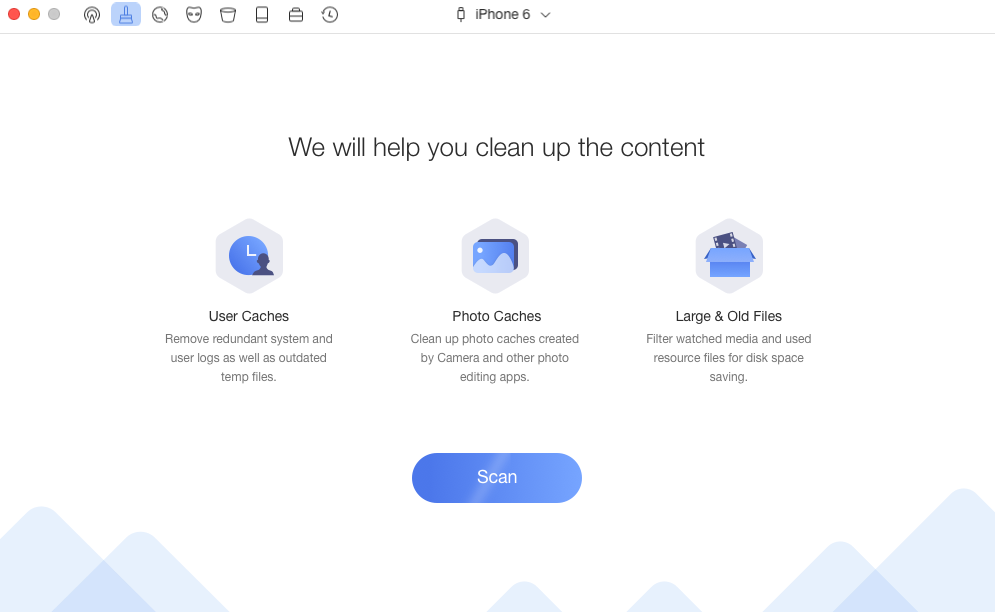
How to Make Your iPhone 11/XS/XR/X/8/7/6s Run Faster – Step 1
Step 2. Wait for the scanning process.
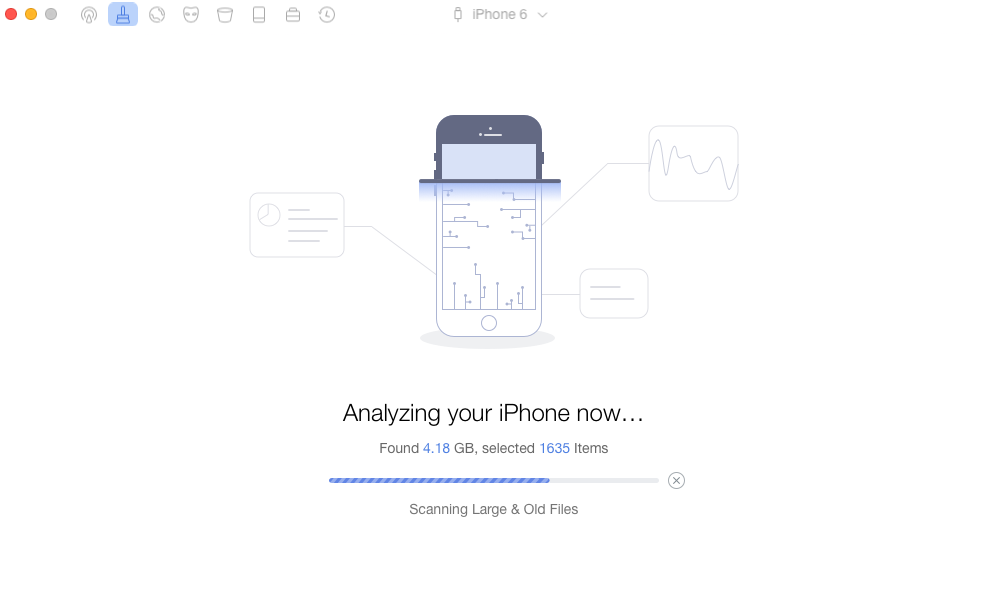
How to Make Your iPhone 11/XS/XR/X/8/7/6s Run Faster – Step 2
Step 3. You can review the files in detail and choose the contents you want to delete > Then click on Clean button.
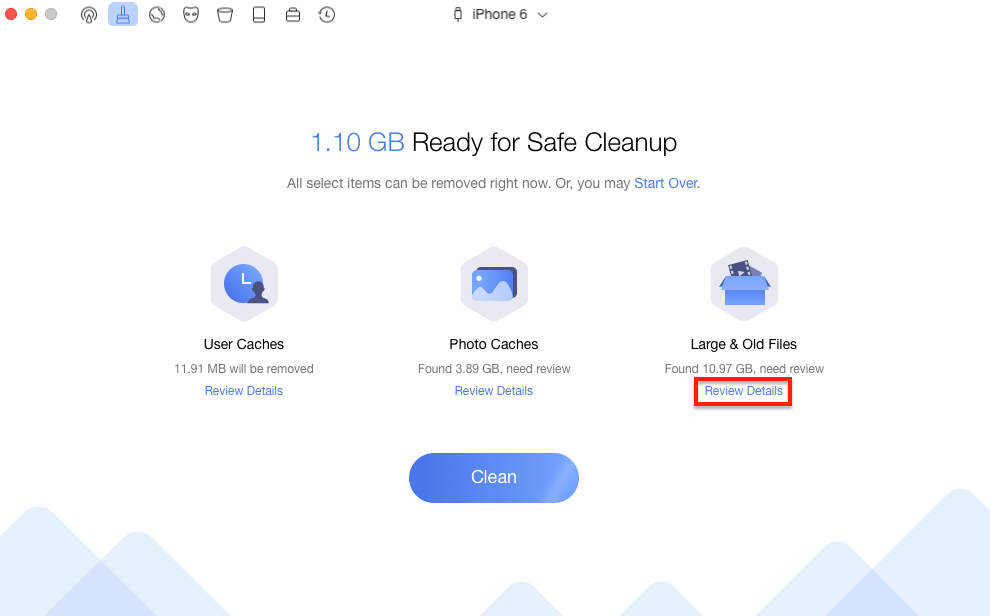
How to Make Your iPhone 11/XS/XR/X/8/7/6s Run Faster – Step 3
If your iPhone works slowly due to iOS 12 update, or iOS 13 update, you should do more things to make your iPhone function well by reading this: 8 Tips to Speed Up Slow iOS on iPhone iPad and iPod touch.
Bonus Tip. Fix iPhone Running Slow After iOS 14 Update
Many people are curious about why their iPhone is slow after the iOS 14 update. This may because the new system is not suitable for your iPhone. If a lower version of the iPhone is installed with a higher version of the system, the iPhone will encounter problems running slow, iPhone slow on wifi, or even get froze.
If your iPhone encounters the same problem, then the most effective method is to downgrade the iOS to the original version or a lower version. AnyFix – iOS system recovery is a software that can provide you a chance to downgrade and upgrade iOS with a few clicks. After downgrade to a suitable iOS version, the problem of the iPhone is slow cloud be fixed. Now download AnyFix and have a try!
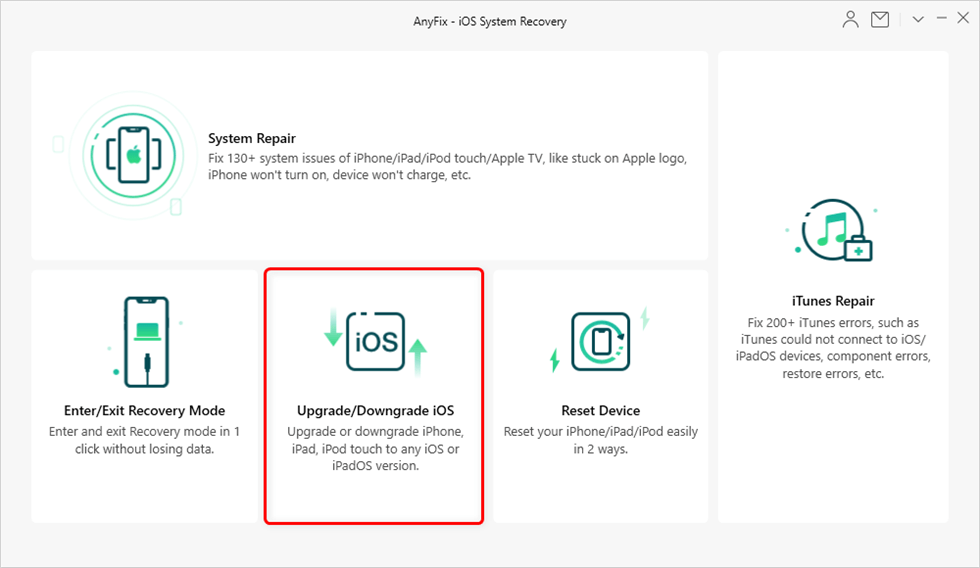
Choose Upgrade/Downgrade iOS
The Bottom Line
That’s all about the problem of iPhone is slow after update. After talking about how to make iPhone run faster above, you can see that PhoneClean is the very tool you need to clean up your iPhone. If this article is helpful for you, don’t hesitate to share it with your friends right away. Why not take a tour with PhoneClean now?



Member of iMobie team as well as an Apple fan, love to help more users solve various types of iOS & Android related issues.
Product-related questions? Contact Our Support Team to Get Quick Solution >
