Huawei FRP Tool 2026: Free Download, APK Risks & EMUI Bypass
Stuck on Huawei Google account verification after a factory reset? This 2026 guide explains how Huawei FRP works, how EMUI version affects bypass methods, whether free Huawei FRP tool APK downloads are safe, why TalkBack and APK tricks often fail, and which official or guided PC-based options to try next.
You tried a factory reset on your Huawei phone, but now the setup screen asks for the previously synced Google account. This is Google’s Factory Reset Protection, also called FRP. It is designed to protect a device after a reset, but it can also lock out legitimate owners who forgot the account, changed the password, or bought a second-hand phone that was not properly removed from the previous owner’s Google account.
If you are searching for a Huawei FRP tool, Huawei FRP tool free download, or Huawei FRP tool APK, this guide will help you choose a safer path. We explain what still works by EMUI version, why many free APK or TalkBack methods fail, what to check before downloading any tool, and when a guided PC-based option may be more practical.
Only use FRP bypass methods on a Huawei device you own or are authorized to repair. If you need broader Android FRP methods across different brands, start with this Android FRP bypass guide. If you are comparing tool options before choosing one, see this FRP bypass tool comparison.
Table of ContentsHide
Quick Answer: Which Huawei FRP Method Should You Use?
What Is Huawei FRP and Why Are You Locked?
Check Your EMUI Version First
Huawei FRP Bypass Methods Compared
Are Free Huawei FRP Tool APK Downloads Safe?
Method 1: Official Recovery and Huawei Support
Method 2: TalkBack Method for Older EMUI Versions
Method 3: Guided Huawei FRP Bypass Tool
Huawei FRP Bypass Not Working: Common Reasons
Is Huawei FRP Bypass Legal?
How to Prevent Huawei FRP Lock Next Time
FAQs About Huawei FRP Tool and Bypass
Conclusion
Quick Answer: Which Huawei FRP Method Should You Use?
The best Huawei FRP bypass method depends on your EMUI version, security patch, device model, and whether you still have access to the original Google account. Older EMUI versions may allow limited manual methods, while newer EMUI versions and security patches usually block TalkBack, APK, and browser shortcut routes.
| Your Situation | Best First Step | What to Know |
| You know the Google account or recovery email | Use Google account recovery | This is the safest and official route. |
| You bought the phone second-hand | Ask the previous owner to remove the device | This avoids risky bypass tools and ownership issues. |
| Huawei phone runs EMUI 9 or older | Try TalkBack or manual method carefully | May work only on some older devices and patches. |
| Huawei phone runs EMUI 10, 11, 12, or 13 | Use a guided PC-based option if official recovery fails | Most free APK and TalkBack methods are usually blocked. |
| You found a free Huawei FRP tool APK | Check file safety before installing | Unknown APKs may be outdated, modified, or unsafe. |
Bottom line: Start with official recovery. If recovery is not possible and the device is yours, choose a method based on EMUI version instead of downloading random Huawei FRP APK files.
What Is Huawei FRP and Why Are You Locked?
FRP is triggered when a Huawei phone with a Google account is factory reset without first removing that account. During setup, the device asks for the Google account that was previously synced to the phone. This helps prevent unauthorized use if the phone is lost or stolen.
You may be locked out because:
- You forgot the Google account or password used on the phone.
- You changed the Google password recently and the phone asks you to wait before signing in again.
- You bought a used Huawei phone that is still linked to the previous owner.
- You reset the device before removing the Google account from Settings.
- The device shows a Google verification screen instead of a normal setup screen.
Important: Some newer Huawei models may involve Huawei ID or activation-related locks instead of classic Google FRP. If your screen asks for a Huawei ID rather than a Google account, this guide may not match your situation.
Check Your EMUI Version First
Before trying any Huawei FRP tool or free APK method, check the EMUI version if possible. The EMUI version is one of the biggest factors that determines whether manual FRP methods can still work.
Step 1. Turn off your Huawei phone completely.
Step 2. Press and hold Volume Up + Power until the Huawei logo appears.
Step 3. Release the buttons to enter Recovery Mode.
Step 4. Look for the EMUI version near the top of the recovery screen or in the recovery information area.
| EMUI Version | Manual Method Chance | Recommended Direction |
| EMUI 8 or older | Possible on some devices | Manual TalkBack or browser routes may still be worth checking. |
| EMUI 9 | Limited | TalkBack may work only on older patches. |
| EMUI 10 | Low | Free APK or TalkBack routes are often blocked. |
| EMUI 11 / 12 / 13 | Very low | Use official recovery or a guided PC-based option for supported devices. |
Huawei FRP Bypass Methods Compared
Use this table to compare your options before downloading any Huawei FRP tool or APK.
| Method | Best For | Difficulty | Main Risk |
| Google account recovery | Original owners who can recover the Google account | Easy | May require waiting after a password reset. |
| Previous owner removal | Second-hand devices | Easy to Medium | Requires cooperation from the previous owner. |
| TalkBack method | Older EMUI versions only | High | Often patched and device-specific. |
| Free Huawei FRP tool APK | Legacy devices where APK install paths still work | High | Malware, outdated files, or blocked installation. |
| Guided PC-based FRP tool | Users who want clearer steps after official recovery fails | Low to Medium | Requires a computer and supported device scenario. |
| Huawei service center | Users with proof of purchase | Medium | May take time and require documentation. |
Are Free Huawei FRP Tool APK Downloads Safe?
Many users search for Huawei FRP tool free download or Huawei FRP tool APK. The problem is that many free FRP APK files are shared through third-party mirrors, old forum posts, or file-hosting pages. The file may be outdated, repackaged, or incompatible with your EMUI version.
Before opening any free Huawei FRP APK or tool, check:
- Whether the source is trusted and not filled with forced download buttons.
- Whether the file name and version match the page description.
- Whether security tools flag the file as suspicious.
- Whether your Huawei phone actually allows APK installation during setup.
- Whether the method is for your EMUI version, not an older Android build.
If you are considering APK-based methods, read this FRP bypass APK safety guide before installing anything. Do not run files that are flagged by multiple security tools or bundled with unrelated installers.
Method 1: Official Recovery and Huawei Support
Official recovery should always be the first route because it is safer than using bypass tools or unknown APK files.
Try Google Account Recovery First
Step 1. On another phone or computer, open the Google account recovery page.
Step 2. Enter the Gmail address or phone number that was previously synced to the Huawei phone.
Step 3. Use your recovery email, phone number, or security prompts to reset the password.
Step 4. Wait if Google asks you to delay sign-in after a password reset.
Step 5. Enter the recovered account on the Huawei setup screen.
Ask the Previous Owner to Remove the Device
If the phone is second-hand, ask the previous owner to remove the Huawei device from their Google account. They can sign in to their Google account on another device, find the device under account security, and remove or sign out of it. After that, restart setup and try again.
Contact Huawei Support
If you have proof of purchase with the IMEI or serial number, a Huawei service center may be able to help. This can take longer than software methods, but it is the safest route when you can prove ownership.
Method 2: TalkBack Method for Older EMUI Versions
The TalkBack method is only worth trying on older Huawei phones, usually EMUI 9 or earlier. It is not reliable on newer EMUI versions because many accessibility and browser shortcuts have been patched.
Use this method only if: your Huawei phone is yours, it runs an older EMUI version, and TalkBack still opens the required settings path. If a menu is missing, the method is likely patched.
Step 1. Connect your Huawei phone to Wi-Fi on the setup screen.
Step 2. Try enabling TalkBack with the gesture or shortcut available on your device.
Step 3. If TalkBack opens, draw the required gesture to access TalkBack settings.
Step 4. Look for a route to open Settings, browser, help pages, or app permissions.
Step 5. If a browser opens, avoid downloading random APK files from unverified pages.
Step 6. If the path leads to account or lock screen settings, complete the method carefully and restart the phone.
Step 7. If the Google verification screen still appears, stop repeating the same method and choose another route.
Method 3: Guided Huawei FRP Bypass Tool
If official recovery is not possible and manual methods are blocked, a guided PC-based tool can be a practical fallback for supported Huawei FRP scenarios. One option is DroidKit, which provides on-screen instructions instead of requiring users to search for unknown APK files or outdated TalkBack routes.
This method is useful when:
- Your Huawei phone runs a newer EMUI version and free methods are blocked.
- TalkBack, browser, or APK routes do not appear on your device.
- You want a more guided workflow on Windows or Mac.
- You prefer official software access instead of random download mirrors.
Step 1: Prepare Your Device and Computer
Before starting, prepare your FRP-locked Huawei phone, a stable USB cable, a Windows or Mac computer, and a reliable internet connection.
Step 2: Download and Launch DroidKit
Download DroidKit and install it on your computer. Open the program and select the FRP Bypass feature.
Free Download * 100% Clean & Safe
Step 3: Connect Your Huawei Phone
Connect the FRP-locked Huawei phone to the computer with a USB cable. Click Start and select the correct device brand or model information when prompted.
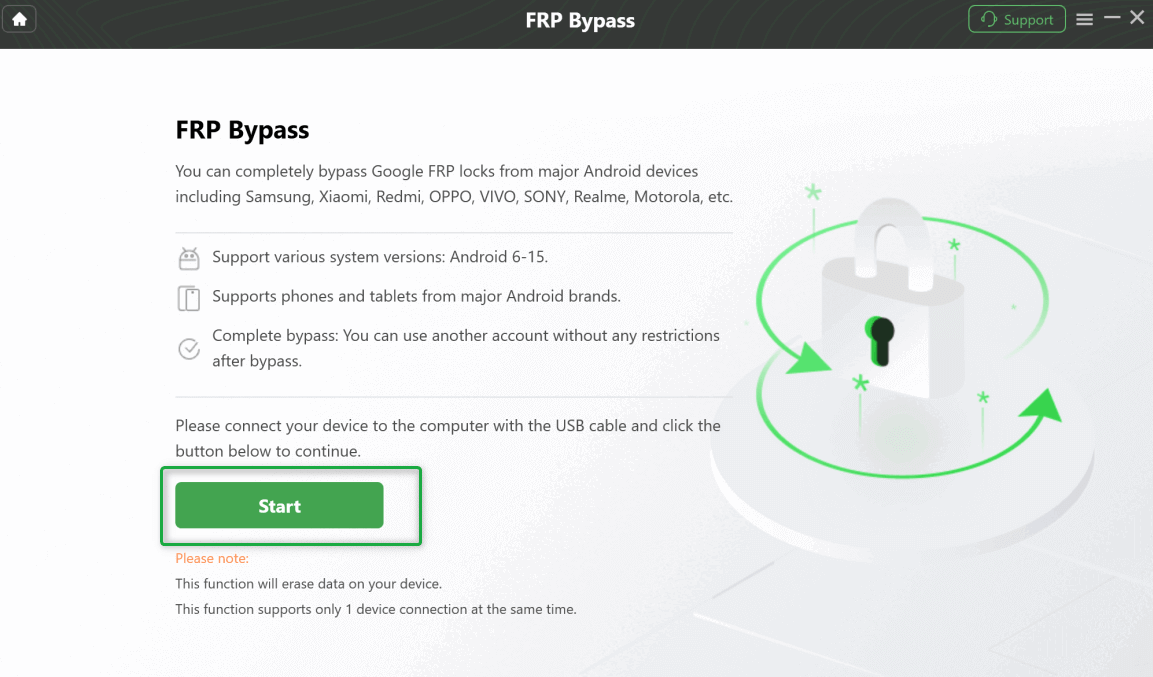
Bypass Huawei Android FRP
Step 4: Prepare the Device-Specific Configuration
DroidKit will prepare a configuration file for the selected device scenario. Do not disconnect the phone while the file is being prepared.
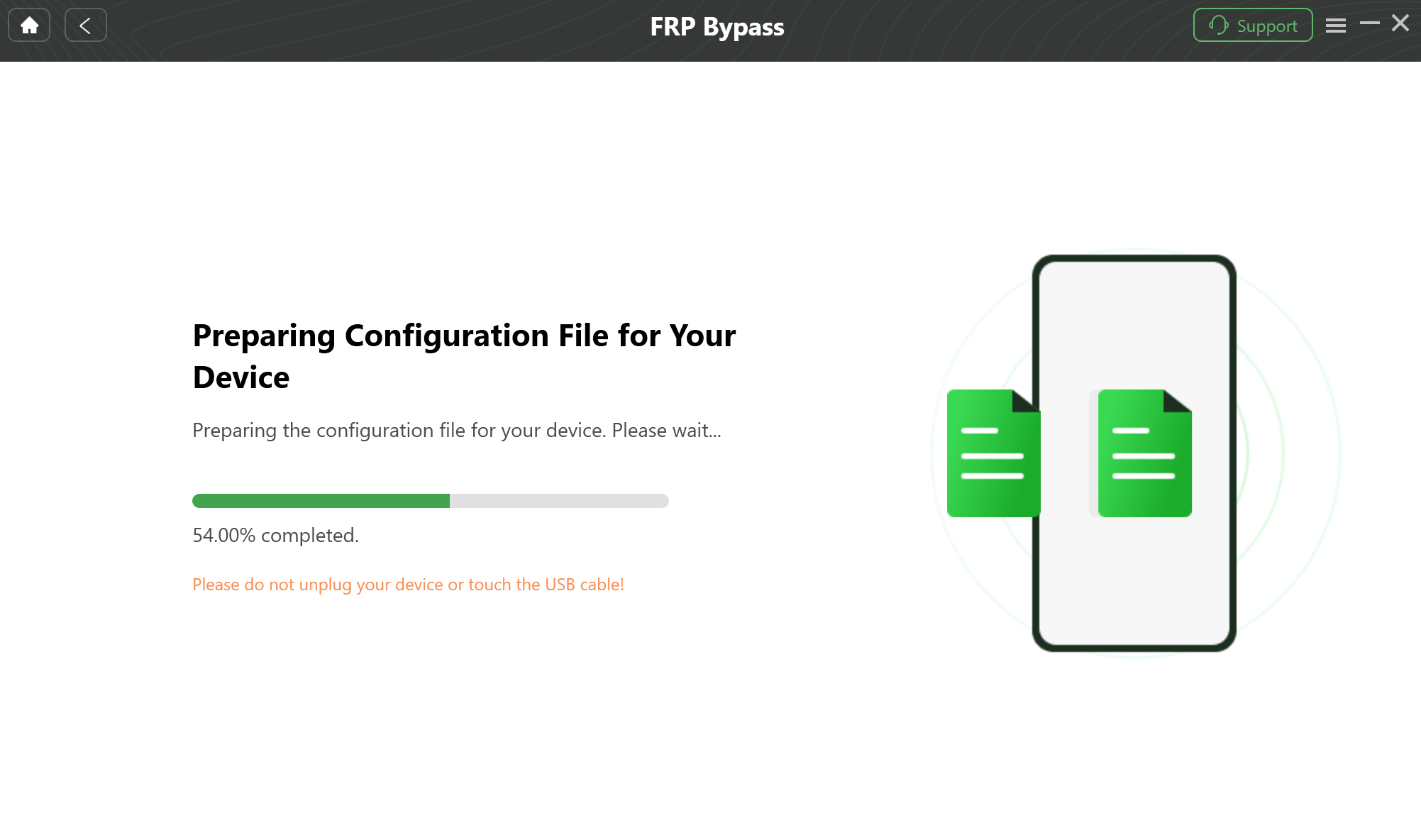
Prepare the Device-Specific Configuration
Step 5: Follow the On-Screen Instructions
Follow the on-screen steps to choose the matching system version, boot screen, or device mode. The instructions may vary by Huawei model and EMUI version.
Step 6: Complete the FRP Workflow
Wait while the software completes the FRP process. Do not unplug the phone during the operation. When the process finishes, the phone will restart and you can set it up again.
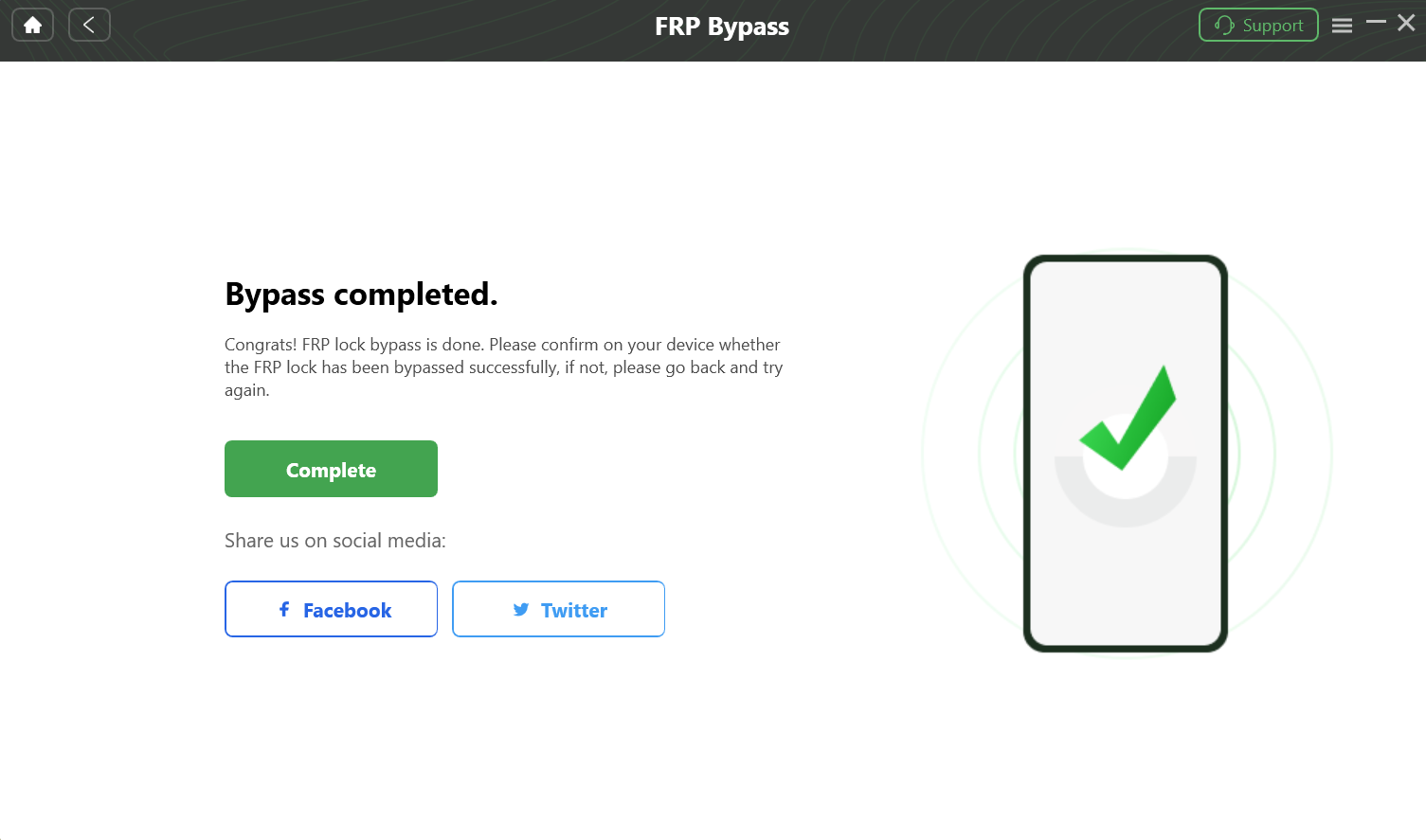
Bypass FRP Lock
Important reminders:
- Use this method only on a device you own or are authorized to repair.
- A stable USB connection and internet connection are important.
- FRP bypass does not recover data erased by a factory reset.
- If your device scenario is not supported, do not repeat failed steps endlessly.
Huawei FRP Bypass Not Working: Common Reasons
If Huawei FRP bypass fails, first identify the reason. Repeating the same old TalkBack or APK method usually does not help if the device has already been patched.
| Problem | Likely Cause | What to Try Next |
| TalkBack menu does not open | Accessibility shortcut is disabled or patched. | Do not keep repeating the same gesture. Check another method. |
| Browser route is missing | Setup Wizard blocks browser access. | Use official recovery or a PC-based route. |
| Huawei FRP APK will not install | Unknown-source installation is blocked or APK is incompatible. | Avoid random APK copies and check safer options. |
| Free tool is flagged by antivirus | The file may be modified, bundled, or unsafe. | Delete the file and use a trusted source. |
| Phone is not detected by PC | Bad USB cable, missing driver, or wrong connection mode. | Try another cable, another USB port, and reinstall drivers if needed. |
| Google verification still appears after reboot | The method does not match your EMUI version or security patch. | Choose a method based on your exact device situation. |
Is Huawei FRP Bypass Legal?
Huawei FRP bypass should only be used for legitimate device recovery. You should continue only if:
- You own the Huawei device.
- You have clear permission to repair or unlock it.
- The phone is not lost, stolen, or connected to someone else’s account without permission.
Do not use FRP tools to access another person’s phone, account, or data. If the device is second-hand and the seller cannot help remove the account, request a refund or proof of ownership rather than using risky bypass files.
How to Prevent Huawei FRP Lock Next Time
After you regain access to your own Huawei phone, take a few steps to prevent the same issue from happening again.
Step 1. Go to Settings > Accounts and remove any Google account you no longer use.
Step 2. Add a recovery phone number and recovery email to your Google account.
Step 3. Before selling or giving away the phone, remove all Google accounts before factory resetting.
Step 4. Keep a record of the Google account used on the device.
Step 5. For a child’s device, use proper family account management so the parent or owner can recover access later.
FAQs About Huawei FRP Tool and Bypass
Q1. Is there a free Huawei FRP tool that works on all EMUI versions?
No. Free Huawei FRP tools and APK methods are highly version-dependent. They may work only on older EMUI versions or unpatched devices, and they often fail on newer security updates.
Q2. Is Huawei FRP tool APK safe to download?
It depends on the source. APK files from unknown mirrors may be outdated, modified, or unsafe. Always scan files before opening them and avoid forced installers or suspicious download buttons.
Q3. Can I bypass Huawei FRP without a PC?
Sometimes, but mostly on older EMUI versions. Newer EMUI versions often block TalkBack, browser, and APK routes, so a computer-based method may be required.
Q4. What should I do if TalkBack FRP bypass does not work?
If TalkBack settings, browser access, or shortcut menus are missing, the method is likely patched. Stop repeating the same route and choose another method based on your EMUI version.
Q5. Can I bypass Huawei FRP without the original Google account?
Officially, the best route is to recover the original Google account or ask the previous owner to remove the device. If that is not possible and you own the device, a supported FRP tool may help in some scenarios.
Q6. Does FRP bypass recover my deleted data?
No. The factory reset that triggered FRP has already erased the data. FRP bypass restores access to the phone; it does not recover deleted files.
Q7. Does Huawei provide an official FRP bypass tool?
Huawei does not provide a public FRP bypass tool for general download. The official path is account recovery or service center support with proof of ownership.
Q8. Why do free Huawei FRP methods fail after an update?
Android and EMUI security updates often close the loopholes used by old TalkBack, browser, or APK methods. A method that worked before may stop working after a security patch.
Conclusion
Huawei FRP bypass in 2026 depends mainly on your EMUI version, security patch, device model, and whether official Google account recovery is possible. Free Huawei FRP tool APK downloads may still appear in search results, but they carry file-safety risks and often fail on newer devices.
Start with official recovery or previous-owner removal first. If that fails and you own the device, use the EMUI version to choose the right path. Older devices may still allow limited manual methods, while newer Huawei phones usually require a safer, guided PC-based option for supported scenarios.
Free Download * 100% Clean & Safe
More Related Articles



Joy Taylor is a seasoned technical writer with over a decade of experience in mobile technology. At iMobie, she specializes in producing in-depth content on iOS data recovery, iPhone unlocking solutions, and iOS troubleshooting.
Product-related questions? Contact Our Support Team to Get Quick Solution >
