How to Transfer Music to iPod from Computer with/without iTunes
How to add music to iPod from computer? Read this guide to learn how to transfer music to iPod, with or without iTunes. Cover Windows PC and Mac.
Computer to iPhone Transfer
- Transfer Files Laptop to iPhone
- Transfer Files PC to iPad
- Transfer Photos Computer to iPhone
- Transfer Photos Laptop to iPhone
- Transfer Photos Mac to iPhone
- Download Music Computer to iPhone
- Transfer Music Laptop to iPhone
- Add Mp3 Computer to iPhone
- Send Videos Laptop to iPhone
- Sync Contacts Mac to iPhone
- Transfer Apps Computer to iPhone
- Transfer Music Computer to iPod
AnyTrans – Transfer Music to iPod in Simple Clicks
How to transfer music from computer to iPod? Just free download AnyTrans to transfer all kinds of music from computer to iPod with or even without iTunes. You only need to click the buttons. And it only takes a few minutes to transfer thousands of music. Supports all iPhone/iPad/iPod models, Windows PC, and Mac.

iPod Touch (7th) was updated with a new 256 GB model, and Apple added more features on it different from the 6th generation iPod touch. You can enjoy AR and group FaceTime, also Apple Arcade on it. Certainly, when it comes to listening to music, the iPod series is still a wonderful choice because of its portability, long battery life, large storage for music with more GBs, etc.
Then, how to transfer music to iPod? If you need to put music on an iPod, then this guide will help you to make Apple life easier. We will focus on how to add music to iPod from computer and iTunes in detail.
How to Transfer Music to iPod without iTunes
How to put music on iPod (touch)? Normally our first choice is syncing with iTunes. However, when syncing entire music and other iOS data like photos, iBooks, Movies with iTunes, all the synced data on our iOS device will be erased. Therefore, before showing you how to transfer songs to iPod/iPod touch with iTunes, we would like to first share with you a new way to transfer music from computer to iPod without iTunes, and you won’t lose any previous data. So now let’s see how to put music on iPod without iTunes.
Way 1. Transfer Music to iPod in Clicks with AnyTrans [No Erase]
AnyTrans – iOS Data Manager is a safe and professional data transfer and management tool for iPhone, iPad, and iPod. With AnyTrans, you can transfer all the music and playlists across your iPhone, iPad, iPod, iTunes, and computer without a sync block. And you can transfer all of them in 1 click, or preview and select what to transfer, just as you like. All iPods are supported, including touch/shuffle/nano. Check its related features as below:
AnyTrans – Transfer Music to iPod
- Transfer music from computer to iPod without erasing.
- It’s very easy & fast to transfer songs to iPod with drag & drop.
- Playlists, ratings, plays, and other info can also be transferred.
- Also transfer music from iPod to iPod, to iPhone, to iTunes library.
Free Download100% Clean & Safe
Free Download100% Clean & Safe
Free Download * 100% Clean & Safe
In addition, you can also use AnyTrans to transfer other data types, like photos, videos, contacts, WhatsApp data, etc., from iOS to computer, iOS to iOS, or computer to iOS.
Follow the step below to learn how to add music to iPod from computer in simple clicks:
Step 1. Connect your iPod to the computer.
Free download and install AnyTrans on your computer first. Launch AnyTrans > Connect your iPod to the computer via a USB cable. Choose Music.
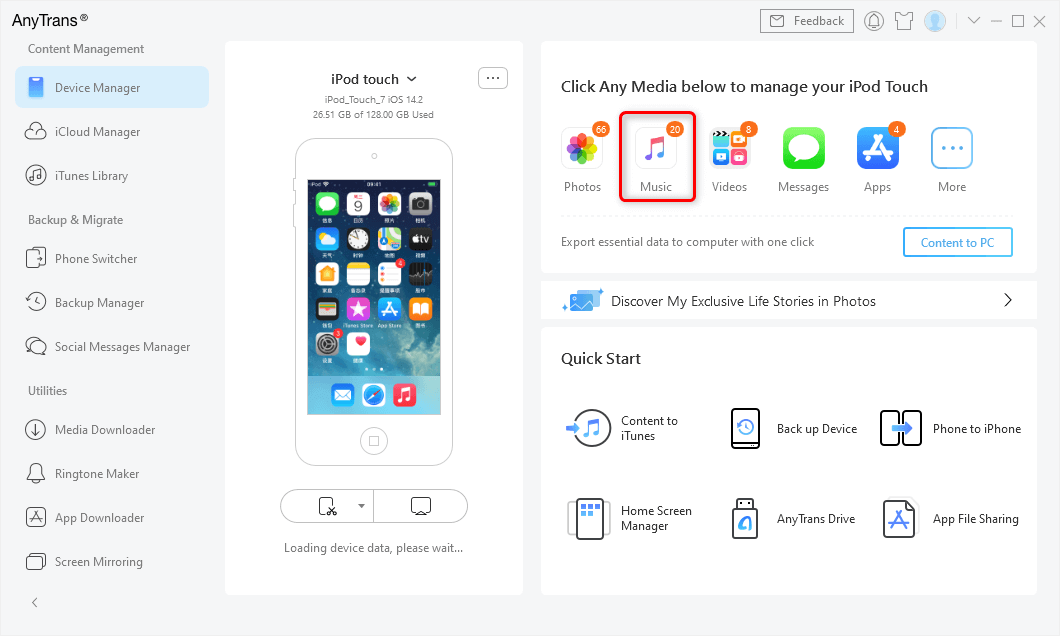
Connect iPod and Choose Music
Step 2. Put music on iPod from computer.
Find and select the music you want to transfer from computer to your iPod, then click Open to start transferring. After transferring, all selected songs will be transferred to your iPod touch Music app or other iPod disk.
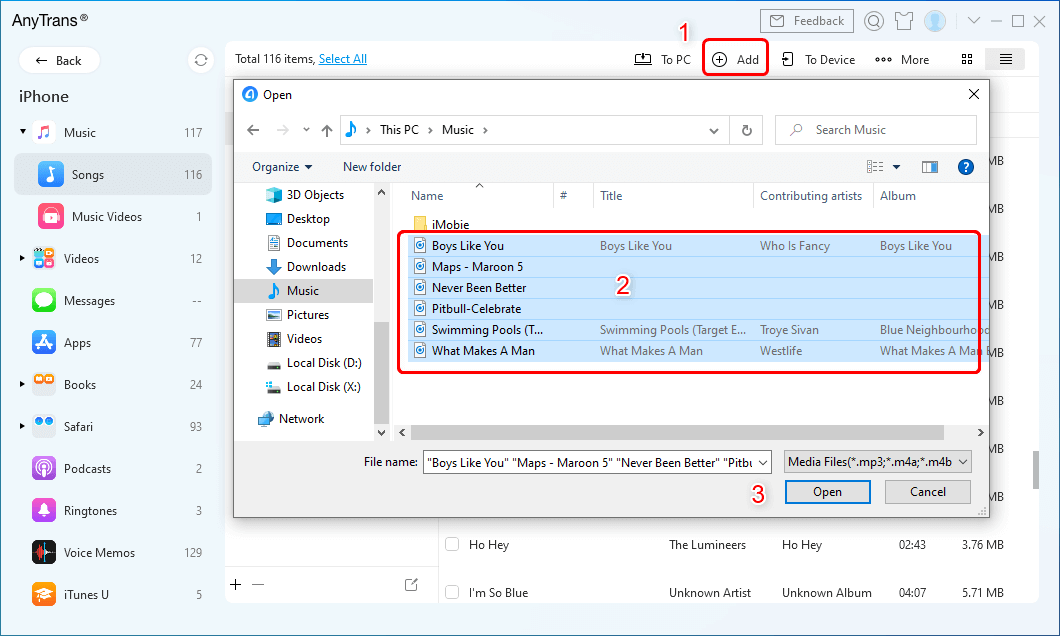
Select Music to Transfer
Way 2. Copy Music to iPod from Computer via Cloud Service
Another method how to transfer music to iPod is using the cloud service, such as Dropbox. As long as you make sure there is enough cloud storage for you to store the songs, you can add music to iPod from computer easily. Here is how to put music on an iPod from a computer in this way.
- Open Dropbox on your computer and iPod (touch).
- Sign in to the same Dropbox account on your computer and iPod.
- Copy music from computer to Dropbox. If you don’t have Dropbox installed on your computer, visit Dropbox.com and upload music to Dropbox.
- Then, you can see songs uploaded from computer. You can download them to your iPod as you need.
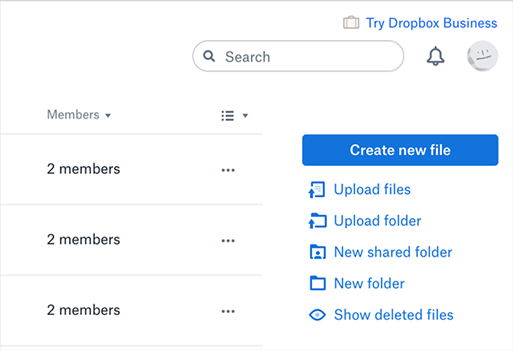
Upload music files to Dropbox to then download on iPhone
How to Transfer Music to iPod with iTunes
Now you have known how to put music on iPod without iTunes. However, if you still want to use iTunes to transfer music to iPod or iPod touch, this part is for you. But when importing songs to iPod or iPod touch with iTunes, all the previous media files synced from computer or iTunes library (like songs, playlists, iBooks, photos, etc.) will be erased. If you don’t want to lose any existing data on your iPod (touch), you can move to Part 1 to learn how to add music to iPod touch with AnyTrans without erasing. Now, let’s check how to add music to iPod from computer via iTunes:
Add music from computer to iTunes Library firstly:
- Make sure you’ve installed the latest iTunes on your computer.
- If you were a Windows Media Player user, you need to transfer songs from Windows Media Player onto iTunes library firstly.
- Open iTunes on your computer.
- Click the “File” option in the upper left corner.
- Choose “Add to Library” to import your music (Ctrl+O).
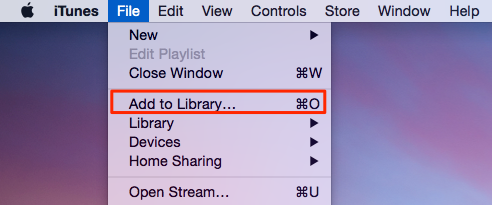
Add Music from Computer to iTunes Library
How to Transfer Music from iTunes to iPod:
- Connect your iPod to the computer through a USB cable.
- iTunes will detect the iPod automatically.
- Then, tap the “Music” option on the left panel.
- Check the “Sync Music” box.
- If you want to transfer all your music, just click on the “Entire music” option.
- Click the “Apply” button to start syncing songs to your iPod.
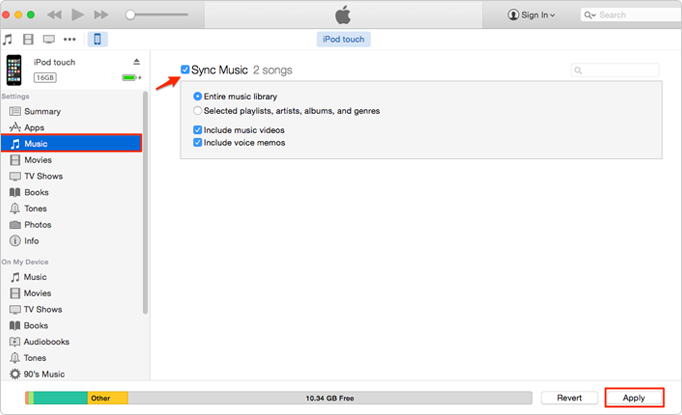
Sync Music from Computer to iPod Touch Using iTunes
If nothing is happening when you drag songs, you may have to go to Summary and check the Manually manage iTunes music and videos box. At last, you will find the selected songs, playlists, artists on your iPod device.
This approach would be very annoying if your music files did not put together, because you need to find them one-by-one and import music into iTunes library before transferring to iPod/iPod touch. Actually, all these methods and steps also can be used to transfer music from computer to iPhone iPad. If you will have further needs to download music from your computer to your iPhone iPad, just follow the steps below to finish the job.
Bonus Tip: Transfer Music from iPhone/iPad/iPod to Computer
Most of our digital music is saved in two places, on our computers and iOS devices. The chances are we might lose our data on them due to a crashed hard drive, long-term usage, or accidental damages. Even the worst news is that the music you purchased disappears along with it. So what’s left? A handicapped iPod, as Apple restricts its gadgets to sync with one music library.
So, backup your data is important. If you want to keep your music and other personal files in other storage locations, what to do? After free downloading and installing AnyTrans, you can easily make it.
Free Download * 100% Clean & Safe
To Download iPhone/iPad/iPod data to Computer:
- Launch AnyTrans and connect your iPhone, iPad, or iPod like Part 1.
- Click Device Manager and choose the Music Category on the right side.
- Select the songs you want to transfer to computer.
- Click the “To PC” button to put music from iOS device to the computer. Also, you can choose to sync with iTunes or another iPhone/iPad/iPod.
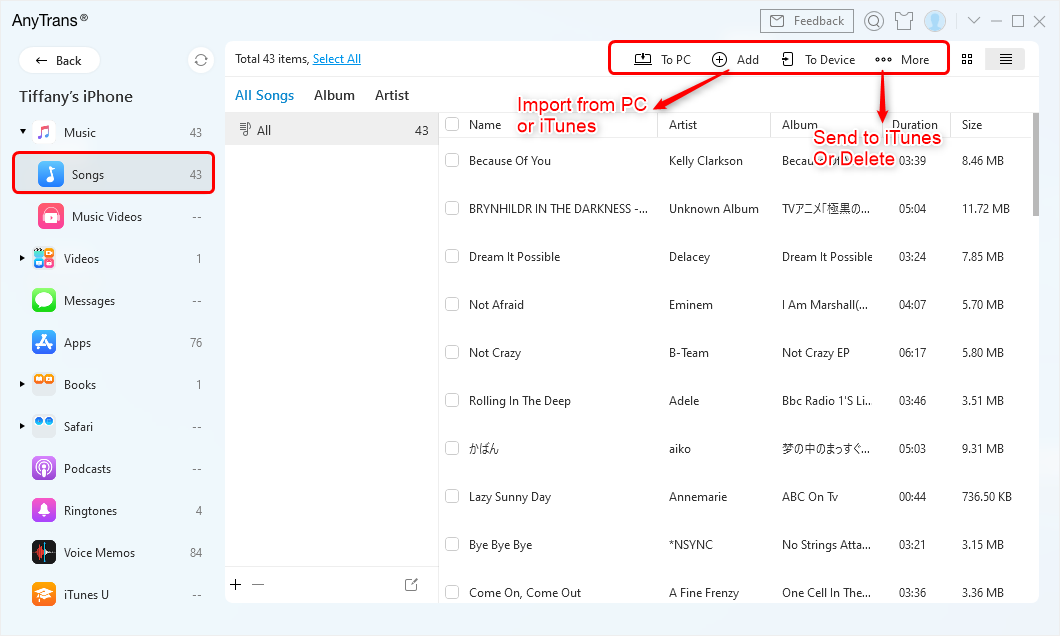
Choices of Music Management
Also Read: You may also like this tip How to Transfer Music from iPhone to iTunes Library >
The Bottom Line
With the above methods, you can successfully solve how to add music to iPod from computer, with or without iTunes. Also, AnyTrans is the best iTunes alternative to transfer andmanage your iPod music as you like. Besides music, it also supports managing photos, videos, ringtones, voice memos, contacts, etc. on your iPhone/iPad/iPod. AnyTrans guarantees you 100% Safe & Security. During this process, all the contents on your iPhone will be kept safe, and you won’t lose any data or files. Now free download AnyTrans to transfer music to iPod now >
Free Download * 100% Clean & Safe
More Related Articles



Joy Taylor is a seasoned technical writer with over a decade of experience in mobile technology. At iMobie, she specializes in producing in-depth content on iOS data recovery, iPhone unlocking solutions, and iOS troubleshooting.
Product-related questions? Contact Our Support Team to Get Quick Solution >
