How to Transfer Music from iPhone to iPhone [Updated]
Switched to a new iPhone? Want to transfer music from an old iPhone to a new iPhone? Read on this post to see how to transfer music from iPhone to iPhone directly, 8 useful methods will be offered here.
iPhone to iPhone Transfer Tips
Transfer/Sync iPhone
Transfer Media Data
AnyTrans – Transfer Music from iPhone to iPhone without iTunes
If your music did not transfer to a new iPhone or want to sync music without iTunes traditionally, you can add music from iPhone to iPhone with AnyTrans. It’s also easy from a computer, iTunes Library to your new iPhone.

When you get a new iPhone, one of the questions is “How do I transfer music from my old phone to my new one?”. Actually, transferring music from iPhone to iPhone is not that hard, whether you want to transfer purchased or non-purchased music. In the following guide, we will share with you 8 solutions to transfer music from iPhone to iPhone without a computer, without iTunes, etc.
As for purchased songs, just log in to your Apple ID and download songs to your new iPhone. If you want to send non-purchased songs from iPhone to iPhone, there are also AirDrop, iTunes, and Home Sharing to rely on.
Easy Ways to Transfer Songs to New iPhone
Further Reading: How to Transfer All Data from iPhone to iPhone in Minutes>
Why Did my Music not Transfer to my New iPhone?
When you are meeting music did not transfer to your new iPhone, several reasons include:
• The two iPhones are signed in with different Apple IDs.
• The Apple Music library sync is not enabled or has been interrupted.
• There is not enough storage space on the new iPhone.
• Your network connection is unstable during the transfer.
• The music files are DRM-protected or were not purchased from iTunes and require special tools to transfer.
• iTunes is set to sync only selected music, not the entire library.
You may check the below aspects to fix the music not transferring:
- Make sure the internet connection is stable.
- You can turn off and on Apple Music Library.
- Check the music size on your old iPhone and the available storage on your new iPhone.
- If you used iTunes to transfer music, make sure the Entire music library is enabled under Sync Music.
How to Transfer Music from iPhone to iPhone (iOS 26 Supported)
When transferring music between iPhones, different methods suit different user needs and scenarios. To help you quickly compare the features and limitations of each option, we have prepared the following comparison table.
| Batch Transfer | Limitations | Suitable Users | |
| Apple Music Sync | Full sync | Requires Apple Music subscription and internet | for Apple Music Users |
| Transfer Music without iTunes | Supports full library sync | May require third-party software, USB or Wi-Fi | For users needing bulk transfer |
| Transfer Music Using AirDrop | Manual one-by-one | Transfers one song at a time | For Individual Songs |
| Home Sharing Music | Accessible on same Wi-Fi | Streams music on same Wi-Fi; no file copying
Must use same Apple ID |
For streaming music between iPhones on same Wi-Fi |
| Use iPhone Data Transfer | Batch transfer | Limited for non-purchased music and must use the same id | For new iPhone setup and data migration |
| Share Music via Email | Single file only | Email attachment size and format limits | For sending a small number of songs |
| Transfer Music with iTunes | Supports full library sync | May overwrite existing data; requires computer and iTunes | For transferring purchased music via iTunes |
| via iCloud Backup | Can restore entire music library | Non-purchased or DRM protected music may not transfer | For restoring purchased music from iCloud backup |
With the above table, you can select the most appropriate music transfer solution based on your specific situation—such as whether you have an Apple Music subscription, need to transfer large amounts of non-purchased music, or prefer using a computer. Next, please refer to the detailed steps and tips for each method provided in this article to ensure a smooth iPhone music transfer process.
Share Music from iPhone to iPhone with Apple Music
Suitable for: Apple Music subscribers who want to sync purchased and added music libraries by signing into the same Apple ID on both devices.
First, you can transfer music to your iPhone without iTunes easily. If you have an Apple Music subscription, then you can sync music with the new iPhone with the same Apple ID. After that, you can access your music library and download music on all devices.
Steps to turn on Sync Library on your iPhone:
- Just make sure you are signed with the same Apple ID on all your devices.
- Go to Settings on your old iPhone> Music > Turn on Sync Library.
- Your music will now sync across to your new iPhones that are signed in on the same account.
If you also want to sync music with Mac or Windows free:
- On Mac: Open Apple Music > Choose Music > Preferences > Tap on General and select Sync Library to turn it on.
- On Windows PC: Open iTunes > choose Edit > Preferences > Tap on General and select Sync Library to turn it on.
Note: This option requires an active Apple Music subscription and internet connectivity.
How to Transfer Music from iPhone to iPhone without iTunes
Suitable for: Users who want to transfer both purchased and non-purchased songs without using iTunes, and those looking for an all-in-one transfer tool.
Another way to sync music without iTunes is AnyTrans, which also allows you to transfer both purchased music and non-purchased ones. You don’t need to use iTunes, AnyTrans will show you all the music on your old iPhone. All you need to do is select the music you want to transfer and click To Device.
Besides, to make changing phones easier, AnyTrans provides the Phone Switcher that allows you to transfer music and videos, photos, contacts, messages without iCloud, etc. with one click. What’s more, you can get music to your new iPhone from a computer with AnyTrans. Below are its highlights on music transfer:
AnyTrans – iPhone Music Transfer
- Transfers all songs from old iPhone to new iPhone at a fast speed.
- Preview and transfer music from iPhone to iPhone without iTunes.
- No erased, you can transfer music after setup or at your needs.
- Supports all iPhone models, including the latest iPhone 17.
Free Download100% Clean & Safe
Free Download100% Clean & Safe
Free Download * 100% Clean & Safe
Now, free download AnyTrans and install it on your Mac/PC computer first, and then follow the simple steps below to transfer music from iPhone to iPhone in minutes.
Step 1. Connect two iPhones and Tap the Music Option
Launch AnyTrans on the computer and plug in your two iPhones via USB cables. Once your iPhones are recognized, select your old iPhone, click Device Manager, and find the category management page on the right side.
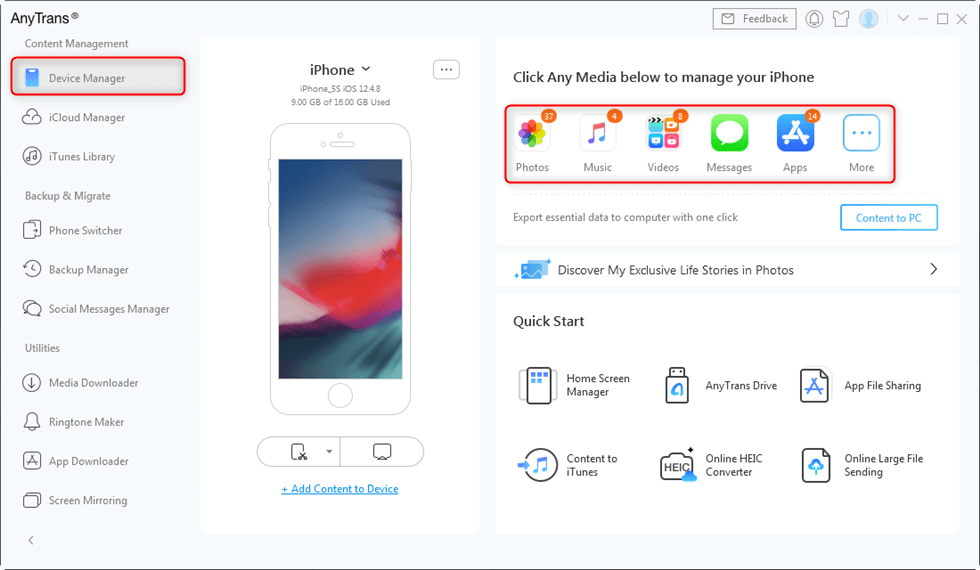
Click on Device Manager
Step 2. Select Music and Click To Device
Click Music to get all the songs loaded on your old iPhone. Select the songs you want to transfer and click the “To Device” button to transfer music from one iPhone to another. Also, you can click the Add button to copy music from computer to iPhone.
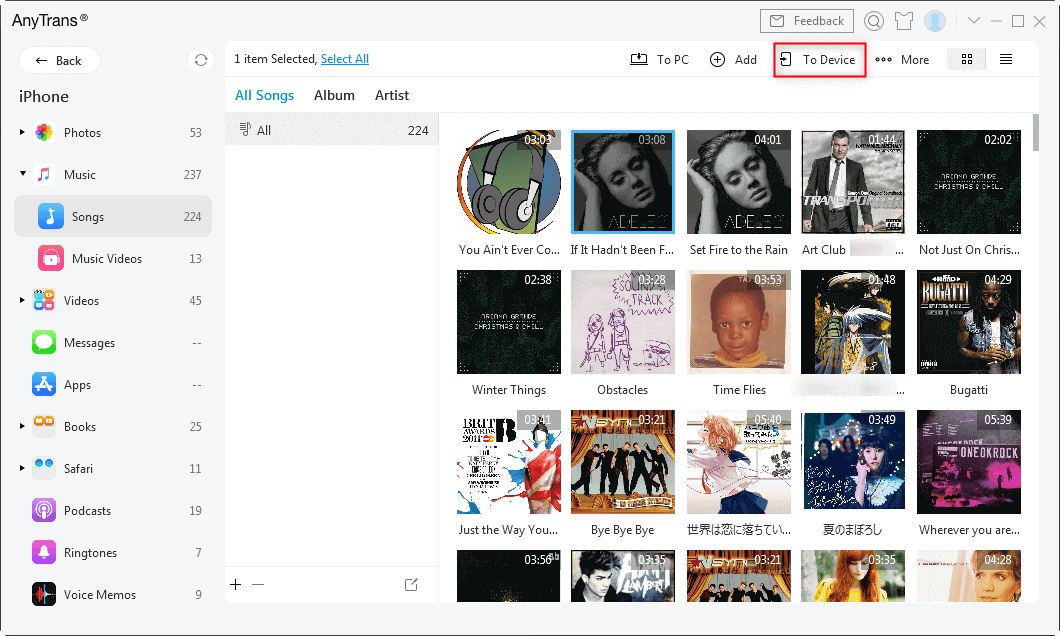
Click the To Device Button
How to Transfer Music iPhone to iPhone Wholly
If you do not need to preview the music list and move all the music or all iPhone data with one click, you can use Phone Switcher as the below picture shows:
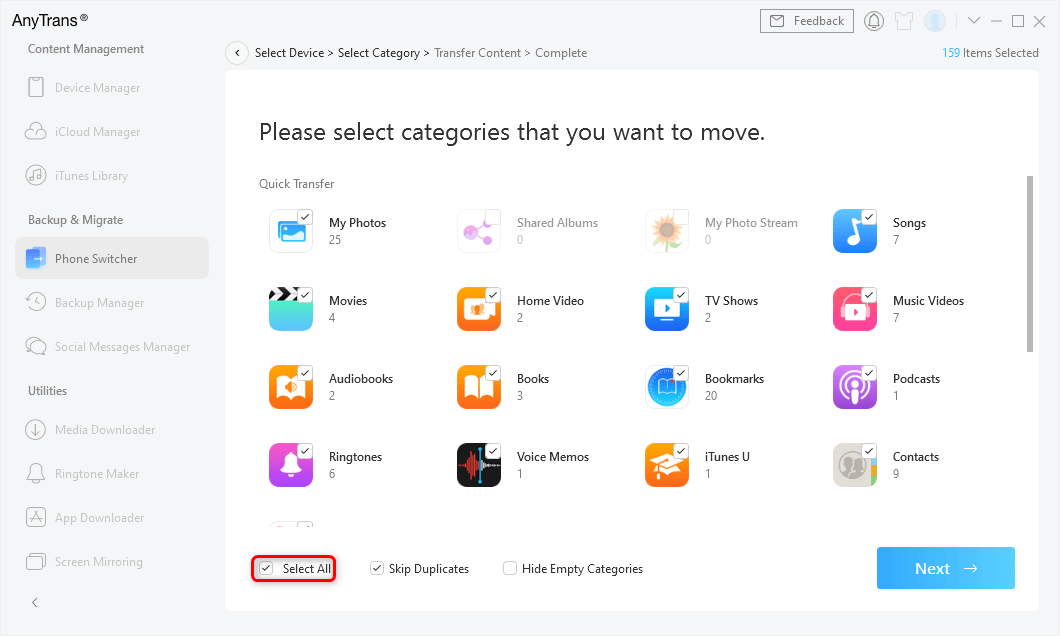
Merge iPhones with Phone Switcher
Transfer Music from iPhone to iPhone Wirelessly
If there is no USB cable available or your iPhone cannot be recognized by your computer, then you can try the AnyTrans app to transfer music from iPhone to iPhone wirelessly.
Now connect your two iPhones with the same Wi-Fi and install the AnyTrans app on the two iPhones. You can download it by clicking the below button or directly search AnyTrans on App Store.
Step 1. Open AnyTrans on your old iPhone, tap on My QR code on the top-right corner of your old iPhone.
Step 2. Open AnyTrans on your new iPhone, and tap on the Scan button to scan the QR code on your old iPhone.
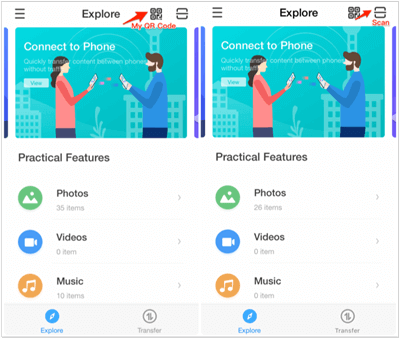
Wirelessly Connect Two iPhones
Step 3. Choose the Music category on your old iPhone > Tap on the Select button at the top right corner to select music > Select the music you want to transfer to your new iPhone > Tap on Send to iPhone button to transfer the selected songs.
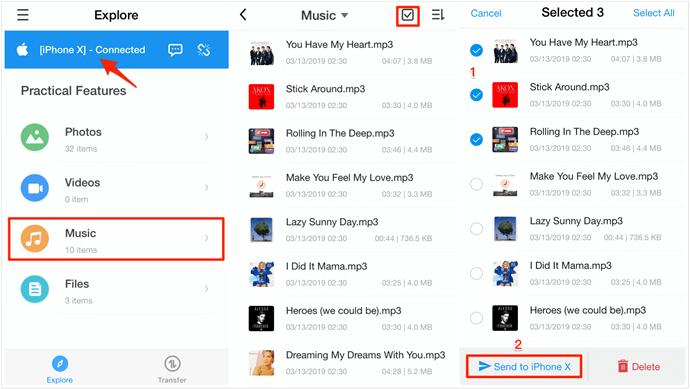
Transfer Music from iPhone to iPhone Wirelessly
Transfer Music from iPhone to iPhone with AirDrop
Suitable for: Quick, wireless transfer of a few songs without a computer
Can you AirDrop music to iPhone? The answer is YES. AirDrop enables you to easily transfer content between two iOS devices. On your device, please press and hold on to the wireless control box, and then you will access AirDrop. But we need to mention that AirDrop only allows you to share music one by one. Follow the steps and learn how to transfer non-purchased music from old iPhone to new iPhone free:
- Turn on AirDrop, Wi-Fi connections Bluetooth on both iPhones.
- Open the Music App on the source iPhone and choose the song you want to transfer.
- Tap the “More” button at the lower right corner. Then tap the “Share” icon.
- Choose AirDrop and choose the target iPhone to send the music > On your target iPhone, just tap Accept to receive.
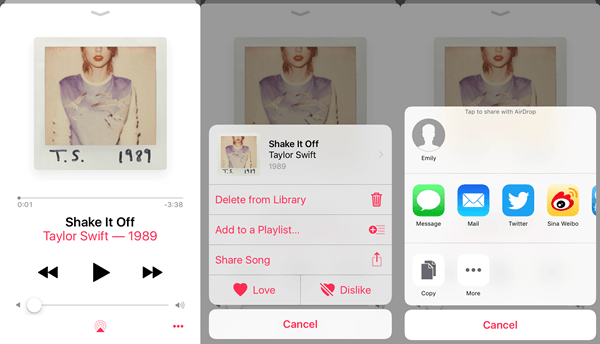
How to Share Music on iPhone with AirDrop
Send Music from Old iPhone to New iPhone with Home Sharing
Suitable for: Users who want to access and play their music library wirelessly across devices; this method streams music but doesn’t make a permanent copy on the new iPhone.
Another possible choice for you to share music on the iPhone is Home Sharing. This way allows you to play the songs of one iPhone on another, namely, the music is not really copied from one iPhone to another. And please ensure your two iPhones are on the same Wi-Fi network.
- On the source iPhone, tap Settings > Music. Scroll down to find Home Sharing.
- Enter your Apple ID and Password and tap Done.
- Repeat the above process on your target iPhone.
- Open the Music app on the target iPhone.
- If you don’t use Apple Music, tap More > Shared and tap the Library you want to listen to. If you do use Apple Music, simply tap “My Music”, then tap “Songs” or “Albums” and select Home Sharing.
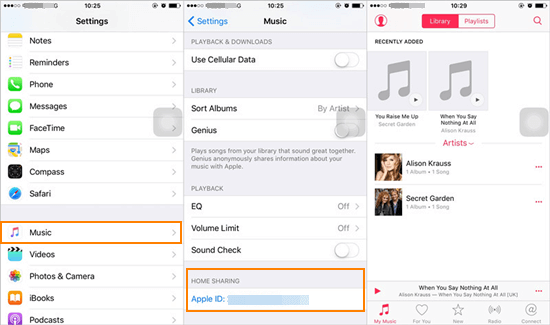
iPhone Music Sharing with Home Share
Transfer Music from iPhone to iPhone with iPhone Data Transfer
Suitable for: Users who want a straightforward, bulk data migration tool.
With PhoneTrans, a Phone to Phone Transfer, you can easily transfer data to your new iPhone including music. It allows you to transfer music (both purchased and non-purchased) from iPhone to iPhone directly. No data will be erased during the process. Here is how:
Step 1. Download PhoneTrans and run it.
Get PhoneTrans installed on your PC or Mac> Open it and connect with your two iPhones > Choose Phone to Phone > Quick Transfer.
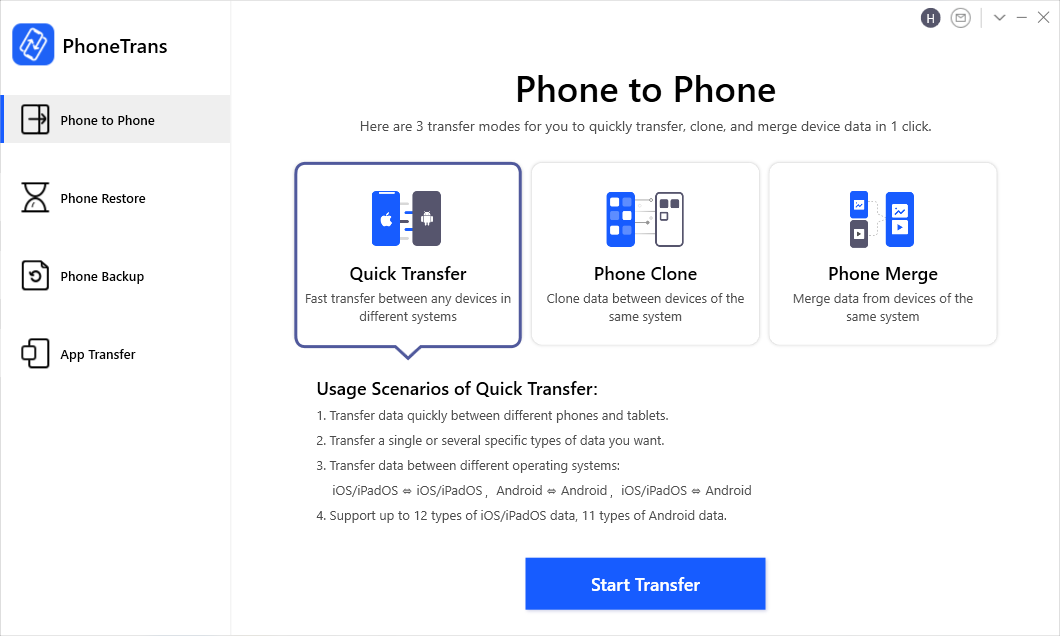
Phone to Phone – Quick Transfer
Step 2. Confirm Your Both iPhones.
You can switch to confirm which iPhone you want to transfer music to or from.
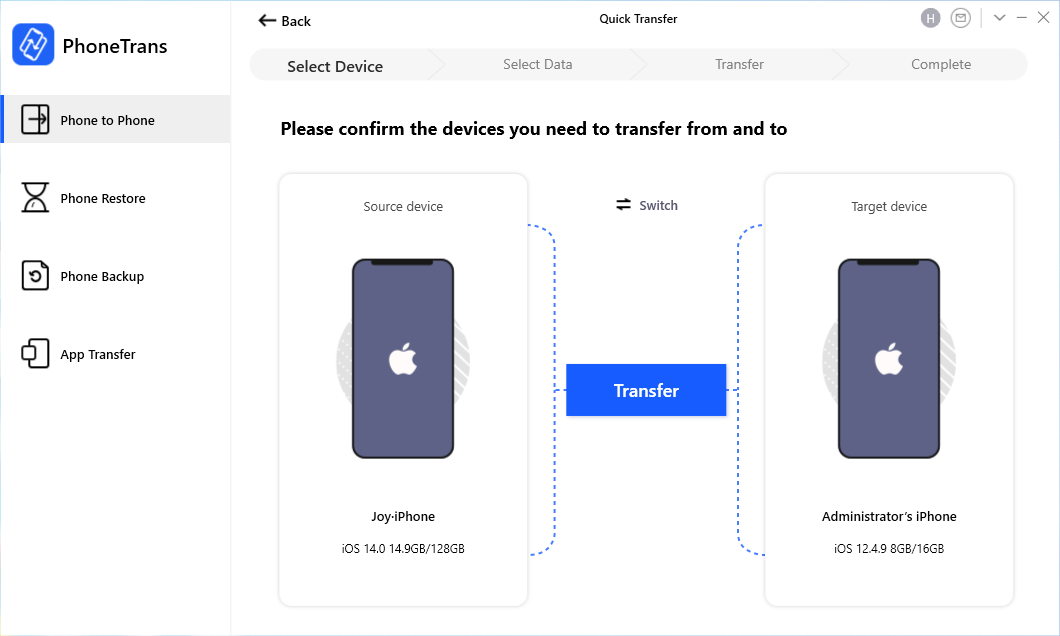
Confirm Your iPhones
Step 3. Transfer music from iPhone to iPhone.
Choose Music and click Transfer Now to get music from your iPhone to iPhone.
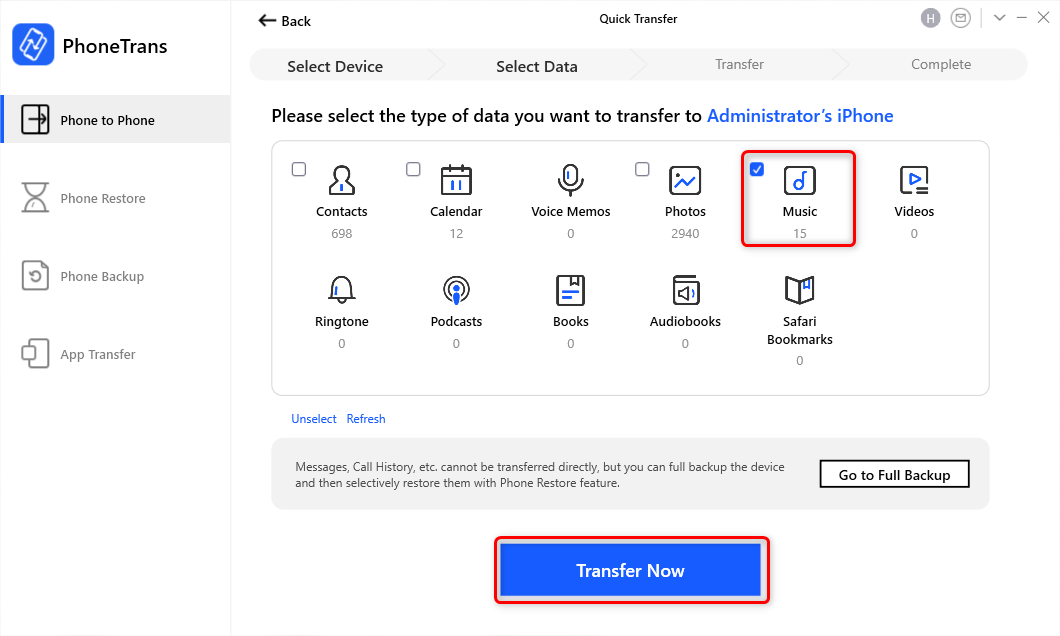
Choose Music and Click Transfer Now
These two methods (Email and AirDrop) can only transfer music downloaded from Apple Music, and due to copyright protection, some transferred songs may NOT be able to play.
Share Music to New iPhone via Email
Suitable for: Sharing a very limited number of songs, such as a single track or two, to yourself or friends.
Besides AirDrop, email is another way to share music between iPhones without a computer. However, most email services restrict file size and type(usually under 20–25MB). This method is impractical for large libraries.
- Open the Mail app on your iPhone > Hit the compose button to open a new email creation window.
- Fill in your email address on the recipient field > Tap the “Add Attachment” button.
- Upload the songs you want to transfer > Tap “Send”.
- Open the Mail app on your other iPhone to receive and download the songs.
You May Like: How to Fix Some Songs Won’t Sync on iPhone>
How to Transfer Music from iPhone to iPhone with iTunes
1. Transfer Purchased Music
If you only want to transfer purchased iPhone music to another iOS device, then iTunes on your computer would be the first choice. You need to sync the music from the source iPhone to the iTunes library and then transfer the synced music from iTunes to your target iPhone. However, only purchased songs are supported and it might erase the existing content on your new iPhone. To transfer music from iTunes to iPhone:
- Connect your source iPhone to the computer via USB cable.
- Launch iTunes and go to File > Devices > Transfer Purchases from [your iPhone name] to transfer music from iPhone to iTunes.
- Connect the target iPhone to your computer and then open iTunes.
- Click Songs, choose the music you’d like to transfer to the target iPhone.
- Right-click and choose Add to Device, then click your device name to send the items to your iPhone.
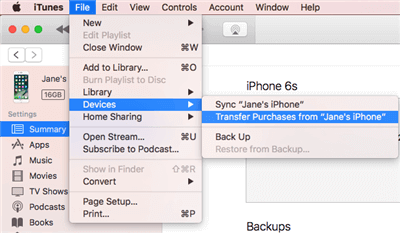
Transfer Music from One iPhone to Another with iTunes
2. Download Music on New iPhone with iTunes Store
To transfer iPhone music, the most recommended option is to use the iTunes Store. But only the songs purchased from the iTunes Store are supported. Both of your two iPhones need to sign into the same Apple ID. To get music on new iPhone with iTunes store:
- Sign in to the target iPhone with the Apple ID you used to buy the music.
- Go to iTunes Store > More > Purchased on the iPhone.
- Choose Music, click the “Not on This iPhone” tab, and select All Songs.
- Click the download icon next to the songs or “Download All” in the top-right corner to get these songs to your iPhone.
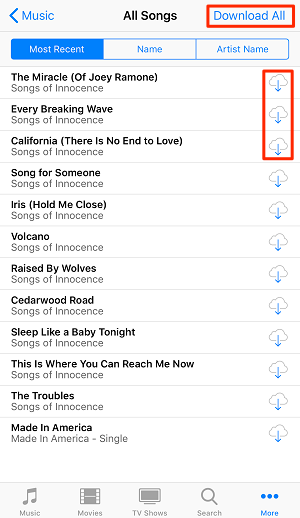
Get Music on New iPhone with iTunes Store
Transfer Music via iCloud Drive (No iTunes Required)
If you prefer to avoid iTunes and want to transfer music files manually using cloud storage, iCloud Drive offers a simple way to move audio files between iPhones. This method is best for non-Apple Music files, such as MP3s you’ve downloaded or received.
On the Old iPhone:
· Open the Files app> Tap Browse > iCloud Drive.
· Locate the music files you want to share. If they are not already in Files, first import them from your music app or another location.
· Tap the Share icon > choose Move > iCloud Drive > select a folder to upload.
On the New iPhone:
· Ensure you’re signed into the same Apple ID and iCloud is enabled.
· Open the Files app and navigate to iCloud Drive.
· Locate and tap the uploaded music file to download and play it.
The Bottom Line
That’s all about how to transfer music from iPhone to iPhone. When getting a new iPhone, users will receive a pop-up message that offers an iOS data migration feature to set up the new iPhone. However, it is only available for the new iPhone or the factory reset one. So if you also want to transfer music from iPhone to iPhone after setup, you can use Home Sharing, Apple Music sharing, or free download AnyTrans and have a try.
Free Download * 100% Clean & Safe
FAQs About How to Transfer Music from iPhone to iPhone
1. Can I transfer music to my iPhone without iTunes?
Yes. You can transfer music without iTunes using AirDrop, Email, Apple Music, Cloud services. Or third-party tools like AnyTrans or PhoneTrans, permit transferring both purchased and non-purchased music without iTunes, often supporting batch transfers and other data as well.
2. How to transfer music library from old phone to new phone?
To transfer your entire music library from an old iPhone to a new iPhone, choose among these common approaches:
- Apple Music syncing: If subscribed, just sign in with your Apple ID on the new phone and enable “Sync Library” to access all purchased and added music seamlessly.
- Home Sharing: Stream music library when both are on the same Wi-Fi and Apple ID, but this does not copy music files permanently.
- iTunes (if you want): Sync your old iPhone’s music library to iTunes on a computer, then sync iTunes to the new iPhone (only supports purchased music and can overwrite new iPhone data).
- AnyTrans or PhoneTrans: Use these third-party tools on a computer or via Wi-Fi to copy both purchased and non-purchased songs in bulk.
3. How to transfer music from iphone to iphone with different apple ID?
Transferring music between iPhones signed in with different Apple IDs is limited by Apple’s DRM and licensing policies:
- Purchased songs are tied to the Apple ID used for purchase and generally cannot be transferred or accessed on another Apple ID without re-purchasing.
- For non-purchased or DRM-free music, you can manually transfer files using AirDrop, third-party tools (like AnyTrans or PhoneTrans), or by exporting music to a computer and then copying to the new iPhone.
- Apple’s iTunes Match service (paid) may help by uploading all your music to Apple’s cloud tied to one account, but requires setup from a computer and may not solve cross-ID limitations fully.
More Related Articles



Joy Taylor is a seasoned technical writer with over a decade of experience in mobile technology. At iMobie, she specializes in producing in-depth content on iOS data recovery, iPhone unlocking solutions, and iOS troubleshooting.
Product-related questions? Contact Our Support Team to Get Quick Solution >
