How to Bypass FRP on Android 14: Samsung, APK & PC Methods
Android 14 FRP bypass depends on your phone brand, firmware, and security patch. This guide explains when Samsung Test Mode may still work, why FRPFile/APK and no-PC methods often fail, and when a PC-based FRP tool is the better route for supported devices.
Quick Answer
Quick Answer: FRP bypass on Android 14 is still possible in some cases, but the working path depends heavily on the phone brand, security patch, and whether Samsung Test Mode still opens. Older Samsung firmware may still allow a manual route through *#0*# Test Mode. On fully updated Android 14 devices, APK, TalkBack, SIM menu, and browser redirect tricks are often blocked, so a computer-based FRP workflow is usually the more realistic option.
Before you try any bypass method, confirm that the phone is yours or that you are authorized to repair it. If you remember the Google account previously synced on the device, signing in during setup is the simplest and safest option. If you need broader background on FRP, start with the Android FRP bypass guide; this page focuses specifically on Android 14 FRP behavior.
Android 14 reality check: Many “FRP bypass Android 14 no PC” videos depend on old patches. If your phone was updated recently, the same entry point may disappear even when the model name looks identical.
Which Android 14 FRP Method Should You Try?
Android 14 FRP is not one universal process. Use the table below to choose the right starting point instead of repeating outdated steps that your security patch has already blocked.
| Your Situation | Best Starting Point | PC Needed? | Main Limitation |
| You know the previous Google account | Sign in during setup | No | This is the official route and does not bypass ownership checks. |
| Samsung Android 14 and *#0*# opens Test Mode | Try the Samsung Test Mode route | Sometimes | Usually blocked on newer firmware and security patches. |
| Samsung Android 14 but Test Mode does not open | Move to a PC-based FRP method | Yes | Dialer-based manual methods are patched. |
| You searched for FRPFile / bypass Android 14 APK | Check APK limitations before downloading anything | No, but success is limited | Android 14 often blocks APK installation during setup. |
| Pixel, Xiaomi, OPPO, OnePlus, Motorola, or updated Samsung | Use account recovery or a PC-based FRP tool | Usually yes | Brand-specific setup restrictions vary. |
If you want to compare tool options before installing anything, see this FRP bypass tool comparison. If you are specifically looking for DroidKit’s FRP module, review the Android FRP tool page for supported scenarios and device notes.
What Changed with FRP on Android 14?
Factory Reset Protection asks for the Google account previously synced to the phone after a reset. On Android 14, that setup flow is harder to interrupt than on older Android versions. The biggest difference is not the FRP message itself, but the number of setup-screen shortcuts that no longer reach Settings, Chrome, file managers, or APK installers.
| Old FRP Entry Point | What Happens on Many Android 14 Builds | What It Means |
| TalkBack shortcut | Accessibility paths may no longer open the same menus. | TalkBack-only methods are less reliable. |
| Emergency call / diagnostic code | Samsung Test Mode may be disabled by firmware patch. | *#0*# is a quick compatibility check, not a guarantee. |
| FRP bypass APK install | Unknown-source installation can be blocked during setup. | APK-only routes often fail before the file can run. |
| YouTube, browser, or share menu redirect | Setup Wizard may close or restrict the redirect path. | Older no-PC videos may no longer match your phone. |
| USB debugging prompt | The prompt may not appear, or access may still be limited. | Debugging access does not always mean FRP can be skipped. |
If your phone runs Android 13, Android 12, or Android 11, use a version-specific guide instead because the available entry points can be different:
Android 13 FRP bypass,
Android 12 FRP bypass, and
Android 11 FRP bypass.
Before You Try Any Android 14 FRP Bypass
A factory reset usually means the phone data is already erased or no longer accessible from the setup screen. The goal now is to complete setup on a device you own or are authorized to unlock. Check the following points before choosing a method:
- Google account access: Try the previous Google account and account recovery first if possible.
- Second-hand phone: Ask the seller to remove the device from their Google account before you reset or bypass anything.
- Security patch: A “Samsung Android 14” method may work on one patch and fail on another.
- USB cable and computer: PC-based methods need a stable USB connection and the correct device drivers.
- SIM lock vs FRP: FRP bypass does not unlock a carrier or SIM network lock.
Important: FRP is designed to protect lost or stolen phones after reset. Use the methods below only for your own device or a device you have permission to service.
Method 1. Samsung Android 14 FRP Bypass with Test Mode
Samsung Android 14 is the main case where some users still try a no-PC or semi-manual FRP path. The deciding check is simple: does *#0*# open Test Mode from the emergency dialer? If it opens, your firmware may still have a usable entry point. If nothing happens, the method is patched and repeating APK steps will not help.
Step 1. Check Whether Test Mode Opens
Step 1. Turn on the locked Samsung phone and connect to Wi-Fi on the setup screen.
Step 2. Tap Emergency Call.
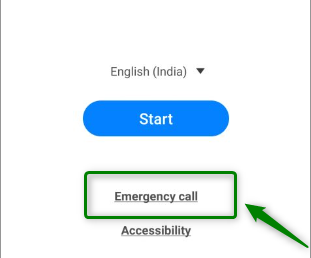
Tap Emergency Call
Step 3. Enter *#0*# on the dial pad.
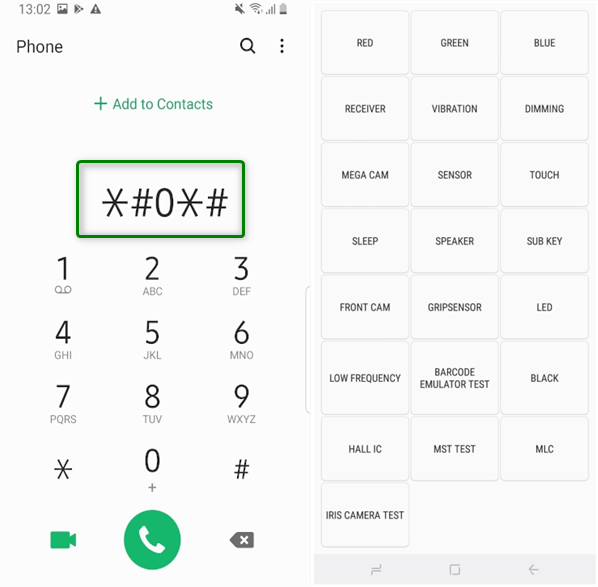
Enter Code to Access Test Mode
Step 4. If the Test Mode screen appears, continue with the next section. If nothing happens, skip to the PC-based method.
Step 2. Try the Manual Route If Your Firmware Allows It
The exact Samsung FRP route changes by One UI version and security patch. The outline below explains the logic, but the available menu names may differ on your device.
Step 1. Keep the locked Samsung phone connected to Wi-Fi.
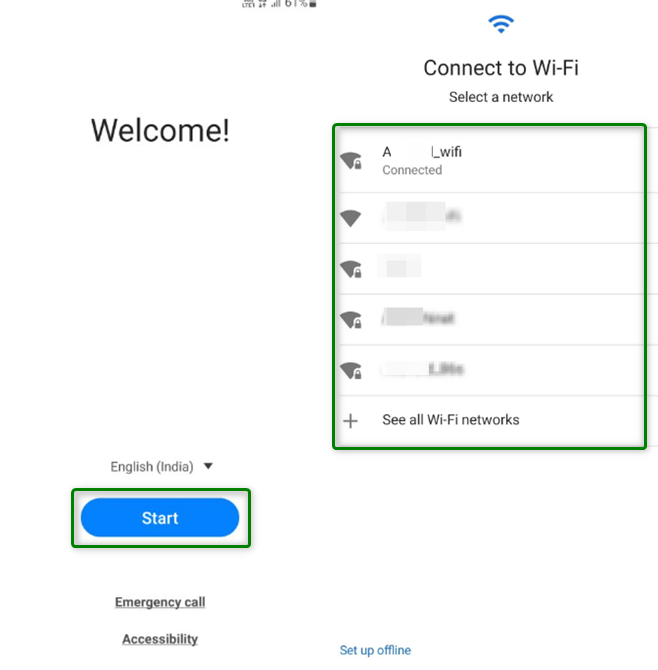
Connect to Wi-Fi
Step 2. Open Emergency Call again and enter *#0*# to access Test Mode if it is still available.
Step 3. Follow the on-screen route required by your method, such as connecting another Android phone, using a transfer path, or opening a Samsung setup component.
Step 4. If your method asks to install an APK, use only a trusted source and stop if Android blocks the installer or Play Protect warning cannot be handled safely.
Step 5. Restart the phone and check whether setup now allows you to continue.
Samsung patch note: If Test Mode does not open, if USB debugging never appears, or if setup returns to the Google verification screen after restart, your firmware is likely patched. For broader Samsung model routing, use the Samsung FRP bypass guide.
Method 2. FRP Bypass APK or FRPFile on Android 14
Queries like FRPFile bypass Android 14 and FRP bypass Android 14 APK usually refer to downloading an APK and trying to launch it from the setup screen. This may still work on a small number of old or weakly patched builds, but it is one of the least stable Android 14 routes.
| APK Checkpoint | What Can Go Wrong on Android 14 | What to Do Next |
| Can you open a browser or file manager? | Setup Wizard may block redirects and sharing menus. | Do not keep repeating the same shortcut if it closes immediately. |
| Can you install unknown apps? | Android may hide or lock the permission during setup. | APK methods will not proceed without install permission. |
| Does Play Protect block the APK? | The file may be unsafe, outdated, or incompatible. | Stop using unknown downloads and switch to a safer route. |
| Does the APK crash after opening? | The APK may target older Android versions only. | Use a version-specific method or PC-based workflow. |
If you still want to understand APK routes, read the FRP bypass APK guide first so you know the file-format risks, compatibility limits, and install-blocking issues before downloading random packages.
Method 3. Use a PC-Based Android 14 FRP Tool
On patched Android 14 devices, a PC-based process is often more practical because it does not depend on opening Chrome, Settings, or a local APK from the setup screen. DroidKit includes an FRP Bypass module for supported Android models and gives step-by-step instructions based on the device route available to the tool.
Use this method when your Android 14 phone is stuck at Google verification, Samsung Test Mode is blocked, or APK installation cannot start. You will need a Windows or Mac computer, a USB cable, and enough battery on the locked phone.
Why a PC-Based FRP Route May Help on Android 14
- It does not rely on old TalkBack, YouTube, or browser shortcuts.
- It can guide different brand routes instead of using one APK for every phone.
- It can help when the computer driver or device-mode step is the main obstacle.
- It is more suitable for fully updated Samsung, Xiaomi, Pixel, OPPO, OnePlus, Motorola, and similar Android 14 devices.
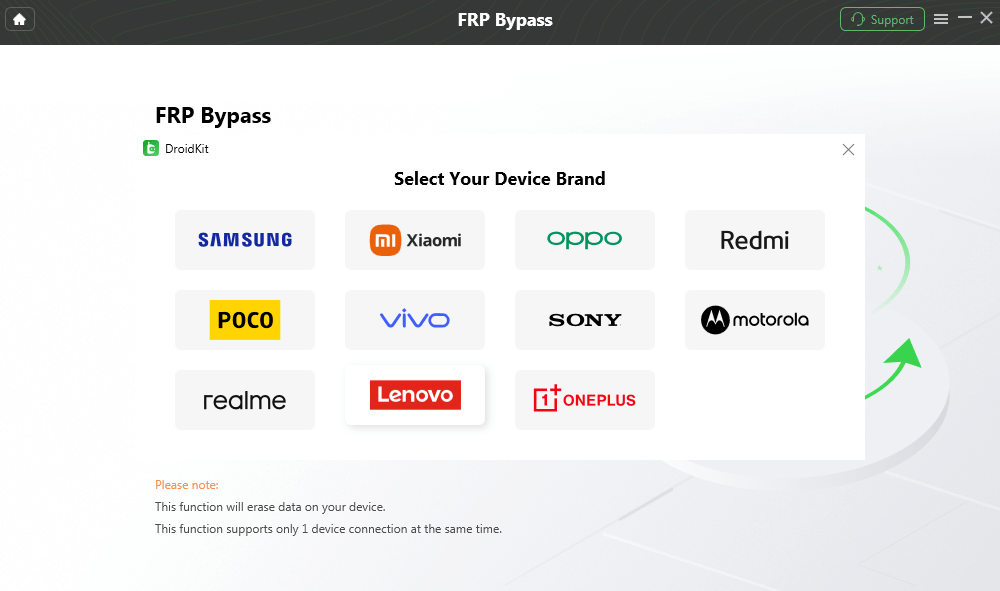
DroidKit Supports Major Android Brands
How to Use DroidKit for Android 14 FRP
Step 1. Download and install DroidKit on your computer.
Step 2. Open DroidKit and choose FRP Bypass from the home screen.
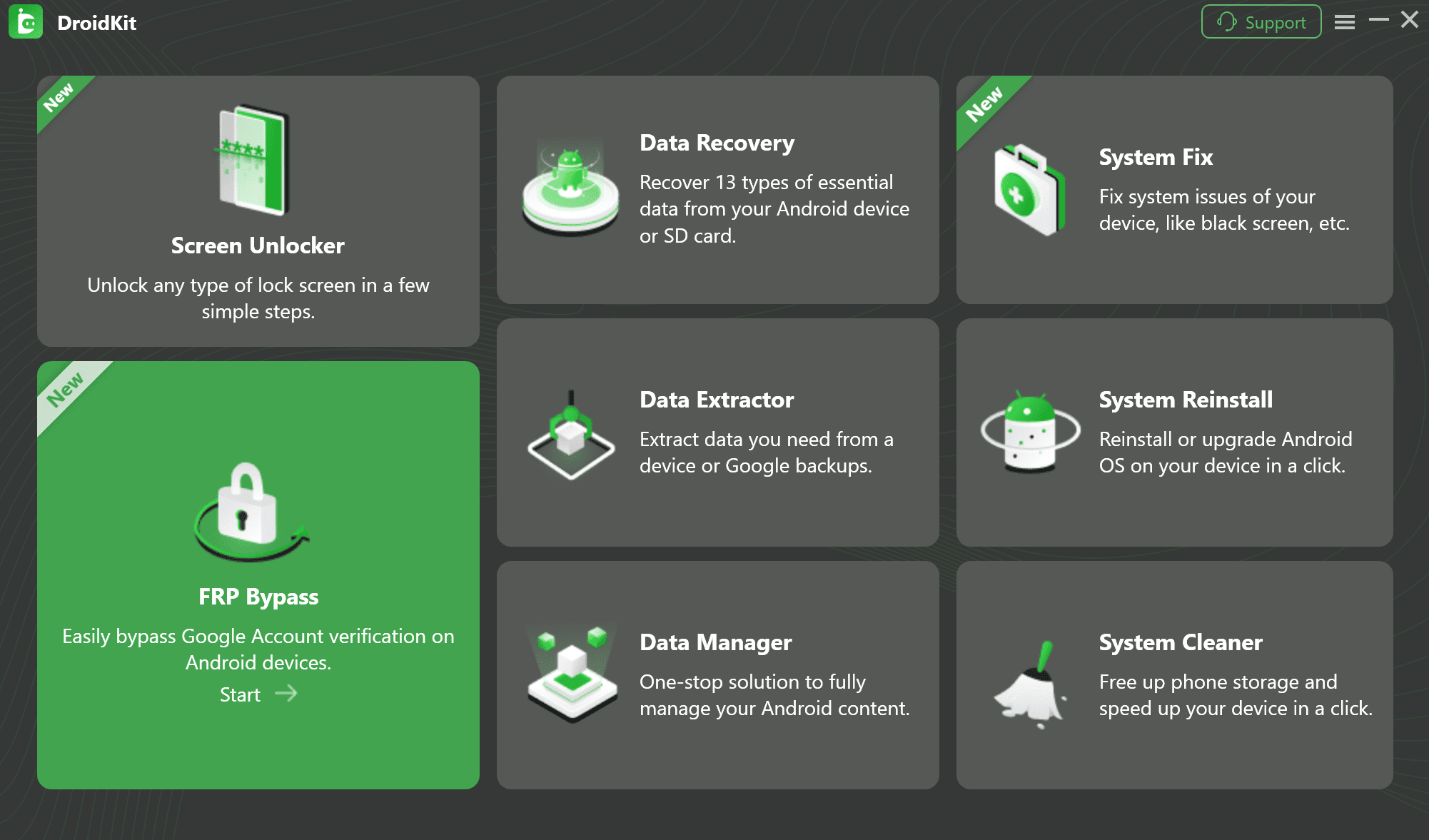
Choose FRP Bypass
Step 3. Connect the Android 14 phone to the computer with a USB cable.
Step 4. Follow the instructions in DroidKit to enter the required device mode. The required mode can vary by brand and model.
Step 5. Wait while DroidKit prepares the matching workflow for your device.
Step 6. Follow the on-screen guide until the FRP process finishes and the phone restarts.
Use the phone’s original USB cable if possible. If the computer cannot detect the device, install the correct USB driver for your phone brand and try another USB port.
Android 14 FRP Notes by Brand
Android 14 FRP behavior is brand-specific. A method built around Samsung Test Mode does not automatically apply to Pixel, Xiaomi, OPPO, OnePlus, Motorola, or other brands.
| Brand / Device Type | Android 14 FRP Behavior | Recommended Direction |
| Samsung | Test Mode may work only on older firmware; newer One UI builds often patch it. | Check *#0*# first, then use Samsung-specific or PC-based routes. |
| Google Pixel | Setup restrictions are usually strict and no-PC tricks are limited. | Use Google account recovery first; consider PC-based support if eligible. |
| Xiaomi / Redmi | MIUI/HyperOS setup behavior can block generic APK routes. | Use Xiaomi-specific FRP guidance or a tool route that lists your model. |
| OPPO / OnePlus / Vivo | Brand setup screens and security patches vary widely. | Do not rely on Samsung dialer codes; use brand-specific instructions. |
| Motorola | Emergency-call and APK paths are often unreliable on newer patches. | Check brand recovery and PC-based options. |
Android 14 FRP Bypass Not Working? Fix These Problems
If the page or video you followed stops halfway, the problem is usually one of the checkpoints below. Identify the failure point before switching to another random method.
Problem 1. *#0*# Test Code Does Not Work
If the Samsung Test Mode screen does not open, your firmware likely patched the diagnostic entry point. Do not continue with instructions that depend on Test Mode. Move to a Samsung-specific tool route or PC-based FRP process instead.
Problem 2. FRP Bypass APK Will Not Install
Android 14 may block unknown-source installation during setup. If you cannot reach the install permission screen, the APK method is blocked on that device. Avoid downloading multiple unknown APKs because this increases malware and compatibility risk.
Problem 3. PC Does Not Recognize the Phone
Try a different USB port, use the original cable, restart the computer, and install the USB driver for your phone brand. On Windows, driver problems are a common reason an FRP tool cannot detect the device in the required mode.
Problem 4. Phone Enters a Boot Loop After a Failed Attempt
A boot loop after a failed bypass attempt may require recovery mode or stock firmware repair. Do not flash random firmware packages. Use the exact model number and official firmware source if you decide to repair manually.
Problem 5. Setup Still Asks for the Previous Google Account
FRP may reactivate after another reset or incomplete bypass. If this is your own phone, use the original Google account or recover it. If it is a second-hand phone, ask the seller to remove the device from their account.
FAQs About Android 14 FRP Bypass
Q1. Can FRP bypass Android 14 be done without a PC?
Only in limited cases. Some older Samsung Android 14 firmware may still allow a Test Mode path, but many fully updated devices block no-PC shortcuts, APK installs, and browser redirects.
Q2. Does FRPFile bypass Android 14 still work?
FRPFile-style APK routes depend on whether your Android 14 setup screen allows browser access, file access, and unknown-app installation. On many updated devices, one of those checkpoints is blocked before the APK can run.
Q3. What is the best FRP bypass method for Samsung Android 14?
First check whether *#0*# opens Test Mode. If it opens, a Samsung-specific manual method may still be possible. If it does not open, use a Samsung FRP guide or a PC-based FRP tool that supports your exact model and firmware.
Q4. Is Android 14 FRP bypass the same as SIM unlock?
No. FRP is a Google account verification lock after reset. SIM or network lock is controlled by a carrier. Removing FRP does not unlock a phone for other carriers.
Q5. Will FRP come back after bypass?
Yes, FRP can be enabled again when you add a Google account and set a screen lock on the phone. That is normal Android security behavior.
Q6. Why did my Android 14 FRP method stop working after an update?
Android security patches often close setup-screen shortcuts, Test Mode behavior, APK access, and permission loopholes. The same method can work on an older build and fail after a newer patch.
The Bottom Line
Android 14 FRP bypass is mainly a compatibility question. The first thing to check is not whether a method is “free,” but whether your brand, firmware, and security patch still expose the entry point that method needs. Samsung users can start with the *#0*# Test Mode check. Users on updated Samsung, Pixel, Xiaomi, OPPO, OnePlus, Motorola, and similar devices should expect old APK and no-PC routes to fail more often.
If you own the device and cannot recover the previous Google account, use a method that matches your Android 14 build instead of repeating outdated steps. For patched devices, a PC-based Android 14 FRP workflow such as DroidKit is often the more practical route because it guides the required device-mode and driver steps directly.

DroidKit
Need an Android 14 FRP route after Samsung Test Mode or APK access is blocked? DroidKit provides a computer-based FRP workflow for supported devices with brand-specific on-screen guidance.



Joy Taylor is a seasoned technical writer with over a decade of experience in mobile technology. At iMobie, she specializes in producing in-depth content on iOS data recovery, iPhone unlocking solutions, and iOS troubleshooting.
Product-related questions? Contact Our Support Team to Get Quick Solution >
