Universal Unlock PIN for Android? What Works If You Forgot PIN
There is no universal unlock PIN for Android. This guide explains why “master PIN” claims are unsafe, compares real Android screen unlock options, and shows what may erase data before you try anything.
Some Android users search for a universal unlock PIN when they forget the lock screen PIN, pattern, or password. The idea sounds convenient, but it is not how modern Android security works. A single code that unlocks every Android phone would defeat the purpose of a private lock screen.
This guide gives you the safe answer first, then compares real ways to recover access to your own Android device. Before you try any method, pay close attention to data loss and Google verification warnings.
Quick Answer: Is There a Universal Unlock PIN for Android?
No, there is no universal unlock PIN for Android. Codes such as 0000 , 1234 , or “master PIN” cannot unlock modern Android phones unless that exact code was already set by the device owner.
If you forgot your PIN, first try methods that were already enabled, such as fingerprint, face unlock, or Extend Unlock . If those are unavailable, you may need to erase the phone with Google Find Hub, reset it, or use a supported screen unlock tool such as DroidKit. These methods may erase device data and may trigger Google verification after reset.
Only use unlock methods on a device you own or are authorized to unlock. Avoid websites, APKs, or videos that promise a secret universal Android PIN.
Why a Universal Android Unlock PIN Does Not Exist
Android screen locks are designed to protect private data. If every device could be opened with one universal code, anyone could access photos, messages, payment apps, work accounts, and personal files.
That is why Android does not provide a hidden unlock code, master PIN, or emergency password for all devices. Real recovery options depend on your phone model, Android version, account access, backup status, and whether a recovery feature was set up before you were locked out.
Before You Try Any Unlock Method: Data Loss and FRP Warning
Before trying to unlock a forgotten Android PIN, check these points:
- Data loss: Many modern unlock or reset methods erase local data on the phone.
- Google account: After a reset, Android may ask for the Google Account previously synced on the device to verify ownership.
- Backups: Check whether photos, contacts, WhatsApp data, and app data are backed up before erasing anything.
- Device ownership: Unlock only your own phone or a device you are authorized to manage.
Google explains that after a factory reset on a protected device, you should expect to verify ownership by unlocking the screen or entering the Google Account information previously used on the phone.
Compare Real Ways to Unlock Android If You Forgot PIN
| Method | Best For | May Erase Data? | Main Requirement |
|---|---|---|---|
| Fingerprint, face unlock, or Extend Unlock | Phones that still meet a trusted unlock condition | No, if it works | Must have been set up before you forgot the PIN |
| DroidKit Screen Unlocker | Supported Android devices when normal unlock methods fail | Yes, usually | Computer, USB cable, supported device, ownership authorization |
| Google Find Hub erase | Device linked to your Google Account and online | Yes | Google Account access and Find Hub enabled |
| Forgot Pattern | Very old Android phones | Usually no | Android 4.4 or earlier and linked Google Account |
| Backup PIN | Older Samsung or Android devices | No, if available | Backup PIN must have been created before lockout |
| Safe Mode | Problems caused by third-party lock screen apps | No | The system PIN is not forgotten; the third-party app is the blocker |
Method 1. Try Extend Unlock If It Was Already Enabled
Extend Unlock can keep an Android phone unlocked in trusted conditions, such as when it is on your body, at a trusted place, or connected to a trusted Bluetooth device. It can help only if it was already enabled before you forgot the PIN.
Try this first if your phone still accepts fingerprint, face unlock, or remains unlocked at a trusted location or with a trusted device nearby. If the phone is fully locked and does not meet any trusted condition, Extend Unlock usually cannot be set up or changed without the current PIN, pattern, or password.
Method 2. Use DroidKit Screen Unlocker on Supported Android Devices
If you own the Android phone and cannot unlock it with PIN, fingerprint, face unlock, or Extend Unlock, DroidKit Screen Unlocker may help remove the screen lock on supported devices. This is not a universal PIN, and it is not a no-data-loss guarantee. DroidKit’s screen unlock guide notes that the process can erase device data, so read the warning before starting.
Free Download * 100% Clean & Safe
How to Remove Android PIN with DroidKit
Step 1. Download and install DroidKit on your computer. Open it and select Screen Unlocker .
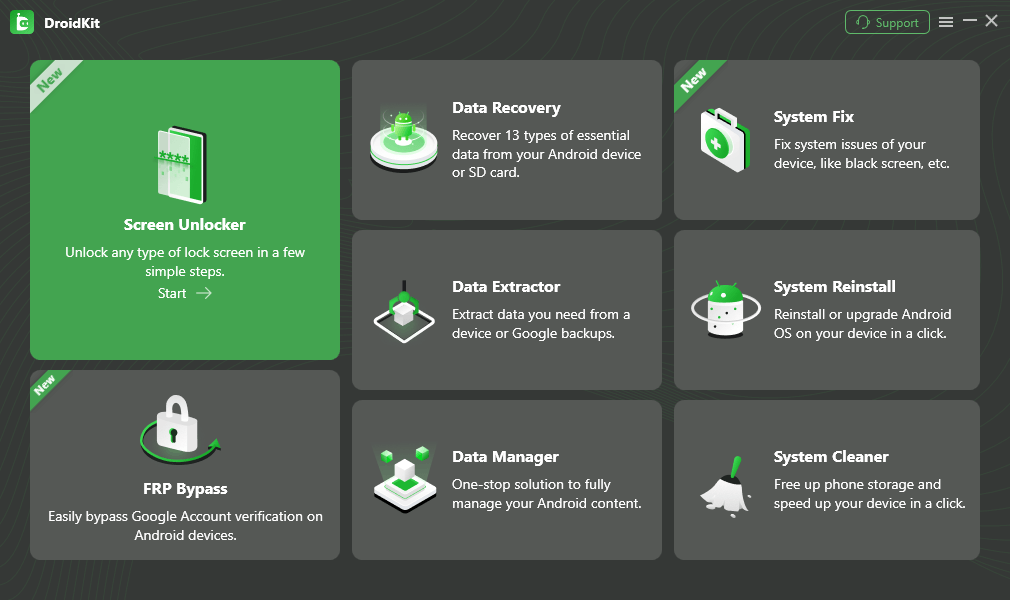
Choose Screen Unlocker
Step 2. Connect your Android phone to the computer with a USB cable, then click Start .

Connect Your Android Device
Step 3. DroidKit will prepare a configuration file for your device. When it is ready, click Remove Now .
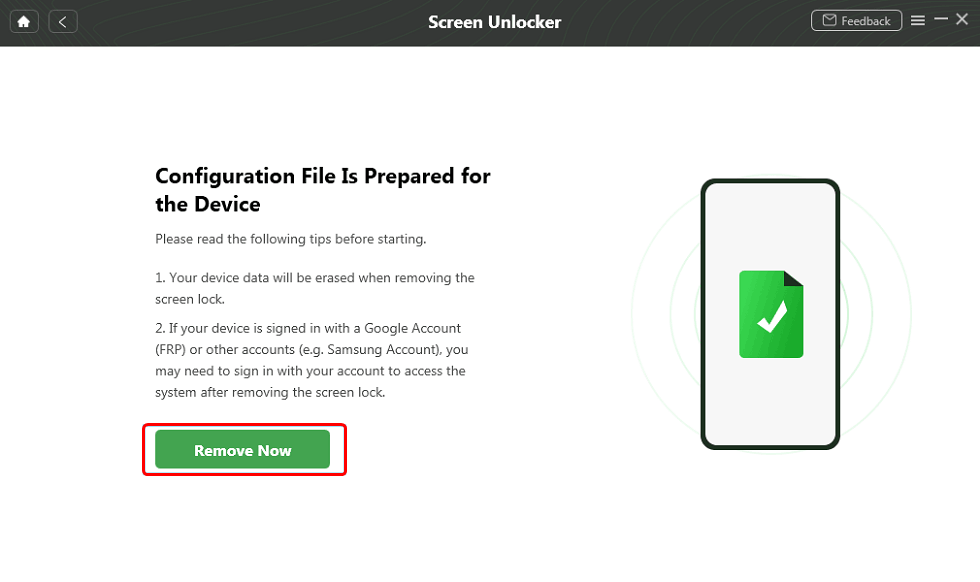
Click Remove Now
Step 4. Choose your Android brand and follow the on-screen instructions to put the device into the required mode.

Follow the On-Screen Instructions
Step 5. Wait for the screen lock removal process to finish. After the device restarts, set it up again and be ready for possible Google verification.
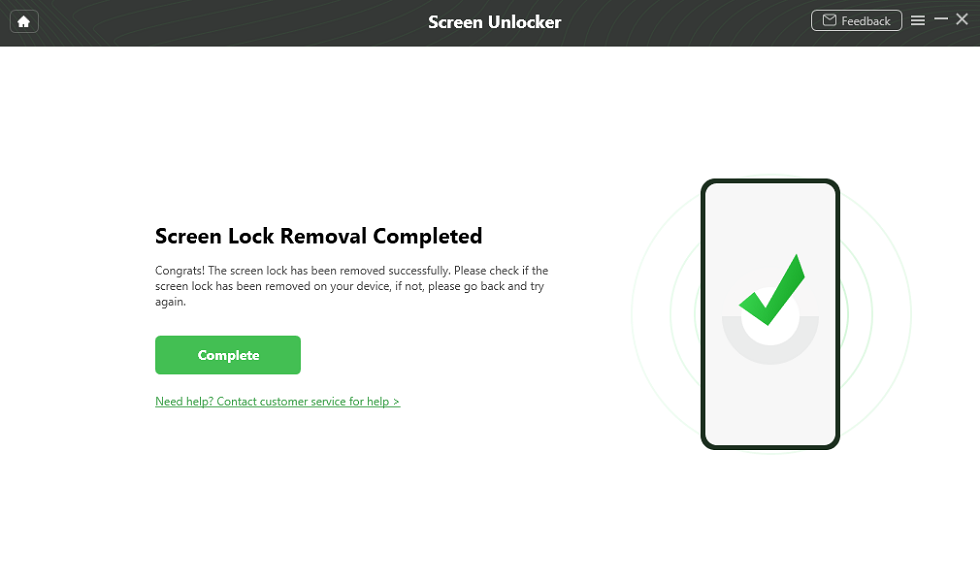
Screen Lock Removal Completed
Method 3. Use Google Find Hub to Erase the Phone
Google Find Hub can help you find, secure, or erase an Android device remotely. It does not show your old PIN and does not create a new screen PIN for a locked phone. If you choose Erase device , the data on the phone will be permanently deleted.
- Go to Google Find Hub or open the Find Hub app on another device.
- Sign in with the Google Account linked to the locked Android phone.
- Select the device you want to erase.
- Choose the erase option and confirm the warning.
- After erase, set up the phone again. You may need the Google Account previously synced on the device.
Method 4. Use Forgot Pattern on Android 4.4 or Earlier
The old Forgot Pattern option may help on Android 4.4 or earlier. It is not a modern Android unlock method and should not be expected on newer phones.
- Enter the wrong pattern several times until the Forgot Pattern option appears.
- Tap Forgot Pattern .
- Sign in with the Google Account previously linked to the device.
- Set a new pattern if the account is verified successfully.
If your phone runs a newer Android version, this option is usually unavailable.
Method 5. Try Backup PIN on Older Samsung or Android Devices
Some older Android or Samsung devices allowed users to create a backup PIN for lock screen recovery. This can help only if you created the backup PIN before you were locked out and still remember it.
- Enter the wrong pattern or PIN until the backup option appears.
- Tap Backup PIN if available.
- Enter the backup PIN.
- Once inside, go to lock screen settings and create a new secure PIN or password.
If the backup option does not appear, your phone likely does not support this recovery path.
Method 6. Boot into Safe Mode If a Third-Party Lock App Is the Problem
Safe Mode does not bypass the original Android system PIN. It can help only when a third-party lock screen app is blocking normal access or causing lock screen errors.
- Press and hold the power button until the power menu appears.
- Long-press Power off until the Safe Mode prompt appears.
- Tap OK to restart in Safe Mode.
- If the phone opens normally in Safe Mode, uninstall the third-party lock screen app.
- Restart the phone to return to normal mode.
If you forgot the original Android system PIN, Safe Mode will not unlock it.
What If Google Verification Appears After Reset?
If you erase or reset a locked Android phone, you may see Google verification during setup. This is called Factory Reset Protection , or FRP. It is separate from the screen PIN and is designed to verify device ownership after an untrusted reset.
Use the Google Account previously synced on the device. If you cannot sign in after reset, this guide may help: bypass Google account verification after reset .
FAQs About Universal Unlock PIN for Android
Is there a universal unlock PIN for Android?
No. Android does not have a universal unlock PIN, master PIN, or secret code that can unlock every phone. Any website or video claiming that one code unlocks all Android devices should be treated with caution.
Do codes like 0000 or 1234 unlock Android phones?
Usually no. Simple codes such as 0000, 1111, or 1234 only work if they are the actual PIN set by the device owner. They are not Android backdoor codes and will not bypass a modern lock screen.
Can I unlock Android without losing data?
Sometimes, but only in limited cases. If fingerprint, face unlock, Extend Unlock, Forgot Pattern on Android 4.4 or earlier, or a previously set backup PIN still works, data may remain safe. Most modern recovery methods, including reset or many screen unlock tools, may erase data.
Can Google Find Hub unlock my Android PIN?
Google Find Hub can help you find, secure, or erase an Android device, but it does not reveal your old PIN. If you erase the device, all data on the phone is permanently deleted, and you may need the previously synced Google Account afterward.
Does DroidKit unlock Android PIN without data loss?
DroidKit Screen Unlocker can remove Android screen locks on supported devices, but its guide says the function will erase data on the device. Some early Samsung models may have a keep-data option, but compatibility must be checked before use.
Does Safe Mode unlock a forgotten Android PIN?
No. Safe Mode does not bypass the system PIN, pattern, or password. It can help only if a third-party lock screen app is causing the issue. If the original Android system lock is forgotten, Safe Mode usually will not unlock it.
What is FRP after factory reset?
FRP, or Factory Reset Protection, is Android’s ownership verification feature. After a reset, the phone may ask for the Google Account previously synced on the device. This is separate from the screen PIN.
What should I do before resetting a locked Android phone?
Make sure you know the Google Account and password previously synced on the device, check whether your data is backed up, and understand that resetting may erase local files, apps, settings, and screen locks.
The Bottom Line
There is no universal unlock PIN for Android. The safest path is to try previously enabled unlock options first, understand which methods erase data, and prepare for Google verification after a reset. If normal recovery options do not work and you own the device, DroidKit Screen Unlocker may help on supported Android devices, but it is not a universal code and it may erase data.
Free Download * 100% Clean & Safe
Related Guides You May Need



Joy Taylor is a seasoned technical writer with over a decade of experience in mobile technology. At iMobie, she specializes in producing in-depth content on iOS data recovery, iPhone unlocking solutions, and iOS troubleshooting.
Product-related questions? Contact Our Support Team to Get Quick Solution >
