6 Best iPhone Backup Extractor and Viewer for Windows & Mac
If you want to view and extract files from an iPhone backup, this guide compares 6 iPhone backup extractors and viewers for Windows and Mac. You will learn what each tool can extract, whether it supports iTunes or iCloud backups, and what limits to check before choosing one.
iPhone Backup Tips
iPhone Backup Locations
iPhone Backup Tips
PhoneRescue for iOS – Best iPhone Backup Viewer & Extractor
How to view and extract backup files from your iPhone? Just free download PhoneRescue, the top iPhone backup extractor, to browse and extract backup iPhone files now. It helps you view and extract data from iTunes/iCloud backups to your device or computer without data loss.

Apple encourages everyone to have a regular backup for an iPhone, iPad, and iPod. This way, you’ll have a backup copy of your information in case your device is ever lost, damaged, and replaced. What if the “misfortune” really happens someday, how can you view iPhone backup files and extract photos, messages, and other files from your iPhone?
If you are using iTunes or iCloud backups, unluckily, there’s no official way to check the contents in your backups. And you can only do that with a professional iPhone backup viewer. So here we will list the best iPhone backup extractor and viewer for you to view all the backup files, and to extract files to your device or computer. Now, keep reading and pick up the best iPhone backup extractor.
When choosing an iPhone backup extractor, you should also check whether it supports encrypted iPhone backups. If your backup is protected by a forgotten password, some tools may provide additional solutions to help access the backup data.
What Is an iPhone Backup Extractor?
Whenever an iPhone backs up to your computer or to the iCloud server, iTunes/iCloud keeps nearly all of your device’s data and settings, like the messages, notes, bookmarks, app settings, and so forth. Regarding the iTunes backup on a Mac, files synced from your iPhone are stored in a backup folder in ~/Library/Application Support/MobileSync/Backup. Three common file types are:
- Info.plist file in each folder tells you which folder corresponds to which device.
- Manifest.plist contains an encoded manifest, a list of those files backed up by iTunes along with info like their digital signature, size, permissions, and so forth.
- Several backup files using my backup extension contain semi-encrypted versions of all the backed-up files.
So, what does an iPhone Backup Extractor do? It locates and downloads your iTunes/iCloud backup folders, and it also reads the Info.plist and Manifest.plist files to let you extract files based on a variety of file types. Usually, an iPhone backup extractor is capable of extracting data on your computer, but rare ones let you transfer the extracted files directly onto a new device.
An iPhone backup extractor is useful when you already have an iTunes, Finder, or iCloud backup and want to preview or export selected data without restoring the whole backup to an iPhone. Before choosing a tool, check whether your backup is local or cloud-based, whether it is encrypted, and whether the tool supports the data type you need, such as messages, photos, contacts, notes, or app data.
How We Compared iPhone Backup Extractors
- Backup source: whether the tool supports iTunes/Finder backup, iCloud backup, or both.
- Preview ability: whether users can view files before exporting them.
- Data types: whether it supports photos, messages, contacts, call history, notes, and app data.
- Encrypted backup support: whether it can work with password-protected local backups.
- Export limits: whether the free version limits the number or type of files that can be extracted.
Will an iPhone backup extractor overwrite my iPhone?
No, a backup extractor usually reads backup files on your computer or from iCloud and exports selected data to your PC or Mac. It should not overwrite your iPhone unless you choose a full restore option in another tool. Always check the export path and avoid restoring the whole backup if you only need a few files.
1. PhoneRescue for iOS – iTunes & iCloud Backup Extractor
Related Scenario: Validate Your Case Before Taking Action
This related scenario shares similarities with the current topic but may involve different devices, workflows, account configurations, or issue triggers. Applying the steps without verification may lead to an unsuitable solution. Please confirm that your case matches the conditions described in this article before proceeding.
As a professional iPhone backup extractor and viewer, PhoneRescue for iOS is the easiest one you should try to extract your data from your backups. It offers the iCloud and iTunes backup extractor features to help you view and extract what is in your iCloud/iTunes backups. Designed with advanced ForceRestore technology, PhoneRescue for iOS supports users to extract multiple data types, including video, app files, etc., even if they’re damaged or encrypted. As a comprehensive iPhone toolkit, it can also solve various iOS issues, such as fixing breakdown iPhones, recovering screen time passcodes, and so on.
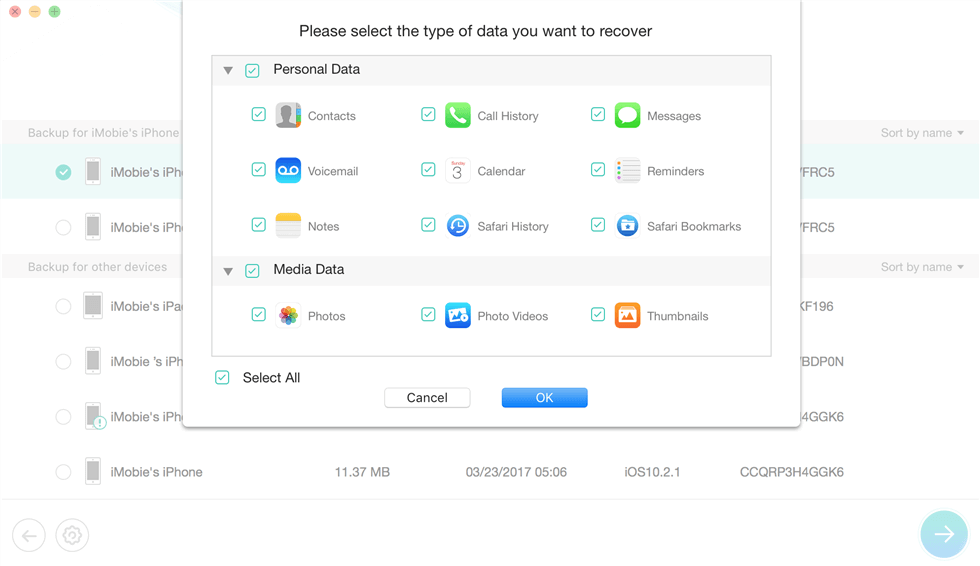
Top iPhone Backup Extractor – PhoneRescue
Main Features of PhoneRescue for iOS:
- Extracting different types of files from iTunes/iCloud backup, like photos, contacts, messages, videos, notes, etc.
- Preview and selectively choose certain data you want, and import them directly to your iPhone or computer.
- No data loss, won’t wipe or overwrite the existing files on your device.
- Recover deleted data from your iPhone without a backup, such as photos, contacts, Safari history, and so on.
- Supports both Windows and Mac, updated to the latest iPhone 17.
Free Download * 100% Clean & Safe
Advantages:
- Extract lost/deleted iPhone data from iCloud/iTunes Backup, even if it is an encrypted one.
- Export iOS files can be saved in your wanted formats, such as HTML/ V-Card/VCF/Text.
- Preview data before extracting, which means you can select and extract only your wanted items.
- Expand the recovery power from specific data to the whole iOS system, a few clicks to fix a system crash.
- Directly extract data from iPhone/ iTunes/iCloud backup and import the data to a new iPhone on the fly.
Disadvantages:
- The newest version of iTunes needs to be downloaded to help detect your iPhone.
- Your iPhone should keep connecting to your computer during the process.
Follow the steps below to view and extract iPhone backup files with this iPhone backup extractor now:
Step 1. Run PhoneRescue for iOS on a computer.
Free download PhoneRescue for iOS on a computer and launch it once you have installed it successfully. You can connect your iPhone, iPad, or iPod to the computer or not. Then you can choose Recover from (iTunes) Backup or Recover from the iCloud tab.
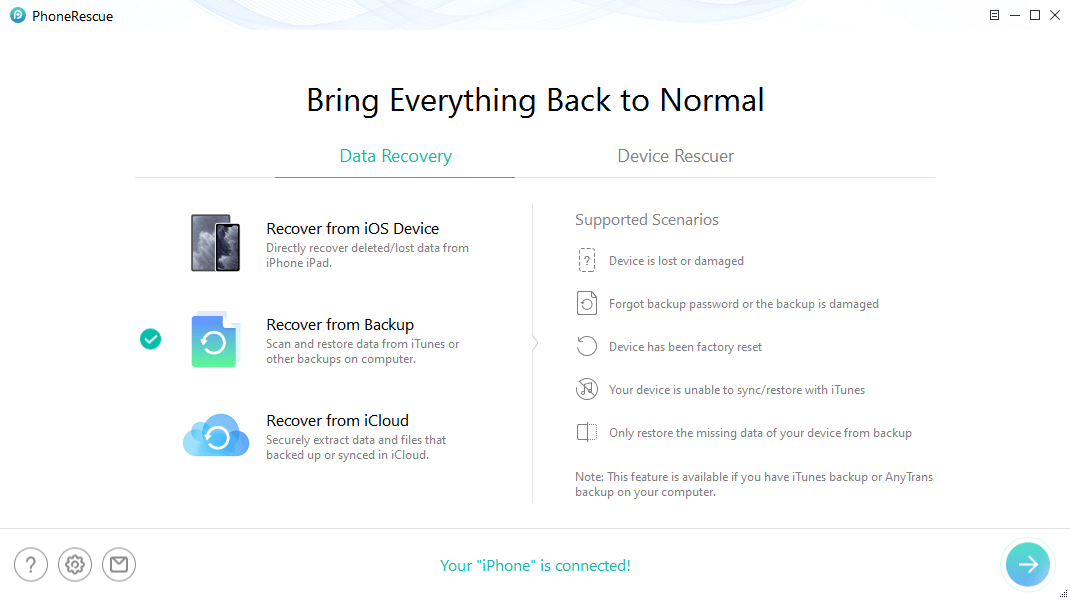
Choose Recover from Backup to Extract Backup Data
Step 2. Choose One backup and Download the Files.
Now you can choose one backup to download. The software defaulted to download all the content the backup owned. You can unselect all contents and get the exact one. Like the messages, click on Messages and tap OK to go on.
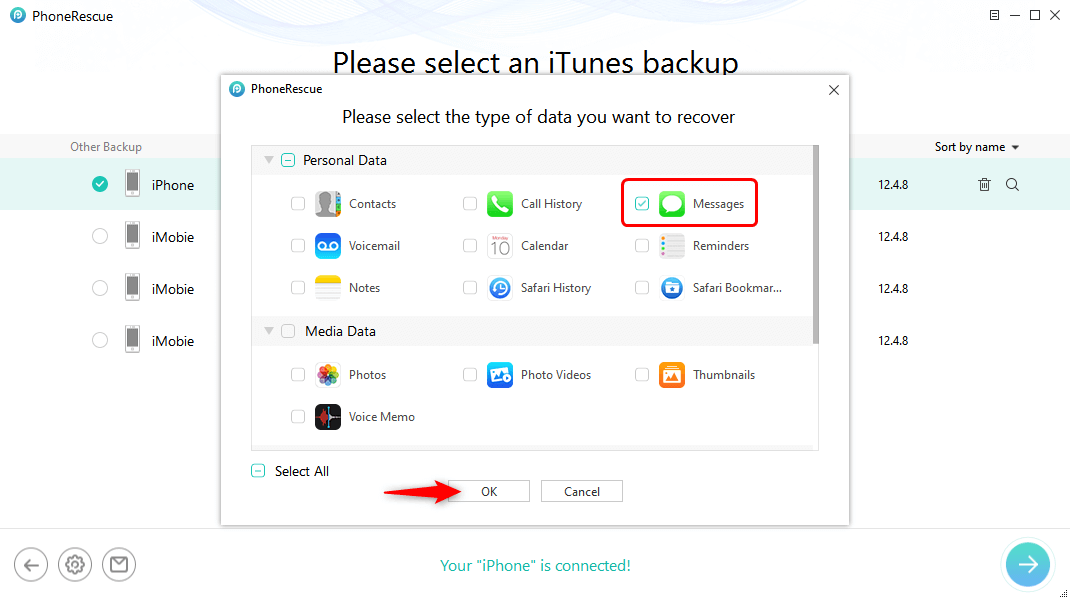
Choose Messages to Export
Step 3. Preview Messages and Export Them.
Once the tool finishes the download and scanning process, you will see all this data listed on the screen. You can click on the To Computer button to get them from backup to your computer, or (if you connected your iPhone to the computer) you can click on the To iPhone to extract this data to your device.
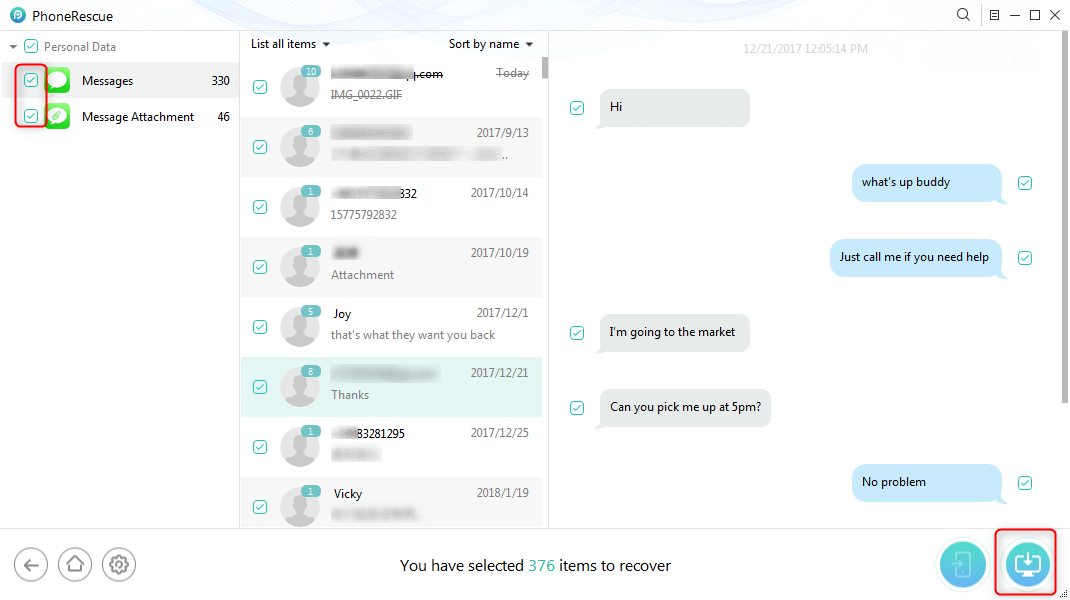
Extract Messages from iPhone Backup to Computer
Well, you can also use PhoneRescue for iOS to extract your backup data from iCloud as easily as from iTunes backup. As a professional iPhone backup viewer and extractor, you can retrieve the exact ones as you want with PhoneRescue for iOS while iTunes/iCloud won’t provide a choice, no matter whether you have a device beside you or not, no matter the device is broken or works great. Just give it a free try and make things easier.
Best for: users who want to preview iTunes or iCloud backup data and selectively extract photos, messages, contacts, notes, or other important files. It is also suitable when you want to recover selected data without restoring the whole backup to an iPhone.
Limit to know: recovery results depend on what is actually stored in the backup. If the backup is incomplete, outdated, or encrypted without the correct password, some files may not be available.
2. AnyTrans –iPhone Backup Viewer Free
Before choosing a backup extractor, consider supported backup types, encrypted backup support, data preview options, and whether it can extract only the files you need instead of restoring the whole backup.
For iOS users, AnyTrans – iPhone Data Manager is acknowledged as a must-have iPhone backup viewer and extractor. As a complete iOS data manager, it does a great job of managing, viewing, and extracting your iPhone backup. It can also act as an iTunes backup extractor to help you browse and extract data from your iTunes backup as well as iCloud’s. Within s a few minutes, AnyTrans can help users to extract thousands of data effortlessly.
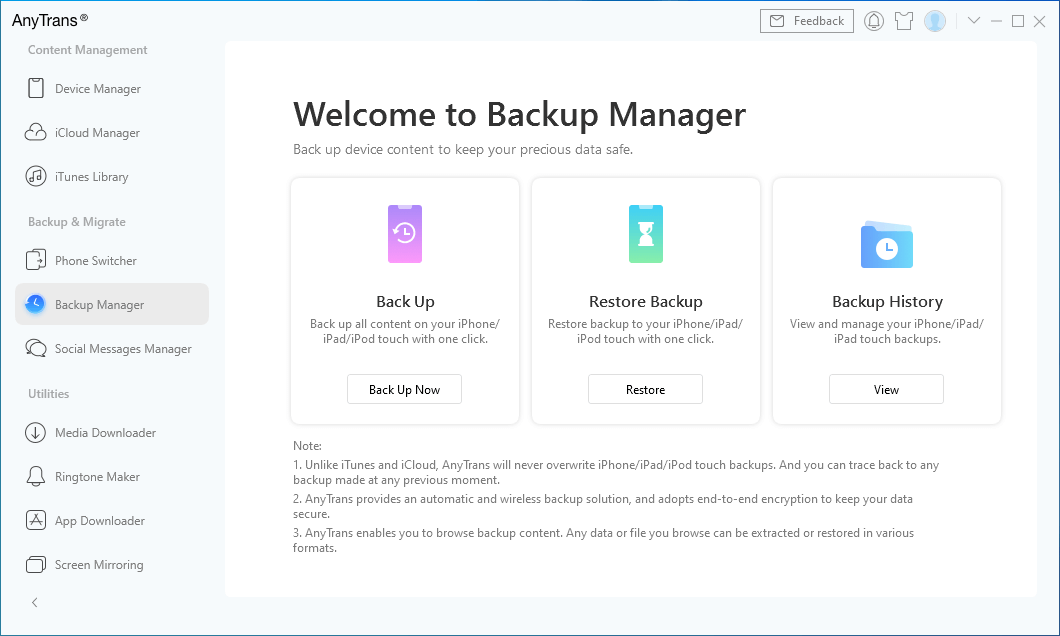
iPhone Backup Extractor & Manager – AnyTrans
- Freely view and manage your iTunes backups, and extract these files without restrictions.
- Extract data from iCloud backup to the computer without data loss.
- Supports viewing and extracting all data types, including photos, contacts, messages, etc.
- Easy and fast process to extract data seamlessly without privacy worries.
Free Download * 100% Clean & Safe
Advantages:
- It is a full-way iPhone manager, that cannot only extract your iPhone backup but also backup and transfer your data.
- The simple and clear design brings everything into focus, extracting your iPhone backup data in a few clicks.
- Fully compatible with all iPhone/iPad/iPod models and iOS versions.
- It also lets you transfer data among iDevice, computer, iTunes, and iCloud.
Disadvantages:
- The newest version of iTunes needs to be downloaded to help detect your iPhone.
AnyTrans is a better fit for users who want both backup viewing and broader iPhone data management. It can help when you need to browse backups, move files between iPhone and computer, or manage iCloud-related data in one place.
Before using it as a backup extractor, check whether the specific data type you need can be exported from your backup and whether the free version has export limits.
3. iPhone Backup Extractor
Another software we want to introduce is named “iPhone Backup Extractor”, which is compatible with all the iDevices and available on both Mac/PC operation systems. With this iTunes/iCloud backup extractor, you can easily get your iTunes and iCloud backup information and extract data from the backup on a computer. The following are the main features of this iPhone backup viewer and extractor.
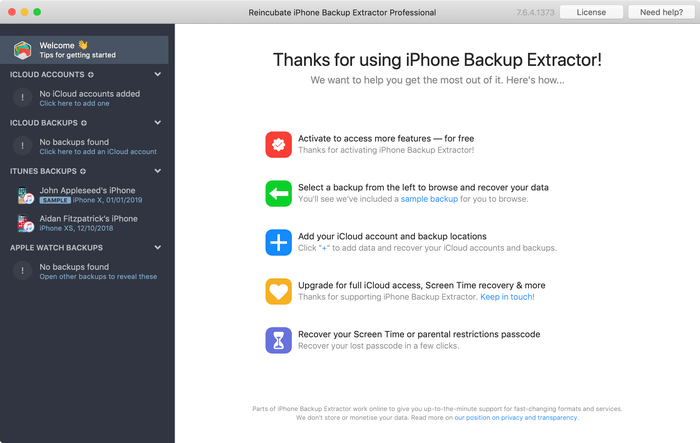
iPhone Backup Extractor Overview
Advantages:
- Available on Mac/PC operation systems.
- Can extract data from iPhone backup or iCloud backup.
- With expert mode to extract iPhone backup.
- Recover deleted iPhone data.
Disadvantages:
- It’s not a free iPhone backup extractor.
- Not allow for data preview before extraction, making it challenging to identify specific files for recovery.
- May not fully scan all data, potentially leading to incomplete recovery of information.
This tool is suitable for users who need a dedicated backup extractor for iTunes, Finder, or iCloud backups and prefer more advanced backup browsing options. It may be helpful when you need to inspect backup contents before deciding what to export.
Its limitation is that full extraction or advanced functions may require a paid license, and encrypted local backups still require the correct backup password.
4. iBackup Extractor-iPhone Backup Extractor Free
Another good choice of iPhone backup viewer & extractor is iBackup Extractor. It can find all iPhone, iPod touch, and iPad backups on your computer and lets you recover your files with ease. With iBackup Extractor, you can extract iMessages, call logs, bookmarks, calendars, and other data from iTunes backup. Read on to learn more about this iPhone backup extractor.
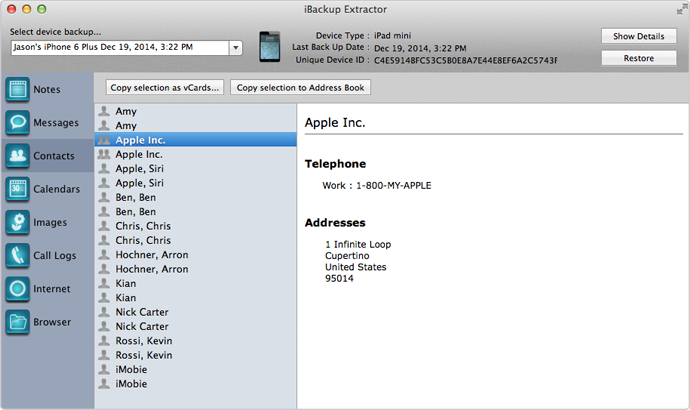
Screenshot of iBackup Extractor
Advantages:
- Can extract files from any iTunes Backup of iOS devices.
- Available on Mac and Windows computers.
- Free trial to extract 50 items and retrieve deleted iPhone data.
Disadvantages:
- Cannot extract data from iCloud backup.
- Cannot fully scan iTunes backup.
- With few Export-formats available.
iBackup Extractor is useful when your backup is stored locally on a Windows PC or Mac and you only need to extract selected files from an iTunes or Finder backup. It is less suitable if your main backup is in iCloud or if you need broad cloud-backup extraction.
5. iSkysoft Toolbox – Data Recovery (iOS)
Similar to PhoneRescue for iOS, iSkysoft Toolbox – Data Recovery (iOS) can help you view iPhone backup files and extract data from iPhone backups. It supports the iPhone iPad, iPod touch and works on PC and Mac. It has also managed to rank among the top iPhone backup extractors due to its practicality and convenience. And here are some highlights of this iPhone backup viewer.
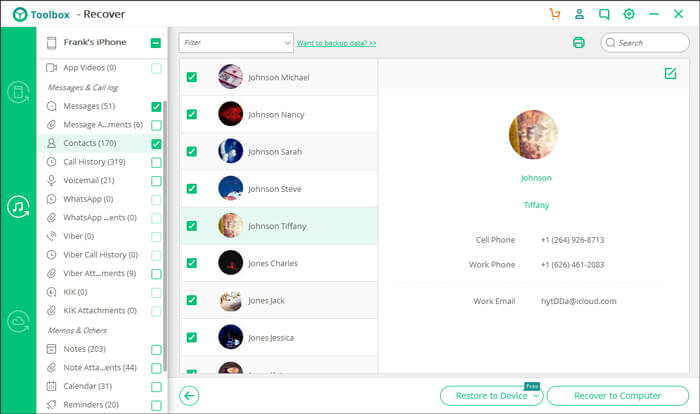
iSkysoft Toolbox – Recover (iOS)
Advantages:
- Scan your iPhone, iPad, and iPod touch directly to recover lost data.
- Extract data from the iTunes Backup for you to recover selected files.
- Extract data from iCloud Backup to retrieve selected files.
Disadvantages:
- You cannot use this iPhone backup extractor free. Instead, you need to pay if you want to extract photos or other data from an iPhone backup.
- It doesn’t support encrypted iTunes backup files.
iSkysoft Toolbox may fit users who want both direct iOS data recovery and backup extraction features. Before choosing it, check whether it supports your current iOS version, encrypted backup type, and the exact files you want to recover.
6. iBackup Viewer
iMacTools iPhone Backup Viewer (iBackup Viewer) supports extracting almost all kinds of data from iPhone backup, including contacts, call history, messages, internet, photos, and App data. With this iPhone backup explorer, you can easily scan and view data on your iTunes backup on the computer.
Some iPhone backup extractor tools can also work with iCloud-related data. This allows users to access important information stored in backups without restoring the entire backup to an iPhone.
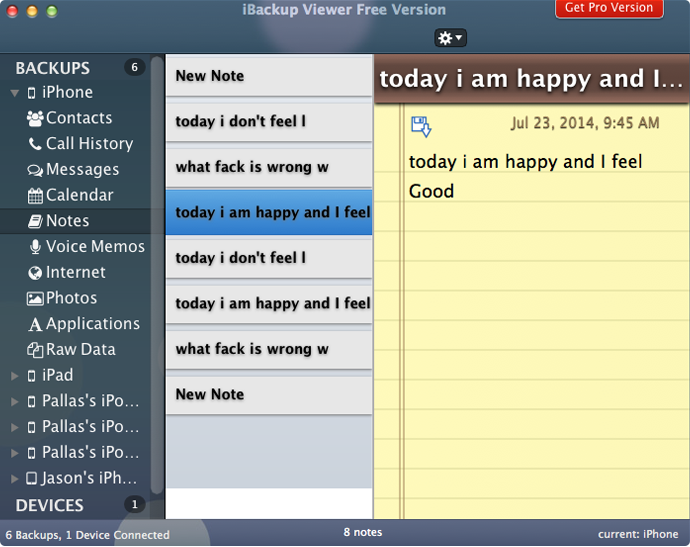
iPhone Backup Viewer – iBackup Viewer
Advantages:
- Can find all of the iPhone backups on the computer.
- Can Browse and extract data from iTunes backup.
- Simple interface and easy-to-use.
Disadvantages:
- Not freeware, you have to pay for it.
- Can’t recover the data that has been overwritten (not only PhoneRescue but also other iPhone backup extractor tools can’t).
iBackup Viewer is a lightweight option for browsing local iPhone backups and exporting common data such as contacts, messages, call history, and photos. It is not the best choice if you need iCloud backup extraction or advanced recovery from damaged backups.
What Is the Best iPhone Backup Extractor? (Criteria)
The criteria for the best iPhone backup extractor vary according to users’ specific demands. Here are some key factors to consider when you need to extract iPhone backup.
1. Compatibility
As Apple keeps rolling out a new version of the iPhone, iPad, and iPod touch, compatibility is one of the key criteria for choosing a suitable iPhone backup extractor. You’d better check the model and iOS of your device to see if it is listed on the developer’s product specification page.
2. Design & Easy-to-use
No one can bear the resident apps on his or her computer is ugly or hard to use. That’s why the design and usability of a Backup Extractor are also one of the key criteria.
3. Privacy Security
As recovering your important personal information is crucial to your life, and privacy protection is always the most focused part, commercial software products with expert support would bring the best result with severe service terms about privacy and data security.
FAQs: iPhone Backup Extractor Related Questions
Now you have known the top iCloud and iTunes backup extractors. And here we will answer some related questions.
Q1. Is it safe to use iPhone Backup Extractor?
Yes. iPhone Backup Extractor is safe to use. For user privacy and data security, it will not search for backups created by other users on your computer. And vice versa. And it also has two-factor authentication and tokenization to keep websites and tools free from malware and malicious content.
Q2. What is iPhone backup?
iPhone backup refers to the copying and archiving of iPhone data with iTunes/iCloud, so it can be used to restore an iPhone from the original after a data loss or iPhone upgrade event. iPhone backup usually has two purposes. One is to recover iPhone data after an iOS data disaster, be it for rescuing from iOS data deletion. The other is to set up an iPhone with the data from an earlier backup.
Q3. Where are iPhone backups stored?
Windows 10/8/7:
- C:\Users\Your username\AppData\Roaming\Apple Computer\MobileSync\Backup\
- Or C:\Users\Your username\Apple\MobileSync\Backup\
Mac:
- ~/Library/Application Support/MobileSync/Backup/
If you still cannot find the backup, you can refer to this article to learn the details about the backup location in PC/Mac.
The Bottom Line
In this article, we mention 6 effective iPhone backup extractors and viewers: PhoneRescue for iOS, AnyTrans, iPhone Backup Extractor, iBackup Extractor, iSkysoft Toolbox – Recover (iOS), and iBackup Viewer. Among them, PhoneRescue for iOS stands out for its convenience and no data loss. It allows you to extract iPhone backup from iTunes or iCloud safely with no data loss or erasing. Before extracting, you can freely view and select photos, videos, etc. to extract. Besides, you can recover deleted files even without a backup. Learn more about PhoneRescue for iOS>>
Free Download * 100% Clean & Safe



Joy Taylor is a seasoned technical writer with over a decade of experience in mobile technology. At iMobie, she specializes in producing in-depth content on iOS data recovery, iPhone unlocking solutions, and iOS troubleshooting.
Product-related questions? Contact Our Support Team to Get Quick Solution >
